
Introduction
The SIKUING CT-06 is a versatile 6-channel audio mixer designed for a wide range of applications, including streaming, recording, live performances, and DJ stages. It features a 16 DSP effects processor, a USB audio interface, Bluetooth connectivity, and 48V phantom power for condenser microphones. This manual provides detailed instructions for setting up, operating, and maintaining your CT-06 mixer to ensure optimal performance.

Figure 1: SIKUING CT-06 6-Channel Audio Mixer
Setup Guide
Follow these steps to properly set up your SIKUING CT-06 audio mixer.
1. Unpacking
Carefully remove all components from the packaging. Verify that all items listed in the package list are present.

Figure 2: Package Contents (Mixer, Manual, Power Adapter)
2. Power Connection
Connect the provided power adapter to the mixer's power input. The power cord features a secure screw-on collar to prevent accidental disconnection. Ensure the connection is firm before powering on the unit.
3. Connecting Microphones and Instruments
The CT-06 mixer offers 6 input channels, each supporting both XLR (microphone) and 1/4-inch (line/instrument) inputs. Each channel has independent gain control.
- XLR Inputs: Use for microphones. For condenser microphones requiring power, activate the 48V Phantom Power.
- 1/4-inch Line Inputs: Use for instruments like guitars or other line-level audio sources.

Figure 3: Connecting a microphone and activating 48V Phantom Power.
4. Connecting Other Audio Devices
The mixer supports various external devices for playback and recording:
- USB Connection: Connect a USB drive for MP3 playback or a computer for mixing and recording.
- Bluetooth Connectivity: Pair your mobile phone or other Bluetooth-enabled devices to stream audio wirelessly.
- External Audio Input/Output: Utilize the RCA (red and white) inputs/outputs for tape decks or other auxiliary devices.

Figure 4: USB and Computer Connectivity

Figure 5: Wireless Bluetooth Connection
5. Connecting Output Devices
Connect your powered speakers or other audio output devices to the L MAIN OUT R (XLR or 1/4-inch) jacks. The mixer does not have a built-in amplifier, so external amplification is required for passive speakers.
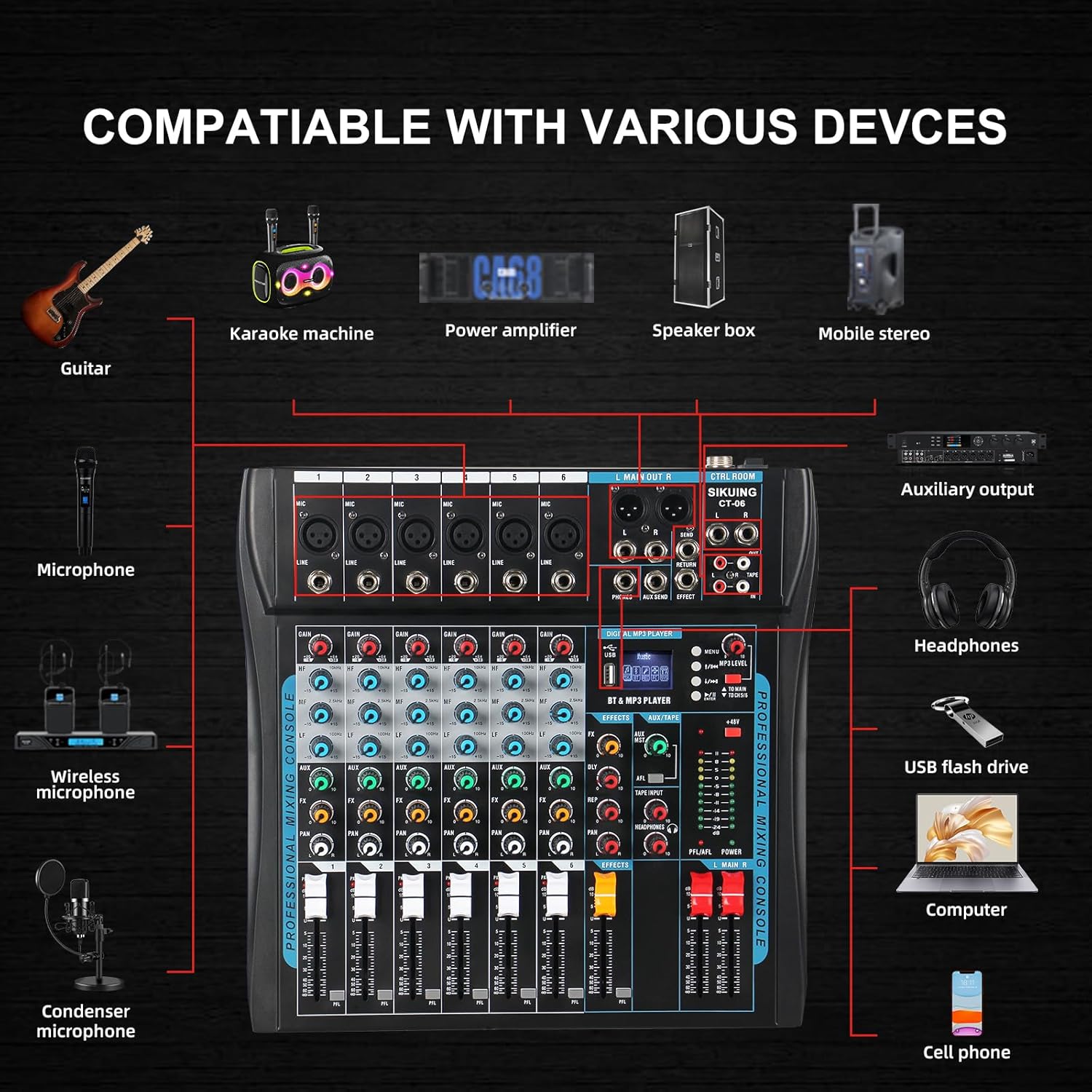
Figure 6: Compatibility with Various Devices
Operating Instructions
Familiarize yourself with the mixer's controls for optimal audio management.
1. Channel Controls
Each of the 6 input channels features the following controls:
- GAIN: Adjusts the input sensitivity for each channel.
- 3-Band EQ (HF, MF, LF): High, Mid, and Low frequency adjustments for tone shaping.
- AUX: Controls the send level to the auxiliary output.
- FX: Controls the send level to the internal effects processor.
- PAN: Adjusts the stereo position (left to right) of the channel's signal.
- Volume Fader: Individual volume control for each channel.
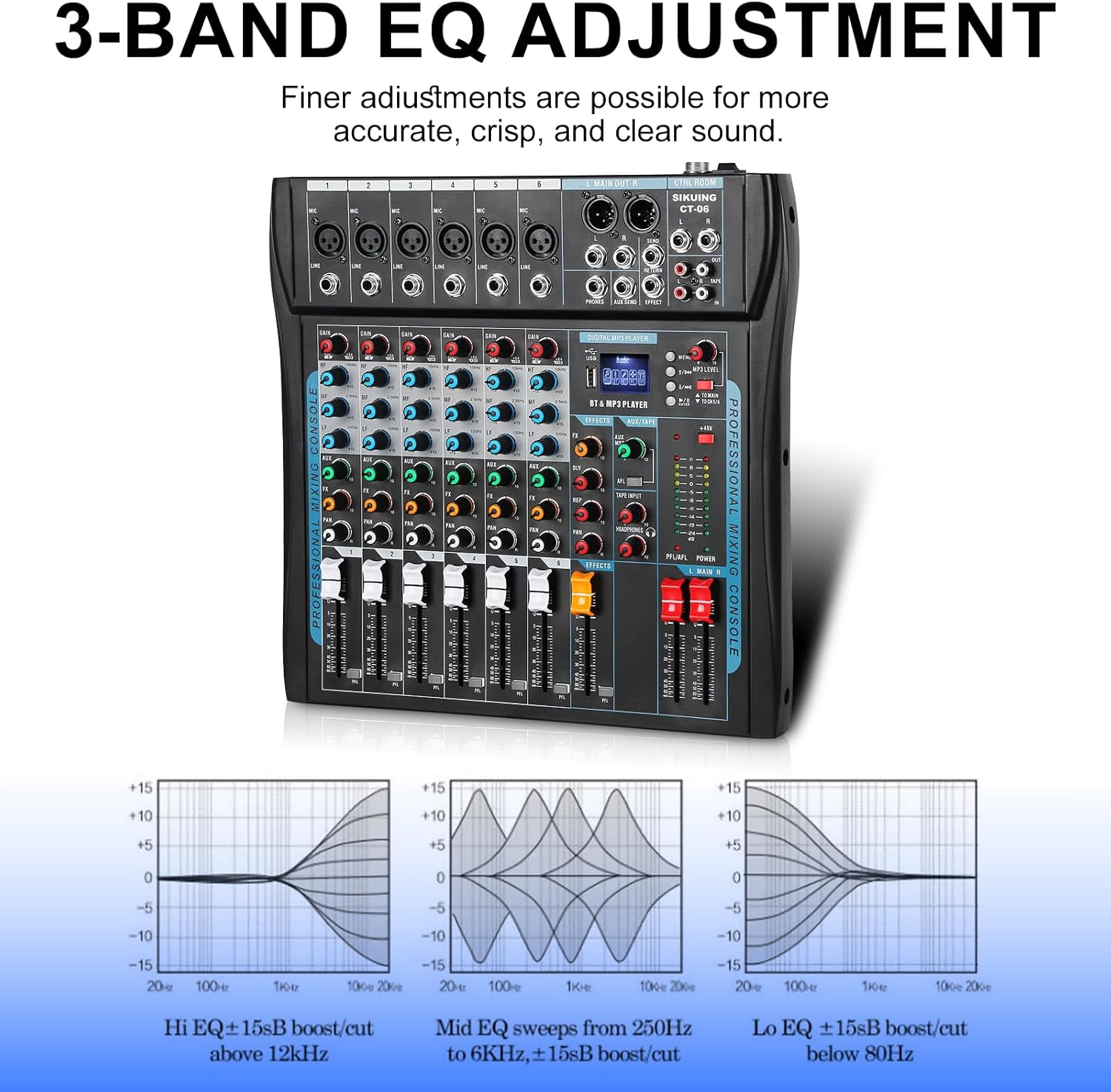
Figure 7: 3-Band EQ Adjustment
2. Digital MP3 Player & Connectivity
The central digital MP3 player section allows for USB playback, Bluetooth streaming, and recording functions.
- USB Port: Insert a USB flash drive for audio playback. Use the menu buttons to navigate tracks.
- Bluetooth: Select 'Bluetooth' from the menu to pair with your device. The MP3 LEVEL knob controls the volume of the Bluetooth audio independently.
- Recording: The mixer can record directly to a connected computer via USB.
3. 16 DSP Effects
The CT-06 includes a built-in 16 DSP effects processor to enhance your sound. Use the FX knob on each channel to send signal to the effects, and the dedicated EFFECTS fader to control the overall effect volume.

Figure 8: 16 DSP Effects Controls
4. Monitoring
Connect headphones to the dedicated headphone output for real-time monitoring of your mix. The headphone volume can be adjusted independently.

Figure 9: Real-Time Monitoring with Headphones
5. Main Output Control
The L MAIN R faders control the overall output volume of the mixer. Adjust these to set the master volume for your connected speakers.
6. Video Demonstration of Features
Video 1: Detailed overview of the SIKUING CT-06 mixer's features and connectivity, including input types, EQ, effects, and main output controls.
Maintenance
To ensure the longevity and optimal performance of your SIKUING CT-06 mixer, follow these maintenance guidelines:
- Cleaning: Regularly wipe the surface of the mixer with a soft, dry cloth. Avoid using liquid cleaners or solvents that could damage the finish or internal components.
- Dust Protection: The mixer features sealed rotary controls to protect against dust. However, it is recommended to cover the unit when not in use to prevent dust accumulation, especially in the fader and port areas.
- Storage: Store the mixer in a cool, dry place away from direct sunlight, extreme temperatures, and high humidity.
- Cable Management: Ensure all cables are neatly organized and not under strain to prevent damage to the ports and connectors.
Troubleshooting
If you encounter issues with your SIKUING CT-06 mixer, refer to the following common problems and solutions:
- No Sound Output:
- Check all cable connections (input, output, power).
- Ensure the main output faders (L MAIN R) are raised.
- Verify individual channel volume faders are raised and gain knobs are set appropriately.
- Confirm external speakers are powered on and functioning correctly.
- Weak Bluetooth Signal/Volume:
- Ensure your Bluetooth device is within range and paired correctly.
- Adjust the MP3 LEVEL knob on the digital player section to increase Bluetooth volume.
- Check the volume level on your paired Bluetooth device.
- Microphone Not Working:
- Verify the microphone is connected to the correct XLR input.
- Increase the channel's GAIN and volume fader.
- If using a condenser microphone, ensure 48V Phantom Power is activated for that channel.
- Test the microphone with another device if possible to rule out microphone malfunction.
- No Effects Applied:
- Ensure the FX knob on the desired channel is turned up.
- Verify the dedicated EFFECTS fader is raised.
- Check the selected DSP effect on the digital display.
Specifications
| Feature | Detail |
|---|---|
| Model Number | CT-06 |
| Number of Channels | 6 |
| Connectivity Technology | Bluetooth, USB |
| Output Connector Type | TRS |
| Phantom Power | 48 Volts |
| Power Source | Corded Electric |
| Item Weight | 6.98 pounds |
| Package Dimensions | 16.81 x 15.13 x 4.44 inches |
Warranty Information
Specific warranty details for the SIKUING CT-06 audio mixer may vary by region and retailer. Please refer to the warranty card included with your product or contact SIKUING customer support for detailed information regarding warranty coverage and terms.
Customer Support
For technical assistance, troubleshooting, or any questions regarding your SIKUING CT-06 audio mixer, please contact SIKUING customer support through their official website or the contact information provided in your product packaging. You can also visit the SIKUING Store on Amazon for additional resources.


