
Introduction
Thank you for choosing the CAMWORLD 5K UHD Dual Lens Video Camera, Model AC09A. This manual provides detailed instructions to help you get the most out of your new device, covering everything from initial setup to advanced features and troubleshooting.
This camera is designed for high-quality video recording and photography, featuring 5K UHD video, 56MP photos, dual lenses, Wi-Fi connectivity, a 3.0-inch 270° rotatable touchscreen, and infrared night vision. It comes with essential accessories including a 64GB SD card, microphone, and tripod.
What's in the Box
Please check the package contents to ensure all items are present:
- CAMWORLD 5K UHD Dual Lens Video Camera
- 64GB SD Card
- 2 x 1700mAh Lithium-Ion Batteries
- External Microphone
- Lens Hood
- Handheld Stabilizer
- 2.4G Wireless Remote Control
- USB Cable
- HDMI Cable
- Mini Tripod
- Camera Bag
- User Manual
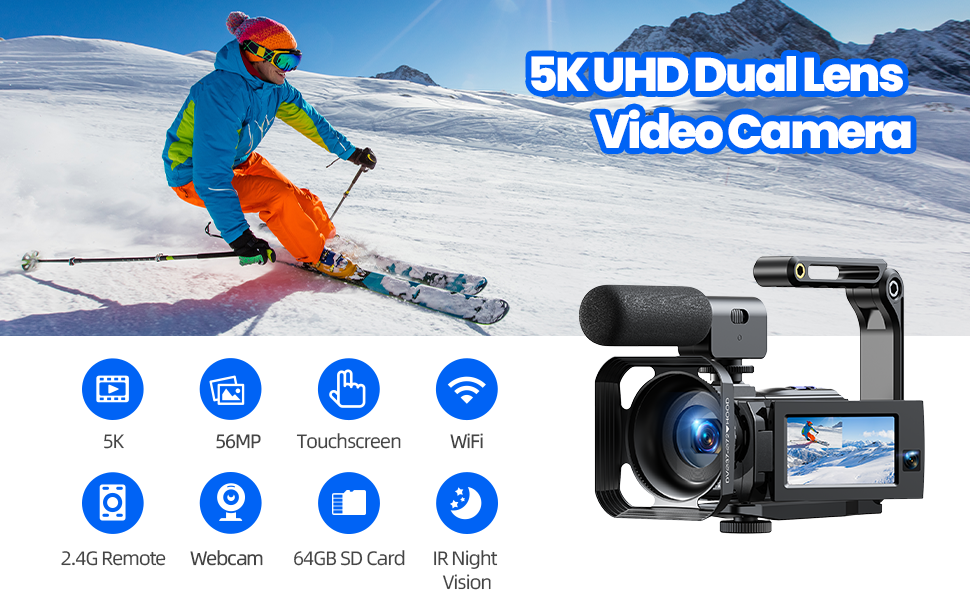
Image: All components included in the CAMWORLD 5K UHD Dual Lens Video Camera package.
Setup
1. Charging the Battery
Insert the provided 1700mAh Lithium-Ion battery into the camera. Connect the camera to a power source using the USB cable. The charging indicator will illuminate. Ensure the battery is fully charged before first use (approximately 90 minutes for continuous use).
2. Inserting the SD Card
Locate the SD card slot on the camera. Insert the 64GB SD card with the metal contacts facing the correct direction until it clicks into place. To remove, press the card gently until it ejects.
3. Attaching the External Microphone
Mount the external microphone onto the camera's hot shoe. Connect the microphone cable to the microphone input port on the camera. Ensure the microphone is switched ON for optimal audio recording.
4. Attaching the Lens Hood
Attach the lens hood to the front of the camera lens. This helps to block unwanted light and protect the lens from accidental damage.
5. Using the Tripod and Handheld Stabilizer
The mini tripod can be screwed into the camera's tripod mount for stable shots. The handheld stabilizer provides improved stability for mobile video recording and low-angle shots. Attach the camera to the stabilizer using the screw mount.

Image: The CAMWORLD video camera with accessories, including the microphone and tripod.

Image: Instructions for adjusting the mini tripod.

Image: The foldable handheld stabilizer for enhanced camera stability.
Operating Instructions
1. Powering On/Off
Press and hold the Power button to turn the camera on or off. The 3.0-inch IPS touchscreen will display the live view.
2. Using the Touchscreen
The 3.0-inch IPS touchscreen can be rotated 270° for flexible viewing angles. Tap the screen to access various functions and settings, including switching between recording modes, adjusting parameters, and reviewing footage.

Image: The camera's 270° rotatable touchscreen in use.
3. Recording Video and Taking Photos
Press the Record button to start/stop video recording. Press the Photo button to capture still images. The camera supports 5K UHD video recording (front lens) and 56MP still images. It also features a unique dual-lens mode for simultaneous 4K front + 1080p rear recording.

Image: Dual video recording capability of the camera.

Image: High resolution video and photo capabilities with digital zoom.
4. Wi-Fi Connectivity
Download the "Lercenker" app on your smartphone or tablet. Turn on Wi-Fi on the camera and connect your device to the camera's Wi-Fi network. This allows for wireless transfer of photos and videos, and remote control of the camera.

Image: Wi-Fi connection and app control for the camera.
5. Infrared Night Vision
Activate infrared night vision mode to capture clear black and white photos and videos in low-light environments.
Image: The camera's 270° rotatable touchscreen in use, also showing IR Night Vision capability.
6. Webcam and HDMI Output
Connect the camera to your computer via USB cable and select "PC Camera" mode to use it as a webcam for live streaming or video calls. Use the HDMI cable to connect the camera to a TV for viewing your content on a larger screen.

Image: Camera functioning as a webcam and connected to a TV via HDMI.
7. Remote Control
The included 2.4G wireless remote control allows you to operate the camera from a distance of up to 6 meters, useful for selfies and group shots.
Image: Remote control functionality of the camera.
8. Multifunctional Features
The camera supports various functions including pause, continuous shooting, selfie, interval recording, loop recording, slow motion, and WDR (Wide Dynamic Range). You can also switch between dual-lens and single-lens modes.

Image: Visual representation of the camera's diverse shooting modes.
Maintenance
- Cleaning the Lens: Use a soft, lint-free cloth specifically designed for camera lenses. Avoid harsh chemicals.
- Cleaning the Screen: Use a microfiber cloth to gently wipe the touchscreen.
- Battery Care: Store batteries in a cool, dry place. Do not expose them to extreme temperatures. Fully charge batteries before extended storage.
- Storage: When not in use, store the camera in its protective bag in a dry, dust-free environment.
- SD Card: Periodically back up your data from the SD card to prevent loss. Format the SD card in the camera regularly for optimal performance.
Troubleshooting
Camera Not Turning On
- Ensure the battery is fully charged and correctly inserted.
- Try using the second provided battery.
- Check if the power button is pressed firmly.
Poor Video/Photo Quality
- Clean the camera lens.
- Ensure adequate lighting conditions.
- Check camera settings (resolution, exposure, etc.) and adjust as needed.
- For night vision, ensure IR mode is activated in low light.
Wi-Fi Connection Issues
- Ensure Wi-Fi is enabled on both the camera and your smart device.
- Verify you have downloaded the correct "Lercenker" app.
- Restart both the camera and your smart device.
- Ensure you are within the optimal range for Wi-Fi connection.
Microphone Not Recording Audio
- Ensure the external microphone is securely connected to the camera's input port.
- Verify the microphone is switched ON.
- Check the audio settings on the camera.
Specifications
| Brand | CAMWORLD |
| Model Number | AC09A |
| Video Capture Resolution | 5K UHD (Front), 4K (Front) + 1080p (Rear) Dual Lens |
| Still Image Resolution | 56 Megapixels |
| Digital Zoom | 16x |
| Screen Size | 3.0 Inches IPS Touchscreen (270° Rotation) |
| Connectivity Technology | Wi-Fi, HDMI, USB |
| Special Features | Remote Control, Infrared Night Vision, Webcam Function, Dual Lens Mode, Pause, Continuous Shooting, Selfie, Interval Recording, Loop Recording, Slow Motion, WDR |
| Storage Media | SD Card (64GB included) |
| Battery Type | Lithium Ion (2 x 1700mAh included) |
| Dimensions | 25 x 9.5 x 14 cm |
| Weight | 1.09 kg |
Warranty and Support
CAMWORLD products are designed for reliability and performance. For any questions regarding your camera, please contact our customer service. We offer 1 year of hassle-free support and a 24-hour quick response service.
For further assistance, please visit the official CAMWORLD store on Amazon: CAMWORLD Store

Image: CAMWORLD customer support information.