
1. Introduction
Thank you for choosing the Artcraft AC11998LU Globo Pendant Light Fixture. This manual provides essential information for the safe installation, operation, and maintenance of your new lighting product. Please read these instructions thoroughly before beginning installation and retain them for future reference.
This pendant light features an 8-light design with a brass finish and iridescent glass shades, providing ambient illumination for indoor spaces such as living rooms.
2. Safety Information
WARNING: Risk of electric shock. Disconnect power at the fuse box or circuit breaker before installation or servicing.
- All electrical connections must be in accordance with local codes, ordinances, or the National Electric Code (NEC). Consult a qualified electrician if you are unfamiliar with proper electrical wiring connections.
- This fixture is intended for indoor use only. Do not expose to water or moisture.
- Ensure the mounting surface can support the weight of the fixture.
- Use only the specified bulb type and wattage. Exceeding the maximum wattage may cause overheating and damage to the fixture.
- Do not install near heat sources or in areas with high humidity.
- Always handle glass components with care to prevent breakage.
Proposition 65 Warning: This product may contain chemicals known to the State of California to cause cancer and birth defects or other reproductive harm.
3. Package Contents
Verify that all components are present and undamaged before beginning installation. If any parts are missing or damaged, do not attempt to assemble or install the fixture. Contact customer support for assistance.
- Pendant Light Fixture Assembly (Brass frame with iridescent glass shades)
- Mounting Hardware Kit (Canopy, mounting bracket, screws, wire nuts)
- Instruction Manual
- Bulbs are not typically included and must be purchased separately.
4. Setup and Installation
Professional installation by a qualified electrician is recommended for safety and proper functionality.
4.1. Preparation
- Turn off power: Locate the circuit breaker or fuse box and turn off the power to the junction box where the fixture will be installed.
- Unpack contents: Carefully remove all components from the packaging. Place them on a clean, soft surface to prevent scratches.
- Review instructions: Read through the entire instruction manual before starting.
4.2. Mounting the Fixture
- Attach the mounting bracket to the junction box using the provided screws. Ensure the bracket is securely fastened.
- Connect the fixture's ground wire (bare copper or green) to the house supply ground wire using a wire nut.
- Connect the fixture's neutral wire (white) to the house supply neutral wire (white) using a wire nut.
- Connect the fixture's hot wire (black or smooth) to the house supply hot wire (black or ribbed) using a wire nut.
- Carefully tuck all wires into the junction box.
- Align the fixture canopy with the mounting bracket and secure it with the decorative nuts or screws provided.
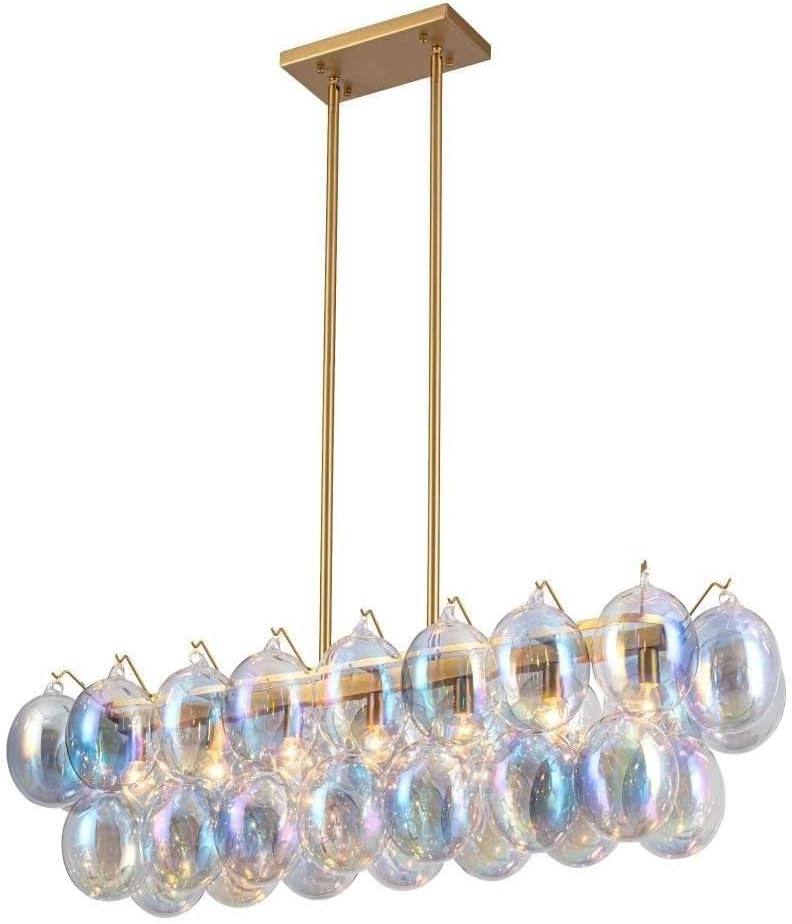
Image: The Artcraft AC11998LU Globo Pendant Light Fixture, showcasing its brass finish and iridescent glass globes, suspended from a ceiling. This image illustrates the fully assembled and installed product.
4.3. Bulb Installation
- Once the fixture is securely mounted, carefully screw the appropriate incandescent bulbs (up to 40 watts per bulb, 8 bulbs total) into the sockets. Do not overtighten.
- Ensure all bulbs are seated correctly.

Image: A close-up view of the Artcraft AC11998LU Globo Pendant Light Fixture, highlighting the individual iridescent glass globes and the brass framework. This image provides a detailed look at the fixture's construction and materials.
4.4. Final Steps
- Restore power at the circuit breaker or fuse box.
- Test the fixture by turning on the light switch.
5. Operating Instructions
The Artcraft AC11998LU Globo Pendant Light Fixture is controlled by a standard wall switch connected to the electrical circuit. Ensure the power is on at the circuit breaker, then use the wall switch to turn the light fixture on or off.
The control method for this fixture is listed as "Touch" in some specifications, which typically refers to compatibility with touch-sensitive dimmer switches or smart home systems, if installed. Consult your electrician for compatibility with advanced control systems.
6. Maintenance
6.1. Cleaning
- Always disconnect power before cleaning.
- Wipe the fixture with a soft, dry cloth.
- Do not use abrasive cleaners, solvents, or polishes as they may damage the finish or glass.
- For glass shades, a slightly damp cloth can be used, followed by a dry cloth to prevent water spots.
6.2. Bulb Replacement
- Ensure the fixture is turned off and has cooled completely before attempting to replace bulbs.
- Carefully unscrew the old bulb.
- Screw in a new incandescent bulb of the correct type and wattage (max 40W per bulb).
- Do not exceed the maximum wattage specified for the fixture.
7. Troubleshooting
| Problem | Possible Cause | Solution |
|---|---|---|
| Light does not turn on. |
|
|
| Flickering light. |
|
|
| Fixture hums. |
|
|
If troubleshooting steps do not resolve the issue, consult a qualified electrician or contact Artcraft customer support.
8. Specifications
| Brand | Artcraft |
| Model Name | AC11998LU |
| Light Fixture Form | Pendant |
| Number of Light Sources | 8 |
| Light Source Type | Incandescent |
| Max Wattage per Bulb | 40 watts |
| Total Wattage | 320 watts (8 x 40W) |
| Voltage | 120 Volts |
| Finish Type | Brass / Iridescent |
| Shade Material | Glass |
| Material | Glass (Shades), Brass (Frame) |
| Product Dimensions | 43.25"L x 15"W x 12.25"H |
| Item Weight | 3 Pounds |
| Installation Type | Semi Flush Mount (Ceiling Mount) |
| Indoor/Outdoor Usage | Indoor |
| Control Method | Touch (typically wall switch compatible) |
| Assembly Required | Yes |
| GTIN (UPC) | 778350023634 |
9. Warranty and Support
This Artcraft AC11998LU Globo Pendant Light Fixture comes with a manufacturer's warranty. Please refer to the warranty documentation included with your purchase or visit the official Artcraft website for detailed warranty terms and conditions.
For technical assistance, missing parts, or warranty claims, please contact Artcraft customer support. Have your model number (AC11998LU) and proof of purchase ready when contacting support.
Artcraft Customer Support: www.artcraftlighting.com/contact (Example link, replace with actual if available)