
1. Introduction
This manual provides detailed instructions for the safe and efficient use of your Proucle PS21K Solar Power Bank. Please read this manual thoroughly before using the device and retain it for future reference.
The Proucle PS21K is a portable power bank designed for outdoor use, featuring a high-capacity battery, solar charging capabilities, and an integrated LED flashlight. It is built to be waterproof, dustproof, and shockproof, making it suitable for various environments.
2. Safety Information
- Do not disassemble, modify, or repair the device yourself. This may cause damage, electric shock, or fire.
- Keep the power bank away from fire, high temperatures, and direct sunlight for prolonged periods.
- Avoid dropping, impacting, or subjecting the device to strong vibrations.
- Do not expose the device to water or moisture for extended periods, despite its waterproof design. Ensure port covers are securely closed.
- Keep out of reach of children.
- Use only certified charging cables and adapters.
- If the power bank swells, leaks, or emits an unusual odor, discontinue use immediately.
3. Package Contents
Verify that all items are present in the package:
- Proucle PS21K Solar Power Bank (38800mAh)
- USB Charging Cable
- Carabiner Clip
- User Manual (this document)
4. Product Overview
Familiarize yourself with the components of your Proucle PS21K Solar Power Bank.

Figure 1: Proucle PS21K Solar Power Bank with key features labeled. This image shows the device from a slightly angled top-down view, highlighting the solar panel, LED lights, USB ports, and the attached carabiner.
- Solar Panel: Converts sunlight into electrical energy for emergency charging.
- Dual LED Flashlight: Provides illumination with multiple modes.
- Battery Level Indicator: LED lights indicating remaining battery capacity.
- USB Output Ports: For charging external devices.
- Type-C Input/Output Port: For charging the power bank or external devices.
- Protection Cover: Shields charging ports from water and dust.
- Power Button: Activates the device and controls the flashlight.
- Carabiner Clip: For attaching the power bank to backpacks or gear.
5. Setup and Charging the Power Bank
5.1 Initial Charging (Recommended Method)
Before first use, fully charge the power bank using a USB adapter. This ensures optimal battery performance.
- Open the protection cover on the side of the power bank.
- Connect the provided USB cable to the Type-C input port on the power bank.
- Connect the other end of the USB cable to a 5V/3A USB wall adapter (not included).
- The battery level indicator lights will illuminate, showing the charging progress. All lights will be solid when fully charged.
- Once fully charged, disconnect the cable and securely close the protection cover.
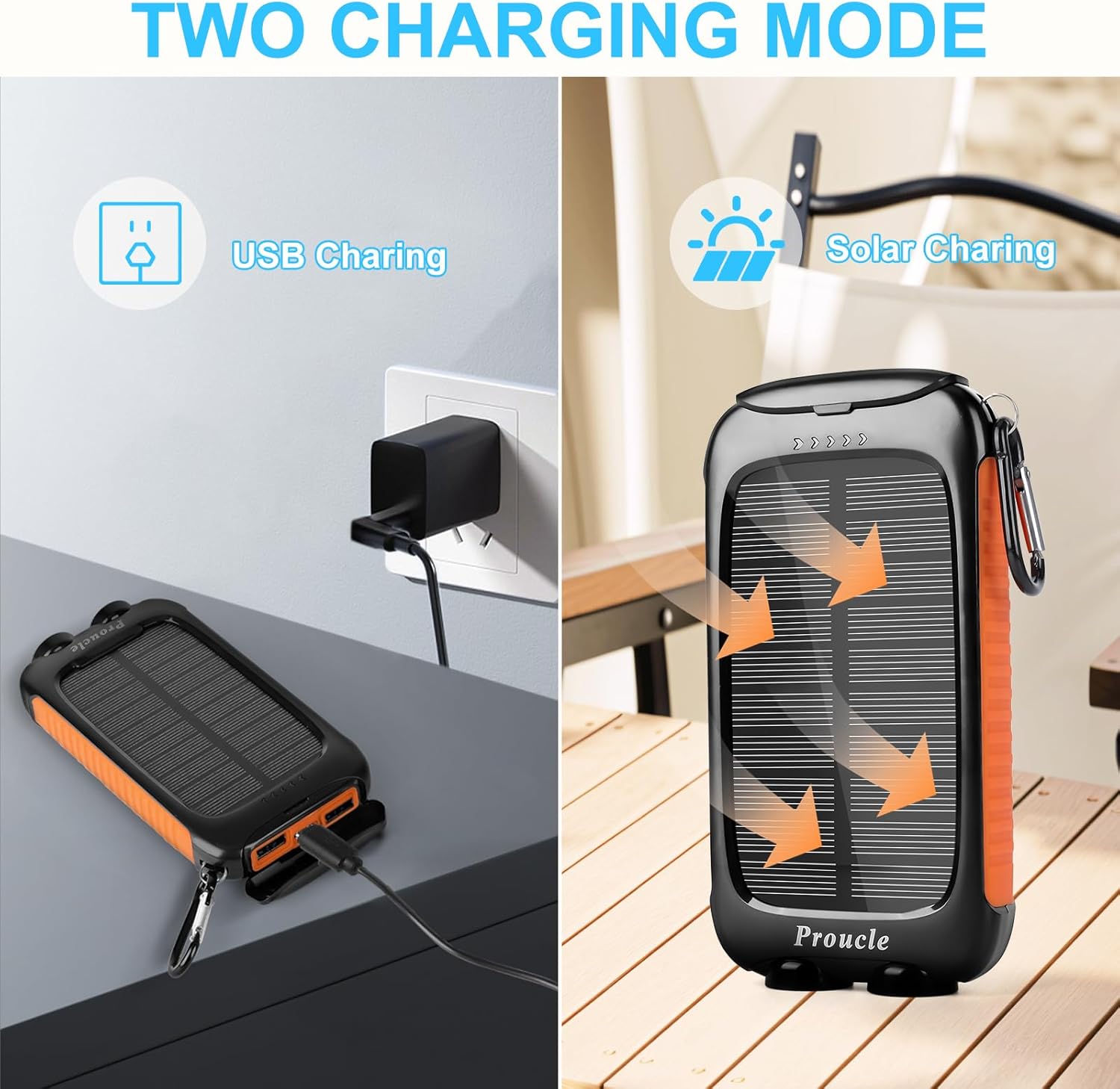
Figure 2: Illustration of USB charging (left) and solar charging (right) methods for the power bank.
5.2 Solar Charging (Emergency Method)
The solar panel is designed for emergency charging and maintaining battery levels in outdoor situations. It is not intended as the primary charging method due to its size and the power bank's large capacity.
- Place the power bank in direct sunlight with the solar panel facing upwards.
- Ensure there are no obstructions blocking the sunlight.
- A dedicated solar charging indicator light will illuminate when solar charging is active.
- For optimal solar charging, position the panel perpendicular to the sun's rays.
Note: Solar charging speed is dependent on sunlight intensity. It will be significantly slower than USB charging.
6. Operating Instructions
6.1 Charging External Devices
The power bank can charge up to three devices simultaneously.
- Open the protection cover to access the USB output ports and the Type-C port.
- Connect your device's charging cable to one of the USB output ports or the Type-C port on the power bank.
- Connect the other end of the cable to your device.
- The power bank will automatically begin charging your device. If not, press the Power Button once to initiate charging.
- The battery level indicator lights will show the remaining power.
- Once charging is complete, disconnect your device and securely close the protection cover.

Figure 3: The power bank is compatible with a wide range of 5V USB-powered devices.

Figure 4: The power bank features three output ports for simultaneous device charging.
6.2 Using the LED Flashlight
The integrated dual LED flashlight offers three lighting modes.
- To Turn On/Off: Press and hold the Power Button for approximately 3 seconds.
- To Change Modes: Once the flashlight is on, press the Power Button briefly to cycle through the modes:
- Steady Mode: Constant illumination.
- SOS Mode: Flashes the international Morse code signal for distress (three short, three long, three short flashes).
- Strobe Mode: Rapid, intermittent flashes.

Figure 5: The dual LED flashlight provides illumination for various outdoor activities and emergencies.
6.3 Checking Battery Level
Briefly press the Power Button once to check the current battery level. The LED indicator lights will illuminate to show the remaining capacity.
7. Maintenance
- Cleaning: Wipe the power bank with a soft, dry cloth. Do not use harsh chemicals or abrasive cleaners. Ensure the solar panel is clean for efficient charging.
- Storage: Store the power bank in a cool, dry place away from direct sunlight and extreme temperatures. For long-term storage, charge the device to approximately 50-75% every 3 months to prolong battery life.
- Water Resistance: While designed to be waterproof and dustproof, always ensure the port protection cover is securely closed when not in use, especially in wet or dusty environments. Avoid submerging the device in water.

Figure 6: The power bank features waterproof, shockproof, and dustproof construction for outdoor durability.
8. Troubleshooting
| Problem | Possible Cause | Solution |
|---|---|---|
| Power bank not charging |
|
|
| Device not charging from power bank |
|
|
| Flashlight not working |
|
|
9. Specifications
| Feature | Detail |
|---|---|
| Model Number | PS21K |
| Battery Capacity | 38800mAh Lithium Polymer |
| Input (Type-C) | 5V/3A |
| Output (USB-A x2, Type-C x1) | 5V/3A (Total) |
| Solar Panel | Yes (for emergency charging) |
| Flashlight Modes | Steady, SOS, Strobe |
| Dimensions | 5.63 x 2.91 x 0.85 inches (14.3 x 7.4 x 2.16 cm) |
| Weight | 12.3 ounces (348.7 grams) |
| Protection Features | Overcharge, Overcurrent, Temperature, Overvoltage, Short-circuit |
| Certifications | UL, CE, FCC, RoHS, UN38.3 |
| Waterproof/Dustproof Rating | Yes (with port cover closed) |
10. Warranty and Support
Proucle products are designed and manufactured to high-quality standards. For warranty information or technical support, please refer to the contact details provided with your purchase documentation or visit the official Proucle website.
Please retain your proof of purchase for warranty claims.


