1. Introduction
Thank you for purchasing the Soonbox Wireless Speaker S33. This manual provides detailed instructions on how to set up, operate, and maintain your speaker to ensure optimal performance and longevity. Please read this manual carefully before using the product and retain it for future reference.
The Soonbox S33 is a versatile portable speaker designed to deliver high-fidelity sound with powerful bass. Its key features include:
- Bluetooth Connectivity for wireless audio streaming
- True Wireless Stereo (TWS) Link for connecting two speakers
- Dynamic RGB Ambient Lighting
- Built-in Microphone for hands-free calls or karaoke
- Multiple Playback Options: TF Card, USB, and AUX input
- Integrated FM Radio
2. Product Overview
Familiarize yourself with the various components and features of your Soonbox S33 speaker.

Figure 2.1: Front view of the Soonbox S33 speaker, showcasing the equalizer display and illuminated speaker cone.

Figure 2.2: The Soonbox S33 speaker in use, demonstrating a smartphone placed in the top slot and the included microphone connected.

Figure 2.3: The Soonbox S33 speaker displaying its vibrant dynamic RGB lighting feature.
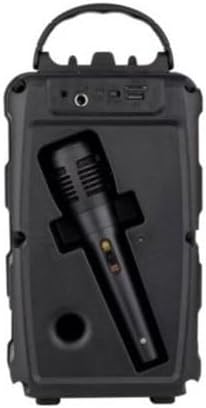
Figure 2.4: Rear view of the Soonbox S33 speaker, highlighting the various input ports and the convenient microphone storage compartment.
3. Setup
3.1 Charging the Speaker
Before first use, fully charge the speaker. Connect the supplied Micro-USB charging cable to the speaker's charging port and the other end to a 5V USB power adapter (not included) or a computer's USB port. The charging indicator light will illuminate during charging and turn off when fully charged.
3.2 Powering On/Off
To power on the speaker, press and hold the Power button for a few seconds until you hear an audible prompt. To power off, press and hold the Power button again until the speaker shuts down.
3.3 Bluetooth Pairing
- Ensure the speaker is powered on and in Bluetooth mode (it usually defaults to Bluetooth mode upon power-on).
- On your mobile device, enable Bluetooth and search for available devices.
- Select "Soonbox S33" from the list of devices.
- Once paired, you will hear a confirmation sound from the speaker.
3.4 TWS Connection (True Wireless Stereo)
The TWS feature allows you to connect two Soonbox S33 speakers for a true stereo sound experience.
- Ensure both speakers are powered on and not connected to any Bluetooth device.
- On one speaker (this will be the primary speaker), double-press the TWS button (or a designated pairing button, refer to speaker controls).
- The primary speaker will search for the secondary speaker. Once connected, you will hear a confirmation sound.
- Now, connect your mobile device to the primary speaker via Bluetooth as described in section 3.3. Audio will play through both speakers in stereo.
4. Operating Instructions
4.1 Music Playback
- Play/Pause: Press the Play/Pause button.
- Volume Up/Down: Press and hold the Volume + / - buttons.
- Next/Previous Track: Short press the Volume + / - buttons.
4.2 FM Radio Mode
To switch to FM Radio mode, press the Mode button until you hear the FM radio prompt. To auto-scan and save stations, press and hold the Play/Pause button. Use the Next/Previous Track buttons to navigate between saved stations.
4.3 TF Card Playback
Insert a TF (microSD) card with MP3 audio files into the TF card slot. The speaker will automatically switch to TF card mode and begin playback.
4.4 AUX Input
Connect an external audio device (e.g., MP3 player, computer) to the speaker's AUX port using a 3.5mm audio cable. The speaker will automatically switch to AUX mode.
4.5 Microphone Usage
Connect the included microphone to the designated microphone input port on the speaker. The microphone can be used for karaoke or public address functions.
4.6 RGB Lighting Control
The Soonbox S33 features dynamic RGB lighting. Refer to the speaker's control panel for a dedicated light button or a combination of buttons to cycle through lighting modes or turn the lights on/off.
5. Maintenance
- Cleaning: Use a soft, dry cloth to clean the speaker's surface. Do not use abrasive cleaners or solvents.
- Storage: Store the speaker in a cool, dry place away from direct sunlight and extreme temperatures.
- Battery Care: To prolong battery life, avoid fully discharging the speaker frequently. Charge the speaker at least once every three months if not in regular use.
- Water Resistance: This speaker is not waterproof. Avoid exposure to water or excessive moisture.
6. Troubleshooting
If you encounter any issues with your Soonbox S33 speaker, please refer to the table below for common problems and their solutions.
| Problem | Possible Cause | Solution |
|---|---|---|
| Speaker does not power on. | Low battery. | Charge the speaker fully. |
| Cannot pair via Bluetooth. | Speaker is not in pairing mode or already connected to another device. | Ensure speaker is in Bluetooth pairing mode. Disconnect from other devices. Move speaker closer to your device. |
| No sound or low volume. | Volume too low on speaker or connected device. | Increase volume on both the speaker and your connected device. |
| FM radio reception is poor. | Weak signal. | Relocate the speaker to an area with better signal. Extend any built-in antenna if available. |
| TWS connection fails. | Speakers are too far apart or already paired to other devices. | Ensure both speakers are within close proximity and not connected to any other Bluetooth devices before initiating TWS pairing. |
7. Technical Specifications
- Rated Output: 5W
- Speakers: 4 Ohm, 5W
- Battery: 1200mAh 3.7V
- Wireless Version: 5.0
- Input Power: DC 5V, 1200mAh
- Frequency Response: 20Hz-20KHz
- Signal-to-noise ratio: >80dB
- Playtime: 2-3 hours (at moderate volume)
- Functions: Wireless (Bluetooth), FM Radio, TF Card Slot, AUX Input
- Charging Interface: Micro-USB
- Product Dimensions: 16D x 12.5W x 26.5H centimetres
8. Warranty and Support
This Soonbox Wireless Speaker S33 comes with a standard manufacturer's warranty against defects in materials and workmanship. Please retain your proof of purchase for warranty claims.
For technical support, troubleshooting assistance beyond this manual, or warranty inquiries, please contact the retailer or the manufacturer's customer service. Contact information can typically be found on the product packaging or the retailer's website.
Note: Specifications are subject to change without prior notice.


