
KODAK PWS-2251
KODAK Portable Wireless Speaker PWS-2251 User Manual
Model: PWS-2251 | Brand: KODAK
1. Introduction
Thank you for purchasing the KODAK Portable Wireless Speaker PWS-2251. This speaker is designed to provide high-quality audio with the convenience of portability and durability. Featuring IPX7 waterproofing, True Wireless Stereo (TWS) pairing, and a long-lasting battery, it's perfect for any environment. Please read this manual carefully before using the speaker to ensure proper operation and to maximize its lifespan.
2. Package Contents
- KODAK Portable Wireless Speaker PWS-2251
- USB Charging Cable
- AUX-in Cable
- User Manual (this document)
3. Product Layout and Controls
Familiarize yourself with the speaker's buttons and ports for optimal use.
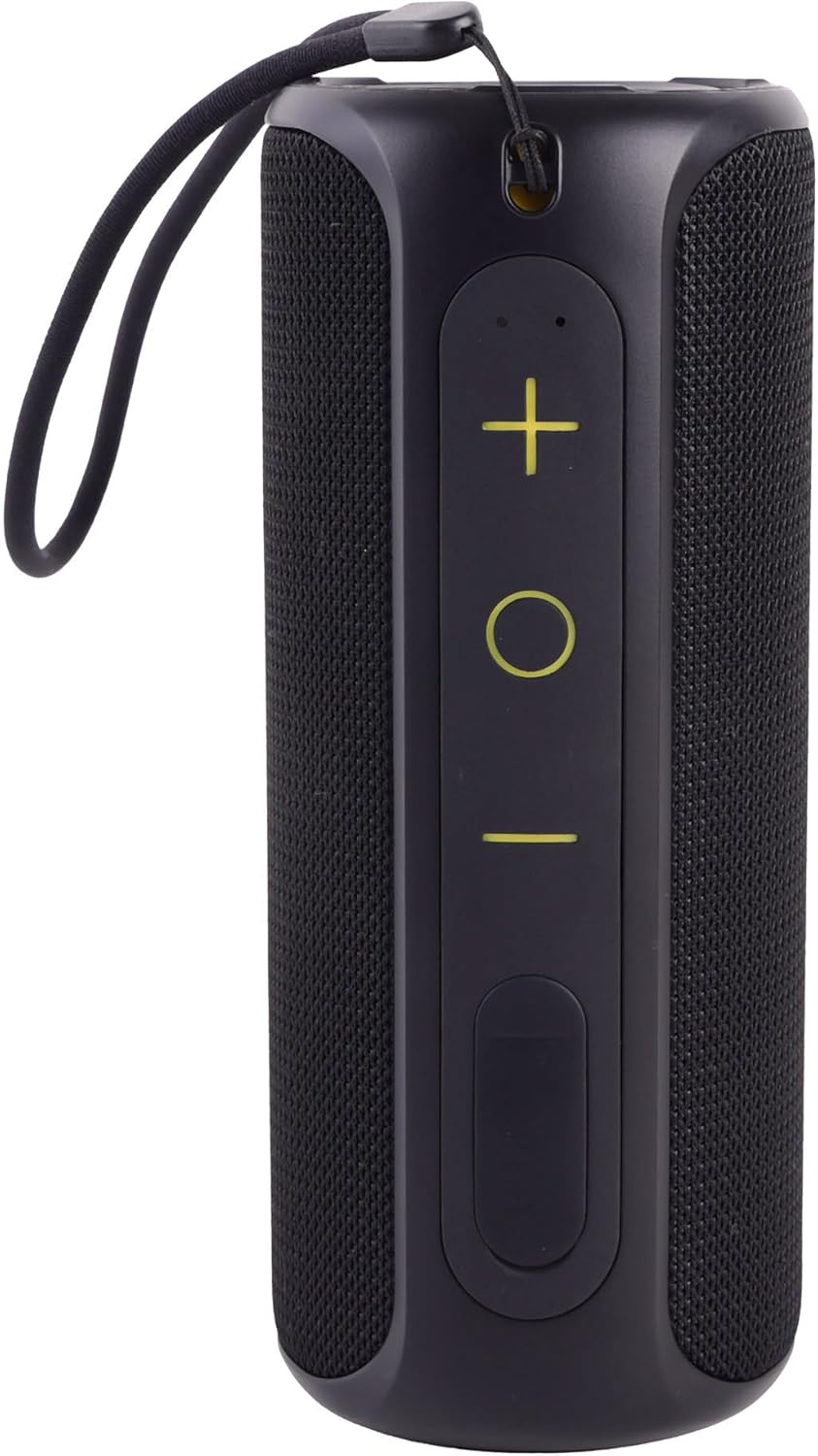
Figure 3.1: Front view of the KODAK PWS-2251 speaker, showing the control panel with volume up (+), play/pause (circle), volume down (-), and power button.

Figure 3.2: Side view of the KODAK PWS-2251 speaker, highlighting the strap attachment point and the sealed port cover for charging and AUX input.
Button Functions:
- Power Button: Press and hold to power on/off. Short press to play/pause music or answer/end calls.
- '+' Button (Volume Up): Short press to increase volume. Long press for next track.
- '-' Button (Volume Down): Short press to decrease volume. Long press for previous track.
- 'O' Button (Multi-function): Short press to play/pause. Long press to activate TWS pairing.
Ports:
- USB-C Charging Port: For charging the speaker's internal battery.
- AUX-in Port: For wired audio connection using the provided 3.5mm AUX cable.
4. Setup
4.1 Charging the Speaker
- Open the protective cover on the side of the speaker to reveal the charging port.
- Connect the USB-C end of the charging cable to the speaker's charging port.
- Connect the USB-A end of the charging cable to a compatible USB power adapter (not included) or a computer's USB port.
- The LED indicator will illuminate during charging and turn off when fully charged.
- Ensure the protective cover is securely closed after charging to maintain waterproof integrity.
A full charge provides approximately 12-14 hours of playtime, depending on volume level and audio content.
4.2 Bluetooth Pairing
- Press and hold the Power button to turn on the speaker. The LED indicator will flash blue, indicating it is in Bluetooth pairing mode.
- On your smartphone, tablet, or other Bluetooth-enabled device, enable Bluetooth.
- Search for Bluetooth devices and select "KODAK PWS-2251" from the list.
- Once successfully paired, the LED indicator will turn solid blue, and you will hear a confirmation tone.
- The speaker will automatically attempt to reconnect to the last paired device when powered on.
4.3 True Wireless Stereo (TWS) Pairing
To achieve immersive stereo sound, you can pair two KODAK PWS-2251 speakers together.
- Ensure both PWS-2251 speakers are powered on and not connected to any Bluetooth device.
- On one of the speakers (this will be the primary speaker), long press the 'O' (Multi-function) button. You will hear a tone, and the speaker will enter TWS pairing mode.
- The two speakers will automatically search for and connect to each other. Once connected, you will hear a confirmation tone, and the LED indicators on both speakers will turn solid blue.
- Now, connect your Bluetooth device to the primary speaker as described in Section 4.2. The audio will play in stereo through both speakers.
5. Operating Instructions
5.1 Basic Controls
- Power On/Off: Press and hold the Power button for 2-3 seconds.
- Play/Pause: Short press the Power button or 'O' button.
- Volume Up: Short press the '+' button.
- Volume Down: Short press the '-' button.
- Next Track: Long press the '+' button.
- Previous Track: Long press the '-' button.
5.2 Phone Call Function
With the built-in microphone, you can answer calls directly through the speaker when connected via Bluetooth.
- Answer Call: Short press the Power button when an incoming call rings.
- End Call: Short press the Power button during a call.
- Reject Call: Long press the Power button when an incoming call rings.
5.3 AUX-in Mode
For devices without Bluetooth, you can use the included 3.5mm AUX cable.
- Open the protective cover on the side of the speaker.
- Connect one end of the 3.5mm AUX cable to the speaker's AUX-in port.
- Connect the other end to the audio output jack of your device.
- The speaker will automatically switch to AUX-in mode.
- Control volume from both the speaker and your connected device.
- Ensure the protective cover is securely closed after use to maintain waterproof integrity.
5.4 Waterproof Usage (IPX7)
The KODAK PWS-2251 speaker is IPX7 waterproof, meaning it can be submerged in up to 1 meter of water for 30 minutes. To ensure waterproof integrity:
- Always ensure the protective cover for the charging and AUX ports is securely and completely sealed before exposing the speaker to water.
- Do not expose the speaker to salt water or chlorinated water for extended periods. Rinse with fresh water after exposure to such environments.
- Do not charge the speaker if it or the charging port is wet.
6. Maintenance
- Cleaning: Wipe the speaker with a soft, damp cloth. Do not use harsh chemicals or abrasive cleaners.
- Storage: Store the speaker in a cool, dry place away from direct sunlight and extreme temperatures.
- Battery Care: To preserve battery life, charge the speaker fully before long periods of inactivity. Avoid completely draining the battery frequently.
- Port Protection: Always keep the protective port cover securely closed when not charging or using the AUX-in feature to prevent dust and water ingress.
7. Troubleshooting
| Problem | Possible Cause | Solution |
|---|---|---|
| Speaker does not power on. | Battery is low or depleted. | Charge the speaker fully. |
| No sound from speaker. | Volume is too low; Device not connected; Incorrect mode. | Increase speaker and device volume; Re-pair Bluetooth; Ensure correct mode (Bluetooth/AUX). |
| Cannot pair with Bluetooth device. | Speaker not in pairing mode; Device Bluetooth off; Too far apart. | Ensure speaker is flashing blue; Turn on device Bluetooth; Move devices closer (within 10m). |
| Poor sound quality. | Device too far; Obstructions; Low battery. | Move device closer; Remove obstructions; Charge speaker. |
| TWS pairing fails. | Speakers already connected to other devices; Not in TWS pairing mode. | Disconnect speakers from all devices; Ensure both speakers are in TWS pairing mode. |
8. Specifications
| Feature | Specification |
|---|---|
| Model Name | KODAK Portable Wireless Speaker - PWS-2251 |
| Dimensions (L x W x H) | 7.1 x 17 x 7.4 cm |
| Weight | 387 Grams |
| Battery Life | 12-14 Hours |
| Waterproof Rating | IPX7 (Submersible up to 1 meter for 30 minutes) |
| Connectivity Technology | Bluetooth, USB, AUX |
| Speaker Type | Portable Speaker |
| Amplification Type | Active |
| Wattage | 12 Watts |
| Max Speaker Output Power | 120 Watts |
| Frequency Response | 16 KHz |
| Battery Composition | Lithium Ion |
| Color | Black |
9. Safety Information
- Do not expose the speaker to extreme temperatures (hot or cold) or direct sunlight for prolonged periods.
- Do not attempt to disassemble, repair, or modify the speaker. This will void the warranty and may cause harm.
- Keep the speaker away from open flames or heat sources.
- Do not use the speaker in environments with high humidity or dust unless the port cover is securely closed.
- Dispose of the speaker and its battery responsibly according to local regulations. Do not dispose of in household waste.
- Keep out of reach of children.
10. Warranty and Support
KODAK products are designed and manufactured to the highest standards. For warranty information or technical support, please refer to the warranty card included with your purchase or visit the official KODAK support website. Please retain your proof of purchase for any warranty claims.