
1. Introduction
This manual provides essential information for the proper installation, operation, and maintenance of your Enpower MC3624 or MC3625 motor controller. These controllers are designed as versatile replacement parts, offering reliable performance for a range of vehicle models.
The Enpower MC3624 and MC3625 controllers feature advanced circuitry and components to deliver performance equivalent to original equipment. They are compatible with various vehicles, including Byvin Auto D50, Letin D70, Boloda, and Haiquan D50D70M6M7A9 models. With a simple plug-and-play installation, these controllers aim to restore full functionality to your vehicle's motor management system.

Figure 1: Enpower MC3624 Controller with wiring harness and connectors.
2. Setup and Installation
The Enpower MC3624 and MC3625 controllers are designed for straightforward plug-and-play installation, eliminating the need for complex rewiring. No assembly of the controller unit itself is required.
2.1 Compatibility Verification
Before installation, it is crucial to verify compatibility with your specific vehicle model. The controller is compatible with Byvin Auto D50, Letin D70, Boloda, and Haiquan D50D70M6M7A9. If unsure, compare the physical appearance, model number, and connector types of the new controller with your original unit.
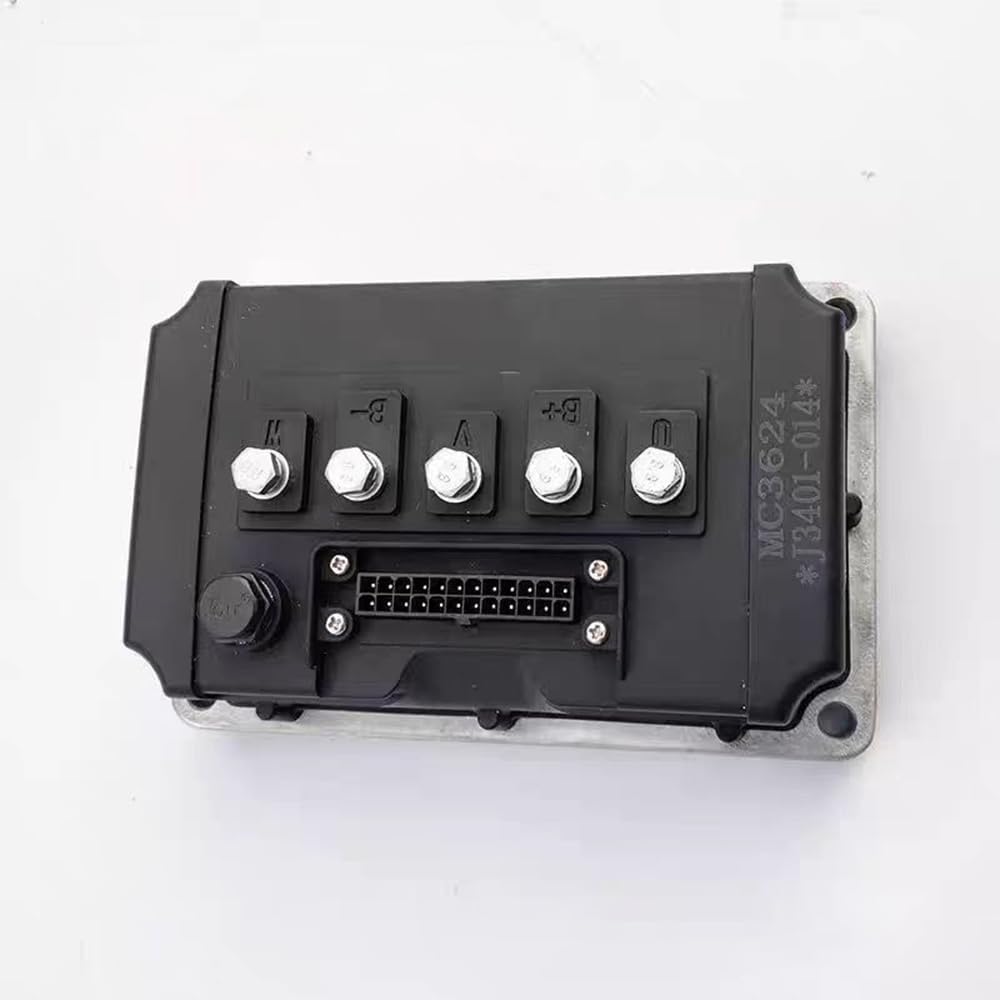
Figure 2: Top view of the Enpower MC3624 controller, highlighting connection terminals and the main connector port.
2.2 Installation Steps
- Safety First: Ensure the vehicle's power supply is completely disconnected before beginning installation. This prevents electrical shock and damage to components.
- Locate Original Controller: Identify the location of the existing motor controller in your vehicle.
- Disconnect Old Controller: Carefully disconnect all wiring harnesses and mounting hardware from the old controller. Note the orientation and connection points if necessary.
- Mount New Controller: Secure the Enpower MC3624 or MC3625 controller in the same location using appropriate mounting hardware. Ensure it is firmly attached to prevent vibration damage.
- Connect Wiring: Connect the vehicle's wiring harnesses to the corresponding ports on the new controller. The plug-and-play design means connectors should only fit in their correct positions. Do not force connections.
- Verify Connections: Double-check all connections to ensure they are secure and correctly seated.
- Restore Power: Reconnect the vehicle's power supply.
- Initial Test: Perform a functional test of the vehicle to confirm the controller is operating correctly.

Figure 3: Side view of the Enpower MC3624 controller with its attached wiring harness, showing the various colored wires.
3. Operating Instructions
Once installed, the Enpower MC3624 and MC3625 controllers provide stable and reliable motor control for a smooth driving experience. The controller operates automatically as part of your vehicle's engine management system.
3.1 Normal Operation
- The controller manages the power delivery to the motor based on vehicle inputs (e.g., accelerator pedal, speed sensors).
- It ensures efficient and responsive motor performance.
- No direct user interaction with the controller unit is typically required during normal vehicle operation.

Figure 4: Enpower MC3625 controller, featuring a label indicating 'Professional Quality Perfect Service' and model number '6027'.
4. Maintenance
The Enpower MC3624 and MC3625 controllers are designed for durability and typically require minimal maintenance. However, following these general guidelines can help ensure their longevity and optimal performance:
- Keep Dry: Protect the controller from excessive moisture and water exposure. While designed to withstand typical vehicle environments, prolonged exposure to water can cause damage.
- Clean Connections: Periodically inspect the wiring harnesses and connectors for dirt, corrosion, or loose connections. Clean any debris gently with a soft, dry cloth. Ensure connections are secure.
- Inspect for Damage: Regularly check the controller's casing for any signs of physical damage, cracks, or overheating. Address any issues promptly.
- Avoid Extreme Temperatures: While designed for vehicle use, avoid exposing the controller to extreme temperatures outside of normal operating conditions for extended periods.

Figure 5: Enpower MC3624-6021 controller, showing the top view with its connection terminals.
5. Troubleshooting
If you experience issues with your vehicle's motor control after installing the Enpower MC3624 or MC3625 controller, consider the following troubleshooting steps:
- No Power/No Response:
- Verify that the vehicle's battery is charged and properly connected.
- Check all wiring harness connections to the controller for looseness or incorrect seating.
- Inspect fuses related to the motor control system.
- Intermittent Operation:
- Examine connectors for signs of corrosion or damage. Clean if necessary.
- Ensure the controller is securely mounted and not subject to excessive vibration.
- Unusual Noises or Performance:
- This could indicate an issue beyond the controller itself. Consult a qualified technician.
- Ensure the controller is the correct model for your specific vehicle.
- Professional Assistance: If troubleshooting steps do not resolve the issue, it is recommended to consult a professional vehicle technician or contact the product manufacturer for further assistance. Attempting complex repairs without proper knowledge can lead to further damage or injury.
6. Specifications
The following table outlines the key specifications for the Enpower MC3624 and MC3625 controllers:
| Feature | Detail |
|---|---|
| Brand | Elecharger |
| Manufacturer | EleCharger |
| Model Number | MC3625-6027 |
| Compatible Models | Byvin Auto D50, Letin D70, Boloda, Haiquan D50D70M6M7A9 |
| Components Included | Controller |
| Assembly Required | No |
| UPC | 666334284310 |
| ASIN | B0D4VFF43Q |
| Date First Available | May 22, 2024 |
7. Warranty and Support
For information regarding product warranty, returns, or technical support, please contact the seller or manufacturer directly. Keep your purchase receipt or order details handy as they may be required for warranty claims or support inquiries.
The manufacturer, EleCharger, and brand, Elecharger, are responsible for product support. Please refer to their official channels for the most accurate and up-to-date support information.