Introduction
Thank you for purchasing the KODAK Detachable Soundbar with Wired Subwoofer, Model WSWRS-6501. This sound system is designed to enhance your audio experience for movies, music, and gaming with versatile connectivity and immersive sound. Please read this manual carefully before operating the device to ensure proper use and to maximize its performance.

Image: The KODAK Detachable Soundbar, its wired subwoofer, and the included remote control. The soundbar is shown as a single unit.
Key Features:
- Versatile & Immersive Audio: Experience cinematic sound with deep bass from the wired subwoofer, perfect for movies, music, and gaming.
- Detachable Design: Enjoy the flexibility of a detachable soundbar that can be used as one unit or separated for wider sound dispersion.
- Multiple Connectivity Options: Connect with your Bluetooth enabled devices, connect directly with USB for audio playback, or use the HDMI-ARC for seamless TV integration.
- Sleek and Modern: The soundbar's gloss finish and minimalist design complement any home décor.
- Easy Setup: Quickly connect and enjoy your upgraded audio experience with simple setup and user-friendly controls.
Package Contents
Please check the package contents carefully. If any items are missing or damaged, contact your retailer.
- Soundbar (WSWRS-6501)
- Wired Subwoofer
- Remote Control
- Power Adaptor
- User Manual (this document)
- Wall Mount Brackets & Set Metal Base (for detachable configuration)
Setup
1. Placement Options
The KODAK WSWRS-6501 soundbar offers flexible placement options:
- Single Unit Placement: Place the soundbar as a single horizontal unit below your television. Ensure it is on a stable, flat surface.
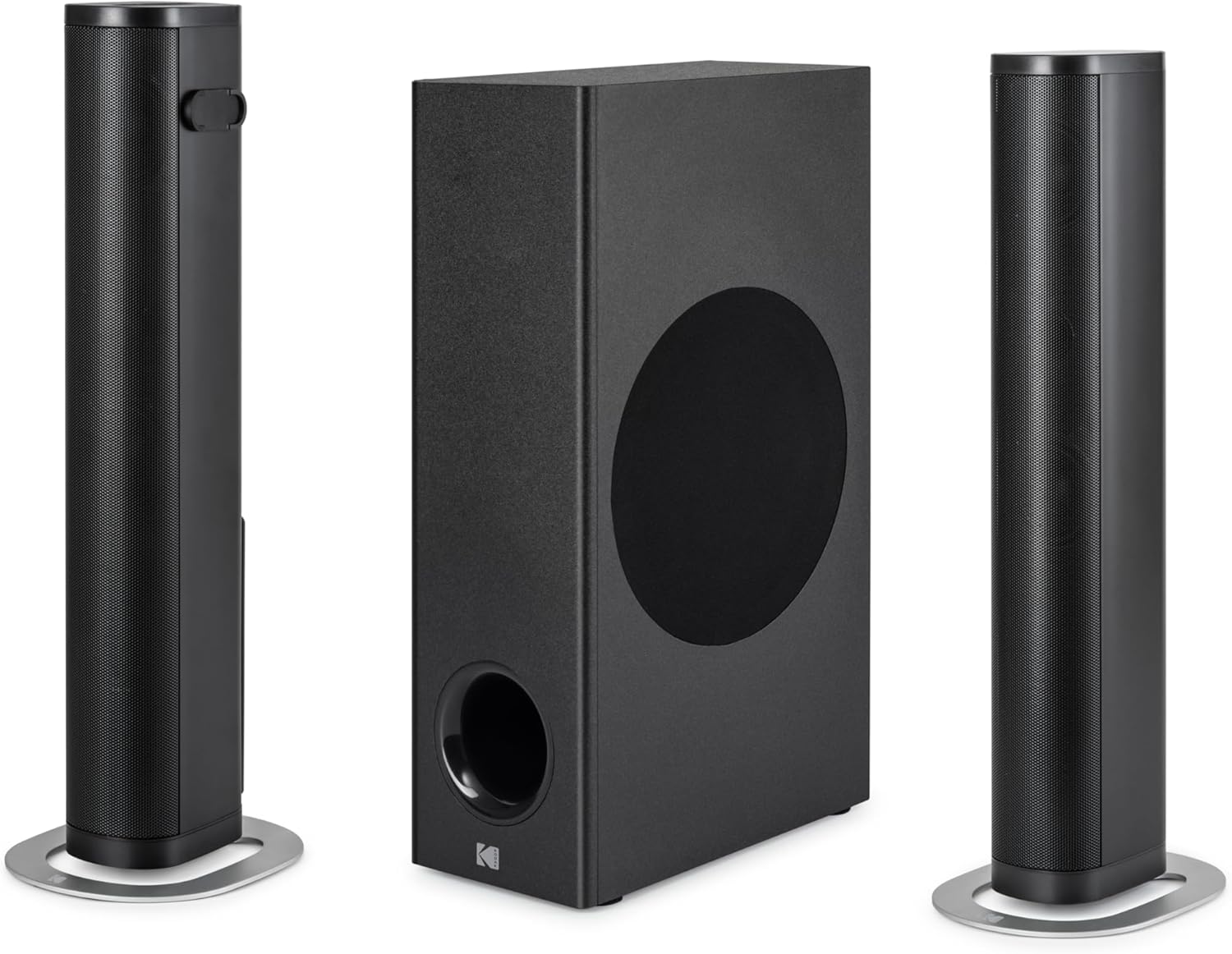
Image: The soundbar configured as a single, horizontal unit.
- Detached Vertical Placement: Separate the soundbar into two vertical speakers. Use the included metal bases for stability. These can be placed on either side of your television for wider sound dispersion.

Image: The soundbar detached into two vertical speakers, positioned with the subwoofer.

Image: The detached soundbar speakers and subwoofer, illustrating the wired connections between them.
- Subwoofer Placement: Position the wired subwoofer on the floor near the soundbar, ensuring it has adequate ventilation and is not obstructed.
2. Connecting the Soundbar and Subwoofer
If using the soundbar in its detached configuration, connect the two speaker units using the provided cables. Then, connect the soundbar unit to the wired subwoofer using the dedicated SUB OUT port.
3. Connecting to Audio Sources
The soundbar offers multiple connectivity options. Choose the one that best suits your device:

Image: Close-up of the soundbar's rear panel, displaying the HDMI, USB, Optical (OPT), Subwoofer Out (SUB OUT), and DC In ports.
- HDMI (ARC): For the best audio quality and control, connect an HDMI cable from the HDMI (ARC) port on the soundbar to the HDMI (ARC) port on your television. This allows your TV remote to control the soundbar's volume.
- Optical (OPT): Connect an optical cable from the OPT port on the soundbar to the optical audio output on your television or other audio device.
- USB: Insert a USB drive into the USB port for direct audio playback of compatible files.
- Bluetooth: For wireless connection, enable Bluetooth on your device and pair it with the soundbar. (Refer to the "Operating" section for detailed Bluetooth pairing instructions).
4. Power Connection
Connect the provided power adaptor to the DC IN port on the soundbar, then plug the adaptor into a wall outlet. The soundbar requires a 24 Volt input.
Operating Instructions
1. Power On/Off
Press the Power button on the remote control or on the soundbar unit to turn the system on or off.
2. Input Selection
Press the Input or Source button on the remote control to cycle through available input modes: HDMI (ARC), Optical, USB, and Bluetooth. The current input mode will typically be indicated by an LED on the soundbar.
3. Volume Control
Use the Volume Up (+) and Volume Down (-) buttons on the remote control or soundbar to adjust the master volume. Press the Mute button to temporarily silence the audio.
4. Bluetooth Pairing
- Switch the soundbar to Bluetooth mode using the Input button.
- The soundbar will enter pairing mode, indicated by a flashing Bluetooth LED.
- On your Bluetooth-enabled device (e.g., smartphone, tablet), search for available Bluetooth devices.
- Select "KODAK WSWRS-6501" (or similar name) from the list.
- Once paired, the Bluetooth LED on the soundbar will become solid, and you can play audio from your device.
Note: The soundbar will automatically attempt to reconnect to the last paired device when in Bluetooth mode.
5. USB Playback
Insert a USB flash drive containing audio files into the USB port. The soundbar will automatically switch to USB mode and begin playing the first compatible audio file. Use the remote control for playback functions such as Play/Pause, Next Track, and Previous Track.
Maintenance
To ensure the longevity and optimal performance of your KODAK soundbar system, follow these maintenance guidelines:
- Cleaning: Use a soft, dry cloth to wipe the surfaces of the soundbar and subwoofer. Do not use liquid cleaners, abrasive cloths, or chemical solvents, as these can damage the finish.
- Ventilation: Ensure the subwoofer and soundbar have adequate ventilation. Do not block any vents or place the units in enclosed spaces that could lead to overheating.
- Storage: If storing the unit for an extended period, disconnect it from power and store it in a cool, dry place away from direct sunlight and extreme temperatures.
- Avoid Moisture: Keep the soundbar and subwoofer away from water, humidity, and any liquids.
Troubleshooting
If you encounter issues with your soundbar, refer to the following common problems and solutions:
| Problem | Possible Cause | Solution |
|---|---|---|
| No power | Power cable not connected; Power outlet not active. | Ensure the power adaptor is securely connected to the soundbar and a working wall outlet. |
| No sound | Incorrect input selected; Volume too low; Cables not connected properly. | Select the correct input source. Increase volume. Check all audio cables (HDMI, Optical) are securely connected. |
| Bluetooth pairing fails | Soundbar not in pairing mode; Device too far; Interference. | Ensure soundbar is in Bluetooth pairing mode. Move device closer to soundbar. Turn off other Bluetooth devices nearby. |
| Remote control not working | Batteries depleted; Obstruction between remote and soundbar. | Replace remote control batteries. Ensure no objects are blocking the remote's signal to the soundbar. |
| Distorted sound | Volume too high; Poor audio source quality; Incorrect cable type. | Reduce volume. Try a different audio source. Ensure high-quality audio cables are used. |
Specifications
| Model Name | KODAK Detachable Soundbar with Wired Subwoofer - WSWRS-6501 |
| Model Number | WSWRS-6501 |
| Brand | KODAK |
| Speaker Type | Soundbar |
| Connectivity Technology | Bluetooth, USB, HDMI (ARC), Optical |
| Max Speaker Output Power | 800 Watts |
| Frequency Response | 15 KHz |
| Audio Output Mode | Stereo |
| Input Voltage | 24 Volts |
| Mounting Type | Table Mount (with wall mount brackets included) |
| Material | Plastic |
| Color | Black |
| Product Dimensions | 6.3D x 81.3W x 9.2H centimeters |
| Product Weight | 5.75 Kilograms |
| Components Included | Adaptor, Remote control, Soundbar, User manual, Wall mount brackets & Set metal base |
| Control Method | Remote control |
| Manufacturer | STAR GLORY LTD. |
Warranty and Support
For warranty information, please refer to the warranty card included with your product or visit the official KODAK audio products website. Keep your purchase receipt as proof of purchase for warranty claims.
For technical support, troubleshooting assistance beyond this manual, or service inquiries, please contact KODAK customer support through their official channels. Contact information can typically be found on the product packaging or the manufacturer's website.


