
1. Introduction
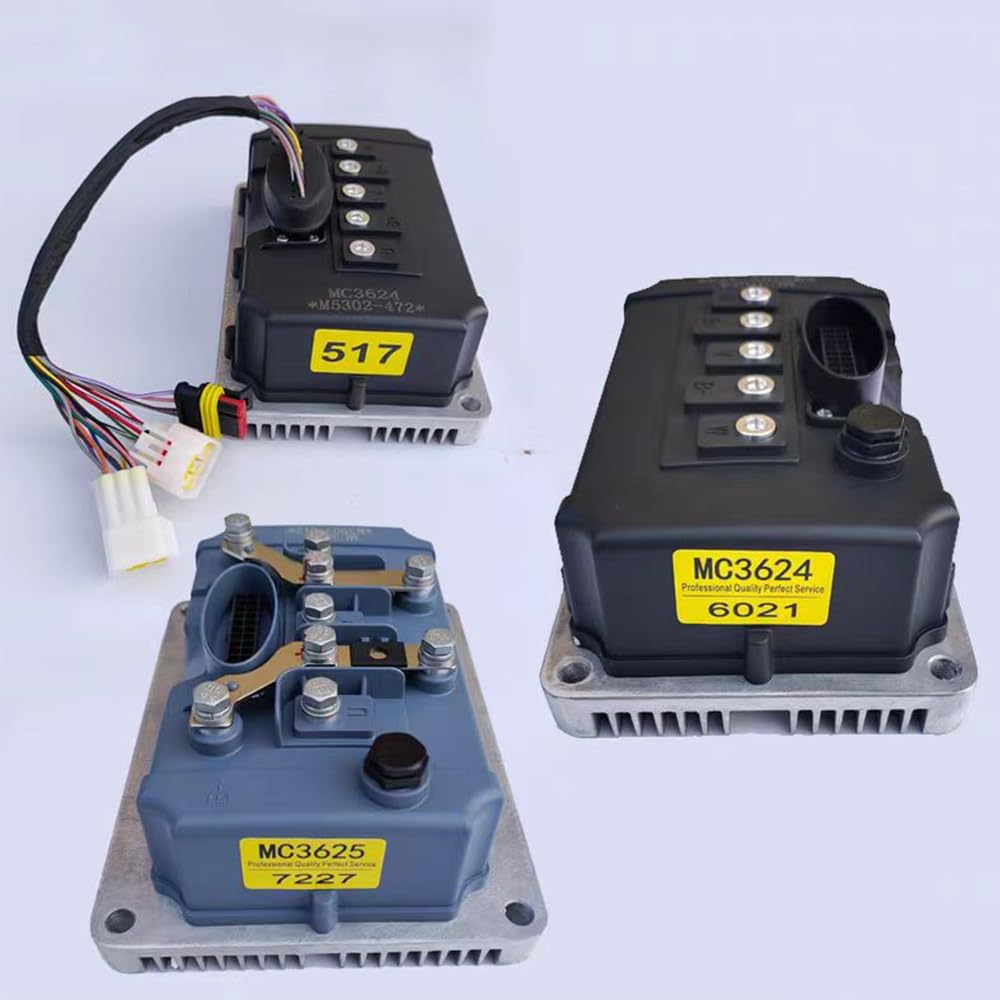
This manual provides essential information for the proper installation, operation, and maintenance of your Enpower MC3624 or MC3625 controller. These controllers are designed as versatile replacement parts, ensuring reliable performance for compatible vehicle models.
1.1. Product Overview
The Enpower MC3624 and MC3625 controllers feature advanced circuitry and components to deliver stable and reliable motor control. They are engineered to provide performance equivalent to original equipment, restoring full functionality to your vehicle's engine management system.
1.2. Compatibility
These controllers are compatible with a wide range of vehicle models, including:
- Byvin Auto D50
- Letin D70
- Boloda
- Haiquan D50D70M6M7A9
2. Safety Information
Always observe the following safety precautions to prevent injury or damage to the product and vehicle:
- Ensure the vehicle's power supply is disconnected before installation or maintenance.
- Wear appropriate personal protective equipment, such as gloves and eye protection.
- Do not attempt to modify the controller. Unauthorized modifications can lead to malfunction and void the warranty.
- Keep the controller away from water, excessive heat, and corrosive substances.
- If you are unsure about any installation step, consult a qualified technician.
3. Package Contents
Verify that all components are present upon opening the package:
- Enpower MC3624 or MC3625 Controller (1 unit)
No other components are included as per product specifications.
4. Setup and Installation
The Enpower MC3624 and MC3625 controllers are designed for plug-and-play installation, eliminating the need for complex rewiring. Follow these general steps for installation:
4.1. Preparation
- Ensure the vehicle's ignition is off and the battery is disconnected to prevent electrical hazards.
- Locate the existing controller in your vehicle.
- Carefully disconnect all wiring harnesses and mounting hardware from the old controller. Note the orientation and connection points for reference.
4.2. Controller Installation
- Position the new Enpower MC3624 or MC3625 controller in the same location as the original unit.
- Secure the controller using the appropriate mounting hardware. Ensure it is firmly attached to prevent movement during vehicle operation.
- Connect the wiring harnesses to the corresponding ports on the new controller. The plug-and-play design means connectors should match directly. Ensure all connections are secure and fully seated.

4.3. Final Steps
- Reconnect the vehicle's battery.
- Turn on the ignition and perform a functional test to ensure the controller is operating correctly. Check for any error indicators or unusual behavior.
5. Operation
Once properly installed, the Enpower MC3624 or MC3625 controller will automatically manage the motor's functions, providing stable and reliable control for a smooth driving experience. No user intervention is typically required for its basic operation.
- The controller continuously monitors engine parameters and adjusts output to optimize performance.
- Its robust design ensures consistent power delivery and efficient operation.
6. Maintenance
The Enpower MC3624 and MC3625 controllers are designed for minimal maintenance. However, periodic checks can help ensure longevity and optimal performance:
- Visual Inspection: Periodically inspect the controller and its wiring for any signs of damage, corrosion, or loose connections.
- Cleanliness: Keep the controller free from excessive dust, dirt, and moisture. Use a soft, dry cloth for cleaning. Do not use harsh chemicals or abrasive materials.
- Environmental Protection: Ensure the controller remains protected from extreme temperatures and direct exposure to water.
7. Troubleshooting
If you encounter issues with your vehicle's engine management system after installing the controller, consider the following:
- No Power/Functionality: Check all wiring connections to ensure they are secure and correctly seated. Verify the vehicle's battery is fully charged and properly connected.
- Erratic Behavior: Ensure the controller is firmly mounted and not subject to excessive vibration. Recheck all connections.
- Error Codes: If your vehicle displays specific error codes, consult your vehicle's service manual for diagnostic information.
For complex issues or if troubleshooting steps do not resolve the problem, it is recommended to contact a qualified technician or the product support team for assistance. Providing details about your specific vehicle model and the issue encountered can help expedite support.
8. Specifications
| Feature | Detail |
|---|---|
| Brand | Elecharger |
| Model Numbers | MC3624, MC3625 (e.g., MC3625-7227) |
| Components Included | Controller |
| Assembly Required | No |
| Display Type (if applicable) | LED or LCD (for compatible systems) |
| UPC | 666334284327 |

9. Warranty and Support
Specific warranty details are not provided in the product information. For warranty inquiries or technical support, please refer to the retailer or manufacturer's official channels.
When contacting support, please have your product model number (e.g., MC3625-7227) and purchase information readily available.