
Elecharger Enpower MC3624 MC3625 Controller User Manual
Models: MC3624, MC3625
1. Product Overview
The Enpower MC3624 and MC3625 controllers are high-quality replacement parts designed to manage the engine system of compatible vehicles. These controllers feature advanced circuitry and components to ensure reliable performance, equivalent to original equipment specifications. They are designed for a wide range of vehicle models, offering a straightforward solution for restoring engine management functionality.
Compatibility: These controllers are compatible with Byvin Auto D50, Letin D70, Boloda Haiquan D50D70M6M7A9 models.
2. Key Features
- Reliable Performance: Provides stable and dependable engine control for smooth vehicle operation.
- Easy Installation: Designed for plug-and-play installation, eliminating the need for complex wiring harness modifications.
- Broad Compatibility: Suitable for various vehicle models, including Byvin Auto D50, Letin D70, Boloda Haiquan D50D70M6M7A9.
3. Setup and Installation
Installation of the Enpower controller is designed to be a direct replacement process. It is crucial to ensure the correct model and connector type are selected for your vehicle to guarantee proper function and safety. If you are unsure about any step, it is recommended to seek assistance from a qualified professional.
- Preparation: Before beginning installation, ensure the vehicle's power system is completely off and disconnected to prevent electrical hazards.
- Locate Existing Controller: Identify the location of the original controller in your vehicle.
- Disconnect Old Controller: Carefully disconnect all wiring harnesses and mounting hardware from the existing controller. Note the orientation and connection points for reference.
- Verify New Controller: Compare the new Enpower controller with the old unit to confirm it is the correct replacement model and that all connectors match.
- Install New Controller: Mount the new Enpower controller in the same location as the original. Secure it using the appropriate mounting hardware.
- Connect Wiring: Reconnect all wiring harnesses to the new controller. Ensure each connector is firmly seated and properly aligned. The plug-and-play design means no rewiring is typically required.
- Final Check: Double-check all connections and mounting points before restoring power to the vehicle.

Figure 3.1: Overview of the Enpower MC3624 controller, showing the main unit and its integrated wiring harness with various connectors.
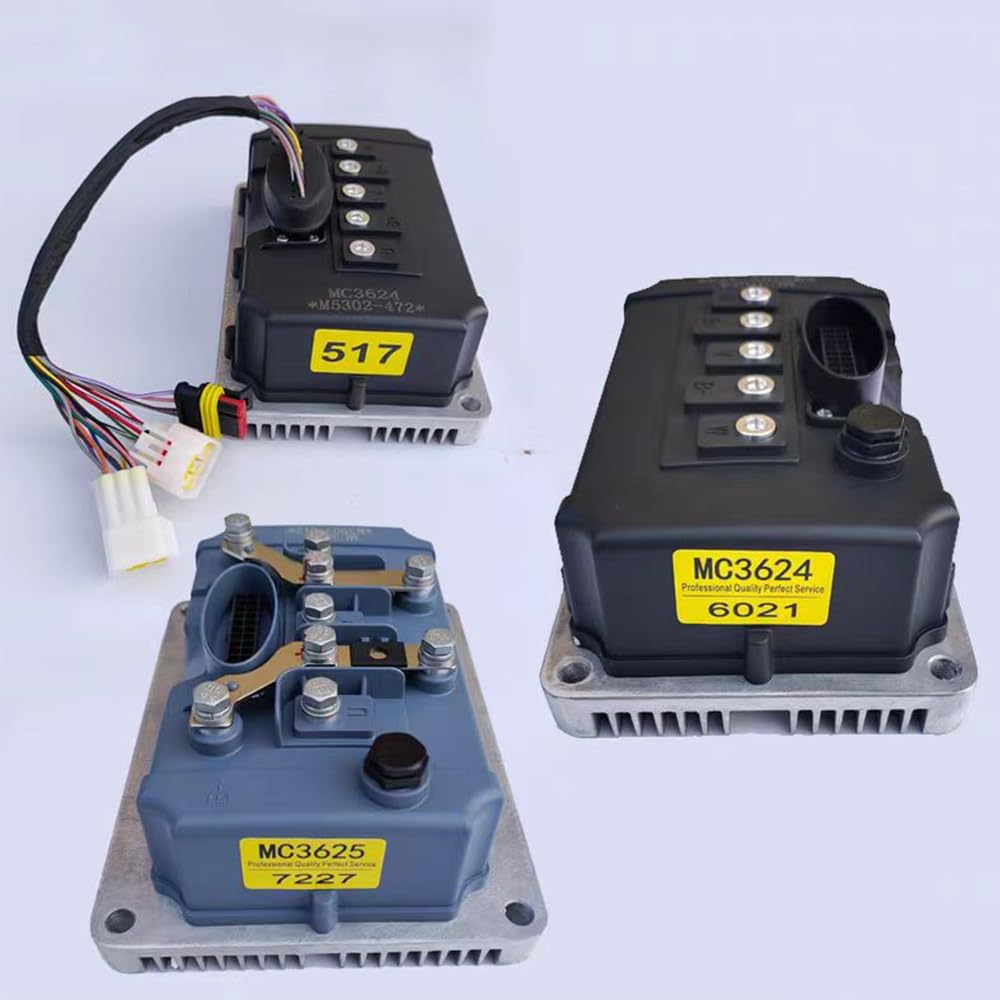
Figure 3.2: Close-up view of the Enpower MC3624 controller, highlighting the various electrical connectors for plug-and-play installation.

Figure 3.3: The Enpower MC3624-6021 controller, showing its specific model designation and connection points.
4. Operating Instructions
Once the Enpower controller is correctly installed, its operation is integrated with the vehicle's existing engine management system. The controller functions automatically to regulate engine performance based on vehicle inputs.
- Power On: After installation, restore power to the vehicle. The controller will initialize automatically.
- Normal Operation: The controller continuously monitors and adjusts engine parameters to ensure stable and efficient performance during driving.
- Monitoring: Any diagnostic indicators on your vehicle's dashboard related to the engine management system should be observed. If new warning lights appear, refer to the troubleshooting section.
5. Maintenance
The Enpower controller is designed for durability and requires minimal maintenance. However, periodic checks can help ensure its longevity and optimal performance.
- Keep Clean: Ensure the controller's exterior is kept clean and free from excessive dust, dirt, or moisture.
- Inspect Connections: Periodically check all wiring harness connections to ensure they remain secure and free from corrosion. Loose connections can lead to intermittent performance issues.
- Avoid Physical Damage: Protect the controller from physical impact or extreme temperatures, which can damage internal components.
6. Troubleshooting
If you experience issues after installing the Enpower controller, consider the following troubleshooting steps:
- No Power/Functionality:
- Verify all electrical connections are secure and properly seated.
- Check vehicle fuses related to the engine management system.
- Erratic Engine Behavior:
- Ensure the controller model is correct for your specific vehicle.
- Inspect for any signs of damage to the wiring or connectors.
- Diagnostic Trouble Codes (DTCs):
- If your vehicle displays specific diagnostic codes, consult your vehicle's service manual or a professional mechanic for interpretation and resolution.
Important: Before placing an order or if you encounter persistent issues, it is recommended to contact customer support with details of your vehicle model and, if possible, images of your existing controller and its plug types. This will help in providing professional assistance and quicker problem resolution.
7. Specifications
| Feature | Detail |
|---|---|
| Brand | Elecharger |
| Model Numbers | MC3624-6021 (and MC3625 variants) |
| Components Included | Controller |
| Assembly Required | No |
| Display Type (if applicable) | LCD or LED (for compatible vehicle displays) |
| UPC | 666334284297 |
8. Warranty and Support
For specific warranty information, please refer to the product packaging or contact the retailer where the product was purchased. For technical support or installation inquiries, please reach out to Elecharger customer service. Providing your product model number and a detailed description of your issue will help expedite support.
Contact Information: Please refer to the Elecharger official website or your purchase documentation for the most current support contact details.