
1. Product Overview
The YOUNGDO Mini Bike Pump is a compact, portable electric tire inflator designed for various inflation needs, including bicycles, motorcycles, and balls. It features a maximum pressure of 150 PSI, an automatic shut-off function, and a digital pressure gauge for precise inflation. Its small size and lightweight design make it an ideal companion for on-the-go tire maintenance.

The YOUNGDO Mini Bike Pump, a compact and portable electric tire inflator.
2. Package Contents
Please verify that all the following items are present in your package:
- Bicycle pump (1)
- Silicone cover (1)
- Keychain (1)
- Inflation tube (1)
- Ball needle adapter (1)
- Presta valve adapter (1)
- Type-C charging cable (1)
- User's Manual (1)
- Storage bag (1)
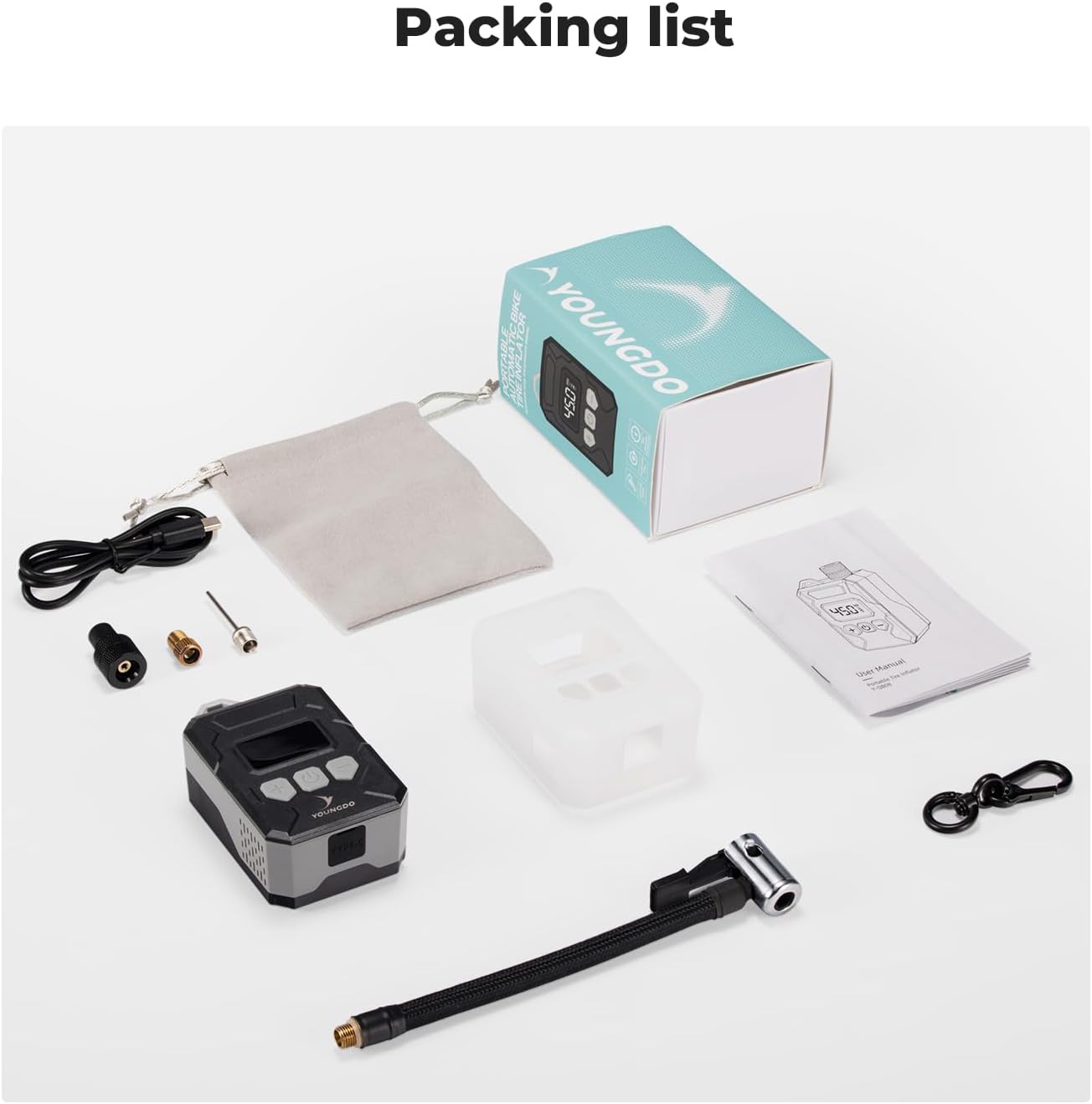
All components included in the YOUNGDO Mini Bike Pump package, laid out for inspection.
3. Product Features
- Compact and Portable: Weighs only 150g and measures 84x53x31 mm, easily fitting into pockets or backpacks. Includes a keychain for convenient carrying.
- High Pressure Inflation: Delivers up to 150 PSI, capable of inflating bicycle tires in 30-120 seconds depending on tire type.
- Fast Charging: The integrated 500 mAh Lithium-Ion battery fully charges in approximately 35 minutes via the included Type-C USB cable.
- Automatic Shut-Off: Automatically stops inflation once the preset pressure is reached, preventing over-inflation.
- Digital Display: An LED screen displays real-time PSI readings, allowing for precise pressure control and monitoring.
- Efficient Motor: Equipped with a new generation brushless motor and an enlarged pure copper cylinder for efficient and reliable inflation.
- Versatile Application: Suitable for various inflatables including bicycles, motorcycles, and balls.

The compact YOUNGDO Mini Bike Pump attached to a backpack via its keychain, highlighting its portability.

The YOUNGDO Mini Bike Pump being charged via a Type-C USB cable.

The digital display of the YOUNGDO Mini Bike Pump showing a preset pressure of 45.0 PSI, with icons for battery, PSI, bicycle, motorcycle, and ball modes.

An illustration of the internal components of the YOUNGDO Mini Bike Pump, highlighting the brushless motor and copper cylinder.


The pump's versatility is demonstrated by its ability to inflate various items, including basketballs and motorcycle tires.
4. Setup
4.1 Charging the Pump
- Connect the provided Type-C charging cable to the pump's charging port.
- Connect the other end of the cable to a suitable USB power adapter (not included).
- The battery indicator on the LED screen will show the charging status. A full charge takes approximately 35 minutes.
4.2 Attaching the Inflation Tube and Adapters
The pump supports both Schrader and Presta valves. Ensure the correct adapter is used for your valve type.

Diagram illustrating the components of Schrader and Presta valve adapters for the pump.
- Screw the inflation tube securely onto the pump's air outlet.
- For Schrader valves, directly attach the inflation tube to the tire valve.
- For Presta valves, first screw the Presta valve adapter onto the tire valve, then attach the inflation tube.
- For balls, attach the ball needle adapter to the inflation tube before inserting it into the ball's valve.
5. Operating Instructions
A video demonstrating the basic operation of the YOUNGDO Mini Bike Pump, including power on, mode selection, and inflation process.
5.1 Power On/Off
Press and hold the "Start/Stop Button" (power button) for 3 seconds to turn the inflator on or off. The device will automatically turn off if not used for 2 minutes after turning on.
5.2 Selecting Inflation Mode
Press the "-" button to cycle through the three different inflation modes: bicycle, motorcycle, and balls. Each mode may have a default pressure range.
5.3 Setting Target Pressure
Use the "+" and "-" buttons to adjust the desired target pressure value. After the numerical value flashes for 3 seconds, it will stop flashing, indicating the setting is complete.
5.4 Starting and Stopping Inflation
Press the "Start/Stop Button" to begin inflation. The pump will automatically stop when the preset pressure is reached. To manually stop inflation, press the "Start/Stop Button" again.

A visual guide to the easy-to-use steps for operating the YOUNGDO Mini Bike Pump: power on, mode selection, pressure adjustment, and starting inflation.

The pump automatically stops inflation once the target pressure is reached, ensuring safety and preventing over-inflation.
5.5 Inflation Methods
The pump supports two primary methods of inflation:
- Direct Inflation: For valves that allow the pump to be screwed directly onto them.
- Using Inflation Hoses: For valves that require the flexible inflation tube for connection.
Images demonstrating the two ways of inflating with the YOUNGDO Mini Bike Pump: direct inflation and using the inflation hose.
6. Maintenance
- Keep the pump clean and free from dust and debris. Use a soft, dry cloth for cleaning.
- Store the pump in a cool, dry place when not in use, away from direct sunlight and extreme temperatures.
- Ensure the charging port cover is properly sealed to prevent moisture ingress.
- Regularly check the inflation tube and adapters for any signs of wear, cracks, or damage. Replace if necessary to ensure optimal performance and safety.
- Do not attempt to disassemble or repair the pump yourself. Unauthorized repairs may void the warranty and cause damage. Contact customer support for assistance.
7. Troubleshooting
| Problem | Possible Cause | Solution |
|---|---|---|
| Pump does not turn on. | Low battery or power button not held long enough. | Charge the pump fully. Press and hold the power button for 3 seconds. |
| Pump inflates slowly or not at all. | Inflation tube not securely attached, valve core loose, or low battery. | Ensure all connections are tight. Check valve core for proper seating. Recharge the pump. |
| Pump stops before reaching target pressure. | Target pressure set too low, or internal safety mechanism activated due to overheating. | Verify target pressure setting. Allow pump to cool down if it has been running continuously for an extended period. |
| Inaccurate pressure reading. | Improper connection to valve, causing air leakage. | Ensure the inflation tube is firmly connected to the valve without any leaks. |
8. Specifications
- Model Number: YD01.0177
- Product Dimensions: 8.4L x 5.3W x 3.1H Centimetres (3.3 x 2.1 x 1.2 inches)
- Item Weight: 150 Grams (0.33 lbs)
- Max Pressure: 150 PSI
- Battery Capacity: 500 mAh Lithium Ion
- Charging Time: Approximately 35 minutes (Type-C USB)
- Material: Plastic
- Color: Grey
- Power Source: Battery Powered
- Manufacturer: YOUNGDO
- Country/Region of Origin: China

A table showing recommended inflation pressures and approximate inflation times for various tire types.
9. Warranty and Support
For warranty information, technical support, or any inquiries regarding your YOUNGDO Mini Bike Pump, please contact YOUNGDO customer service. Refer to the contact details provided with your purchase documentation or visit the official YOUNGDO website for the most up-to-date support information.
You can also visit the YOUNGDO Brand Store on Amazon for additional product information and support resources.