
Biolomix BG706
BioloMix Electric Coffee Grinder User Manual
Model: BG706
Brand: Biolomix
Introduction
Thank you for choosing the BioloMix Electric Coffee Grinder. This conical burr grinder is designed to provide precise and consistent grinding for various coffee brewing methods, from fine espresso to coarse French press. With its intuitive LCD touchscreen and anti-static technology, preparing your favorite coffee is made simple and mess-free. Please read this manual thoroughly before operation to ensure proper use and maintenance.

Image: The BioloMix Electric Coffee Grinder shown with its main unit, bean hopper, ground coffee container, portafilter holder, and cleaning brush.
Key Features
- Durable Conical Burr: Equipped with 40mm stainless steel conical burrs for uniform grinding and optimal flavor extraction. Features double safety protection (friction clutch and overheating protection) for longevity.
- 30 Precise Grind Settings: Offers 30 adjustable grind settings, suitable for various brewing methods including espresso, pour over, drip coffee, siphon, and French press. The gear reduction motor minimizes heat to preserve coffee aroma.
- Easy to Clean: Designed with a removable burr, bean hopper, and grinding chamber for straightforward cleaning. Includes a cleaning brush.
- Auto Locking System: Prevents bean spills, facilitating easy removal, storage, and transfer of the bean hopper.
- Clear LCD Touchscreen: Intuitive display for adjusting grind time and cup quantity.
- Large Capacity Hopper: 10-ounce (300ml) bean hopper capacity, suitable for multiple brews.
- Anti-Static Technology: Ensures a mess-free coffee preparation experience.
Product Components
Familiarize yourself with the main parts of your BioloMix coffee grinder:
- Lid
- Bean Hopper
- Removable Conical Burr
- Grinding Settings Dial
- Grinding Chamber Lid
- Grinding Chamber (Ground Coffee Container)
- Cleaning Brush
- Portafilter Cradle

Image: An exploded view diagram illustrating the various components of the BioloMix coffee grinder, including the lid, bean hopper, removable burr, grinding settings, grinding chamber, cleaning brush, and portafilter cradle.
Setup Instructions
- Unpack: Carefully remove all components from the packaging.
- Clean: Before first use, wash the bean hopper, grinding chamber, and lid with warm, soapy water. Rinse thoroughly and dry completely. The main unit should be wiped with a damp cloth.
- Assemble:
- Ensure the removable conical burr is securely in place.
- Place the bean hopper onto the main unit, aligning it correctly until it locks into position.
- Place the lid on top of the bean hopper.
- Insert the portafilter cradle into its slot at the base of the grinder until it clicks into place. This activates the espresso mode.
- Add Beans: Fill the bean hopper with whole coffee beans. Do not overfill.
- Position Grinder: Place the grinder on a stable, flat, and dry surface.
- Connect Power: Plug the power cord into a suitable electrical outlet.
Operating Instructions
1. Adjusting Grind Settings
The BioloMix grinder offers 30 precise grind settings, ranging from fine (for espresso) to coarse (for French press). Rotate the grinding settings dial located below the bean hopper to select your desired fineness.
- Fine (1-10): Ideal for Espresso, Moka Pot.
- Medium (11-20): Suitable for Drip Coffee, Pour Over, Siphon.
- Coarse (21-30): Best for French Press, Cold Brew.

Image: A visual representation of the 30 grind settings on the BioloMix coffee grinder, showing examples of coffee grounds for French Press (coarse), Pour Over (medium), and Espresso (fine).
2. Using the LCD Touchscreen
The intuitive LCD touchscreen allows you to easily control the grinding process.
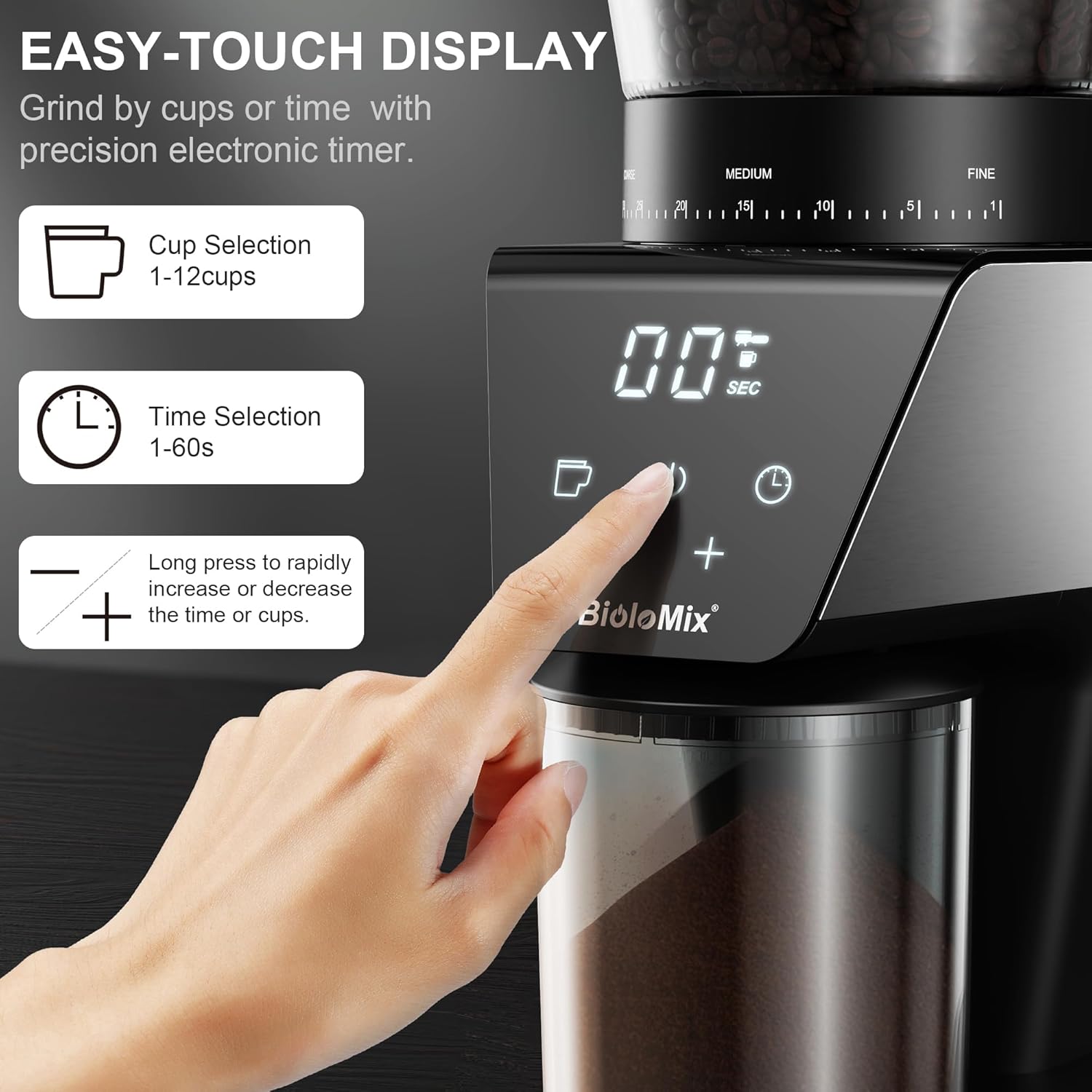
Image: A close-up view of the BioloMix coffee grinder's LCD touchscreen, highlighting the cup selection, time selection, and adjustment buttons.
3. Selecting Grind Quantity (Cups or Time)
You can choose to grind by the number of cups or by grinding time.
- Cup Selection: Press the cup icon on the touchscreen. Use the '+' and '-' buttons to select the desired number of cups (1-12 cups).
- Time Selection: Press the clock icon on the touchscreen. Use the '+' and '-' buttons to set the grinding time in 1-second increments (up to 60 seconds).

Image: The digital timer and cup selection feature on the BioloMix coffee grinder's display, showing how to adjust grind time or cup quantity.
4. Grinding Coffee
Once the grind setting and quantity are selected, you are ready to grind.
- For Ground Coffee Container: Ensure the grinding chamber (ground coffee container) is placed securely under the dispenser. Press the power button on the touchscreen to start grinding. The grinder will automatically stop when the selected quantity/time is reached.
- For Portafilter (Espresso Mode):
- Ensure the portafilter cradle is inserted.
- Place your 51-54mm portafilter into the cradle. The grinder is designed to activate when the portafilter touches the activation switch.
- If your portafilter does not fit the cradle, you may grind directly into a dosing ring placed on your portafilter to avoid powder leakage.

Image: The BioloMix coffee grinder demonstrating its compatibility with 51-54mm portafilters for direct grinding into an espresso machine's portafilter.

Image: A hand inserting a portafilter into the BioloMix coffee grinder's cradle, illustrating the activation process for grinding.
Maintenance and Cleaning
Regular cleaning ensures optimal performance and extends the lifespan of your grinder.
- Unplug: Always unplug the grinder from the power outlet before cleaning.
- Empty Hopper and Chamber: Remove any remaining coffee beans from the bean hopper and discard any ground coffee from the grinding chamber.
- Remove Components:
- Remove the bean hopper by twisting it counter-clockwise and lifting it off.
- Carefully remove the upper conical burr.
- Remove the grinding chamber (ground coffee container) and its lid.
- Clean Components:
- Wash the bean hopper, grinding chamber, and lid with warm, soapy water. Rinse thoroughly and dry completely before reassembling.
- Use the provided cleaning brush to remove any coffee grounds from the conical burrs and the grinding chute. Do not wash the burrs with water; wipe them clean with a dry cloth or brush.
- Clean Main Unit: Wipe the exterior of the main unit with a soft, damp cloth. Do not immerse the main unit in water or any other liquid.
- Reassemble: Once all parts are dry, reassemble the grinder in reverse order of disassembly.
Image: An illustration showing the removable parts of the BioloMix coffee grinder, including the top burr, bean hopper, and grind chamber, along with the cleaning brush for easy maintenance.
Troubleshooting
| Problem | Possible Cause | Solution |
|---|---|---|
| Grinder does not start. |
|
|
| Grinding is inconsistent or too slow. |
|
|
| Excessive static or mess. |
|
|
| Portafilter does not activate grinding. |
|
|
Specifications
| Feature | Detail |
|---|---|
| Model Number | BG706 |
| Brand | Biolomix |
| Color | Black |
| Grind Settings | 30 Precise Settings |
| Burr Type | Conical Burr (40mm Stainless Steel) |
| Bean Hopper Capacity | 10 oz (300ml) |
| Grinding Chamber Capacity | 150ml |
| Power | 300W |
| Product Dimensions (L x W x H) | 6.68"L x 5.6"W x 13.6"H |
| Item Weight | 5.81 pounds |
| Special Features | LCD Touchscreen, Anti-Static Technology, Auto Locking System |
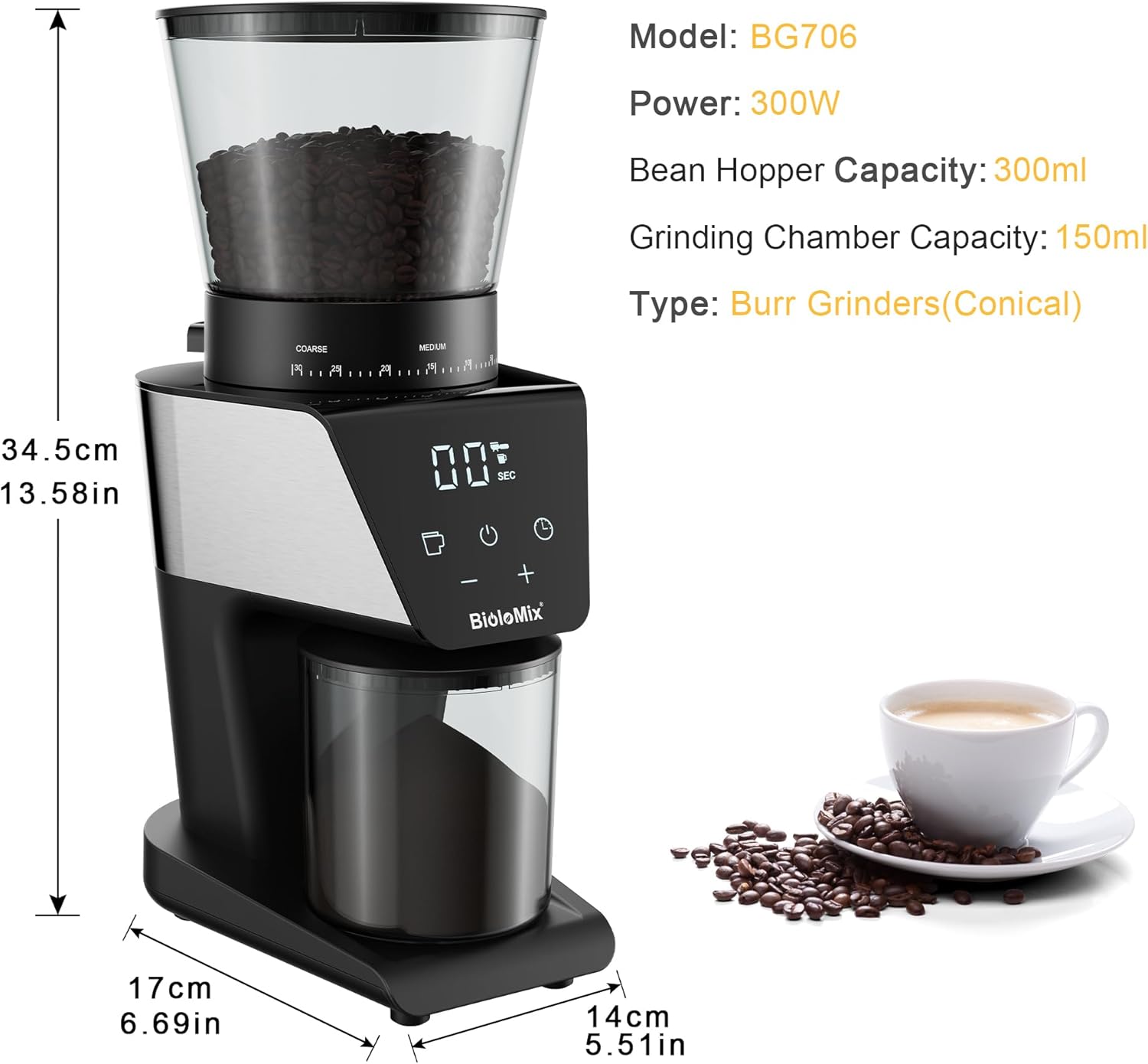
Image: A diagram showing the BioloMix coffee grinder with its model number, power, bean hopper capacity, grinding chamber capacity, and burr type listed.
Warranty and Support
For warranty information and customer support, please refer to the documentation included with your product or visit the official Biolomix website. Keep your purchase receipt as proof of purchase for any warranty claims.
For further assistance, you may contact Biolomix customer service through their official channels.
Ask a question about this manual
Ask about setup, troubleshooting, compatibility, parts, safety, or missing instructions. Manuals+ will review the question and use this page’s manual context to help answer it.