
Introduction
Thank you for choosing the TOPWARP 10000mAh Power Bank. This portable charger is designed to provide reliable and fast charging for your mobile devices on the go. Featuring a compact design, multiple charging ports, and an emergency lighting function, it is an ideal companion for daily use and travel. Please read this manual carefully to ensure proper use and maintenance of your device.
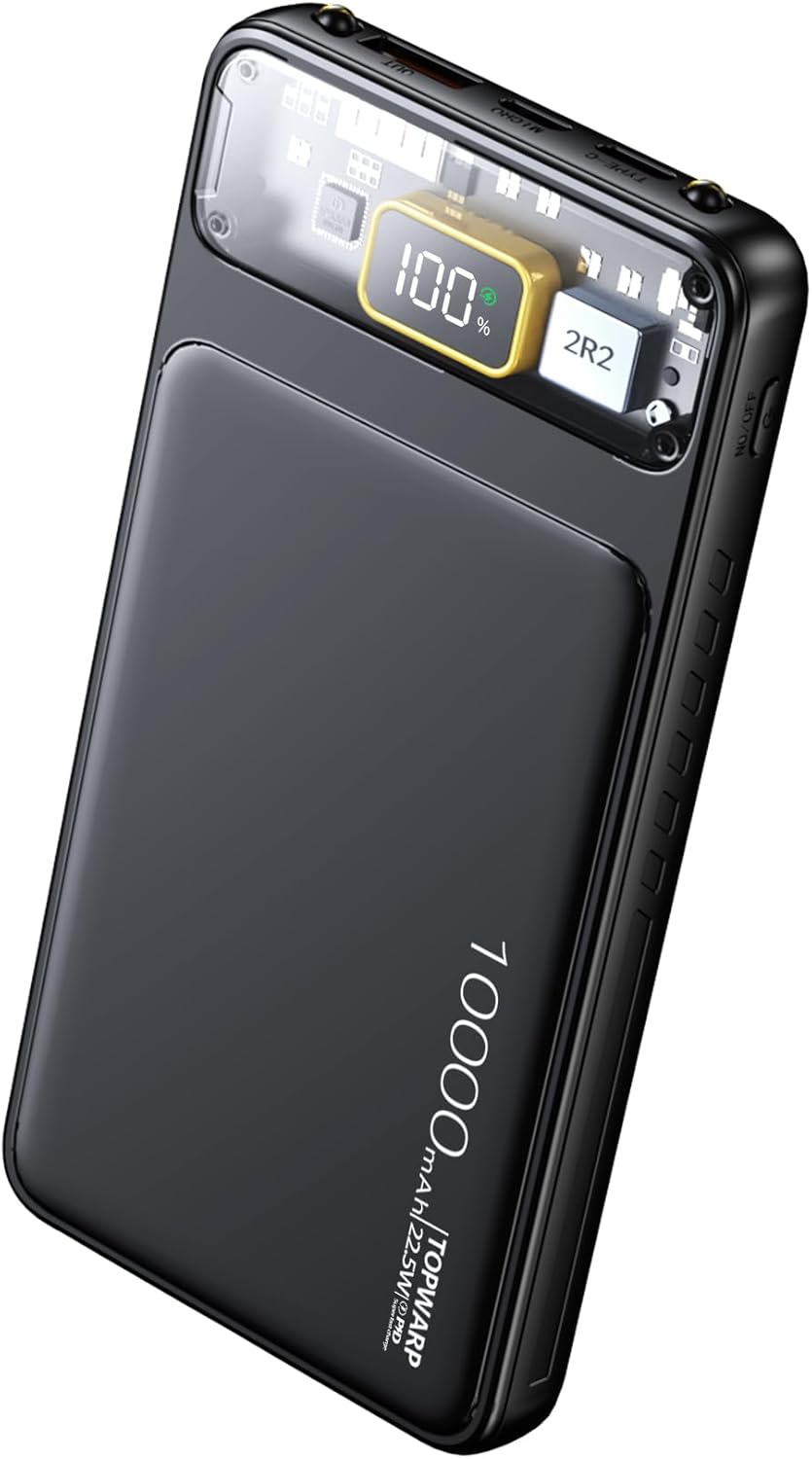
Image: The TOPWARP 10000mAh Power Bank, showcasing its sleek black design and transparent section revealing the internal circuitry and digital display.
Product Features
- High Capacity: 10000mAh battery for extended power.
- Fast Charging: Supports PD 22.5W super fast charging protocol, compatible with various devices including iPhone (PD 20W) and Android phones.
- Dual Input Ports: Equipped with USB-C and Micro USB input ports for convenient recharging of the power bank.
- Dual Output Ports: Features USB-C and USB-A output ports, allowing simultaneous charging of two devices.
- Emergency Lighting: Integrated flashlight function for use in low-light conditions or emergencies.
- Digital Display: LED liquid crystal display provides real-time battery percentage for accurate power monitoring.
- Advanced Safety Protections: Incorporates nine levels of circuit safety protection, including overcharge, over-discharge, overvoltage, temperature, overcurrent, short-circuit, over-power, resume, and electromagnetic field protection.
- Compact and Portable: Slim and lightweight design (5.5 x 2.6 x 0.63 inches, 7.9 ounces) for easy portability.

Image: The power bank's wide compatibility with various mobile devices, illustrating its ability to charge both Android (PD 22.5W) and iPhone (PD 20W) devices.
What's in the Box
Upon opening the package, please ensure all items are present and in good condition:
- 1 x TOPWARP 10000mAh Power Bank
- 1 x User Manual
Setup
Initial Charging of the Power Bank
Before first use, it is recommended to fully charge your TOPWARP Power Bank. This ensures optimal performance and battery longevity.
- Connect a compatible USB-C or Micro USB charging cable (not included) to the input port of the power bank.
- Connect the other end of the cable to a USB wall adapter (e.g., 20W PD charger) or a computer's USB port.
- The LED digital display will show the charging progress, indicating the battery percentage.
- The power bank is fully charged when the display shows 100%.

Image: The power bank connected to a wall charger via its USB-C input, demonstrating the fast recharge capability.
Operating Instructions
Charging Your Devices
The power bank features both USB-A and USB-C output ports to charge a wide range of devices.
- Connect your device's charging cable to either the USB-A or USB-C output port on the power bank.
- Connect the other end of the cable to your device.
- The power bank will automatically begin charging your device. The digital display will show the remaining battery percentage.
- You can charge two devices simultaneously using both output ports.

Image: The power bank charging an iPhone and a tablet concurrently, demonstrating its dual output capability.
Using the Emergency Lighting (Flashlight)
The power bank includes a built-in flashlight for convenience.
- To turn on the flashlight, press and hold the power button for approximately 3 seconds.
- To turn off the flashlight, press and hold the power button again for approximately 3 seconds.

Image: The power bank's integrated dual flashlights providing illumination in a dark environment, useful for camping or emergencies.
Checking Battery Level
The LED digital display provides an accurate percentage of the power bank's remaining charge.
- Briefly press the power button to activate the display and view the current battery percentage.
- The display will automatically turn off after a few seconds to conserve power.

Image: A close-up view of the power bank's LED digital display, clearly showing the battery percentage for easy monitoring.
Maintenance
- Cleaning: Use a soft, dry cloth to clean the surface of the power bank. Do not use harsh chemicals or abrasive materials.
- Storage: Store the power bank in a cool, dry place away from direct sunlight, extreme temperatures, and humidity.
- Battery Care: To prolong battery life, fully charge the power bank at least once every three months if not in regular use. Avoid completely draining the battery for extended periods.
- Handling: Avoid dropping, impacting, or disassembling the power bank.
Troubleshooting
Power Bank Not Charging
- Ensure the charging cable is securely connected to both the power bank's input port and the power source.
- Verify that the wall adapter or USB port is functioning correctly. Try a different adapter or port.
- Check if the charging cable is damaged. Try a different cable.
Device Not Charging from Power Bank
- Ensure the power bank has sufficient charge (check the digital display).
- Verify that the charging cable is securely connected to both the power bank's output port and your device.
- Check if your device's charging cable is compatible and undamaged. Try a different cable.
- Ensure your device is compatible with the power bank's output specifications (5V/3A, 22.5W max).
Flashlight Not Working
- Ensure the power bank has sufficient charge.
- Press and hold the power button for approximately 3 seconds to activate the flashlight.
Specifications
| Attribute | Value |
|---|---|
| Model Number | TP68-1W |
| Battery Capacity | 10000mAh |
| Product Dimensions | 5.5 x 2.6 x 0.63 inches |
| Item Weight | 7.9 ounces |
| Input Ports | USB-C, Micro USB |
| Output Ports | USB-C, USB-A |
| Max Output Power | 22.5W (PD 5V/3A) |
| Material | PC+ABS |
| Special Features | LED Indicator Lights, Digital Display, Fast Charging, Pocket Size, Emergency Lighting |

Image: The power bank's ultra-slim design and dimensions, illustrating its compact and portable form factor.
Safety Information
To ensure safe operation and prevent damage, please observe the following safety precautions:
- Do not expose the power bank to extreme temperatures (above 60°C/140°F or below 0°C/32°F), direct sunlight, or high humidity.
- Do not immerse the power bank in water or other liquids.
- Do not disassemble, modify, or attempt to repair the power bank. This will void the warranty and may cause injury.
- Keep the power bank away from flammable materials and explosive environments.
- Do not use the power bank if it is damaged, swollen, or leaking.
- Keep out of reach of children.
- Dispose of the power bank responsibly according to local regulations. Do not dispose of it with household waste.

Image: Visual representation of the nine levels of circuit safety protection integrated into the power bank, ensuring safe and reliable operation.
Warranty and Support
For warranty information and customer support, please refer to the documentation provided with your purchase or contact TOPWARP customer service directly. Specific warranty terms and conditions may vary by region and retailer.
For further assistance, please visit the official TOPWARP store or contact their support channels.