
1. Product Overview
The YOUDO PCB10KEY33 Smart Door Lock offers advanced security and convenience with multiple unlocking methods. Designed for various applications including bedrooms, homes, apartments, and garages, this keyless entry system integrates modern technology with robust construction.
- 5-in-1 Unlocking Methods: Access your door using Password, Bluetooth App control, IC card, Physical key, and WiFi Remote Access (with separate gateway).
- WiFi Remote Access: Remotely lock/unlock, receive notifications, share passcodes, and view history (requires separate WiFi gateway).
- Easy Installation: Designed for quick setup, typically within 10 minutes using a screwdriver.
- Long Battery Life: Powered by 4 AAA batteries (not included), lasting up to 6 months with low battery alerts. USB emergency power available.
- Auto-Lock & Notifications: Automatically locks within 7-14 seconds. Provides real-time status updates and unlock history via the app.
- Durable Design: Operates effectively in extreme temperatures (-22°F to 140°F) and is resistant to rain and sun.

Image: Overview of the YOUDO Smart Door Lock, showing the handle, keypad unit, mobile app interface, IC cards, and physical keys. This illustrates the various components and unlocking methods.
Download Welock App
Image: Detailed view of the smart lock's exterior keypad, interior handle, and the latchbolt mechanism. Key features like ANSI Grade 2 certification, auto-lock, wide operating temperature range, ease of installation, mute mode, and low battery warning are highlighted.
Download Welock App2. Package Contents
Verify that all components are present in the package before beginning installation.
- Keypad Door Lock x1
- Detailed Manual x1
- IC Card x3
- Key x2

Image: Contents of the YOUDO Smart Door Lock package, showing the main lock unit, instruction manual, physical keys, and IC cards.
3. Specifications
| Brand | YOUDO |
| Model Number | PCB10KEY33 |
| Material | Stainless Steel, Alloy Steel, Zinc |
| Color | Black |
| Product Dimensions | 8.26"L x 4.33"W |
| Item Weight | 2.1 pounds |
| Lock Type | Combination Lock, Key Lock, Keypad Lock, Push Button Lock |
| Special Features | Anti-Peeping Password, Auto-Lock, Back-Lit Keypad, Battery Indicator, Passcode Unlock |
| Power Source | 4 AAA Batteries (not included) |
| Door Thickness Compatibility | 1.37" - 2.17" (35mm - 55mm) |
| Operating Temperature | -22°F to 140°F (-30°C to 60°C) |
4. Installation Guide
The YOUDO Smart Door Lock is designed for easy installation, typically taking less than 10 minutes with a standard screwdriver. Ensure your door meets the compatibility requirements before starting.
4.1 Door Compatibility
This lock is suitable for doors with a thickness between 1.37" and 2.17" (35mm - 55mm). The distance between the cylinder hole and the door frame should be 2.4" or 2.7". It supports both left-handed and right-handed doors.

Image: Diagram illustrating door compatibility, including measurements for door thickness (1.37" to 2.16") and backset (2.36" or 2.75"). It also shows that the lock is compatible with single cylinder setups and both left-handed and right-handed doors, while not being compatible with mortise locks.
4.2 Installation Steps
- Install lock latch and tighten the latch screws: Secure the latch mechanism into the door edge.
- Insert exterior assembly: Carefully slide the exterior keypad assembly into the door, aligning it with the latch.
- Install the bracket and tighten the screws: Attach the interior mounting bracket and secure it with screws.
- Tighten the handle screws: Finally, attach the interior handle and tighten its screws to complete the installation.
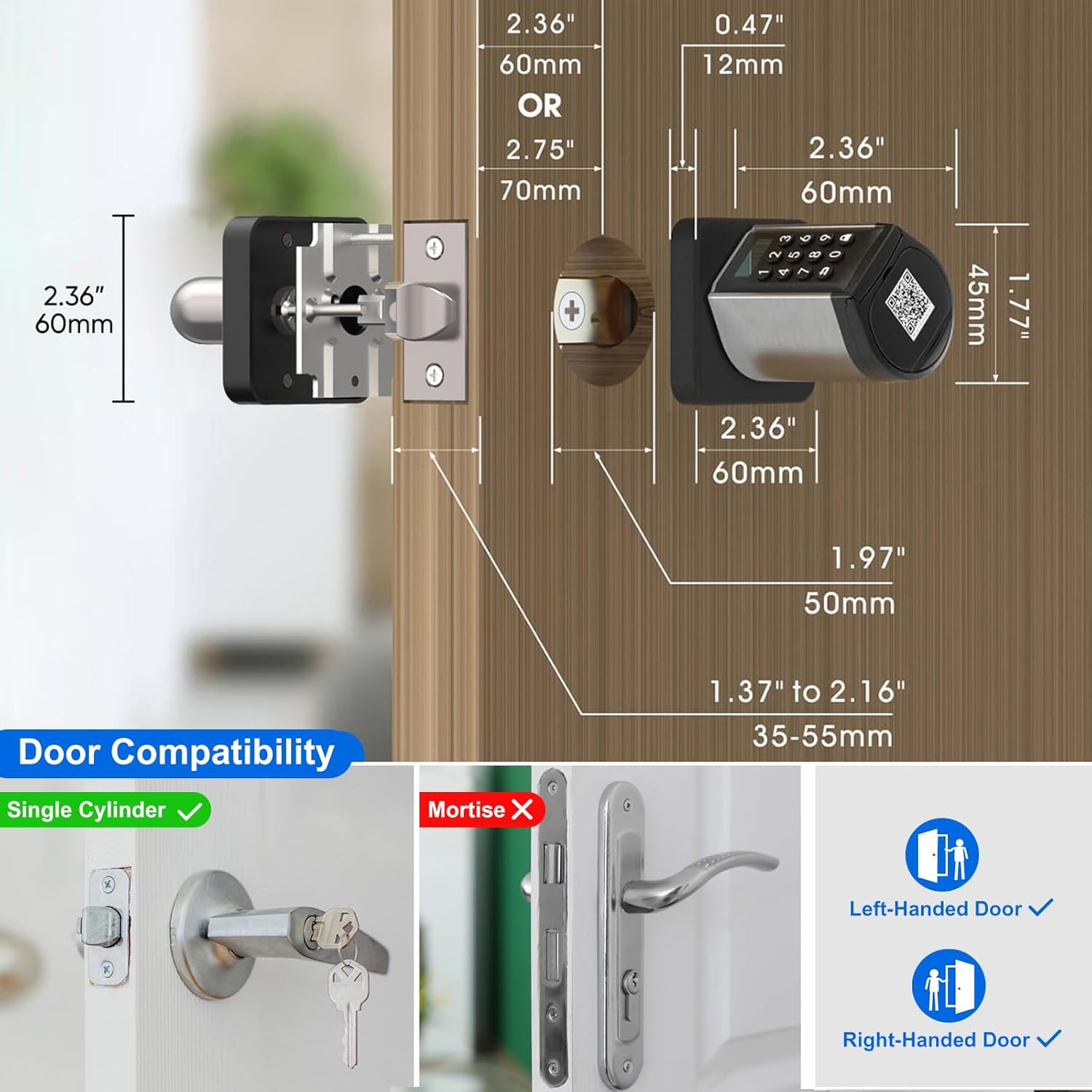
Image: Step-by-step visual guide for installing the smart door lock, detailing the process from installing the latch to securing the handle.
5. Operating Instructions
5.1 Unlocking Methods
The YOUDO Smart Door Lock offers five convenient ways to unlock your door:
- Password: Enter your pre-set password on the keypad.
- RFID Cards: Use the provided IC cards by tapping them on the lock.
- APP Unlock (Bluetooth): Use the Welock app on your smartphone via Bluetooth when in close proximity.
- Mechanical Key: Use the physical keys provided for traditional unlocking.
- Remote Unlock (WiFi): Unlock remotely from anywhere using the Welock app, requires a separately purchased WiFi gateway.

Image: Visual representation of the five unlocking methods available for the smart door lock: keypad password, RFID card, mobile app via Bluetooth, physical key, and remote unlock via a gateway.
5.2 Anti-Peep Password
Enhance your security by using the anti-peep password feature. You can enter random digits before and after your actual password to prevent others from guessing your code by observing your input.
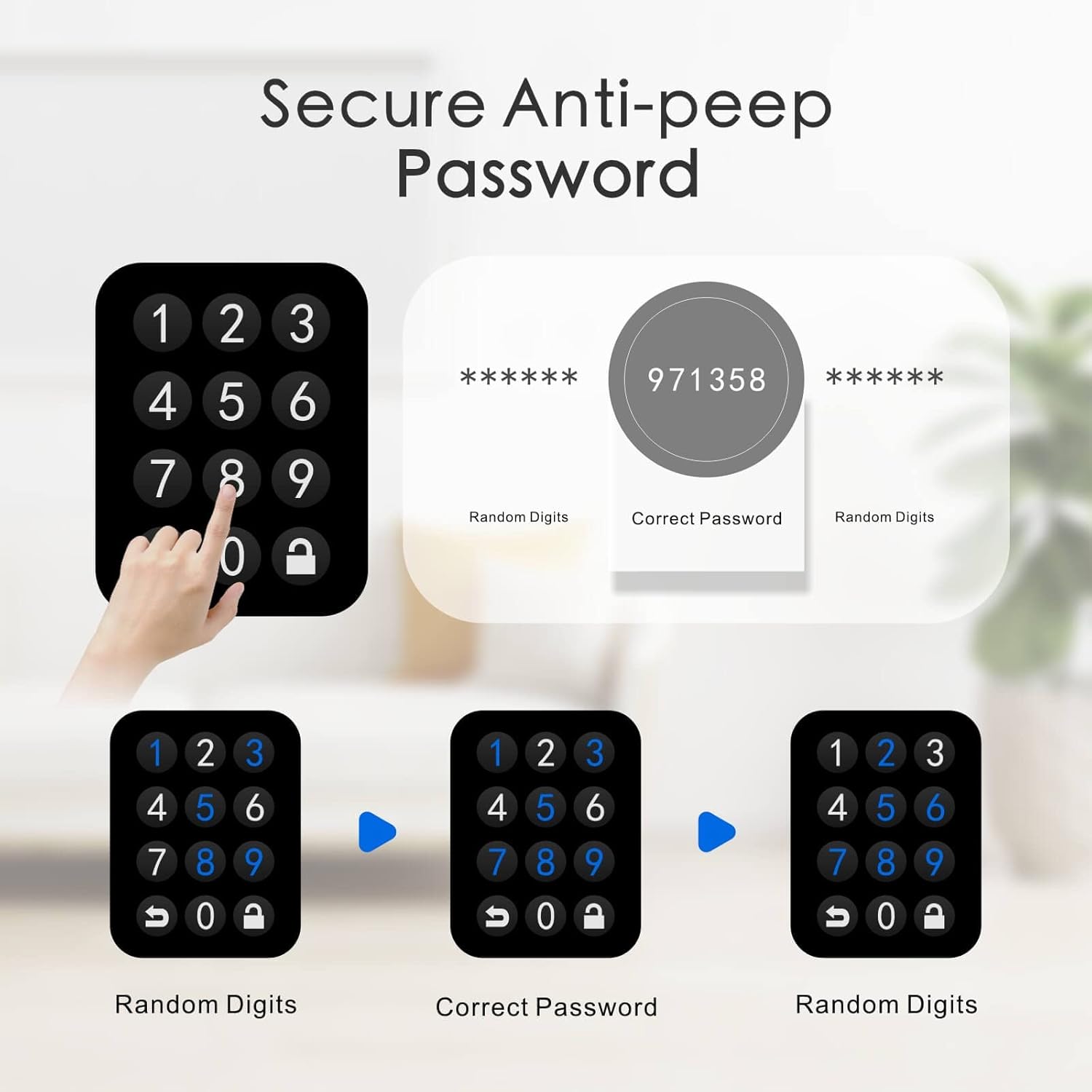
Image: Illustration of the anti-peep password function, demonstrating how to input random numbers before and after the actual password to obscure it from onlookers.
5.3 Setting Temporary Codes for Visitors
The Welock app allows you to generate and manage temporary passwords for guests, cleaners, repairmen, or other visitors. This provides flexible access control without sharing your primary codes.

Image: The Welock app displaying options to set temporary access codes, useful for granting limited access to friends, cleaners, gardeners, or repair personnel.
5.4 Auto-Lock Function
The lock features an automatic locking mechanism that engages 7-14 seconds after the door is closed, ensuring your home is always secure.

Image: Visual demonstration of the auto-lock feature, where the lock automatically secures itself after a short delay.
5.5 App Notifications and Unlock History
The Welock app provides real-time notifications about the lock's status and allows you to view a detailed history of all unlock events, including the method used and the time.

Image: Screenshot of the Welock app displaying the unlock history, providing a log of all access events.
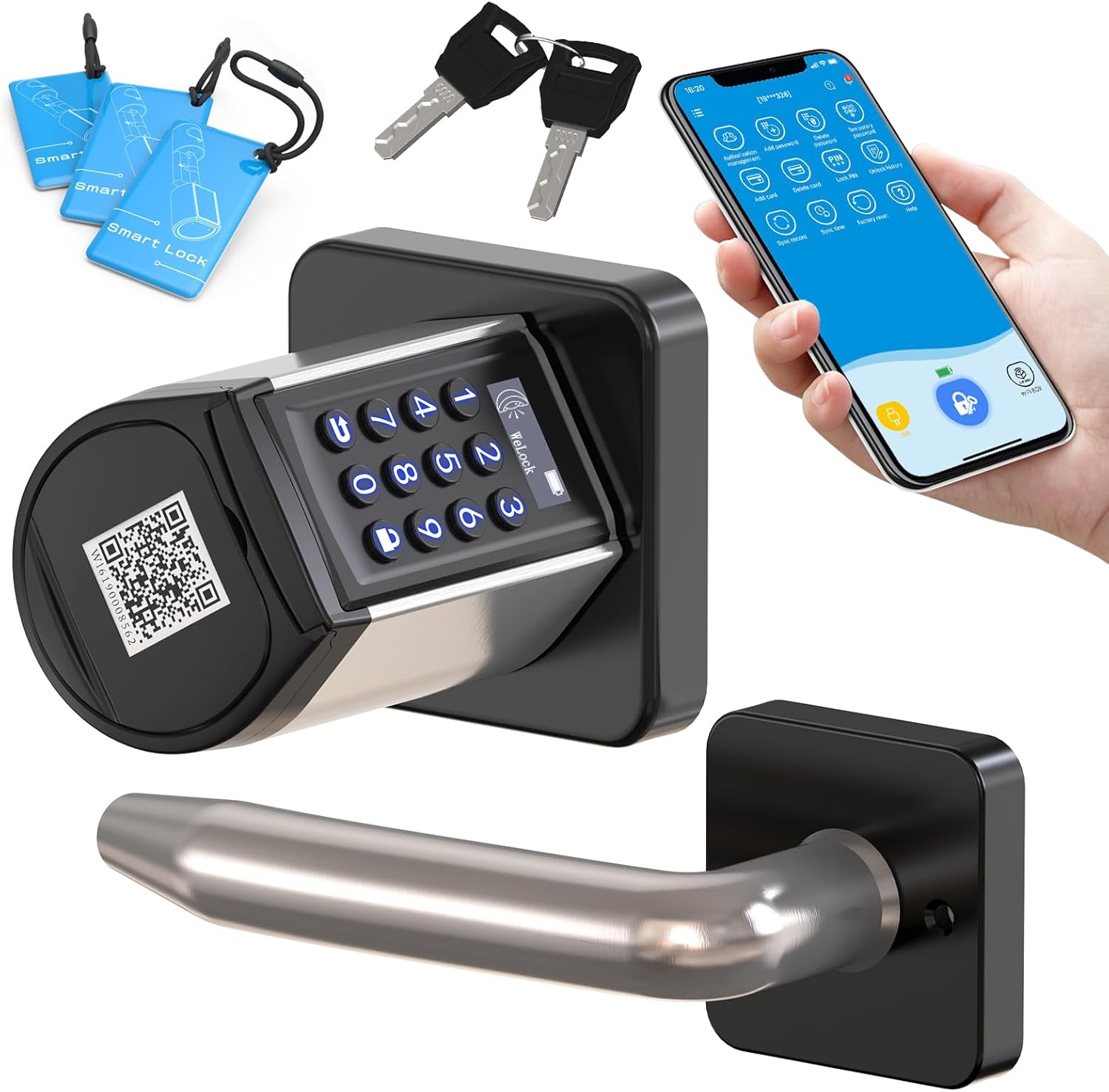
Image: Depiction of remote control capabilities using a gateway (sold separately) and voice control integration with Amazon Alexa (also sold separately).
Download Welock App6. Maintenance
6.1 Battery Replacement and Life
The lock is powered by 4 AAA batteries (not included) and can last up to 6 months. A low battery alert will notify you when the power drops below 20%. Replace batteries promptly to ensure continuous operation.

Image: Graphic illustrating the long battery life of the smart lock.
6.2 Emergency Power Supply
In case the batteries completely run out, you can use a USB power bank to temporarily power the lock via the emergency USB port, allowing you to unlock it and replace the batteries.

Image: Demonstration of using an emergency backup key and connecting a USB power bank to the lock for temporary power.
7. Troubleshooting
If you encounter any issues with your YOUDO Smart Door Lock, consider the following general troubleshooting steps:
- Check Batteries: Ensure batteries are correctly installed and have sufficient charge. Replace if necessary.
- Verify Passcode: Double-check that the correct passcode is being entered. Try the anti-peep feature.
- App Connection: Ensure Bluetooth is enabled on your phone and you are within range for app control. For remote access, verify your WiFi gateway is properly connected and online.
- Physical Key: Always have your physical keys available as a backup.
- Reset: Refer to the detailed manual for instructions on how to perform a factory reset if the lock is unresponsive (note: this will erase all settings).
8. Warranty and Support
YOUDO offers a 2-year product warranty and 24/7 customer support for the Smart Door Lock. For any questions regarding installation, setup, missing parts, or technical assistance, please contact us.
Contact Email: service@welockglobal.com

Image: Graphic indicating 2 years warranty and 7/24 customer service with the contact email: service@welockglobal.com.