1. Overview
The Godrej Smart Lock Catus Touch is a digital lock designed for main and internal wooden doors, offering enhanced security and convenience. It features a compact design with multiple access modes, including PIN access and a mechanical key for emergencies. This manual provides detailed instructions for the installation, operation, and maintenance of your Catus Touch digital lock.

Figure 1: Front view of the Godrej Smart Lock Catus Touch Digital Lock.
2. Key Features
- 2-in-1 Access Modes: Offers both PIN code access and a mechanical key for entry.
- Smart & Compact Design: Suitable for various wooden doors, including bedrooms, kitchens, and main doors.
- Mechanical Key Override: A physical key is provided for emergency access, ensuring entry even if electronic systems fail or batteries deplete.
- Anti-Prank Alarm: Activates an alarm and temporarily disables the lock for 3 minutes after 3 consecutive failed access attempts.
- Low Battery Indication: Provides an audible beep and LED alert to indicate when batteries need replacement.
- Adjustable Spy Code: Allows users to enter random numbers before or after the actual PIN to prevent unauthorized observation of the code.
- Privacy Function: When activated from the inside, the lock cannot be opened from the outside using a PIN. Only the mechanical key or master password can override this function.
- Emergency Micro USB: An external power bank can be connected via Micro USB to provide emergency power if the batteries are completely discharged.

Figure 2: Access methods: PIN code and mechanical key.

Figure 3: Enhanced security features and battery type.
3. Installation
The Godrej Smart Lock Catus Touch is designed for professional installation. Free professional installation is available within 72 hours in over 350+ cities. It is crucial to ensure the lock is installed correctly for optimal performance and security.
- Door Compatibility: This lock is suitable only for wooden doors and wooden door frames. It is not compatible with metal doors, double doors, sliding doors, or grill gates.
- Door Thickness: Compatible with door thicknesses ranging from 35 mm to 65 mm (3.5 cm to 6.5 cm).
- Door Opening Direction: Suitable for both right or left, inside/outside opening doors.
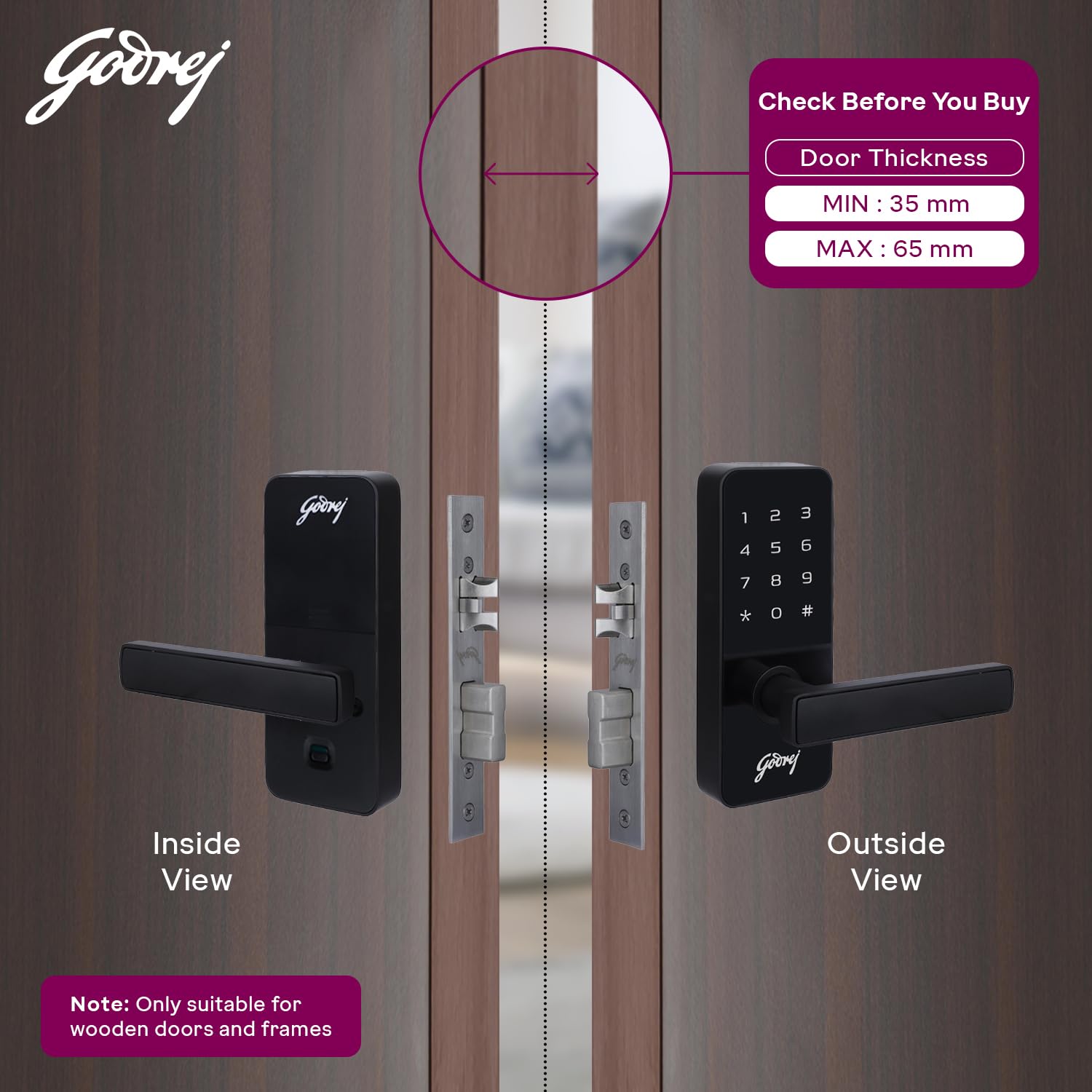
Figure 4: Door thickness compatibility (Min: 35mm, Max: 65mm).

Figure 5: Visual guide for compatible door types (single, inside/outside opening wooden doors) and incompatible types (double, metal/glass, sliding doors).
3.1 Professional Installation Service
To avail the free installation service, please refer to the contact details provided in the 'Warranty & Support' section or on the Free Installation Service Card included in the package. Batteries are not included in the package and must be purchased separately.

Figure 6: Free installation service availability and contact information.
4. Operation
4.1 PIN Code Access
- Touch the keypad to activate it.
- Enter your registered PIN code (4 to 9 digits).
- Press the '#' key to confirm.
- The lock will unlock, allowing you to open the door.
4.2 Adjustable Spy Code
To maintain privacy when entering your PIN in the presence of others, you can input random numbers before or after your actual PIN. For example, if your PIN is 1234, you can enter 56123478#.
4.3 Mechanical Key Access
In case of battery depletion or electronic malfunction, the lock can be opened using the provided mechanical key. Insert the key into the keyhole and turn to unlock.
4.4 Privacy Function
To activate the privacy function, locate the privacy button on the inside unit of the lock and engage it. Once activated, the lock cannot be opened from the outside using a PIN. Only the mechanical key or master password can open the lock.

Figure 7: Internal view showing battery compartment and privacy mode switch.
4.5 Locking the Door
The lock automatically secures the door upon closing. Ensure the door is fully closed for the lock to engage properly.
5. Maintenance
5.1 Battery Replacement
The lock will emit a beep sound and an LED indication when the batteries are low. Replace all batteries promptly with new, high-quality AA alkaline batteries to ensure continuous operation. Refer to Figure 7 for the battery compartment location.
5.2 Cleaning
Clean the lock's exterior with a soft, dry cloth. Avoid using abrasive cleaners, solvents, or harsh chemicals, as these can damage the finish and electronic components.
6. Troubleshooting
- Lock Not Responding: Check battery levels. If batteries are completely drained, use an external power bank via the emergency Micro USB port or the mechanical key.
- Anti-Prank Alarm Activation: If the alarm sounds after multiple incorrect PIN entries, the lock will be temporarily disabled for 3 minutes. Wait for the lockout period to end before attempting to enter the correct PIN again.
- Door Not Locking/Unlocking Properly: Ensure the door is correctly aligned and closes completely. Check for any obstructions in the door frame or latch mechanism.
- Privacy Function Issue: If the lock cannot be opened from the outside with a PIN, verify that the privacy function is not engaged from the inside.

Figure 8: Features like Emergency Micro USB for power and Low Battery Indication.
7. Specifications
| Specification | Detail |
|---|---|
| Brand | Godrej Locking Solutions and Systems |
| Model Name | Smart lock - 4201-4199 |
| Lock Type | Digital Lock |
| Access Modes | PIN Code, Mechanical Key |
| Material | Alloy Steel |
| Color | Black |
| Item Dimensions (L x W x H) | 17.1 x 7.1 x 7 Centimeters |
| Item Weight | 1 Kilogram |
| Recommended Uses | Main door, Internal door (Wooden) |
| Door Thickness Compatibility | 35 mm to 65 mm |
| Power Source | AA Batteries (not included) |
| Special Features | Pin code, Passage Function, Privacy Function, Mechanical Key Unlock, Low battery indication, Anti Prank Alarm |
8. Warranty & Support
The Godrej Smart Lock Catus Touch comes with a 3-year warranty from the date of purchase, covering manufacturing defects and malfunctions under normal usage conditions.
8.1 Customer Support & Installation Service
For installation services, repairs, emergency opening, key duplication, or free home safety checkups, please contact Godrej customer support:
- Toll-Free: 1800 209 4543, +91 80 6743 6743
- Email: glafsescalation@godrej.com
- Website: www.godrejenterprises.com/support/locks-and-security
- WhatsApp: +91 9321 6655 11
9. Product Video
Watch this official product video for a visual overview of the Godrej Catus Touch Digital Lock's features and benefits.
Video: An animated demonstration of the Godrej Catus Touch Digital Lock, highlighting its passcode and mechanical key access, privacy function, and emergency power options. The video also showcases its sleek design and color variants.


