
MR125060
Animated Graveyard Host Instruction Manual
Model: MR125060
Important Safety Information
WARNING: For outdoor use only. Unplug the unit during inclement weather conditions such as heavy rain, snow, or strong winds. Do not allow children to play on or near the display. Keep the animated graveyard host away from flammable materials, open flames, and heat sources. Ensure all electrical connections are secure and protected from moisture. Always follow local electrical codes and regulations.
Package Contents
- Animated Graveyard Host Figure (with integrated frame)
- Detachable Lantern
- Detachable Shovel
- Power Adapter (120 Volts AC)
- Base Stand Components
- Instruction Manual (this document)
Setup Instructions
Carefully unpack all components from the box. It is recommended to assemble the unit on a flat, stable surface.
- Assemble the Base Stand: Connect the base stand components as indicated in the diagrams. Ensure they are securely fastened to provide a stable foundation for the figure.
- Attach the Figure to the Base: Carefully lift the animated graveyard host figure and attach its feet to the assembled base stand. Secure it firmly to prevent tipping.
- Attach Accessories: Insert the detachable lantern into the figure's hand. Place the detachable shovel into the figure's other hand or secure it to its back, depending on the design.
- Positioning: Place the assembled unit in your desired outdoor location. Ensure the area is clear of obstructions and provides enough space for the figure's height (8.5 feet).
- Power Connection: Connect the power adapter to the figure's power input port. Plug the adapter into a standard 120V AC outdoor-rated electrical outlet. Ensure the outlet is protected from weather elements.

Figure 1: The Animated Graveyard Host fully assembled, holding a lantern and a shovel. This image shows the complete appearance of the product after setup.
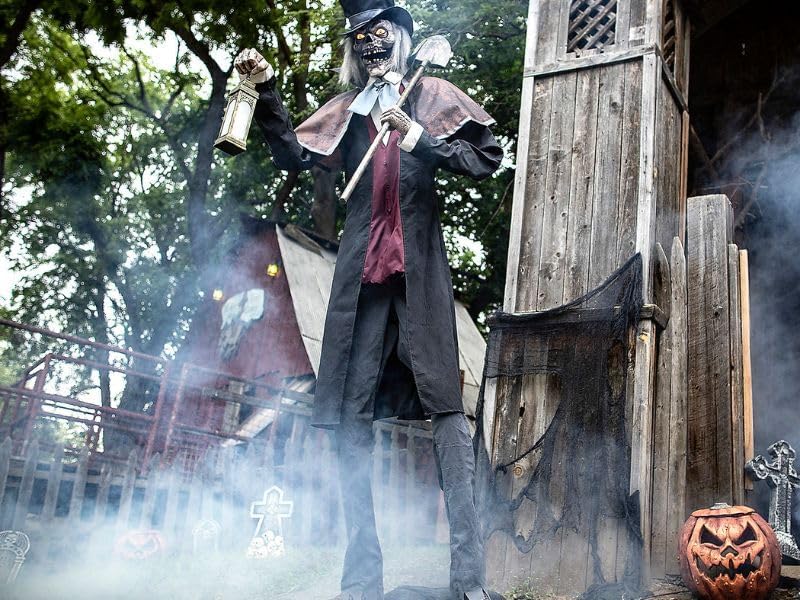
Figure 2: The Animated Graveyard Host positioned outdoors, demonstrating its imposing presence in a Halloween-themed setting with artificial fog.

Figure 3: A visual representation of the Animated Graveyard Host's height (approximately 8.5 feet) compared to a standard 10-foot scale and an average human figure.
Operating Instructions
The Animated Graveyard Host is designed for automatic operation once powered on.
- Power On: Once plugged into a live electrical outlet, the unit will enter standby mode.
- Motion Activation: The integrated motion sensor will detect movement within its range. Upon detection, the animatronic will activate.
- Animated Features: When activated, the host's head will turn, its jaw will move, its eyes will light up with a ghostly glow, and the lantern it holds will flicker, simulating a flame. These actions are synchronized with creepy sound effects.
- Cycle Duration: The animation and sound sequence will play for a set duration after motion detection, then return to standby mode, awaiting the next trigger.
- Placement for Optimal Performance: For best motion detection, place the unit in an area where movement is expected within the sensor's field of view, such as near a walkway or entrance.
Maintenance
To ensure the longevity and proper functioning of your Animated Graveyard Host, follow these maintenance guidelines:
- Cleaning: Gently wipe the surface of the figure with a soft, dry cloth. Do not use abrasive cleaners or solvents, as they may damage the finish.
- Storage: When not in use, especially during off-season, unplug the unit and disassemble it if necessary. Store all components in their original packaging or a protective container in a cool, dry place, away from direct sunlight and extreme temperatures.
- Electrical Connections: Periodically inspect the power cord and adapter for any signs of damage. If damaged, discontinue use and replace with an approved adapter.
- Outdoor Exposure: While designed for outdoor use, prolonged exposure to severe weather conditions (e.g., heavy rain, snow, high winds) should be avoided. Consider bringing the unit indoors or covering it during such conditions.
Troubleshooting
| Problem | Possible Cause | Solution |
|---|---|---|
| Unit does not power on. | No power to the outlet; power adapter not connected; damaged power cord/adapter. | Check if the outlet is working by plugging in another device. Ensure the power adapter is securely connected to both the unit and the outlet. Inspect the power cord for damage. |
| Animation/sound not activating. | Motion sensor obstructed or not detecting movement; unit in a brightly lit area; sensor malfunction. | Ensure the motion sensor is clear of obstructions. Test the sensor by moving directly in front of it. Try placing the unit in a less brightly lit area, as strong light can sometimes interfere with sensors. |
| Lights (eyes/lantern) not working. | Loose connection; LED malfunction. | Check all internal connections if accessible. If the issue persists, contact customer support. |
| Figure is unstable or tips over. | Base not assembled correctly; uneven ground; strong winds. | Re-check base assembly and ensure all fasteners are tight. Place the unit on a flat, level surface. Consider securing the base with stakes (not included) in windy conditions. |
Specifications
- Model Number: MR125060
- Product Dimensions: Approximately 0.1 x 0.1 x 102 inches (L x W x H)
- Item Weight: 25 Pounds
- Frame Material: Metal
- Body Material: Fabric, Metal
- Light Color: Yellow (for eyes and lantern flicker)
- Voltage: 120 Volts (AC)
- Recommended Use: Halloween outdoor decoration
- Features: Motion Sensor, Light-up Eyes, Flickering Lantern, Moving Jaw, Turning Head, Sound Effects
Warranty and Support
For warranty information or technical support, please refer to the contact details provided on the product packaging or the retailer's website where the product was purchased. Keep your proof of purchase for any warranty claims.
For further assistance, you may also visit the manufacturer's official website or contact their customer service department.
no relevant documents
Ask a question about this manual
Ask about setup, troubleshooting, compatibility, parts, safety, or missing instructions. Manuals+ will review the question and use this page’s manual context to help answer it.