
Product Overview
The Fuers A604-5MP is a versatile 5-in-1 security camera designed for both indoor and outdoor surveillance. It offers exceptional 5MP Super HD video resolution, 80ft IR night vision, and a durable IP66 weatherproof construction, making it suitable for various environments. This camera is compatible with multiple DVR formats, providing flexible integration into existing security systems.

Image: The Fuers A604-5MP bullet camera, showcasing its compact design and connection cables.
Package Contents
Before beginning installation, please verify that all components are present in your package:
- 1x Fuers 5MP HD Security Surveillance Bullet Camera (Model: A604-5MP)
- 1x Mounting Screws Bag
- Note: CCTV cable and power supply are not included and must be purchased separately.
Setup and Installation
Proper installation is crucial for optimal performance and longevity of your security camera. Follow these steps carefully.
1. Physical Installation
The Fuers A604-5MP camera is designed for both indoor and outdoor use, featuring an IP66 weatherproof rating. Choose a location that provides the desired viewing angle and is within reach of necessary cabling.
- Mounting Location: Identify a stable surface (wall, ceiling, eave) that offers a clear, unobstructed view of the area you wish to monitor.
- Drilling: Use the provided mounting screws to securely attach the camera base to the chosen surface. Ensure the surface can support the camera's weight.
- Adjusting Angle: The camera features a flexible mount allowing for 180° horizontal and 360° orbital angle adjustments. Position the camera to cover the desired surveillance area.

Image: Diagram illustrating the 180° horizontal and 360° orbital adjustment capabilities of the camera mount.

Image: Examples of camera placement for outdoor, indoor, waterproof, and night vision scenarios, demonstrating its versatility.
2. Wiring and Connection
This camera is a hardwired unit and requires connection to a Digital Video Recorder (DVR) and a separate power supply (not included). It cannot operate independently.
- Connect Video Cable: Attach one end of your CCTV video cable (BNC connector) to the camera's video output port.
- Connect Power Cable: Connect the camera's power input to a 12V DC power adapter (not included).
- Connect to DVR: Route the video cable from the camera to an available video input port on your DVR.
- Power On: Once all connections are secure, power on your DVR and the camera's power adapter.
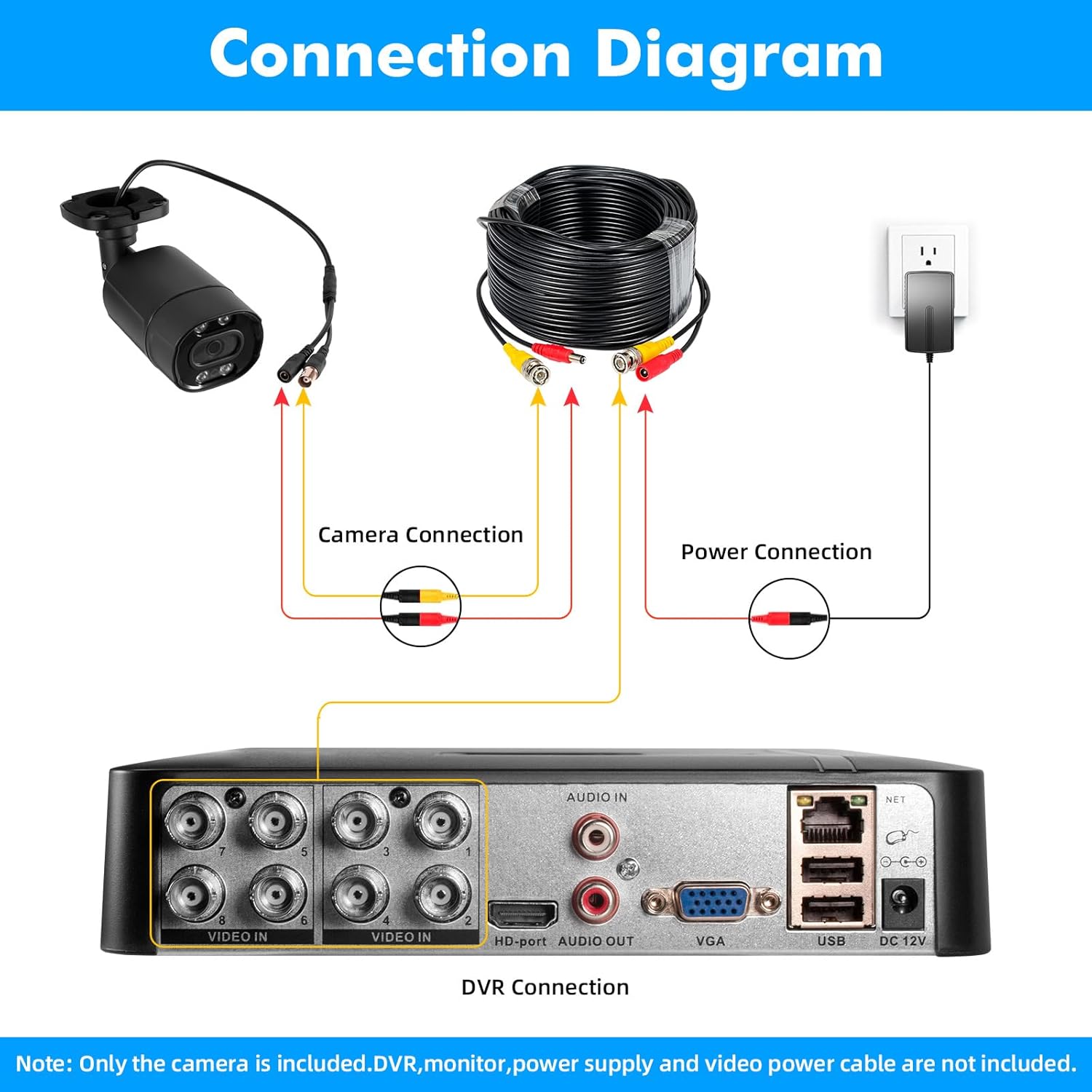
Image: A detailed diagram showing how to connect the camera to a DVR, including video and power connections. Note: DVR, monitor, power supply, and video power cable are not included.
Video: An instructional video demonstrating the connection process for the Fuers 5MP Security Bullet Camera to a DVR system. This video highlights the necessary steps for setting up the camera for surveillance.
Operating the Camera
The Fuers A604-5MP camera is designed for seamless integration with compatible DVR systems.
1. Camera Modes and Compatibility
This camera is a 5-in-1 XVI/AHD/TVI/CVI/CVBS Bullet Camera. It is highly versatile and can work with various DVR types. The default video mode is AHD 5MP.
- AHD (Analog High Definition): Default mode, compatible with AHD DVRs.
- TVI (Transport Video Interface): Compatible with TVI DVRs.
- CVI (Composite Video Interface): Compatible with CVI DVRs.
- XVI: Compatible with XVI DVRs.
- CVBS (Composite Video Broadcast Signal): Standard analog video, compatible with older analog DVRs.
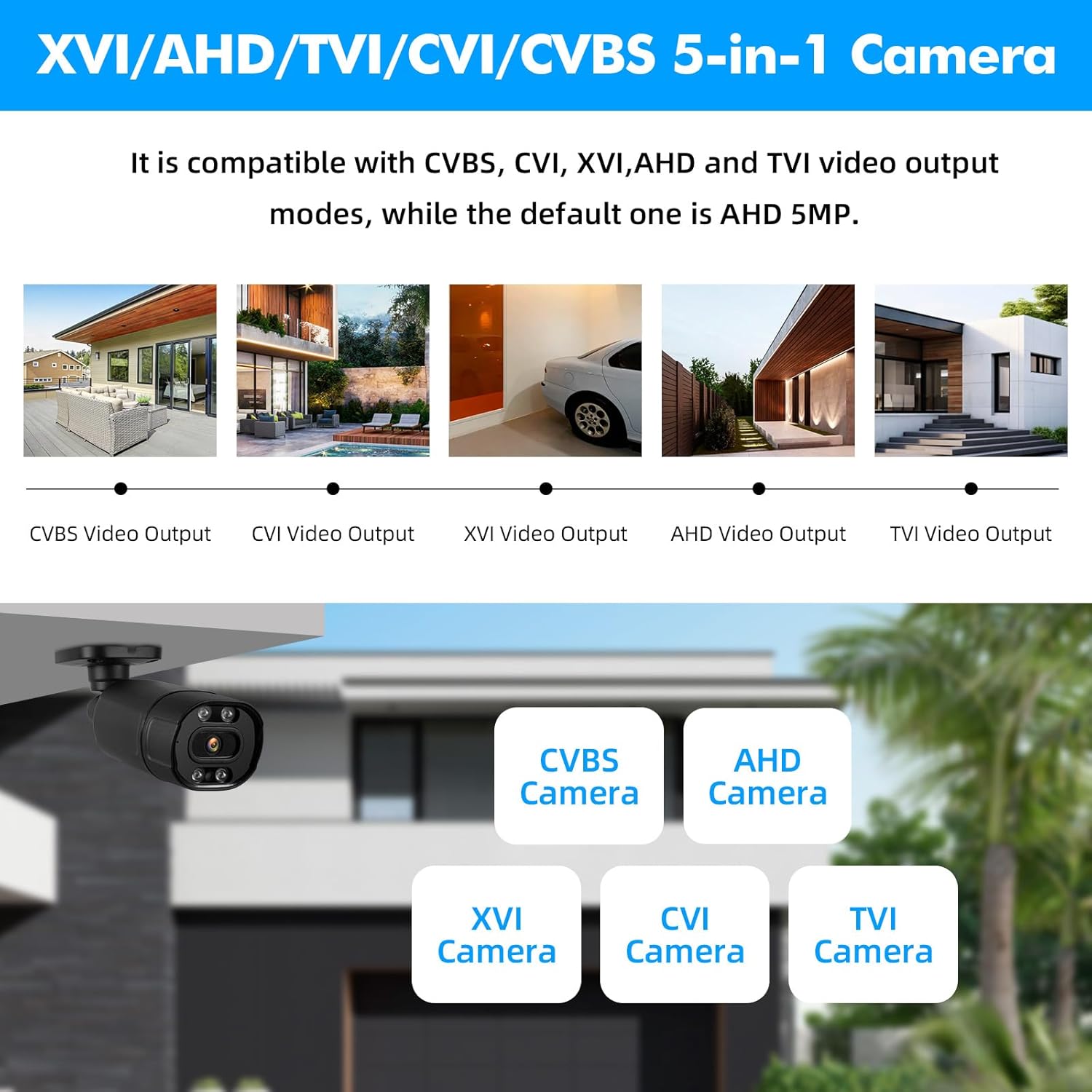
Image: Visual representation of the camera's 5-in-1 compatibility with CVBS, CVI, XVI, AHD, and TVI video output modes. The default mode is AHD 5MP.

Image: A diagram showing the camera's self-adaptive compatibility with various DVR types including XVI, AHD, TVI, CVI, and CVBS DVRs.
2. Key Features in Operation
- Exceptional 5MP Super HD: Captures video at 25fps in 2592*1944 HD resolution, ensuring clear and detailed footage. The 3.6mm lens covers large areas effectively.
- 80ft IR Night Vision: Equipped with infrared LEDs, the camera provides clear visibility up to 80 feet in low-light or complete darkness, ensuring 24/7 surveillance.
- IP66 Weatherproof: Constructed with high-quality metal aluminum materials, the camera is resistant to vandalism and can withstand harsh outdoor conditions, including rain and snow.
- Wide Application: Suitable for apartments, offices, garages, shopping malls, warehouses, courtyards, and homes, providing comprehensive security.

Image: An annotated image highlighting key features of the camera: IP66 waterproof, 3.6mm lens, power port, video output (5MP@25fps), and IR-CUT for clear imaging.
Maintenance
Regular maintenance helps ensure the longevity and optimal performance of your Fuers security camera.
- Lens Cleaning: Periodically clean the camera lens with a soft, lint-free cloth to remove dust, dirt, or water spots that may obscure the view. Avoid abrasive cleaners.
- Housing Inspection: Inspect the camera housing and mounting bracket for any signs of damage, corrosion, or loose connections, especially for outdoor installations.
- Cable Check: Ensure all cables (video and power) are securely connected and free from damage. Protect cables from environmental exposure where possible.
- Software/DVR Maintenance: Refer to your DVR's user manual for instructions on regular software updates, hard drive maintenance, and video backup procedures.
Troubleshooting
If you encounter issues with your Fuers A604-5MP camera, refer to the following common problems and solutions:
| Problem | Possible Cause | Solution |
|---|---|---|
| No video signal on monitor/DVR. | Loose cable connection, incorrect video mode, no power to camera, incompatible DVR. |
|
| Poor image quality or blurry video. | Dirty lens, improper focus (if adjustable), low light conditions, cable interference. |
|
| Night vision not working or dim. | Insufficient power, IR LEDs obstructed, camera placed too far from subject. |
|
| Camera not detected by DVR. | Incorrect video format setting on DVR, faulty cable, camera not powered. |
|
Specifications
Detailed technical specifications for the Fuers A604-5MP camera:
| Feature | Detail |
|---|---|
| Model Name | A604-5MP Cam |
| Video Capture Resolution | 2592p (5MP) |
| Frame Rate | 25 fps |
| Connectivity Technology | Wired / BNC cable |
| Compatible Devices | Digital Video Recorder (DVR) |
| Indoor/Outdoor Usage | Outdoor (IP66 Weatherproof) |
| Power Source | Corded Electric (12V DC, adapter not included) |
| Night Vision Range | 80 Feet |
| Lens Type | 3.6mm HD Lens |
| Dimensions (L x W x H) | 7 x 2.59 x 2.2 inches |
| Item Weight | 12.6 ounces |
| Color | Black |
| UPC | 765142241123 |
Warranty and Support
Warranty Information
This product is typically covered by a standard return policy, allowing for returns or replacements within 30 days of purchase. For specific warranty details and duration, please refer to the terms and conditions provided by your retailer or contact the manufacturer directly.
Customer Support
For any questions, technical assistance, or support regarding your Fuers A604-5MP camera, please contact the seller, MBANGDE-COM, or visit the official Fuers brand store for further resources.
- Seller: MBANGDE-COM
- Brand Store: Visit the Fuers Store on Amazon
- You can also reach out via email for an immediate response as mentioned in the product features.