1. Introduction
This manual provides detailed instructions for the installation, operation, and maintenance of the Arbilato replacement screen for the Honor Magic 5 Lite (Model RMO-NX3). This product is designed to replace damaged or malfunctioning LCD screens and digitizer assemblies, addressing issues such as white screens, dead pixels, liquid leakage, or unresponsive touch functionality.
Please read this manual thoroughly before attempting any installation to ensure proper procedure and to prevent damage to your device or the replacement part.
2. Safety Information and Important Precautions
- Professional Installation Recommended: Correct installation requires specialized skills and techniques. It is highly recommended to seek assistance from a professional technician to perform the replacement. The manufacturer is not responsible for any damage caused during the replacement process due to improper installation.
- Battery Disconnection: Always unplug the battery connector and remove the battery before beginning the installation to prevent short circuits and potential damage to the device.
- Cleanliness: Before installing the new LCD, ensure all old adhesive residue is completely removed from the device frame. Residual glue can affect the adhesion of the new screen and potentially cause damage.
- Frame Condition: If your device's frame is bent or damaged, it must be repaired or replaced before installing the new screen. Installing a new screen into a bent frame can lead to the screen glass breaking or improper fit.
- Electrostatic Discharge (ESD): Take precautions against ESD. Use an anti-static wrist strap or work on an anti-static mat to prevent damage to sensitive electronic components.
- Handle with Care: The screen assembly is fragile. Handle it with extreme care to avoid bending, cracking, or damaging the flex cables.
3. Package Contents
Verify that all items listed below are included in your package. If any items are missing or damaged, please contact customer support immediately.

Image 3.1: Contents of the Arbilato Honor Magic 5 Lite Screen Replacement Kit. This image displays the replacement screen with frame, a tempered glass screen protector, a set of repair tools (screwdrivers, prying tools, suction cup), and a waterproof sticker, all packaged in a box.
- 1x Arbilato Honor Magic 5 Lite Replacement Screen with Frame (Black)
- 1x Tempered Glass Screen Protector
- 1x Set of Repair Tools (includes screwdrivers, prying tools, suction cup, dust absorber, dust removal sticker)
- 1x Waterproof Sticker
4. Setup and Installation Guide
This section outlines the general steps for replacing the screen. For a visual guide, it is highly recommended to search for specific video tutorials on platforms like YouTube by searching for "Honor Magic 5 Lite LCD With Frame replacement".
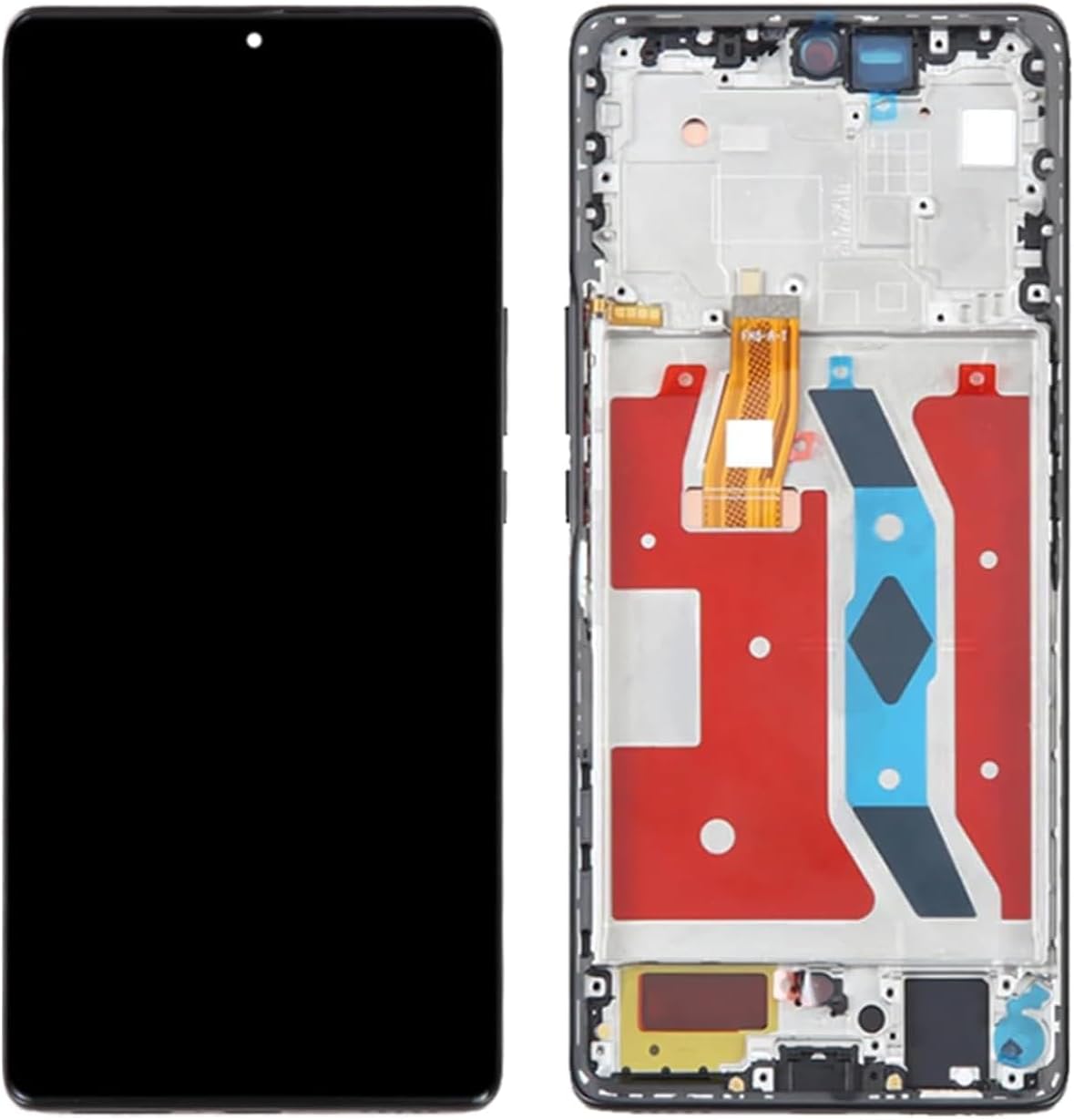
Image 4.1: Front and back view of the Honor Magic 5 Lite replacement screen assembly. The front shows the display panel, while the back reveals the flex cables for connection to the phone's motherboard and the integrated frame.
4.1. Preparation
- Power Off Device: Ensure your Honor Magic 5 Lite is completely powered off before starting.
- Gather Tools: Have all necessary tools (provided in the kit) and a clean, well-lit workspace ready.
- Backup Data: Although not directly related to screen replacement, it is always good practice to back up your device data before any repair.
4.2. Disassembly of Old Screen
- Heat the Edges: Carefully apply heat to the edges of the old screen using a heat gun or hairdryer to soften the adhesive. Do not overheat.
- Pry Open: Use a suction cup to create a small gap, then insert a thin prying tool (e.g., plastic spudger) to carefully separate the old screen from the phone frame. Work slowly around all edges.
- Disconnect Cables: Once the screen is partially lifted, locate and carefully disconnect the flex cables connecting the screen to the motherboard. This usually involves opening small ZIF (Zero Insertion Force) connectors.
- Remove Old Screen: Completely remove the old screen assembly.
4.3. Frame Cleaning and New Screen Installation
- Clean Frame: Thoroughly clean the phone's frame, removing all traces of old adhesive, glass fragments, and dust. This step is crucial for proper adhesion of the new screen.
- Test New Screen (Pre-installation): Before fully adhering the new screen, connect its flex cables to the motherboard. Power on the phone to test the display, touch functionality, and ensure there are no dead pixels or display issues. Power off the phone after testing.
- Apply Adhesive: Apply the new waterproof adhesive sticker (or suitable adhesive) around the perimeter of the phone's frame where the screen will sit.
- Connect Cables: Carefully connect the flex cables of the new screen to the corresponding connectors on the motherboard. Ensure they are securely seated.
- Position and Press: Carefully align the new screen assembly with the phone's frame and gently press it into place. Ensure even pressure around all edges to secure the adhesive.
4.4. Reassembly
- Reconnect Battery: Reconnect the battery connector.
- Secure Back Cover: Reattach the phone's back cover and any other components removed during disassembly.
- Final Test: Power on the device and perform a comprehensive test of all screen functions, including touch, display quality, and brightness.
5. Operation (Post-Installation)
After successful installation, your Honor Magic 5 Lite should function as normal. The new screen provides the same display and touch capabilities as the original. Ensure you test all areas of the screen for touch responsiveness and visual clarity.
Consider applying the included tempered glass screen protector immediately after installation to provide an additional layer of protection against scratches and impacts.
6. Maintenance
- Cleaning: Clean the screen regularly with a soft, lint-free cloth. For stubborn smudges, lightly dampen the cloth with water or a screen-specific cleaning solution. Avoid harsh chemicals or abrasive materials.
- Protection: Use a protective case and the provided tempered glass screen protector to minimize the risk of future damage from drops or impacts.
- Avoid Pressure: Do not apply excessive pressure to the screen, especially when carrying the phone in a pocket or bag with other objects.
- Temperature Extremes: Avoid exposing your device to extreme temperatures, as this can affect screen performance and adhesive integrity.
7. Troubleshooting
If you encounter issues after installing the new screen, consider the following troubleshooting steps:
- No Display / Black Screen:
- Ensure all flex cables are securely connected to the motherboard.
- Check if the battery is properly connected and charged.
- Perform a hard reset of the device (refer to your phone's original manual for instructions).
- Unresponsive Touch / Ghost Touch:
- Verify the touch digitizer flex cable is correctly seated.
- Ensure there is no debris or liquid under the screen.
- Restart the device.
- Display Anomalies (Lines, Discoloration, Dead Pixels):
- This could indicate a faulty screen or a damaged flex cable. Re-check connections.
- If the issue persists after re-checking, the screen itself may be defective. Contact customer support.
- Screen Not Fitting Properly:
- Ensure all old adhesive and debris have been removed from the frame.
- Verify that the phone's frame is not bent or damaged.
If troubleshooting steps do not resolve the issue, it is recommended to consult a professional repair service or contact Arbilato customer support for further assistance.
8. Specifications
| Brand | Arbilato |
| Compatible Model | Honor Magic 5 Lite (RMO-NX3) |
| Screen Size | 6.67 inches |
| Color | Black (with Frame) |
| Item Weight | 1.6 ounces |
| Manufacturer | Arbilato |
9. Warranty and Support
Arbilato provides an after-sales guarantee for this product. If you encounter any problems after receiving the screen, please contact Arbilato customer support. After understanding the specific situation, we will provide suitable and effective solutions.
For support, please refer to the contact information provided with your purchase or on the Arbilato official website.