1. Important Safety Instructions
Read all safety warnings and instructions before operating this power tool. Failure to follow the warnings and instructions may result in electric shock, fire, and/or serious injury.
- Work Area Safety: Keep the work area clean and well-lit. Cluttered or dark areas invite accidents. Do not operate power tools in explosive atmospheres, such as in the presence of flammable liquids, gases, or dust.
- Electrical Safety: Power tool plugs must match the outlet. Never modify the plug in any way. Avoid body contact with earthed or grounded surfaces such as pipes, radiators, ranges, and refrigerators.
- Personal Safety: Always wear eye protection. Use personal protective equipment such as dust masks, non-skid safety shoes, hard hats, or hearing protection when appropriate. Dress properly; avoid loose clothing or jewelry.
- Tool Use and Care: Do not force the power tool. Use the correct power tool for your application. Disconnect the plug from the power source before making any adjustments, changing accessories, or storing power tools.
- Specific Grinder Safety: Always use the guard. Ensure the grinding wheel is correctly installed and secured. Do not use damaged accessories. Hold the tool firmly with both hands.
2. Product Overview and Components
The Dongcheng DSM10-100 Angle Grinder is a powerful tool designed for grinding and cutting various materials. Familiarize yourself with its main components before use.
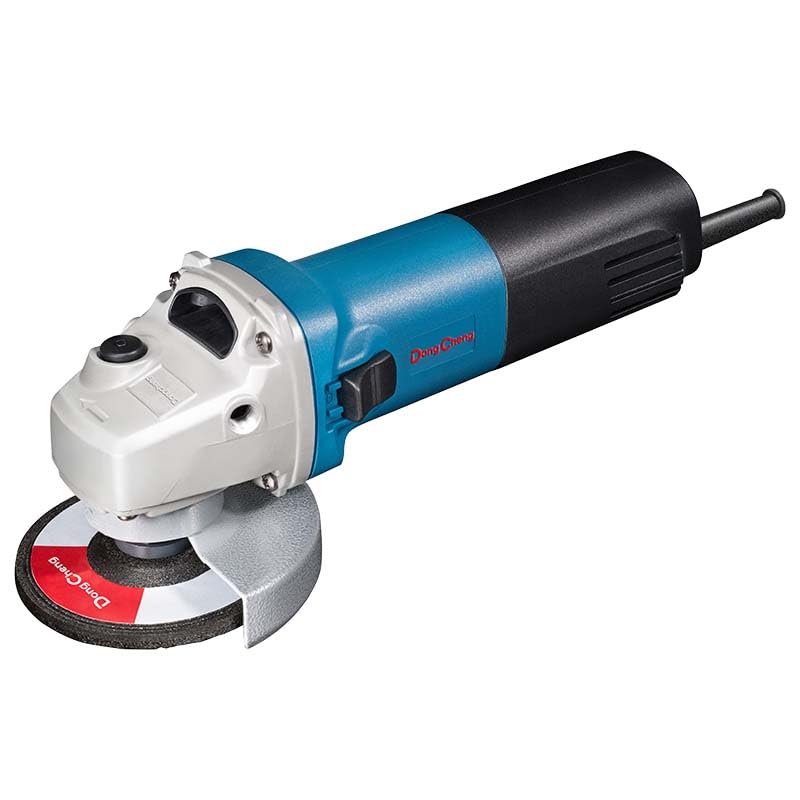
Figure 1: Dongcheng DSM10-100 Angle Grinder. This image shows the complete angle grinder assembly, including the main body (blue and black), the white gear housing, the grey protective guard, and a red and black grinding wheel attached to the spindle.
Key Components:
- Main Body: Houses the motor and internal mechanisms.
- Gear Housing: Connects the motor to the spindle.
- Spindle Lock Button: Used to lock the spindle for accessory changes.
- Slide Switch: For turning the tool on and off.
- Auxiliary Handle: Provides additional grip and control.
- Protective Guard: Shields the user from sparks and debris.
- Grinding Wheel/Disc: The abrasive accessory for material removal.
- Power Cord: For connecting to an electrical outlet.
3. Setup and Assembly
Before operating the angle grinder, ensure all components are correctly assembled.
3.1 Attaching the Auxiliary Handle
- Identify the threaded holes on the gear housing of the grinder.
- Screw the auxiliary handle into one of the threaded holes. The handle can be positioned on either side of the gear housing for left or right-handed operation.
- Tighten the handle securely by hand.
3.2 Adjusting the Protective Guard
- Loosen the screw or lever on the protective guard.
- Rotate the guard to a position that provides maximum protection for your hand and body from sparks and debris, relative to your working angle.
- Tighten the screw or lever firmly to secure the guard in place. Never operate the grinder without the protective guard.
3.3 Installing the Grinding Wheel
- Ensure the grinder is unplugged from the power source.
- Press and hold the spindle lock button to prevent the spindle from rotating.
- Place the inner flange onto the spindle.
- Position the grinding wheel onto the spindle, ensuring it sits flush against the inner flange.
- Screw the outer flange (nut) onto the spindle.
- Use the provided wrench to firmly tighten the outer flange, securing the grinding wheel. Release the spindle lock button.
4. Operating Instructions
Follow these steps for safe and effective operation of your angle grinder.
4.1 Powering On and Off
- Plug the power cord into a suitable electrical outlet.
- To turn the grinder ON, push the slide switch forward until it locks into the ON position.
- To turn the grinder OFF, push the slide switch backward to release it from the ON position.
4.2 Adjustable Speed Function
This model features adjustable speed. Refer to the speed adjustment dial or mechanism on your specific tool. Rotate the dial to select the desired speed setting. Lower speeds are suitable for polishing or delicate work, while higher speeds are for aggressive grinding or cutting.
4.3 General Grinding and Cutting Tips
- Always secure your workpiece firmly to prevent movement during operation.
- Allow the grinder to reach full speed before making contact with the workpiece.
- Apply moderate pressure. Excessive force can reduce efficiency and damage the tool or accessory.
- Maintain a consistent angle and movement for even material removal.
- For cutting, use a cutting disc and make shallow passes, gradually increasing depth.
- Avoid overloading the tool. If the motor slows down significantly, reduce pressure.
5. Maintenance
Regular maintenance ensures the longevity and safe operation of your angle grinder.
5.1 Cleaning
- Always unplug the tool before cleaning.
- Use a soft brush or compressed air to clean dust and debris from the ventilation openings.
- Wipe the tool housing with a damp cloth. Do not use harsh chemicals or abrasive cleaners.
5.2 Carbon Brush Replacement
The carbon brushes are wear items and should be inspected periodically. Worn brushes can lead to reduced power or intermittent operation. Replacement carbon brushes are included with the product.
- Unplug the grinder from the power source.
- Locate the brush caps on the sides of the motor housing.
- Unscrew the brush caps using a screwdriver or coin.
- Remove the old carbon brushes.
- Insert the new carbon brushes, ensuring they are oriented correctly.
- Screw the brush caps back on securely.
6. Troubleshooting
Refer to the table below for common issues and their potential solutions.
| Problem | Possible Cause | Solution |
|---|---|---|
| Grinder does not start. | No power supply; Faulty switch; Worn carbon brushes. | Check power connection; Test outlet; Replace switch; Replace carbon brushes. |
| Loss of power during operation. | Overload; Worn carbon brushes; Loose connection. | Reduce pressure; Replace carbon brushes; Check power cord and connections. |
| Excessive sparking at motor. | Worn carbon brushes; Dirty commutator. | Replace carbon brushes; Clean commutator (professional service recommended). |
| Grinding wheel wobbles. | Improperly installed wheel; Damaged wheel; Damaged flanges. | Reinstall wheel correctly; Replace damaged wheel; Inspect and replace flanges if necessary. |
7. Specifications
Technical data for the Dongcheng DSM10-100 Angle Grinder.
| Feature | Detail |
|---|---|
| Model Number | DSM10-100 |
| Brand | Generic (Reliance Tools) |
| Power Source | Corded Electric |
| Wattage | 1020 Watts |
| Disc Diameter | 100mm |
| Material | Metal |
| Product Dimensions | 25L x 20W x 10H Centimeters |
| Item Weight | 1 kg |
| Features | Adjustable speed, Constant output power, Spindle lock, Slide switch |
8. Warranty and Support
For information regarding warranty coverage, technical support, or service, please refer to the documentation provided with your purchase or contact the retailer. Keep your purchase receipt as proof of purchase for any warranty claims.


