
UGREEN PB761
UGREEN Magsafe Portable Charger User Manual
Model: PB761
1. Introduction
Thank you for choosing the UGREEN Magsafe Portable Charger. This 10000mAh power bank features Qi2 certified 15W magnetic wireless charging and 30W USB-C wired fast charging, designed to provide convenient and efficient power on the go for your iPhone 12-16 series and other compatible devices. Please read this manual carefully before use to ensure proper operation and maintenance.

Image: Front view of the UGREEN Magsafe Portable Charger, showcasing its sleek design and Qi2 magnetic charging pad.
2. Safety Information
To ensure safe and reliable operation, please observe the following safety precautions:
- Do not expose the power bank to extreme temperatures (above 45°C/113°F or below 0°C/32°F).
- Avoid dropping, disassembling, or modifying the device.
- Keep away from water, moisture, and flammable materials.
- Use only certified charging cables and adapters.
- Do not place metal objects between the power bank and your device during wireless charging.
- This power bank is equipped with multi-protection features including overvoltage, short circuit, overheat, and overcharge protection.

Image: Diagram illustrating the multi-protection features of the power bank, including UL94 V-0 fire resistance, overvoltage, short circuit, overheat, and overcharge protection.
3. Package Contents
Please check the package for the following items:
- UGREEN Magsafe Portable Charger (PB761)
- USB-C to USB-C Charging Cable
- User Manual
4. Product Overview
Familiarize yourself with the different parts of your UGREEN Magsafe Portable Charger:
- Magnetic Wireless Charging Pad: For Qi2 compatible devices.
- USB-C Port (Input/Output): For charging the power bank and wired charging devices.
- Power Button: To activate/deactivate charging and check battery level.
- LED Indicators: To show battery level and charging status.
5. Setup
5.1 Charging the Power Bank
Before first use, fully charge your power bank. Connect the provided USB-C cable to the power bank's USB-C port and the other end to a USB-C wall charger (not included). The LED indicators will show the charging progress.

Image: Illustration of the power bank being recharged via its USB-C port using a wall adapter.
5.2 Checking Battery Level
Press the power button once to check the remaining battery level indicated by the LED lights.
6. Operating Instructions
6.1 Wireless Charging (Qi2 Certified 15W)
For optimal magnetic wireless charging, ensure your device is compatible with MagSafe (iPhone 12-16 series recommended) or has a magnetic case. Align your device with the magnetic charging pad on the power bank. The magnetic connection will secure your device and initiate charging.

Image: A hand holding an iPhone magnetically attached to the UGREEN power bank, illustrating 15W wireless charging.
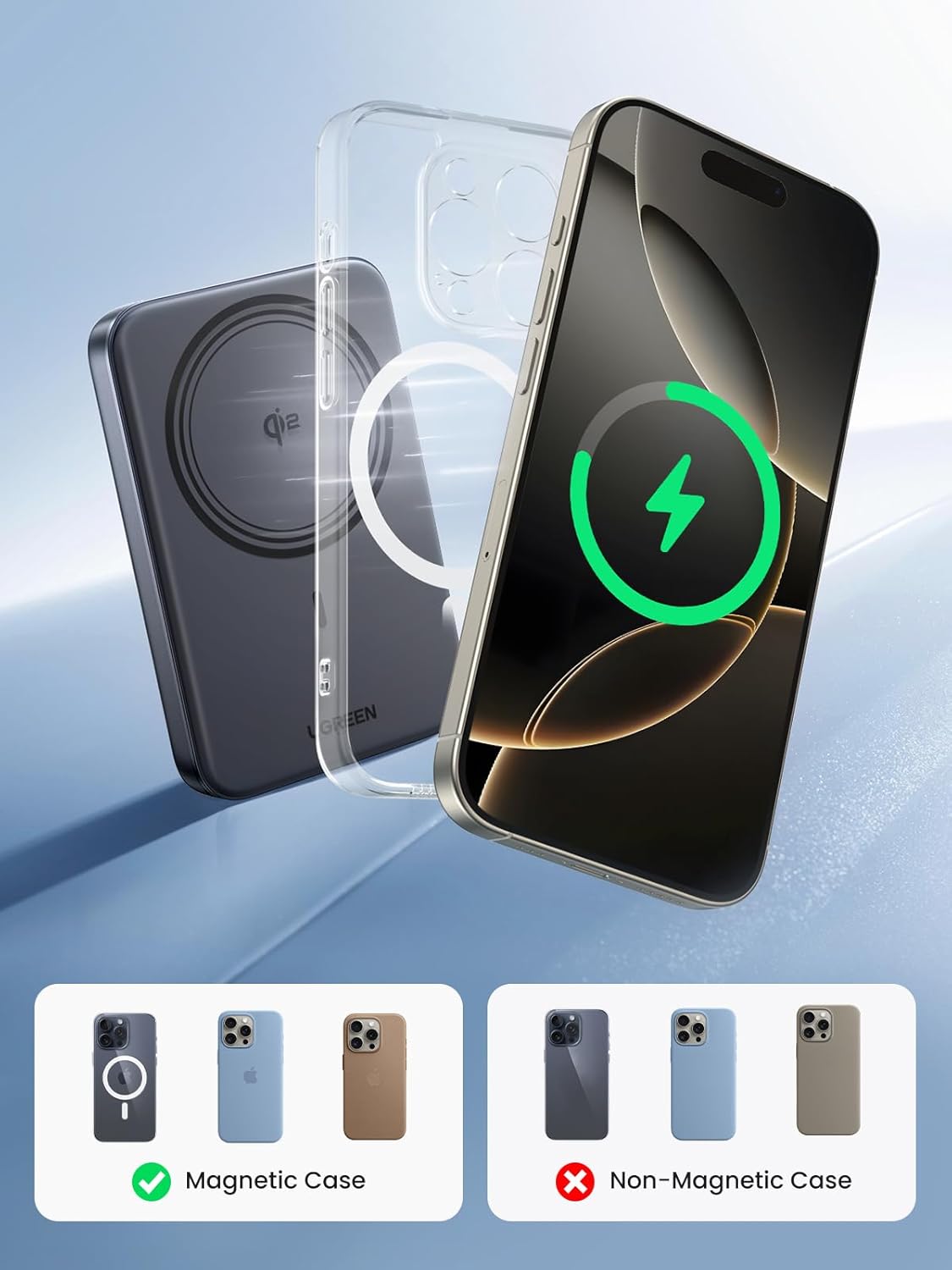
Image: Visual guide showing that a magnetic case is recommended for secure attachment and efficient wireless charging, while a non-magnetic case is not ideal.
6.2 Wired Charging (30W USB-C)
Connect your device to the power bank's USB-C port using a compatible USB-C to USB-C cable. The power bank supports up to 30W fast charging for devices like smartphones and tablets.

Image: An iPhone being fast-charged via a USB-C cable connected to the UGREEN power bank, highlighting 30W charging capability.
6.3 Trickle Charging Mode
For low-power devices such as AirPods or smartwatches, activate trickle charging mode. Press and hold the power button for 3 seconds to enter this mode. The power bank will provide a low current output suitable for these devices. To exit trickle charging, press and hold the power button for 3 seconds again or wait for 3 hours.

Image: Visual guide on how to activate and deactivate trickle charging mode, showing the power bank charging AirPods and an Apple Watch.
7. Maintenance
To prolong the lifespan of your UGREEN Magsafe Portable Charger:
- Clean the surface with a soft, dry cloth. Do not use harsh chemicals or abrasive materials.
- Store in a cool, dry place away from direct sunlight.
- Recharge the power bank at least once every three months if not in regular use to maintain battery health.
8. Troubleshooting
If you encounter issues with your power bank, refer to the following common problems and solutions:
| Problem | Possible Cause | Solution |
|---|---|---|
| Power bank not charging | Cable or adapter faulty; power bank fully discharged. | Try a different cable/adapter; allow power bank to charge for a few minutes before checking indicators. |
| Device not charging wirelessly | Misalignment; non-magnetic case; foreign objects; device not Qi2 compatible. | Ensure proper alignment; use a magnetic case; remove foreign objects; verify device compatibility. |
| Device not charging via USB-C | Cable faulty; device not compatible; power bank low on battery. | Try a different USB-C cable; ensure device supports USB-C charging; recharge power bank. |
| Slow charging | Cable quality; device input limit; high ambient temperature. | Use a high-quality cable; check device's charging specifications; charge in a cooler environment. |
If the problem persists, please contact UGREEN customer support.
9. Specifications
| Feature | Detail |
|---|---|
| Model Number | PB761 |
| Battery Capacity | 10000mAh (3.85V, 38.5Wh) |
| Wireless Output | Up to 15W (Qi2 Certified) |
| USB-C Input/Output | Up to 30W |
| Dimensions | 4.13 x 2.72 x 0.79 inches (10.5 x 6.9 x 2.0 cm) |
| Weight | 7.7 ounces (218 grams) |
| Battery Type | Lithium Polymer |
| Color | Black |
| Special Features | Airline Approved, Qi2 Certified, Pocket Size, Multi-Protection |

Image: Illustration detailing the 10000mAh capacity and approximate charge times for various devices like iPhone 15 Pro, iPhone 15, Galaxy 24 Ultra, and iPad Pro 11.
10. Warranty and Support
UGREEN products come with a standard warranty. For detailed warranty information, product registration, or technical support, please visit the official UGREEN website or contact their customer service team. Keep your purchase receipt for warranty claims.
UGREEN Official Website: www.ugreen.com
Customer Service Email: Refer to the UGREEN website for contact details.