
1. Product Overview
The Vvikizy Digital Electronic Security Cabinet Lock provides a secure and convenient way to protect your belongings in cabinets and lockers. Featuring a touch keypad for password access, this lock eliminates the need for traditional keys, offering enhanced security and ease of use. Its durable ABS construction ensures long-lasting performance.
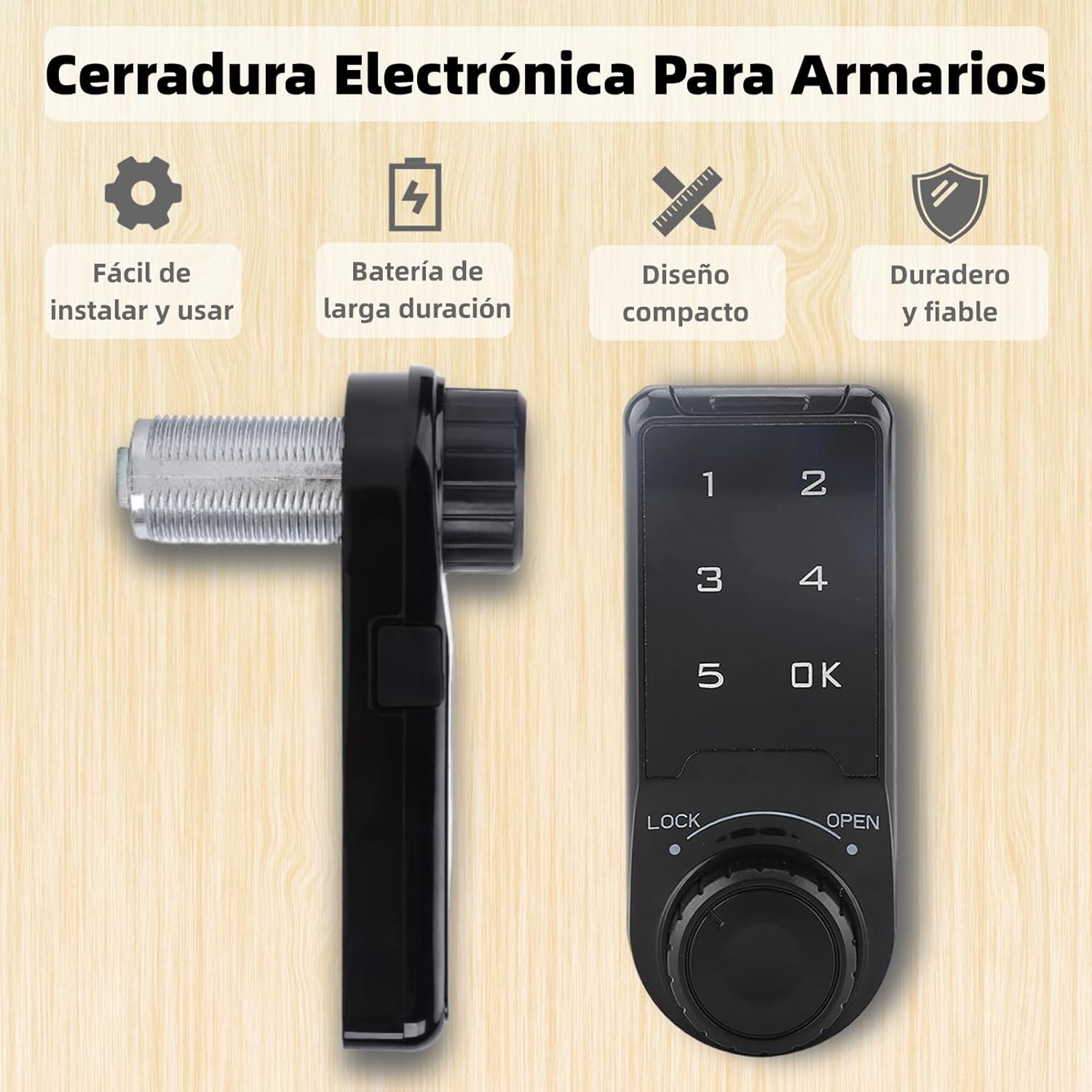
Image 1.1: Overview of the Vvikizy Digital Electronic Security Cabinet Lock, highlighting its key features such as easy installation, long-lasting battery, compact design, and reliable durability.
2. Product Components
Before installation, please ensure all components are present and undamaged. The package typically includes the main lock unit, mounting hardware, and a battery compartment cover.
- Main Lock Unit with Touch Keypad and Rotary Knob
- Mounting Nut
- Mounting Screws
- Lock Plate
- Battery Compartment Cover
- Emergency Power Cable (USB)

Image 2.1: Detailed product view illustrating the lock's dimensions, the touch keypad, the rotary knob for locking/unlocking, and the external battery compartment.
Video: Unboxing and Components Overview
Video 2.1: This video demonstrates the unboxing of the Vvikizy Digital Electronic Security Cabinet Lock and provides a clear overview of all included components and their initial handling.
3. Setup and Installation
The Vvikizy Digital Electronic Security Cabinet Lock is designed for easy installation on various cabinet types. This model is suitable for an installation size of L=20.
- Prepare the Cabinet: Ensure the cabinet door or drawer has the appropriate hole drilled for the lock cylinder. The installation size L=20 refers to the length of the lock cylinder.
- Insert the Lock: Insert the threaded cylinder of the main lock unit through the prepared hole from the outside of the cabinet.
- Secure the Lock: From the inside of the cabinet, place the mounting nut over the threaded cylinder and tighten it securely. Ensure the lock is stable and flush against the cabinet surface.
- Attach the Lock Plate: Position the lock plate on the inside of the cabinet door/drawer, aligning it with the lock mechanism. Secure it with the provided screws.
- Install Batteries: Open the battery compartment cover (usually located on the side or back of the main unit). Insert the required batteries (not included) according to the polarity markings. Close the cover securely.
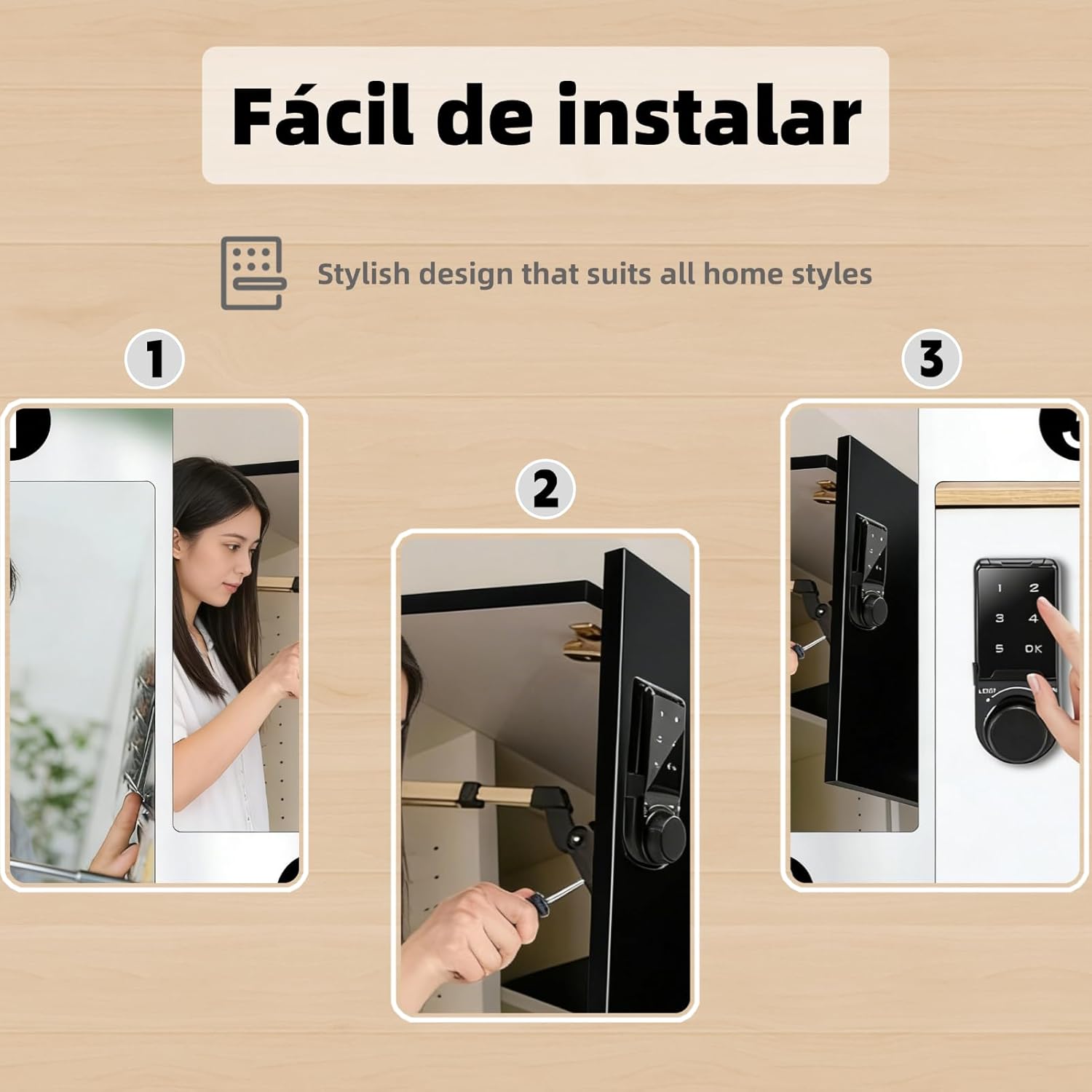
Image 3.1: Visual guide demonstrating the three main steps for installing the electronic cabinet lock, including preparing the cabinet, inserting the lock, and securing it.
4. Operating Instructions
4.1 Initial Setup and Default Password
Upon first use or after a factory reset, the lock will be in its default home mode with a management password of 1234. It is highly recommended to change this default password immediately after installation.

Image 4.1: The lock unit showing the factory default management password (1234) and indicating its default home mode.
4.2 Changing the Management Password
- Press the 'OK' button to wake up the keypad.
- Enter the current management password (default is 1234) and press 'OK'.
- Press and hold the 'OK' button for 3 seconds until the indicator light changes.
- Enter your new 4-6 digit management password and press 'OK'.
- Re-enter the new management password and press 'OK' to confirm. The indicator light will flash to confirm success.
4.3 Setting User Passwords (Public/Temporary)
The lock supports setting public and temporary passwords for flexible access control.
- Public Mode: Allows any user to set a temporary password for a single use.
- Private Mode: Requires a specific user password for access.
Refer to the detailed instructions in the full manual for specific steps on setting up public and private user codes.
4.4 Locking and Unlocking
- To Lock: Close the cabinet door/drawer. Rotate the knob to the 'LOCK' position. The lock will engage automatically.
- To Unlock: Press any key to activate the keypad. Enter your valid password (management or user password) and press 'OK'. Once unlocked, rotate the knob to the 'OPEN' position to open the cabinet.
4.5 False Password Option
To enhance security, the lock features a false password option. You can enter random digits before or after your actual password. For example, if your password is '123456', you can enter '9871234560' and the lock will still recognize the correct sequence within the longer input. This helps prevent others from guessing your password by observing your finger movements.

Image 4.2: Examples of the digital lock installed on different types of furniture, showcasing its application in various home settings.
5. Battery Information
The lock operates on batteries (not included). It features an external battery compartment for easy replacement. When the battery level is low, the lock will typically provide an audible or visual warning.
5.1 Battery Installation and Replacement
- Locate the external battery compartment cover on the side or back of the lock unit.
- Carefully remove the cover.
- Insert new batteries, ensuring correct polarity (+/-).
- Replace the battery compartment cover securely.
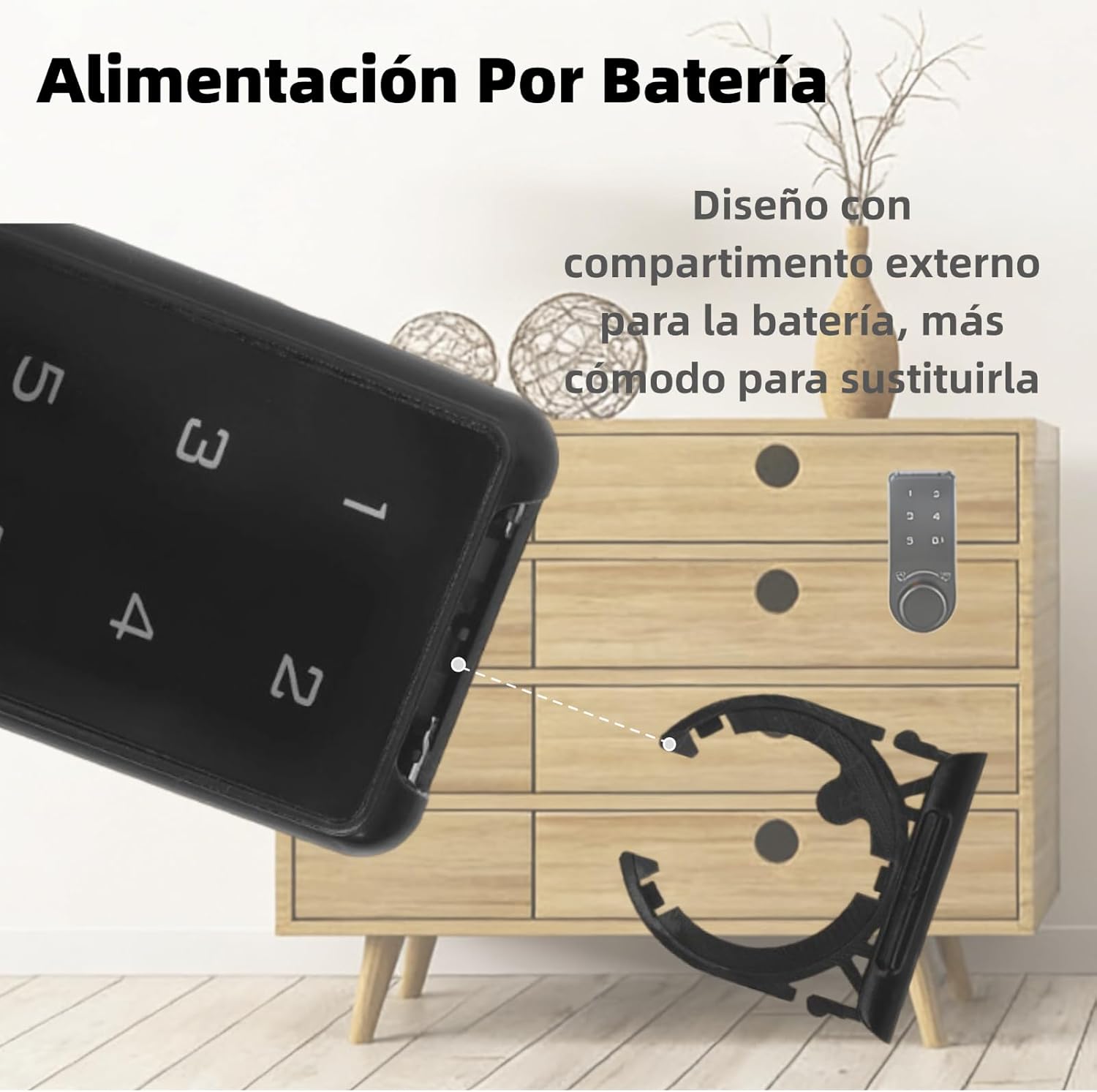
Image 5.1: Close-up of the external battery compartment, designed for convenient battery replacement.
5.2 Emergency Power
In case of complete battery depletion, the lock is equipped with a USB port for emergency power. Connect a standard USB power source (e.g., power bank) to this port to temporarily power the lock and gain access.

Image 5.2: Side view of the lock, highlighting the USB port for emergency power access.
6. Maintenance
To ensure the longevity and optimal performance of your Vvikizy Digital Electronic Security Cabinet Lock, follow these maintenance guidelines:
- Cleaning: Wipe the keypad and lock body with a soft, dry cloth. Avoid using abrasive cleaners or solvents, which can damage the surface or electronic components.
- Battery Check: Regularly check the battery status and replace batteries promptly when low to avoid being locked out.
- Avoid Moisture: The lock is not water-resistant. Keep it away from water and high humidity environments.
- Operational Check: Periodically test the lock and unlock functions to ensure smooth operation.
7. Troubleshooting
If you encounter issues with your lock, refer to the following common troubleshooting steps:
| Problem | Possible Cause | Solution |
|---|---|---|
| Lock does not respond to keypad input. | Dead batteries. | Replace batteries. Use emergency USB power if necessary. |
| Cannot unlock with correct password. | Incorrect password entry; keypad not active. | Ensure keypad is active (press any key). Re-enter password carefully. Verify you are using the correct management or user password. |
| Lock mechanism is stuck. | Obstruction; mechanical issue. | Check for any physical obstructions around the lock plate. Ensure the knob rotates freely. If the issue persists, contact support. |
| Forgotten password. | Password lost. | If you have access to the management password, you can reset user passwords. If the management password is lost, a factory reset might be required (refer to advanced settings in the full manual or contact support). |
8. Specifications
- Brand: Vvikizy
- Model Number: Vvikizym6v0pctznx-01
- Lock Type: Electronic
- Color: Black
- Material: Acrylonitrile Butadiene Styrene (ABS)
- Product Dimensions: 3.93"D x 2.36"W x 1.96"H
- Item Weight: 3.1 ounces
- Mounting Type: Freestanding
- Included Components: Screw
- Water Resistance Level: Not Water Resistant
- Installation Size: L=20
9. Warranty and Support
For warranty information, technical support, or further assistance, please refer to the product packaging or contact the seller directly. Keep your purchase receipt for warranty claims.