
1. Introduction
This manual provides detailed instructions for the installation, operation, and maintenance of your BHI 12,000 BTU 115-Volt, 17 SEER2, Wi-Fi Ductless Mini Split Air Conditioner with Heat Pump. Please read this manual thoroughly before operating the unit to ensure proper use and to prevent damage or injury. Keep this manual for future reference.
The BHI mini-split system is designed to provide efficient cooling and heating for spaces up to 600 sq. ft., featuring Wi-Fi connectivity for convenient control and a heat pump for year-round comfort.
2. Safety Information
Always adhere to the following safety precautions to reduce the risk of fire, electric shock, or injury.
- Professional Installation Required: Installation, maintenance, and repair of this appliance must be performed by qualified service personnel. Improper installation can lead to electric shock, fire, or water leakage.
- Electrical Safety: Ensure the power supply matches the unit's specifications (115-Volt). Do not use extension cords. Always disconnect power before servicing.
- Refrigerant Safety: This unit contains R410A refrigerant. Handle with care and ensure proper ventilation during installation and servicing.
- Clearances: Maintain adequate clearances around both indoor and outdoor units for proper airflow and service access.
- Children and Pets: Keep children and pets away from the unit during operation and maintenance.
- No Obstructions: Do not block the air inlet or outlet of either unit.
- Water Drainage: Ensure proper drainage for condensate to prevent water damage.
3. Package Contents
Upon unpacking, verify that all components are present and undamaged. If any items are missing or damaged, contact your supplier immediately.

Figure 3.1: Complete BHI Mini Split Air Conditioner System Components.
This image displays the full package contents, including the indoor air handler, the outdoor condenser unit, the wireless remote control, and the 16.4 ft. pre-charged lineset, along with other installation accessories.
- Indoor Unit (Air Handler)
- Outdoor Unit (Condenser)
- Wireless Remote Control
- 16.4 ft. Pre-charged Lineset
- Drain Hose
- Electrical Wiring
- Installation Accessories (e.g., wall sleeve, insulation tape)
- User Manual (this document)
4. Product Features
4.1 Wi-Fi Control

The BHI mini split system features integrated Wi-Fi connectivity, allowing users to easily control the air conditioner from outside the home via a smart device. This provides convenient and intelligent life management of your indoor climate.
4.2 Outdoor Unit Heating Belt

The BHI Outdoor Unit is equipped with a "Heating Belt" that operates via a temperature sensor. If the ambient temperature drops below 32°F (0°C), the heating belt will automatically activate to prevent the outdoor unit from freezing. It will deactivate once the temperature rises above 32°F (0°C), ensuring reliable operation in cold climates.
4.3 "I Set" Function
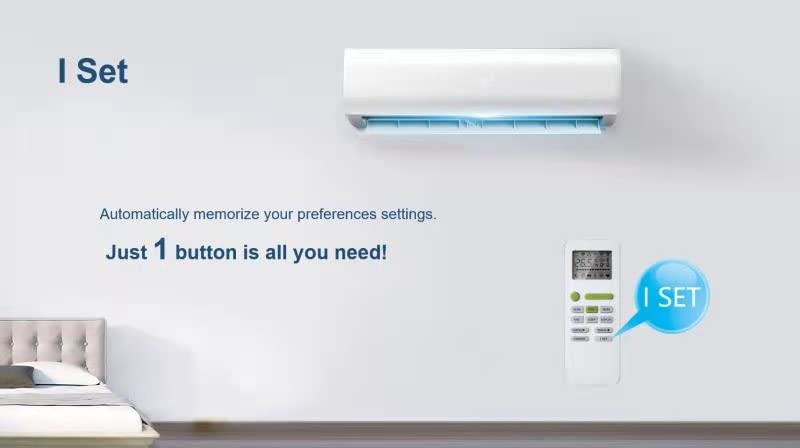
The "I Set" function allows the unit to automatically memorize your preferred settings. With just one button press, you can recall your customized comfort preferences, simplifying operation.
4.4 "I Feel" Function and Louver Position Memory
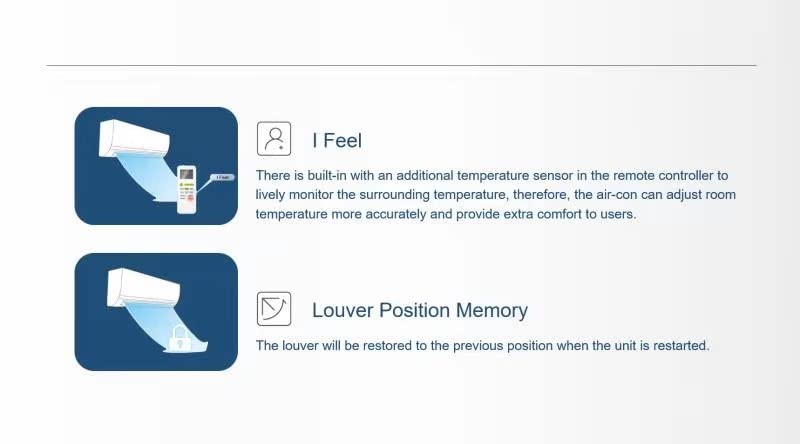
I Feel: This feature utilizes a built-in temperature sensor in the remote controller to monitor the surrounding temperature more accurately. This allows the air conditioner to adjust the room temperature precisely, providing enhanced comfort.
Louver Position Memory: The unit remembers the last louver position. When the unit is restarted, the louvers will automatically return to their previously set position.
5. Setup and Installation
Installation of this mini split system requires specialized tools and knowledge. It is strongly recommended that installation be performed by a certified HVAC professional to ensure safety, proper operation, and warranty validity.
5.1 Unit Dimensions

Figure 5.1: Indoor and Outdoor Unit Dimensions.
This image provides detailed measurements for both the indoor air handler and the outdoor condenser unit, crucial for planning installation space and clearances.
- Indoor Unit:
- Width: 30.59 inches
- Height: 11.91 inches
- Depth: 9.84 inches
- Outdoor Unit:
- Width: 30.59 inches
- Height: 19.63 inches
- Depth: 11.41 inches
5.2 General Installation Steps (Overview for Professional)
- Indoor Unit Placement: Select a suitable location on an interior wall, ensuring adequate space for airflow and maintenance.
- Outdoor Unit Placement: Choose a stable, level outdoor location with sufficient clearance for airflow and service access.
- Drilling Wall Hole: Create a hole through the wall for the refrigerant lines, drain hose, and electrical cables.
- Lineset Connection: Connect the pre-charged 16.4 ft. lineset between the indoor and outdoor units. Ensure proper flaring and torque.
- Electrical Wiring: Connect the power supply and communication wiring according to the wiring diagram provided with the unit. Ensure proper grounding.
- Drainage Connection: Connect the condensate drain hose from the indoor unit to an appropriate drainage point.
- Vacuuming and Leak Test: Evacuate the refrigerant lines to remove air and moisture, then perform a leak test.
- Test Run: After installation, perform a test run to verify proper operation in all modes.
6. Operating Instructions
Your BHI mini split system is controlled primarily by the wireless remote control. Familiarize yourself with the remote's functions for optimal use.
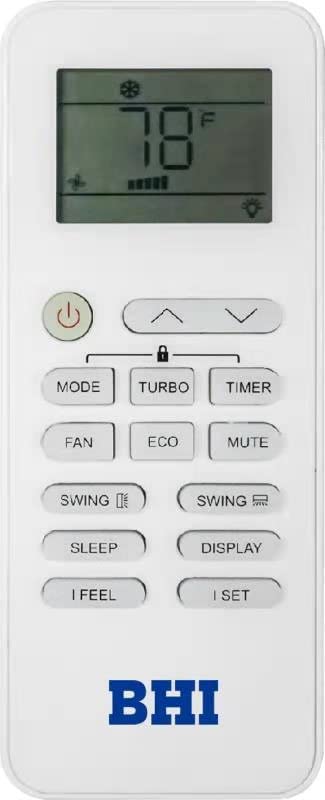
Figure 6.1: Wireless Remote Control.
This image shows the layout of the wireless remote control, which is used to operate the BHI mini split air conditioner.
6.1 Remote Control Functions
| Button | Function |
|---|---|
| Power (⏻) | Turns the unit ON or OFF. |
| MODE | Cycles through operating modes: Auto, Cool, Dry, Heat, Fan. |
| TEMP (▲/▼) | Adjusts the set temperature. |
| FAN | Adjusts fan speed (Auto, Low, Medium, High). |
| SWING (↕/↔) | Controls vertical (up/down) and horizontal (left/right) louver swing. |
| TIMER | Sets the ON/OFF timer for automatic operation. |
| TURBO | Activates rapid cooling or heating for quick temperature changes. |
| ECO | Engages energy-saving mode. |
| MUTE | Silences beeps or sounds from the unit. |
| SLEEP | Optimizes temperature and fan speed for comfortable sleep. |
| DISPLAY | Turns the indoor unit's display ON or OFF. |
| I FEEL | Activates the remote's temperature sensor for more accurate room temperature sensing. |
| I SET | Recalls previously saved preferred settings. |
6.2 Wi-Fi App Control
For Wi-Fi control, download the dedicated BHI smart app from your device's app store. Follow the in-app instructions to connect your mini split unit to your home Wi-Fi network. Once connected, you can control the unit's functions remotely, set schedules, and monitor its status.
7. Maintenance
Regular maintenance ensures the longevity and efficiency of your BHI mini split system. Always disconnect power to the unit before performing any maintenance.
7.1 Air Filter Cleaning
The indoor unit's air filters should be cleaned every two weeks or more frequently depending on usage and air quality.
- Open the front panel of the indoor unit.
- Remove the air filters.
- Clean the filters using a vacuum cleaner or wash them with lukewarm water and mild detergent.
- Allow filters to dry completely in a shaded area before reinstalling.
- Reinstall the filters and close the front panel.
7.2 Outdoor Unit Cleaning
Periodically inspect the outdoor unit for debris, leaves, or dirt that may obstruct airflow. Gently clean the coils with a soft brush or water hose. Do not use high-pressure water directly on electrical components.
7.3 Professional Servicing
It is recommended to have a qualified HVAC technician perform annual professional maintenance, including checking refrigerant levels, electrical connections, and overall system performance.
8. Troubleshooting
Before contacting service, review the following common issues and their potential solutions.
| Problem | Possible Cause | Solution |
|---|---|---|
| Unit does not turn ON. | No power supply; Remote control batteries dead; Circuit breaker tripped. | Check power connection; Replace remote batteries; Reset circuit breaker. |
| Insufficient cooling/heating. | Dirty air filters; Blocked outdoor unit; Incorrect mode setting; Low refrigerant. | Clean air filters; Clear obstructions from outdoor unit; Select correct mode; Contact professional for refrigerant check. |
| Water leakage from indoor unit. | Clogged drain hose; Improper installation. | Clear drain hose; Contact professional for inspection. |
| Unusual noise. | Loose parts; Fan obstruction; Compressor issue. | Check for loose parts; Clear obstructions; Contact professional. |
| Wi-Fi connection issues. | Incorrect Wi-Fi password; Router too far; App issues. | Verify password; Move router closer or use extender; Reinstall app. |
If the problem persists after attempting these solutions, please contact BHI customer support or a qualified service technician.
9. Specifications
| Attribute | Detail |
|---|---|
| Model Number | BHI-T17-12K115V-US-C |
| Cooling Capacity | 12,000 BTU |
| Voltage | 115-Volt |
| SEER2 Rating | 17 SEER2 |
| Coverage Area | Up to 600 sq. ft. |
| Refrigerant Type | R410A |
| Lineset Length | 16.4 ft. (Pre-charged) |
| Product Dimensions (Indoor Unit) | 30.59 x 11.91 x 9.84 inches (W x H x D) |
| Product Dimensions (Outdoor Unit) | 30.59 x 19.63 x 11.41 inches (W x H x D) |
| Item Weight | 68.33 Pounds (Total system weight) |
| Manufacturer | BHI |
10. Warranty and Support
For specific warranty terms and conditions, please refer to the warranty card included with your product packaging or visit the official BHI website. Keep your proof of purchase for warranty claims.
If you require technical assistance, have questions about operation, or need to report an issue, please contact BHI customer support. Contact information can typically be found on the manufacturer's website or in the product packaging.


