
CG CHIPS GATE DCS3204-VT1-BB1
CG CHIPS GATE DCS3204-VT1-BB1 Industrial Automation Equipment User Manual
Model: DCS3204-VT1-BB1
1. Introduction
This manual provides essential information for the safe and effective use of the CG CHIPS GATE DCS3204-VT1-BB1 industrial automation equipment. It covers product overview, general setup, operational considerations, maintenance, and troubleshooting guidelines. Please read this manual thoroughly before installation and operation.
2. Safety Information
Important: Always observe local safety regulations and industry standards when installing, operating, or maintaining industrial automation equipment. Failure to do so may result in personal injury or equipment damage.
- Ensure power is disconnected before any installation or maintenance procedures.
- Only qualified personnel should perform installation and servicing.
- Verify correct wiring and connections according to system diagrams.
- Protect the equipment from moisture, dust, and extreme temperatures.
3. Product Overview
The DCS3204-VT1-BB1 is a component of industrial automation equipment, designed for integration into various control systems. CG CHIPS GATE specializes in supplying reliable industrial automation equipment, including PLC modules, motor drives, and control systems.

Figure 3.1: Close-up view of a digital display and control buttons on an industrial automation component, likely part of the DCS3204-VT1-BB1 or a similar unit.
4. Setup and Installation
This section provides general guidelines for the installation of the DCS3204-VT1-BB1. Specific installation instructions should be obtained from the overall system documentation where this component will be integrated.
- Unpacking: Carefully remove the unit from its packaging. Inspect for any visible damage during transit. Refer to the "Packaging and Quality Assurance" section for details on how products are packaged.
- Mounting: Mount the DCS3204-VT1-BB1 securely in its designated location within the control panel or system enclosure. Ensure adequate ventilation and clearance for wiring.
- Wiring: Connect all necessary power, input, and output wiring according to the system's electrical schematics. Double-check all connections for proper polarity and secure fastening.
- Grounding: Ensure the unit is properly grounded to prevent electrical hazards and ensure stable operation.
- Initial Power-Up: After verifying all connections, apply power to the system. Observe the unit for any error indicators or unusual behavior.
5. Operation
The DCS3204-VT1-BB1 functions as a critical component within a larger industrial automation system. Its specific operational parameters and interaction methods are determined by the overarching system design and programming.
- System Integration: The unit is designed to communicate and operate in conjunction with other PLC modules, motor drives, or control systems.
- Monitoring: Monitor the unit's status indicators and any associated system displays for normal operation.
- Parameter Adjustment: Any necessary parameter adjustments or configuration changes should be performed through the main control system interface, following established procedures.
6. Maintenance
Regular maintenance helps ensure the longevity and reliable performance of the DCS3204-VT1-BB1 and the overall automation system.
- Cleaning: Periodically clean the exterior of the unit to prevent dust accumulation, which can affect cooling and component lifespan. Use a soft, dry cloth. Do not use harsh chemicals or abrasive materials.
- Inspection: Regularly inspect wiring connections for tightness and signs of wear or corrosion. Check for any loose components or unusual noises.
- Environmental Control: Ensure the operating environment remains within specified temperature and humidity ranges to prevent damage.
- Firmware Updates: If applicable, consult your system integrator or CG CHIPS GATE for information on firmware updates.
7. Troubleshooting
This section provides general troubleshooting steps for common issues. For complex problems, consult a qualified technician or the system integrator.
| Problem | Possible Cause | Solution |
|---|---|---|
| Unit does not power on | No power supply; Loose power connection; Faulty power supply | Check power source; Verify power cable connections; Test power supply unit |
| Error indicator light active | Internal fault; Communication error; Overload condition | Refer to system diagnostics; Check communication cables; Reduce load if applicable |
| Intermittent operation | Loose connections; Environmental interference; Software glitch | Inspect all wiring; Shield cables if necessary; Restart system or consult system integrator |
8. Specifications
| Feature | Detail |
|---|---|
| Model Number | DCS3204-VT1-BB1 |
| Manufacturer | CG CHIPS GATE |
| ASIN | B0D4LQM88F |
| Country of Origin | China |
| First Available Date | May 20, 2024 |
9. Packaging and Quality Assurance
CG CHIPS GATE prioritizes maintaining consistent product standards through careful sourcing and quality checks. Each order is packaged securely to help ensure safe delivery during transit.

Figure 9.1: Large items are packed in cartons with corner protectors. Foam wrap inside the carton prevents product damage, ensuring safe transit.

Figure 9.2: Electronic components are packed in anti-static bags to protect them from electrostatic discharge during shipping and handling.
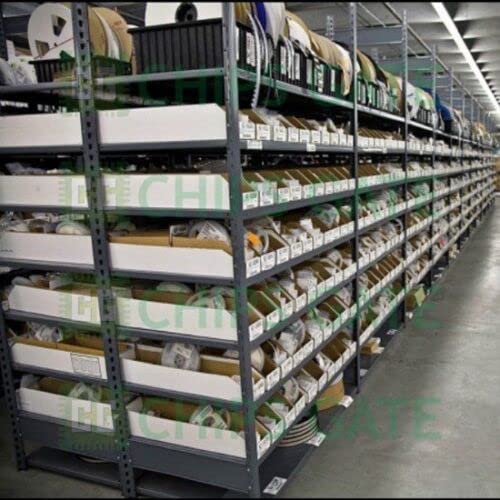
Figure 9.3: Organized warehouse storage of industrial automation equipment, reflecting systematic inventory management and product handling.
10. Warranty and Support
For support regarding the DCS3204-VT1-BB1 or other CG CHIPS GATE products, please contact your supplier or the system integrator. As this product is often supplied for B2B and B2C applications, specific warranty terms may vary based on the purchase agreement.
CG CHIPS GATE is dedicated to maintaining consistent quality standards through careful selection and handling of equipment. For inquiries regarding product quality or technical assistance, please refer to the contact information provided by your point of purchase.
Note on Import Duties and Taxes: Depending on the destination country’s regulations, local customs authorities may impose import duties or taxes. Any such charges are the responsibility of the recipient.