
Introduction
Thank you for choosing the MUSHPORT YS-802C Stopwatch Timer. This manual provides essential information for the proper setup, operation, and maintenance of your device. Please read it thoroughly before use to ensure optimal performance and longevity.

Image: MUSHPORT YS-802C Stopwatch Timer, orange color, with a black lanyard.
Key Features
- Dedicated Stopwatch Mode: Operates solely as a stopwatch, without clock, calendar, or countdown functions.
- Split Timing: Allows for timing of single and split events, freezing the split-time display while total time continues.
- ON/OFF Function: Power saving feature; long press the ON/OFF button to activate or deactivate the device.
- Silent Operation: Designed without audible alerts (no bell, whistle, beep, or alarm).
- High Accuracy: Measures with 1/100th second precision.
- Large Display: Clear LCD digit display for easy readability.
- Extended Timing Range: Capable of timing up to 99 hours, 59 minutes, and 59 seconds.

Image: Visual representation of the stopwatch's key features: simple mode, silent, ON/OFF, and large display.
Setup
1. Battery Installation
The MUSHPORT YS-802C Stopwatch Timer typically comes with a pre-installed battery. If the display is blank or dim, battery replacement may be necessary.
- Locate the battery compartment cover on the back of the stopwatch.
- Use a small screwdriver (if required) to open the compartment.
- Insert new batteries, ensuring correct polarity (+/-).
- Securely close the battery compartment cover.
2. Powering On/Off
To turn the stopwatch ON or OFF, press and hold the central ON/OFF button for a few seconds. The display will illuminate or turn off accordingly.

Image: Instructions for using the ON/OFF button, demonstrating the stopwatch in both active and inactive states.
Operating Instructions
The MUSHPORT YS-802C features three primary buttons for all operations:
- • START/STOP Button: Located on the right side. Initiates and pauses the timing.
- • SPLIT/RESET Button: Located on the left side. Records split times and resets the stopwatch.
- • ON/OFF Button: Central button. Powers the device on or off (long press).
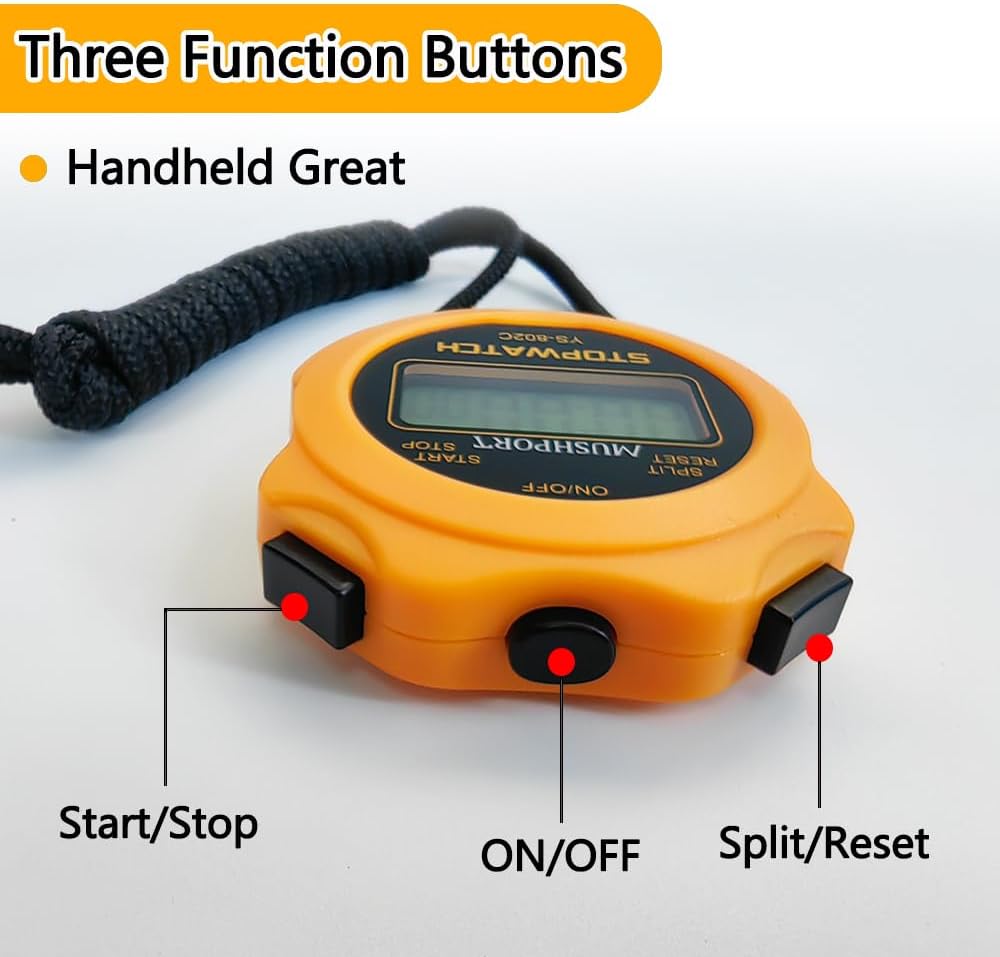
Image: Detailed view of the stopwatch's three function buttons and their labels.
Basic Timing (Start/Stop)
- Ensure the stopwatch is powered on.
- Press the START/STOP button once to begin timing.
- Press the START/STOP button again to pause the timing.
- To resume timing from the paused state, press START/STOP again.
- To clear the time and reset to zero, press the SPLIT/RESET button while the stopwatch is stopped.
Split Timing Function
The split timing function allows you to record intermediate times without stopping the main timer.
- Ensure the stopwatch is powered on.
- Press the START/STOP button to begin timing.
- At any point during the timing, press the SPLIT/RESET button to display the current split time. The main timer will continue to run in the background.
- Press the SPLIT/RESET button again to return to the running total time display.
- To stop the main timer, press the START/STOP button.
- To clear the time and reset to zero, press the SPLIT/RESET button while the stopwatch is stopped.
Maintenance
- Cleaning: Wipe the stopwatch with a soft, dry cloth. Avoid using abrasive cleaners or solvents.
- Battery Replacement: Replace batteries promptly when the display becomes dim or unresponsive to ensure continued functionality.
- Storage: Store the stopwatch in a cool, dry place away from direct sunlight and extreme temperatures.
- Water Resistance: This specific model (YS-802C, non-waterproof-orange) is not waterproof. Avoid exposure to water or high humidity to prevent damage.
Troubleshooting
- Problem: Stopwatch does not turn on or display is blank.
- Solution: Check the battery. The battery may be depleted or incorrectly installed. Replace with new batteries if necessary.
- Problem: Stopwatch buttons feel loose or produce a shaking sound.
- Solution: This is normal. The buttons are designed with a slight flexibility to maintain their service life. The sound is a characteristic of this design and does not indicate a defect.
- Problem: Stopwatch takes longer to turn on than to turn off.
- Solution: This is expected behavior. The stopwatch performs a self-test process during power-on, which requires a slightly longer duration compared to powering off.
- Problem: Stopwatch is unresponsive or behaving erratically.
- Solution: Try removing and reinserting the battery to perform a hard reset. If the issue persists, contact customer support.
Specifications
| Brand | MUSHPORT |
| Model Number | YS-802C |
| Color | Orange |
| Material | Plastic |
| Product Dimensions (D x W x H) | 0.6" x 2.3" x 2.9" (1.5cm x 5.8cm x 7.4cm) |
| Item Weight | 1.6 ounces (45 grams) |
| Accuracy | 1/100th second |
| Max Timing Duration | 99 hours, 59 minutes, 59 seconds |
| Water Resistance | No (Non-waterproof model) |
| Manufacturer | Shenzhen yisheng Technology Co., Ltd |

Image: Physical dimensions of the stopwatch.
Warranty and Support
Warranty Information
Specific warranty details for the MUSHPORT YS-802C Stopwatch Timer are not provided in this manual. Please refer to the product packaging, the retailer's return policy, or the official MUSHPORT website for warranty terms and conditions.
Customer Support
For further assistance, technical support, or inquiries regarding your MUSHPORT YS-802C Stopwatch Timer, please visit the MUSHPORT Store on Amazon or consult the contact information provided on the product packaging.


