
Introduction
The Xmenha OWS Wireless Bone Conduction Open Ear Headphones (Model F6OWS) are designed to provide a unique audio experience while keeping you aware of your surroundings. Featuring Bluetooth 5.4 connectivity, these headphones are waterproof and offer ultra-long playtime, making them ideal for sports and daily use.
Key features include:
- Open-Ear Design: Allows awareness of surroundings, enhancing safety during outdoor activities.
- Comfortable & Lightweight: Made of non-slip & skin-friendly ABS, weighing only 0.3oz for extended comfortable wear.
- Directional Sound Transmission: Utilizes breakthrough technology for lossless audio and 360° panoramic stereo sound with reduced sound leakage.
- Crystal-Clear Calls: Enhanced noise reduction through ENC algorithm and dual noise-canceling microphones.
- Waterproof and Sweatproof: IPX5 nano-coating protects against sweat and rain, suitable for various activities.
Package Contents
Upon opening your product package, you should find the following items:
- 1 x Workout Open Ear Headphones
- 1 x USB-C cable
- 1 x User manual
- 1 x Exquisite packaging box
- Ear Cushions

Image: The OWS Wireless Bone Conduction Open Ear Headphones shown with their charging case.
Setup Guide
1. Initial Charging
Before first use, fully charge your headphones and the charging case. Connect the provided USB-C cable to the charging port on the case and a compatible power source. A full charge takes approximately 1.5 hours.

Image: Visual representation of the headphones and charging case, highlighting battery life.
2. Bluetooth Pairing
- Ensure the headphones are charged and removed from the charging case. They will automatically enter pairing mode.
- On your device (smartphone, tablet, etc.), navigate to the Bluetooth settings.
- Look for "F6OWS" or a similar name in the list of available devices and select it to connect.
- Once connected, you will hear an audio prompt, and the headphones will be ready for use.
Video: Demonstrates the unboxing, physical features, and the process of connecting the headphones to a smartphone via Bluetooth and the companion app.
For optimal experience and advanced features, download the "Original Sound" app from your device's app store. The video above demonstrates how to find and use the app for connection and settings adjustments.
Operating Instructions
Wearing the Headphones
The open-ear design allows the headphones to rest comfortably on your ear, ensuring you can hear both your audio and ambient sounds. The lightweight and ergonomic design provides a secure fit for various activities.

Image: A person wearing the open-ear headphones, illustrating their comfortable and open design.
Basic Controls (Tactile Buttons)
The headphones feature tactile buttons for easy control of media and calls:
- Single Click: Volume Up (Right earbud), Volume Down (Left earbud)
- Double Click: Play/Pause music, Answer/End call
- Triple Click: Next Song (Right earbud), Previous Song (Left earbud)
- Long Press: Activate Voice Assistant (Siri, Google Assistant)
Advanced Controls (Original Sound App)
The "Original Sound" app provides additional customization and control:
- Battery Level Display: Monitor the charge of each earbud and the charging case.
- Earphone Loss Prevention: Locate misplaced earbuds.
- Bluetooth Modification: Manage Bluetooth connections.
- EQ Adjustment: Customize sound profiles (Default, Popular, Dance, Classical, Jazz, Slow song, or custom settings).
- Operation Customization: Reassign button functions.
- Game Mode: Optimize audio for gaming.
- Change Name: Personalize your device's Bluetooth name.
- OTA Upgrade: Update headphone firmware.
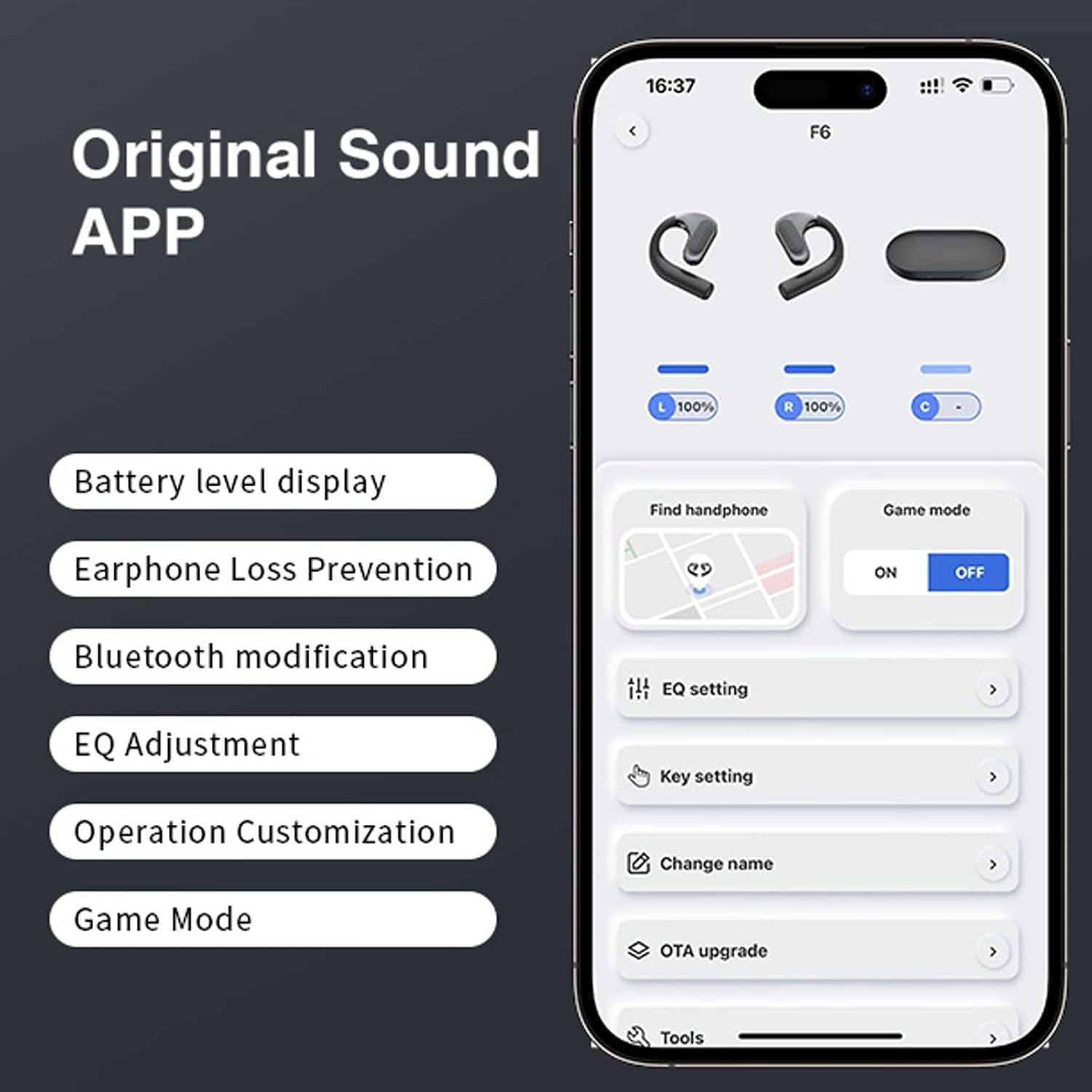
Image: A smartphone screen displaying the "Original Sound" app, detailing its various features and customization options.
Audio Quality and Technology
These headphones feature 16.2mm large dynamic drivers for pure, high-quality sound with powerful bass. The directional sound transmission technology automatically adjusts the propagation angle of the integrated sound beam, ensuring efficient audio delivery into the ear canal and effectively reducing sound leakage. The ACS panoramic audio matrix simulates a realistic 360° stereo surround sound field.

Image: Diagram explaining the directional sound transmission technology, showing how sound is directed into the ear.

Image: An exploded view diagram highlighting the 16.2mm dynamic driver for enhanced bass.

Image: A visual representation of the ACS Panoramic Audio Matrix creating a 360° sound field.
Call Quality
Equipped with dual noise-canceling microphones and enhanced noise reduction technology (ENC algorithm), these headphones ensure crystal-clear calls even in noisy environments.

Image: A graph demonstrating the effectiveness of ENC noise cancellation, showing a 95% reduction in ambient noise.
Maintenance
The headphones feature an IPX5 waterproof and sweatproof nano-coating. After exercise or exposure to sweat/rain, gently wipe the headphones clean with a soft cloth to maintain their condition and longevity. Do not submerge the headphones in water.
Troubleshooting
- Headphones not pairing: Ensure Bluetooth is enabled on your device and the headphones are in pairing mode. Try turning Bluetooth off and on again on your device.
- Low battery life: Ensure both earbuds and the charging case are fully charged. The headphones offer approximately 8-12 hours of music time (depending on volume) on a single charge. The charging case provides additional charges for a total listening time of up to 54 hours.
- App not found: Search for "Original Sound" in your device's app store (e.g., Apple App Store, Google Play Store).
- Sound quality issues: Check the EQ settings in the "Original Sound" app. Ensure the headphones are clean and free from debris.
- No sound: Verify the headphones are connected via Bluetooth and the volume is turned up on both the headphones and your connected device.
If you encounter any other issues or receive a defective product, please contact Xmenha customer support for assistance.
Product Specifications
| Feature | Detail |
|---|---|
| Model Name | F6OWS |
| Connectivity Technology | Wireless (Bluetooth 5.4) |
| Bluetooth Range | 33 Feet (approx. 10m) |
| Audio Driver Type | Bone Conduction Driver |
| Battery Life (Headphones) | Approx. 8-12 hours (depending on volume) |
| Total Playtime with Charging Case | Up to 54 hours |
| Charging Time | 1.5 hours |
| Water Resistance Level | IPX5 (Waterproof) |
| Item Weight | 0.64 Ounces |
| Material | Plastic (ABS) |
| Ear Placement | Open Ear |
| Control Type | Media Control, Remote |
| Manufacturer | Jiaxing Yuejia Trading Co., Ltd. |
| Product Dimensions | 1 x 1 x 1 inches |
Warranty and Support
Xmenha is committed to providing high-quality products. If you have any questions, concerns, or require assistance with your OWS Wireless Bone Conduction Open Ear Headphones, please do not hesitate to contact our customer support team. Refer to the contact information provided with your purchase or on the official Xmenha website.
Optional protection plans are available for extended coverage. Please check with your retailer for details on available protection plans.