
BOJOSZCN BOJBD01
Smart Outdoor Bird Feeder with Camera & AI
Model: BOJBD01 | Brand: BOJOSZCN
Introduction
This manual provides detailed instructions for the installation, operation, and maintenance of your Smart Outdoor Bird Feeder with Camera & AI. This device allows you to observe and interact with birds in your backyard through a high-resolution camera, AI bird identification, and smart notifications. Please read this manual thoroughly before using the product to ensure proper function and longevity.
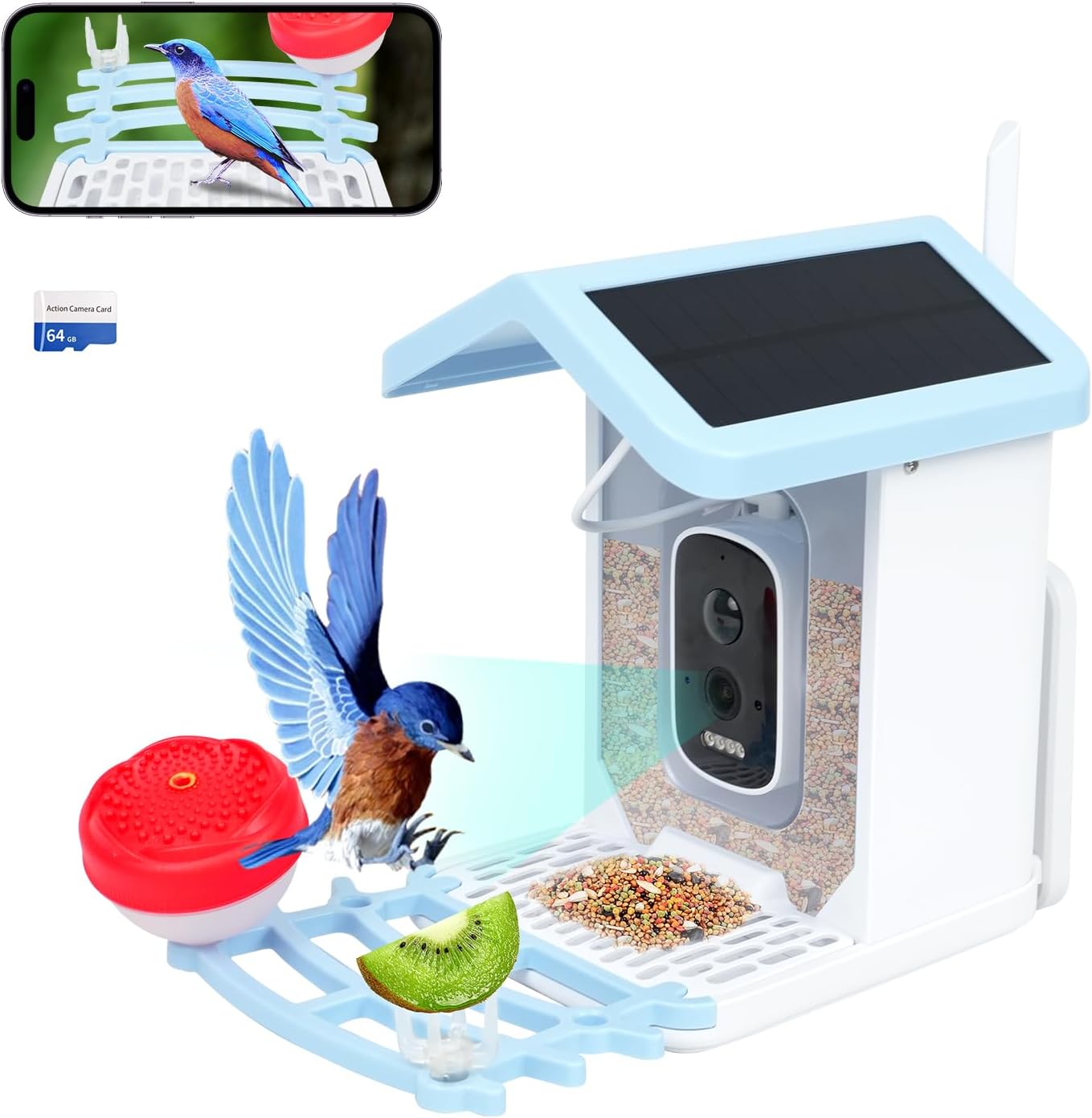
Image: The Smart Outdoor Bird Feeder, highlighting its camera, solar panel, and feeding tray, with a bluebird in flight and a smartphone displaying a live view.
Important Safety Information
Please adhere to the following safety guidelines to prevent injury or damage to the product:
- Always follow local regulations regarding feeding wildlife.
- Keep the feeder clean and dry to prevent mold and bacterial growth.
- Do not use foods that are harmful to birds, such as chocolate, caffeine, or salt.
- Always supervise children when handling the feeder.
- Disconnect the solar panel and battery before cleaning or storing the feeder.
- Always follow the manufacturer's instructions for proper installation and handling.
Product Overview & Components
The Smart Outdoor Bird Feeder is designed to provide an immersive bird-watching experience. Key features include a 5MP camera, AI bird identification, solar charging, and mobile app connectivity.
Included Components:
- Feeder Cover
- Hanging Wire
- Honey Jar and SD Card
- Hook
- Feeding Tray

Image: A visual representation of the bird feeder's main features, including real-time monitoring, HD photo/video, AI recognition, solar power, cloud storage, motion detection, and waterproofing.
Setup
1. Assembly and Mounting:
Assemble the feeder components as shown in the diagram. The feeder supports various mounting types including Hanging Mount, Wall Mount, Tree Mount, and Tripod Mount. Select a location that provides clear visibility for the camera and sufficient sunlight for the solar panel.

Image: Examples of the bird feeder mounted in various outdoor settings, including a wall, tree, and shed, illustrating its adaptability to different environments.
2. Powering the Feeder:
The feeder is equipped with a built-in battery and a 3W dual solar panel for continuous power. Ensure the solar panel is exposed to direct sunlight for optimal charging. The battery is included and pre-installed.

Image: A graphic illustrating the solar high-speed charging capability of the bird feeder, showing sunlight converting to battery power.
3. Wi-Fi Connection & App Setup:
Download the dedicated mobile application (e.g., 'Tris home' as mentioned in product features) from your device's app store. The feeder supports 2.4GHz Wi-Fi networks only (5GHz is not supported). Follow the in-app instructions to pair your feeder with your smartphone. Ensure your Wi-Fi signal is strong at the feeder's location; an extender may be necessary for distant installations.
4. SD Card Installation:
The feeder comes with an SD card for local storage. Insert the SD card into the designated slot. The feeder supports up to 128GB SD cards (not included, but a 64GB card is mentioned as included in some descriptions).
Operating Instructions
1. Real-time Monitoring & Notifications:
Once connected, you can view live footage from the feeder via the mobile app. The feeder will send instant notifications to your phone whenever bird activity is detected. This allows you to observe birds and listen to their songs day or night, thanks to the built-in microphone and night vision lights.
2. AI Bird Identification:
The feeder utilizes advanced AI to recognize over 13,000 species of birds. After a paid subscription (e.g., $3.99/month on Tris home), you can access detailed information about the identified birds within the app.
3. Photo and Video Capture:
The camera automatically captures photos and videos of visiting birds. These can be saved to the cloud (3-day loop records, 2 years trial) or directly to the installed SD card (up to 128GB). You can share these moments with family and friends through the app.

Image: A visual representation of the feeder's ability to save photos and videos to an SD card for long-term storage.
4. Two-Way Audio:
The built-in microphone allows you to hear bird songs. While primarily for listening, some models may offer a two-way audio feature to speak through the feeder, which can be used to deter unwanted visitors (e.g., squirrels or other animals).

Image: Demonstrates the full-color day and night viewing capabilities of the bird feeder camera.
Maintenance
1. Cleaning:
Regularly clean the feeder to prevent the buildup of mold, bacteria, and old food. Disconnect the solar panel and battery before cleaning. Use mild soap and water, and ensure all parts are completely dry before refilling and reassembling.
2. Food Refill:
Monitor the food level in the feeder and refill as needed. The feeder has a capacity of 1.5 liters. Use appropriate bird seed for the target species.
3. Battery & Solar Panel Care:
Ensure the solar panel remains clean and free of debris to maximize charging efficiency. If the feeder is in a shaded area, occasional manual charging via USB-C may be required, though the solar panel is designed to minimize this need.
Troubleshooting
- Feeder not connecting to Wi-Fi: Ensure you are connecting to a 2.4GHz network. Check your Wi-Fi signal strength at the feeder's location. Move the feeder closer to your router or consider a Wi-Fi extender. Restart both your router and the feeder.
- Frequent false notifications: Adjust the motion detection sensitivity settings within the app. Ensure the feeder is not positioned where wind or other non-bird movements (e.g., tree branches, other animals) frequently trigger the sensor.
- Feeder stopped working/not charging: Verify the solar panel is clean and receiving direct sunlight. Check the battery level in the app. If the issue persists, try a full reset of the device (refer to app for specific reset instructions) or contact customer support.
- Poor image/video quality: Ensure the camera lens is clean. Check your Wi-Fi connection speed, as a weak signal can affect streaming quality.
- AI bird identification not working: Confirm your subscription for AI identification is active. Ensure the camera has a clear view of the bird for accurate recognition.
Specifications

Image: A detailed comparison of the feeder's performance specifications against typical alternatives.
| Feature | Detail |
|---|---|
| Brand | BOJOSZCN |
| Model Number | BOJBD01 |
| Target Species | Bluebird and all birds |
| Recommended Uses | Fruit/ Wall/Tree/Tripod Mount/Hanging Mount |
| Material | PVC |
| Special Feature | Portable, Removable Roof, Weatherproof |
| Mounting Type | Hanging Mount /Wall/Tree/Tripod Mount |
| Product Dimensions | 9"L x 8"W x 7"H |
| Power Source | Solar Powered (1 Lithium Polymer battery included) |
| Capacity | 1.5 Liters |
| Color | Blue |
| Item Weight | 2.51 pounds |
| UPC | 667763834039 |
Warranty and Support
For warranty information or technical support, please refer to the contact details provided with your product packaging or visit the BOJOSZCN official website. Keep your purchase receipt for warranty claims.
Ask a question about this manual
Ask about setup, troubleshooting, compatibility, parts, safety, or missing instructions. Manuals+ will review the question and use this page’s manual context to help answer it.