Introduction
This manual provides comprehensive instructions for the ZPIMY 1.43-inch AMOLED Smartwatch, model cfbfa9ce-b5fa-4aa1-82b3-d060b8cc1565. It covers setup, operation, maintenance, and troubleshooting to help you maximize your device's potential. This smartwatch integrates advanced craftsmanship and high technology to offer intelligent, health-focused, and convenient features.

Figure 1: ZPIMY 1.43" AMOLED Smartwatch with its included silver metal band.

Figure 2: The ZPIMY smartwatch available in multiple styles and strap options.
1. Setup
1.1 Unboxing and Initial Inspection
Upon opening the package, verify that all components are present and undamaged. The package should contain:
- 1 * Smartwatch for men with steel strap
- 1 * Leather strap
- 1 * Silicone strap
- 1 * Charging cable
- 1 * User Manual (French, German, English, Spanish, Italian)
1.2 Charging the Smartwatch
Before first use, fully charge the smartwatch. Connect the charging cable to the watch's charging port and a USB power source. A full charge takes approximately 60 minutes. The 400 mAh battery provides up to 15 days of battery life with Bluetooth call function activated.
1.3 App Installation and Pairing
To unlock the full functionality of your smartwatch, download and install the "DaFit" application on your smartphone. The smartwatch is compatible with Android 4.4 and above, and iOS 8.0 and above.
- Scan the QR code in the included manual or search for "DaFit" in your smartphone's app store (Google Play Store for Android, Apple App Store for iOS).
- Install the "DaFit" app.
- Open the app and follow the on-screen instructions to create an account or log in.
- Enable Bluetooth on your smartphone.
- In the "DaFit" app, navigate to the device pairing section and search for your smartwatch.
- Select your smartwatch from the list of available devices to establish a Bluetooth connection.
- Confirm the pairing request on both your smartphone and the smartwatch.

Figure 3: Bluetooth call functionality and multiple movement modes on the smartwatch.
2. Operating Instructions
2.1 Display and Watch Faces
The smartwatch features a 1.43-inch AMOLED touch screen with a high-definition resolution of 466 x 466 pixels. You can choose from various pre-installed watch face styles or customize your own by setting a personal photo as the watch face through the "DaFit" app.
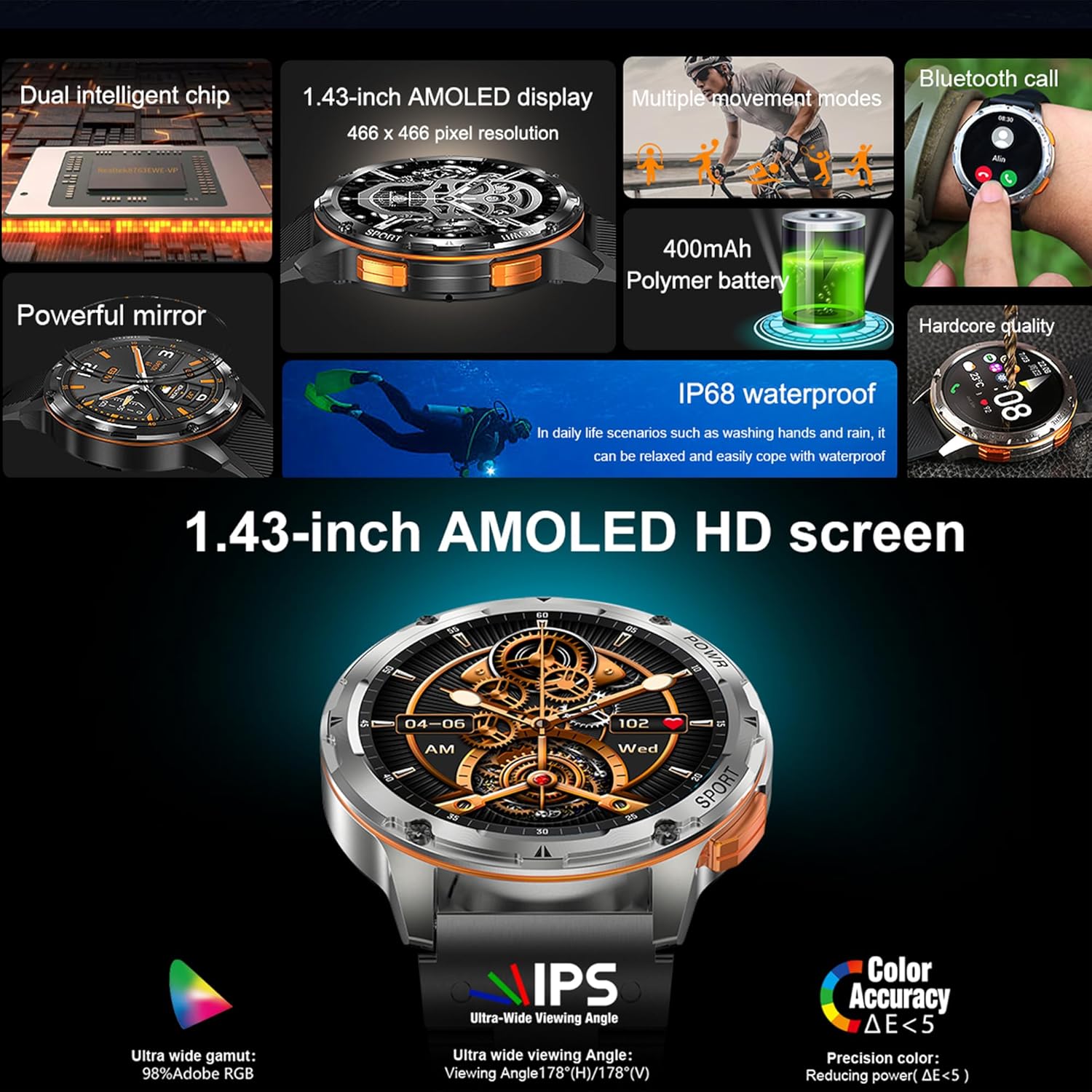
Figure 4: Detailed view of the 1.43-inch AMOLED HD screen and its features.
2.2 Bluetooth Calling and Notifications
With the built-in microphone and speaker, the smartwatch allows you to make and receive calls directly from your wrist via Bluetooth. You can also view call records and add common contacts. The watch supports receiving notifications from various messaging applications, ensuring you don't miss important information.

Figure 5: Smartwatch displaying incoming message notifications.
2.3 Music Control
When your phone is playing music and connected to the "DaFit" app, you can control music playback directly from your smartwatch. This includes play/pause, next/previous track, and volume adjustment, eliminating the need to take out your phone.
2.4 AI Voice Assistant
Connect your smartwatch via Bluetooth to utilize the AI voice assistant. This feature allows you to give voice commands for various functions, such as answering calls or checking the weather, providing a convenient hands-free experience.

Figure 6: AI Voice Assistant, Weather Forecast, and 400mAh Battery features.
2.5 Weather Forecast
Once connected to the app, the smartwatch can display real-time weather conditions for your local city, including a 5-day forecast, helping you prepare for outdoor activities.
2.6 Daily Assistant Features
The smartwatch includes several convenient daily assistant functions:
- Alarm Clock: Set alarms to wake up or for reminders.
- Stopwatch: For timing activities.
- Timer: For countdowns.
- Do Not Disturb Mode: Silence notifications during specific times.
- Sedentary Reminder: Vibrates to remind you to move after periods of inactivity.
3. Health Tracking
The ZPIMY smartwatch offers comprehensive health monitoring features to help you stay informed about your well-being.

Figure 7: Health tracking features including heart rate, blood pressure, blood oxygen, and scientific sleep monitoring.
3.1 Heart Rate Monitor
The watch continuously monitors your heart rate for 24 hours. You can view your daily heart rate records within the "DaFit" app.
3.2 Blood Oxygen (SpO2) Monitor
Monitor your blood oxygen levels to help you avoid excessive exercise and maintain optimal health.
3.3 Sleep Monitor
The smartwatch tracks your sleep patterns, including light sleep, deep sleep, and awake times. It provides a sleep quality score and professional advice to help improve your sleep.
3.4 Menstrual Cycle Tracking
For female users, the watch can track menstrual cycles and predict ovulation periods.
3.5 Breathing Training
Engage in guided breathing exercises to improve lung function and potentially prevent respiratory issues.
4. Sport Modes and Activity Tracking
The smartwatch supports 123 different sport modes, including running, cycling, football, and more. During your workouts, it accurately tracks key metrics:
- Calories: Monitor your calorie consumption.
- Distance: Track the distance covered.
- Steps: Count your daily steps.
- Exercise Time: Record the duration of your activities.
When connected to the "DaFit" app, the smartwatch can accurately record your GPS movement tracking and allow you to share your progress with friends.
5. Maintenance
5.1 Water Resistance
The smartwatch is 5ATM waterproof and conforms to IP67 standards. This means it can withstand daily life scenarios such as washing hands and rain. Important: It cannot be used for bathing or swimming.
5.2 Cleaning and Care
To maintain your smartwatch, regularly wipe the screen and body with a soft, dry cloth. If necessary, a slightly damp cloth can be used, but ensure no moisture enters the charging port or speaker/microphone openings. Avoid using harsh chemicals or abrasive materials.
5.3 Battery Care
To prolong battery life, avoid extreme temperatures. Do not leave the watch in direct sunlight or in very cold environments for extended periods. Charge the watch regularly, but avoid leaving it fully discharged for long durations.
6. Troubleshooting
If you encounter issues with your smartwatch, refer to the following common solutions:
- Watch not turning on: Ensure the watch is fully charged. Connect it to the charging cable and a power source for at least 10 minutes.
- Cannot pair with phone:
- Ensure Bluetooth is enabled on your phone and the watch.
- Make sure the "DaFit" app is open and running in the background.
- Restart both your phone and the smartwatch.
- Forget the device in your phone's Bluetooth settings and try pairing again through the "DaFit" app.
- Inaccurate health data:
- Ensure the watch is worn snugly on your wrist, not too loose or too tight.
- Clean the sensors on the back of the watch.
- Update the "DaFit" app to the latest version.
- Notifications not appearing:
- Check notification permissions for the "DaFit" app in your phone's settings.
- Ensure the watch is connected via Bluetooth.
- Verify that "Do Not Disturb" mode is not active on the watch.
For further assistance, consult the "Help" section within the "DaFit" app or contact customer support.
7. Specifications
| Feature | Detail |
|---|---|
| Brand | ZPIMY |
| Model Number | cfbfa9ce-b5fa-4aa1-82b3-d060b8cc1565 |
| Display | 1.43-inch AMOLED, 466 x 466 HD Resolution |
| Battery Capacity | 400 mAh Lithium-ion |
| Charging Time | Approx. 60 minutes |
| Battery Life | Up to 15 days (with Bluetooth call activated) |
| Water Resistance | 5ATM, IP67 (Not for swimming/bathing) |
| Connectivity | Bluetooth 5.2 |
| Compatible Devices | Android 4.4+, iOS 8.0+ Smartphones |
| Sensors | Heart Rate, Blood Oxygen (SpO2), Sleep Tracker |
| Special Features | Bluetooth Call, AI Voice Assistant, 123 Sport Modes, Music Control, Weather Forecast, Menstrual Cycle Tracking, Breathing Training, Sedentary Reminder |
| Materials | Zinc alloy, Sapphire mirror |
| Color | Silver |
| Screen Size | 1.43 Inches |
| GPS | Integrated GPS (for tracking via app) |
| Manufacturer | ZPIMY |
| Country of Origin | China |

Figure 8: Smartwatch dimensions (45mm width, 12.7mm thickness, 270mm total strap length).
8. Warranty and Support
8.1 Manufacturer's Warranty
This ZPIMY smartwatch comes with a 2-year manufacturer's warranty. Please retain your proof of purchase for warranty claims. The warranty covers defects in materials and workmanship under normal use.
8.2 Customer Support
For technical support, troubleshooting not covered in this manual, or warranty inquiries, please refer to the "Help" or "FAQ" section within the "DaFit" application. You may also contact the seller directly through the platform where the product was purchased.