
1. Product Overview
The Dafit ZL02CPRO Smart Watch is a versatile wearable device designed for health monitoring, fitness tracking, and smart notifications. It features a 1.28-inch round TFT screen, Bluetooth call functionality, and multi-sport modes. This manual provides detailed instructions for setup, operation, and maintenance of your smart watch.
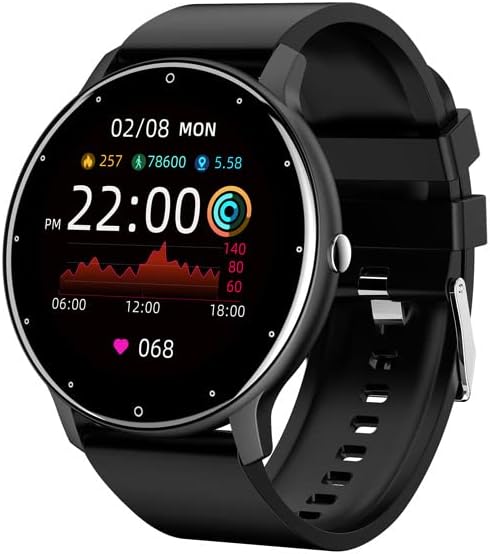
Figure 1.1: Dafit ZL02CPRO Smart Watch (Black Silicone Strap)
This image shows the main view of the Dafit ZL02CPRO Smart Watch in black with a silicone strap. The watch face displays the current time, date, step count, distance, and heart rate data, illustrating its primary functions.
2. What's in the Box
Upon opening the product packaging, please verify that all the following items are included:
- Dafit ZL02CPRO Smart Watch
- User Manual
- Wristbands (Silicone or Steel, depending on model)
- Charging Cable
3. Setup Guide
3.1 Charging the Device
Before initial use, fully charge your smart watch. Connect the provided charging cable to the charging port on the watch and a standard USB power adapter (not included). A full charge typically takes approximately 2 hours. The watch can operate for 5-7 days on a single charge, depending on usage.
3.2 App Installation and Pairing
To unlock the full functionality of your smart watch, you need to install the companion application on your smartphone. The watch supports Android 5.0 and above, and Apple iOS 9.0 or later.
- Download the App: Search for "Dafit" in your smartphone's app store (Google Play Store for Android or Apple App Store for iOS) and install the application.
- Enable Bluetooth: Ensure Bluetooth is enabled on your smartphone.
- Open the App: Launch the Dafit application and follow the on-screen instructions to create an account or log in.
- Pair the Watch: Within the app, navigate to the device pairing section. The app will search for nearby devices. Select "ZL02CPRO" or the corresponding device name when it appears. Confirm the pairing request on both your phone and the watch if prompted.
- Maintain Connection: For optimal performance and to receive notifications, keep the Bluetooth distance between your watch and smartphone within 10 meters.
4. Operating Instructions
4.1 Basic Navigation
The ZL02CPRO Smart Watch features a full touch screen for intuitive navigation. Swipe across the screen to access different functions and menus. Press the side button to return to the main watch face or to power on/off the device.
4.2 Health Monitoring Features
The watch is equipped with sensors to track various health and fitness metrics:
- Activity Tracker: Monitors daily steps, calories burned, and distance traveled.
- Heart Rate Monitoring: Provides continuous or on-demand heart rate readings.
- Sleep Monitoring: Tracks sleep patterns and quality.
- Multi-Sport Modes: Supports various exercise modes to record specific workout data, including exercise time, heart rate tracking, and mileage. GPS movement track data is available when connected to your smartphone's GPS.
4.3 Smart Assistant Features
Your smart watch acts as a personal assistant, keeping you connected and organized:
- Notifications: Receive alerts for incoming calls, SMS messages, and notifications from various applications directly on your wrist. You can reject calls from the watch.
- Remote Control: Control music playback and trigger your smartphone's camera remotely.
- Weather Report: Get real-time weather updates.
- Reminders: Set sedentary reminders and alarm clocks.
- Tools: Access stopwatch functionality.
- Display Settings: Adjust screen brightness and activate power-saving mode.

Figure 4.1: Customizable Watch Faces and On-Wrist View
This image illustrates the variety of customizable watch faces available for the ZL02CPRO Smart Watch, allowing users to personalize their device. It also shows the watch being worn on a wrist, demonstrating its comfortable fit and display visibility during use.
4.4 Language Support
The watch supports multiple languages, including Chinese, English, German, Spanish, French, Russian, Arabic, Ukrainian, Italian, and Portuguese. Language settings can typically be adjusted within the companion app.
5. Water Resistance and Care
The ZL02CPRO Smart Watch is IP68 waterproof, meaning it is resistant to dust and can withstand immersion in water up to 1.5 meters for 30 minutes. It can be worn when washing hands or in the rain. However, it is important to note that the watch is not suitable for use in showers, saunas, or during diving activities, as steam and high water pressure can damage the device.
To maintain the watch's condition, regularly clean the device and straps with a soft, dry cloth. Avoid exposing the watch to extreme temperatures or harsh chemicals.
6. Specifications
| Feature | Detail |
|---|---|
| Display Screen Type | TFT Screen |
| Screen Size | 1.28 Inches (Round) |
| Case Material | Plastic PC |
| Strap Material | Anti-static Silicone or Steel (depending on model) |
| Item Weight | 80 Grams (2.82 ounces) |
| Battery Capacity | 230 Milliamp Hours |
| Charging Time | Approx. 2 hours |
| Battery Life | 5-7 days (typical usage) |
| Water Resistance Rating | IP68 |
| Connectivity Technology | Bluetooth |
| Operating System Compatibility | Android 5.0+ / iOS 9.0+ |
| GPS | Via Smartphone |
| Model Number | cn101 |
7. Troubleshooting
If you encounter issues with your Dafit ZL02CPRO Smart Watch, please refer to the following common solutions:
- Watch not turning on: Ensure the watch is fully charged. Connect it to the charging cable and a power source for at least 30 minutes.
- Cannot pair with smartphone:
- Ensure Bluetooth is enabled on your smartphone and the watch.
- Make sure the watch is within 10 meters of your smartphone.
- Restart both the watch and your smartphone.
- Try unpairing and re-pairing the device through the Dafit app.
- Check if the Dafit app is updated to the latest version.
- Notifications not received:
- Verify that the watch is successfully paired and connected via Bluetooth.
- Check notification permissions for the Dafit app in your smartphone's settings.
- Ensure notifications are enabled within the Dafit app for specific applications.
- Disable any "Do Not Disturb" or "Power Saving" modes on your phone or watch that might block notifications.
- Inaccurate health data:
- Ensure the watch is worn snugly on your wrist, but not too tight.
- Clean the sensor on the back of the watch.
- For best results, ensure your profile information (height, weight) is accurate in the Dafit app.
- Short battery life:
- Reduce screen brightness.
- Limit continuous heart rate monitoring.
- Disable unnecessary notifications.
- Activate power-saving mode if available.
If issues persist, please contact customer support for further assistance.
8. Warranty and Support
This product comes with a standard manufacturer's warranty. For specific warranty terms and conditions, please refer to the documentation provided with your purchase or contact the seller directly. For technical support or any questions regarding the operation of your Dafit ZL02CPRO Smart Watch, please reach out to the customer service team via the contact information provided by your retailer or on the product packaging.