
1. Introduction
Thank you for choosing the Dafit ZL02CPRO Smart Watch. This device is designed to enhance your daily life with advanced health monitoring, communication features, and smart assistant capabilities. Please read this manual carefully to ensure proper use and optimal performance of your new smart watch.
2. What's in the Box
Upon opening your Dafit ZL02CPRO Smart Watch package, you should find the following items:
- Dafit ZL02CPRO Smart Watch
- Wristbands (pre-attached or separate, depending on model)
- Charging Cable
- User Manual (this document)
3. Product Overview
The Dafit ZL02CPRO Smart Watch features a 1.28-inch round TFT screen and is available with either a metal or silicone strap. It includes a side button for navigation and interaction.

Image: Dafit ZL02CPRO Smart Watch with a black metal mesh band, displaying time, date, steps, and heart rate data.
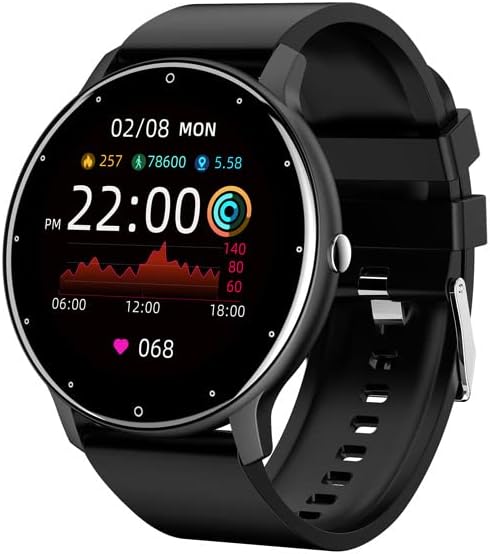
Image: Dafit ZL02CPRO Smart Watch with a black silicone band, showing a similar display with health metrics.

Image: A selection of over 100 stylish digital watch faces available for the Dafit ZL02CPRO Smart Watch, demonstrating customization options.
4. Setup Guide
4.1 Charging the Device
Before first use, fully charge your smart watch. Connect the magnetic charging cable to the charging points on the back of the watch and plug the USB end into a standard USB power adapter (not included) or a computer USB port. A full charge typically takes about 2 hours.
4.2 Downloading the App
To unlock the full functionality of your smart watch, download the companion application. Search for "Dafit" in your smartphone's app store (Google Play Store for Android or Apple App Store for iOS). The app supports Android 5.0 and above, and Apple iOS 9.0 or later.
4.3 Pairing with Your Smartphone
- Ensure your smart watch is charged and powered on.
- Enable Bluetooth on your smartphone.
- Open the Dafit app on your smartphone.
- Follow the in-app instructions to search for and connect to your ZL02CPRO watch. The app will guide you through the pairing process.
- Once paired, you can synchronize data, customize settings, and receive notifications.
5. Operating Instructions
5.1 Basic Navigation
- Touch Screen: Swipe left/right, up/down to navigate through menus and features. Tap to select.
- Side Button: Press to return to the home screen or wake the device. Long press for power options.
5.2 Bluetooth Call Function
After successful pairing, your watch can make and receive calls directly. Ensure the Bluetooth connection is stable and within 10 meters of your phone.
- Making Calls: Access the dial pad or contact list on the watch to initiate a call.
- Receiving Calls: When a call comes in, the watch will display the caller ID. Tap to answer or reject the call.
5.3 Notifications
Receive notifications for calls, SMS messages, and various app alerts directly on your watch. Enable desired app notifications within the Dafit app settings on your smartphone.
5.4 Music and Camera Control
- Music Control: Control music playback on your smartphone (play, pause, skip tracks) directly from your watch.
- Camera Remote: Use your watch as a remote shutter for your smartphone's camera.
6. Health Monitoring Features
The Dafit ZL02CPRO Smart Watch provides comprehensive health and fitness tracking capabilities:
- Activity Tracker: Monitors step number, calories burned, and distance traveled.
- Heart Rate Monitoring: Continuously tracks your heart rate throughout the day.
- Sleep Monitoring: Analyzes your sleep patterns, including deep sleep, light sleep, and awake times.
- Multi-Sport Modes: Supports various sport modes to track specific exercise data, including GPS movement track (requires smartphone GPS).
7. Smart Assistant Features
Beyond health tracking, your smart watch offers several convenient smart assistant functions:
- Weather Report: Get real-time weather updates.
- Sedentary Reminder: Alerts you when you've been inactive for too long.
- Alarm Clock: Set alarms directly from your watch.
- Stopwatch: A built-in stopwatch for timing activities.
- Brightness Adjustment: Adjust screen brightness for optimal viewing.
- Power-Saving Mode: Extend battery life when needed.
8. Water Resistance and Battery Life
8.1 IP68 Water Resistance
The Dafit ZL02CPRO Smart Watch is IP68 waterproof, meaning it is resistant to dust and can withstand immersion in water up to 1.5 meters for 30 minutes. It can be worn when washing hands or in the rain. Important: Do not use the watch in showers, saunas, hot tubs, or during diving, as steam and hot water can damage the device.
8.2 Battery Life
With a full charge, the watch can be used for approximately 5-7 days, depending on usage patterns and features enabled. Charging time is approximately 2 hours.
9. Maintenance
To ensure the longevity and proper functioning of your Dafit ZL02CPRO Smart Watch, follow these maintenance guidelines:
- Cleaning: Regularly wipe the watch screen and body with a soft, dry cloth. If necessary, use a slightly damp cloth and then dry thoroughly.
- Strap Care: Clean silicone straps with mild soap and water. For metal straps, use a soft brush to remove debris. Ensure straps are dry before wearing.
- Avoid Chemicals: Do not use harsh chemicals, cleaning solvents, or strong detergents, as they may damage the watch's finish or internal components.
- Storage: When not in use for extended periods, store the watch in a cool, dry place away from direct sunlight.
10. Troubleshooting
If you encounter issues with your Dafit ZL02CPRO Smart Watch, please refer to the following common solutions:
| Problem | Possible Solution |
|---|---|
| Watch does not turn on | Ensure the watch is fully charged. Connect to the charging cable and wait a few minutes before attempting to power on again. |
| Cannot pair with smartphone | Check that Bluetooth is enabled on your phone. Ensure the watch is within Bluetooth range (10m). Restart both the watch and your phone. Try unpairing and re-pairing through the Dafit app. |
| Notifications not received | Verify that notifications are enabled in the Dafit app settings for specific applications. Ensure the watch is connected via Bluetooth. Check your phone's notification settings. |
| Inaccurate health data | Ensure the watch is worn snugly on your wrist, about one finger's width above the wrist bone. Clean the sensor on the back of the watch. |
| Short battery life | Reduce screen brightness, disable continuous heart rate monitoring if not needed, and use power-saving mode. Limit frequent screen wake-ups. |
If the problem persists, please contact customer support for further assistance.
11. Specifications
Below are the technical specifications for the Dafit ZL02CPRO Smart Watch:
| Feature | Detail |
|---|---|
| Model | ZL02CPRO |
| Display Screen Type | TFT Screen |
| Screen Size | 1.28 Inches (Round Screen) |
| Connectivity Technology | Bluetooth |
| Wireless Communication Standard | Bluetooth |
| Operating System | Wear OS (compatible with Android 5.0+ / iOS 9.0+) |
| Battery Capacity | 230 Milliamp Hours |
| Battery Life | 5-7 days (typical usage) |
| Charging Time | Approx. 2 hours |
| Water Resistance | IP68 |
| Item Weight | 80 Grams (2.82 ounces) |
| GPS | GPS Via Smartphone |
| Supported Languages | Chinese, English, German, Spanish, French, Russian, Arabic, Ukrainian, Italian, Portuguese |
12. Warranty and Support
For warranty information, please refer to the documentation included with your purchase or contact the retailer. If you have any questions or require technical support, please reach out to the manufacturer's customer service. Contact details are typically available on the product packaging or the official brand website.