
1. Important Safety Instructions
Please read all safety instructions carefully before operating the Eastnmythet Automatic Self-Cleaning Cat Litter Box. Failure to follow these instructions may result in injury or damage to the product.
- This appliance is designed for use with cats weighing between 3 lbs (1.36 kg) and 17 lbs (7.7 kg) and over 6 months of age.
- Always place the litter box on a firm, level surface. Uneven surfaces can affect sensor accuracy and cleaning cycles.
- Do not immerse the main unit in water or other liquids. Clean only with a damp cloth.
- Ensure the power adapter is connected to a 110V power outlet.
- Keep children and pets away from the litter box during cleaning cycles. The machine is equipped with a safety transmitter and infrared sensors that will stop operation if a cat is detected nearby, but caution is always advised.
- Do not attempt to disassemble or repair the unit yourself. Contact customer support for assistance.
- Use only clumping cat litter as specified in the operating instructions. Non-clumping litter or other materials may cause malfunction.
- Regularly check the waste bin and empty it to prevent overflow and maintain hygiene.
2. Package Contents
Verify that all items listed below are included in your package:
- Automatic Cat Litter Box Unit x 1
- Power Adapter x 1
- Garbage Bag x 2
- Instruction Manual x 1
- Litter Pad x 1
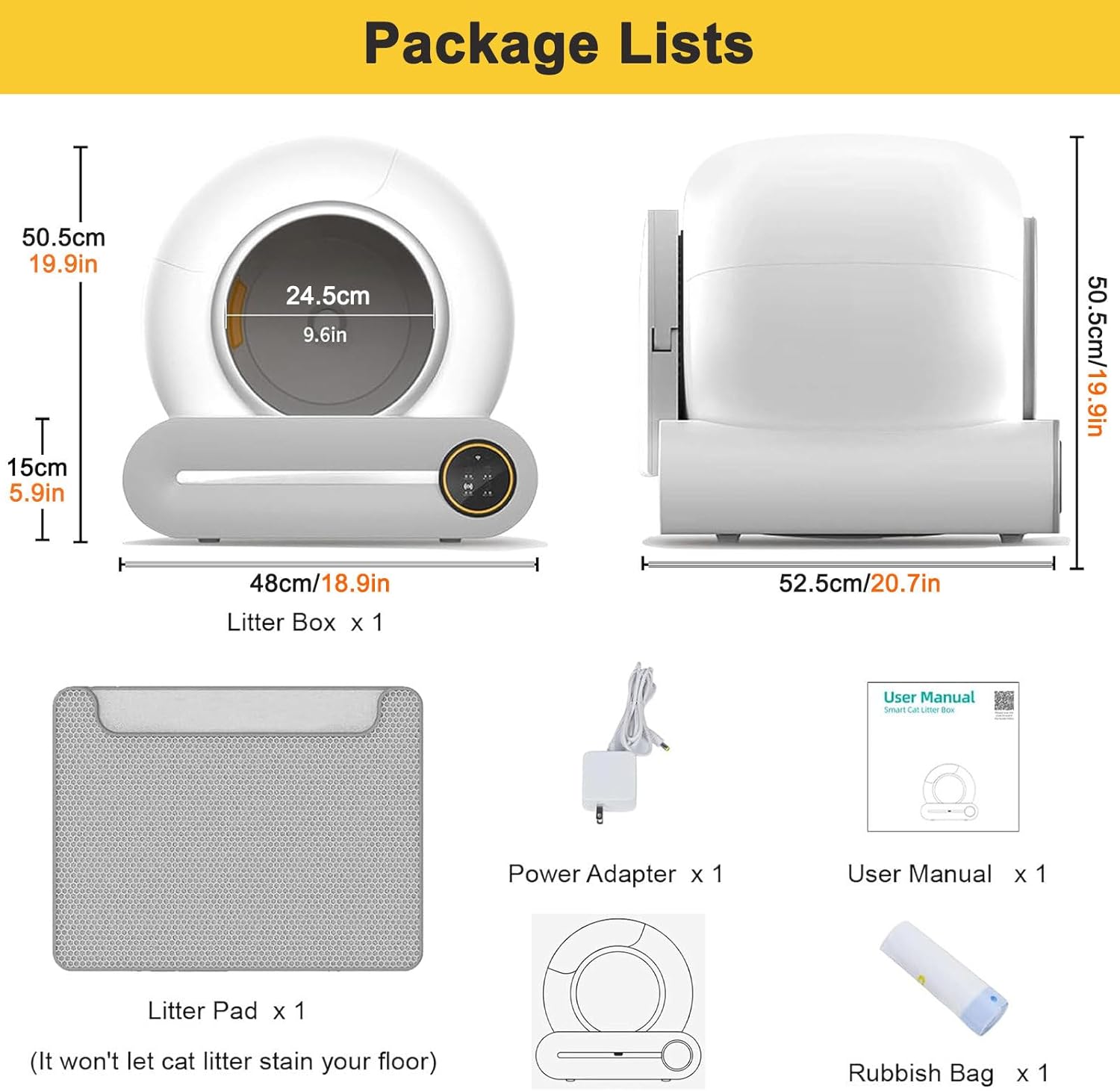
Image 2.1: Package Contents. This image displays the main litter box unit, power adapter, user manual, litter pad, and two garbage bags, illustrating what is included in the product package.
3. Product Overview
The Eastnmythet Automatic Self-Cleaning Cat Litter Box is designed to provide a convenient and hygienic solution for cat owners. It features a spacious interior, automated cleaning cycles, and smart app control.

Image 3.1: Eastnmythet Automatic Self-Cleaning Cat Litter Box. This image shows the overall design of the litter box, highlighting its spherical main compartment and the base with the control panel.
Key Features:
- Automatic Self-Cleaning: Eliminates the need for manual scooping, offering one-click cleaning and timed cleaning options.
- App Control: Monitor and control the litter box remotely via a smartphone application (2.4GHz Wi-Fi required). Track cat weight, usage frequency, and timing.
- Large Capacity: Features a 65L inner barrel space and a 9L waste collection bin, suitable for multiple cats and allowing up to 15 days of hands-free operation for one cat.
- Odor Removal System: Integrated ionic deodorizer system helps maintain a fresh environment.
- Multi-Safety Design: Equipped with an anti-pinch safety hatch, 4 sensors, malfunction sound reminders, and an infrared sensor to ensure pet safety during operation.
- Low Noise Operation: Designed to operate quietly, minimizing disturbance.

Image 3.2: Extra Large Space. This image highlights the generous dimensions and 65L capacity of the litter box, with a cat comfortably resting inside.
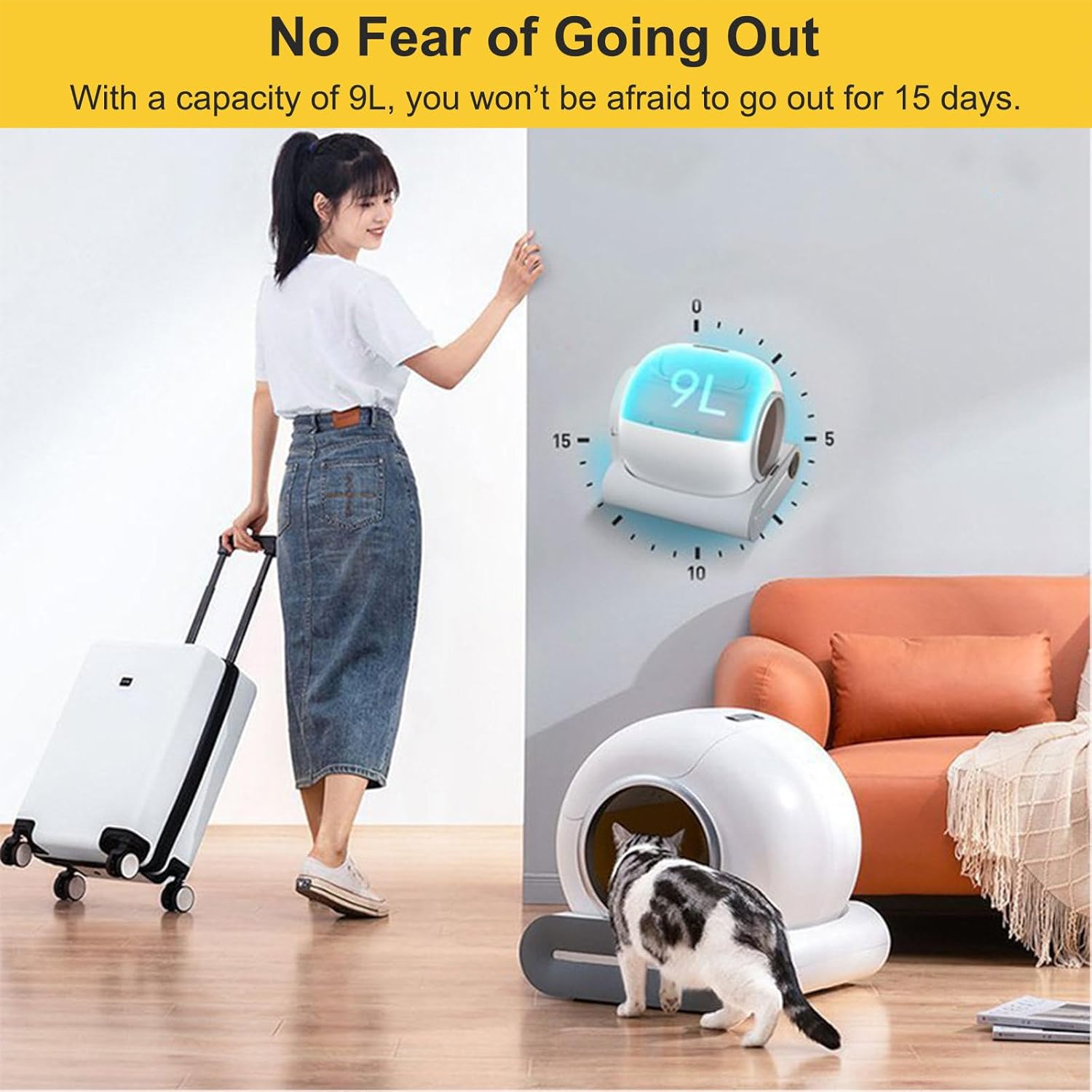
Image 3.3: 9L Waste Bin Capacity. This image visually represents the 9L waste bin, indicating it can hold waste for up to 15 days, ideal for owners who travel.
4. Setup
4.1 Placement
- Choose a stable, level surface for the litter box. Avoid placing it on soft carpets or uneven floors, as this can affect sensor performance.
- Ensure there is sufficient space around the unit for proper ventilation and access for cleaning.
- Place the litter box near a 110V power outlet.
4.2 Power Connection
- Connect the power adapter to the designated port on the back of the litter box.
- Plug the power adapter into a standard 110V electrical outlet.
- The unit will power on, and indicator lights on the control panel will illuminate.
4.3 Installing Waste Bag and Litter
- Open the waste bin compartment, typically located at the front or side of the base unit.
- Place a garbage bag (provided or similar size) inside the waste bin, ensuring it is properly seated and secured.
- Close the waste bin compartment securely.
- Open the main litter compartment.
- Pour clumping cat litter into the inner barrel. The litter level should be between the minimum and maximum fill lines indicated inside the barrel. Do not overfill.
- Close the main litter compartment.
5. Operating Instructions
5.1 Initial Operation
- Once powered on and litter is added, the unit will perform an initial calibration cycle.
- Allow your cat to use the litter box naturally. The unit will detect when your cat has exited and initiate a cleaning cycle after a preset delay (typically a few minutes).
5.2 Manual Cleaning
- To initiate a cleaning cycle manually, press the designated 'Clean' button on the control panel.
- The unit will rotate, sift the litter, and deposit waste into the waste bin.
- Ensure no cat is inside or near the unit during manual cleaning.
5.3 Replacing Litter
When it's time to replace all the litter, follow these steps:
- Press the 'Empty' or 'Sand Change' button on the control panel. This will rotate the inner barrel to empty all litter into the waste bin.
- Once the litter is emptied, remove the waste bin and dispose of the used litter and bag.
- Replace with a new garbage bag in the waste bin.
- Pour fresh clumping cat litter into the inner barrel, ensuring it is between the fill lines.

Image 5.1: Click to Change the Sand. This image illustrates the four steps for easily changing the cat litter: initiating the empty cycle, removing the waste bag, replacing the bag, and adding new litter.
6. App Control
The Eastnmythet Automatic Self-Cleaning Cat Litter Box can be controlled and monitored via a smartphone application.
6.1 App Download and Installation
- Scan the QR code provided in the quick start guide or search for the 'Eastnmythet' app in your device's app store.
- Download and install the application on your smartphone.
6.2 Connecting to Wi-Fi
- Ensure your smartphone is connected to a 2.4GHz Wi-Fi network. The app does not support 5GHz networks.
- Open the app and follow the on-screen instructions to add a new device.
- The app will guide you through the pairing process, which typically involves putting the litter box into pairing mode (refer to the app or quick start guide for specific button presses).
6.3 App Functions
Once connected, the app allows you to:
- Remote Control: Initiate automatic cleaning, timed cleaning, or manual cleaning cycles from anywhere.
- Monitoring: View real-time data such as cat weight, frequency of use, and duration of visits.
- Odor Removal: Activate the ionic deodorizer system.
- Empty Litter: Command the unit to empty all litter for replacement.
- Notifications: Receive alerts for waste bin full, malfunctions, or other important status updates.

Image 6.1: App Binding Intelligent Monitoring. This image demonstrates the remote control capabilities of the app, showing a user interacting with the litter box's functions and monitoring cat data.
7. Maintenance and Cleaning
Regular maintenance ensures optimal performance and hygiene of your litter box.
7.1 Emptying the Waste Bin
- The app will notify you when the waste bin is full, or you can check the indicator light on the control panel.
- Open the waste bin compartment, remove the full garbage bag, and dispose of it.
- Insert a new garbage bag and close the compartment securely.
7.2 Cleaning the Inner Barrel
The inner barrel can be easily removed for thorough cleaning:
- Ensure the unit is powered off and unplugged.
- Follow the instructions to unlock and remove the inner barrel from the main unit.
- The inner barrel can be washed with water and mild detergent. Rinse thoroughly and ensure it is completely dry before reassembling.
- Reinstall the inner barrel, ensuring it clicks securely into place.

Image 7.1: Quick Disassembly Easy Cleaning. This image demonstrates how the inner barrel can be quickly removed for washing and how the base unit can be wiped clean.
7.3 General Cleaning
- Wipe the exterior of the unit with a damp cloth. Do not use abrasive cleaners or immerse the unit in water.
- Clean the sensors regularly with a soft, dry cloth to ensure accurate detection.
8. Troubleshooting
If you encounter issues with your Eastnmythet Automatic Self-Cleaning Cat Litter Box, refer to the following common problems and solutions:
| Problem | Possible Cause | Solution |
|---|---|---|
| Unit not powering on | Power adapter not connected; Power outlet issue | Ensure power adapter is securely plugged into both the unit and a working 110V outlet. |
| Cleaning cycle not starting automatically | Cat still inside or near unit; Sensors obstructed; Litter level incorrect | Ensure cat has completely exited. Clean sensors. Check litter level and adjust if necessary. |
| App not connecting to unit | Incorrect Wi-Fi frequency; Incorrect pairing process | Ensure phone is connected to a 2.4GHz Wi-Fi network. Re-attempt pairing following app instructions. Restart both phone and litter box. |
| Litter not sifting properly | Litter type incompatible; Litter too wet/sticky; Inner barrel not installed correctly | Use only clumping cat litter. Ensure litter is dry. Reinstall inner barrel securely. |
| Malfunction sound reminders | Sensor error; Overload; Obstruction | Check for obstructions. Clean sensors. Power cycle the unit (unplug and plug back in). If persistent, contact support. |
9. Specifications
| Feature | Specification |
|---|---|
| Product Name | Automatic Self-Cleaning Cat Litter Box |
| Applicable Cats | More than 6 months old, weighing 3 lbs to 17 lbs (1.36 kg to 7.7 kg) |
| Inner Barrel Space | 65 Liters |
| Waste Storage Space | 9 Liters |
| Connection Method | 2.4GHz Wi-Fi |
| Power Input | 110V |
| Package Dimensions | 22.83 x 21.46 x 20.67 inches (58 x 54.5 x 52.5 cm) |
| Item Weight | 20.9 pounds (9.48 kg) |
| Manufacturer | Eastnmythet |
10. Warranty and Support
For warranty information or technical support, please refer to the contact details provided with your purchase or visit the official Eastnmythet website. Please have your product model number and purchase date available when contacting support.