
Xiaomi VHU4737EU
Xiaomi Redmi Pad Pro User Manual
Model: VHU4737EU
1. Introduction
Thank you for choosing the Xiaomi Redmi Pad Pro. This tablet is designed to provide an immersive and powerful experience with its 12.1-inch display, long-lasting battery, and robust performance. This manual will guide you through the setup, operation, and maintenance of your device to ensure optimal use.

Figure 1.1: Xiaomi Redmi Pad Pro. This image displays the tablet from both the front, highlighting its large screen, and the back, showing the camera setup.
2. Safety Information
Please read all safety information carefully before using your device to ensure safe and proper operation and to learn how to dispose of the product properly.
- Battery Safety: Do not disassemble, impact, crush, or throw the battery into fire. Avoid high temperatures or direct sunlight.
- Charging: Use only approved chargers and cables. Unplug the charger once the device is fully charged.
- Water and Moisture: Keep the device dry. Do not expose it to water or high humidity.
- Disposal: Dispose of this product responsibly. Do not dispose of it with household waste. Refer to local regulations for proper electronic waste disposal.
3. Package Contents
Ensure all items are present in your product package:
- Xiaomi Redmi Pad Pro Tablet
- USB Type-C Cable
- Power Adapter (may vary by region)
- Quick Start Guide
- Warranty Card
4. Device Overview
Familiarize yourself with the physical components of your Redmi Pad Pro.

Figure 4.1: Device Dimensions and Screen Size. This image illustrates the physical dimensions of the tablet, including its width (280.0 mm), height (181.9 mm), and thickness (7.5 mm), along with the 12.1-inch screen size.
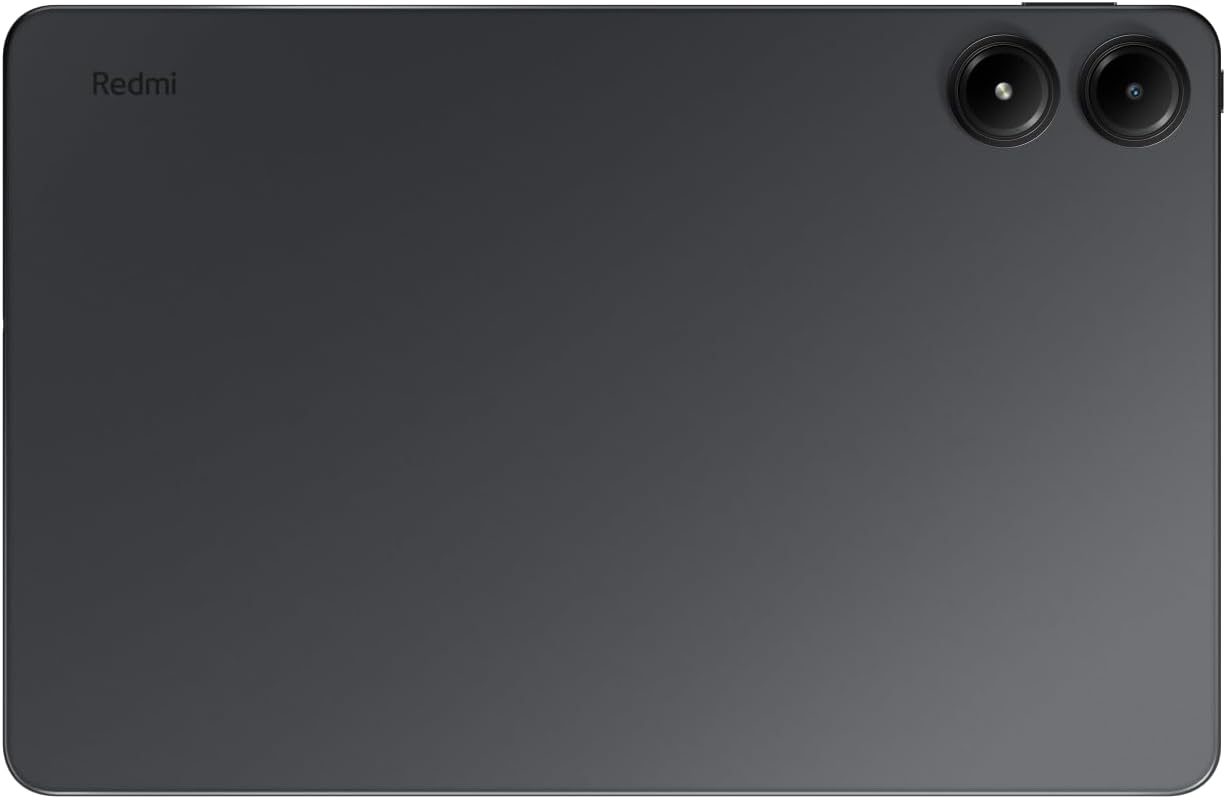
Figure 4.2: Rear View. This image shows the back of the tablet, featuring the Redmi branding and the dual camera system.
Key Components:
- Display: 12.1-inch 2.5K (2560 x 1600 pixels) LCD with 120Hz refresh rate.
- Cameras: 8MP rear camera, 8MP front camera.
- Speakers: Four Dolby Atmos speakers for immersive audio.
- Ports: USB Type-C port for charging and data transfer, 3.5mm headphone jack.
- Buttons: Power button, Volume buttons.
- Card Slot: MicroSD card slot for expandable storage up to 1.5TB.
5. Setup
5.1 Initial Charging
Before first use, it is recommended to fully charge your Redmi Pad Pro. Connect the USB Type-C cable to the tablet's charging port and the other end to the power adapter. Plug the adapter into a power outlet. The battery indicator on the screen will show charging progress.
The tablet supports 33W fast charging.
5.2 Powering On/Off
- To Power On: Press and hold the Power button until the Xiaomi logo appears.
- To Power Off: Press and hold the Power button until the power menu appears, then select "Power off".
- To Restart: Press and hold the Power button until the power menu appears, then select "Restart".
5.3 Initial Setup Wizard
Upon first power-on, the tablet will guide you through an initial setup process. This includes:
- Selecting your language.
- Connecting to a Wi-Fi network.
- Signing in with your Google account.
- Setting up screen lock (PIN, pattern, password, or facial recognition).
- Reviewing and accepting terms and conditions.
6. Operating Instructions
6.1 Display and Navigation
The 12.1-inch display offers a 2.5K resolution and a 120Hz refresh rate for smooth visuals. Navigation is primarily touch-based.
- Tap: Select an item or open an application.
- Swipe: Scroll through pages or lists.
- Pinch-to-Zoom: Zoom in or out on images or web pages.
- Long Press: Access contextual menus or move icons.

Figure 6.1: Core Features Overview. This image highlights the tablet's main features, including its high-resolution, high-refresh-rate display, the Xiaomi HyperOS, the large 10000mAh battery, the Snapdragon 7s Gen 2 processor, and the quad Dolby Atmos speaker system.
6.2 Connectivity
- Wi-Fi: Go to Settings > Network & internet > Wi-Fi to connect to available networks. The tablet supports Wi-Fi 6 (802.11ax) for fast internet access.
- Bluetooth: Go to Settings > Connected devices > Bluetooth to pair with Bluetooth devices like headphones or keyboards.
6.3 Camera Usage
The Redmi Pad Pro features an 8MP rear camera and an 8MP front camera. Open the Camera app to capture photos and videos.
- Switch Cameras: Tap the camera icon to switch between front and rear cameras.
- Modes: Select different modes like Photo, Video, Portrait, etc.
- Settings: Adjust resolution, timer, and other camera settings.
6.4 Storage Management
Your tablet comes with 128GB of internal storage. You can expand this storage up to 1.5TB using a microSD card.
- Insert MicroSD Card: Locate the card slot on the side of the tablet. Gently insert the microSD card until it clicks into place.
- Manage Storage: Go to Settings > Storage to view storage usage and manage files.

Figure 6.2: Design and Connectivity Features. This image details the tablet's premium monocoque metal design, the inclusion of a 3.5mm headphone jack, support for Wi-Fi 6, the capability for up to 1.5TB of expandable storage, and the specifications of its 8MP front and rear cameras.
6.5 Interconnectivity Features
The Redmi Pad Pro, running on Xiaomi HyperOS, offers enhanced interconnectivity with other Xiaomi devices.

Figure 6.3: Interconnectivity Features. This image demonstrates various ways the tablet can connect and interact with other devices, including extended home screen functionality, synchronized networks, collaborative content sharing, and integration with the Xiaomi Smart Hub.
- Home Screen+: Extend your phone's home screen to the tablet for a larger view.
- Sync Networks: Seamlessly share network connections between devices.
- Collaboration: Share and edit content across your Xiaomi devices.
- Xiaomi Smart Hub: Centralized control for your smart home devices.
7. Maintenance
7.1 Cleaning Your Device
To clean your tablet, use a soft, lint-free cloth. For stubborn smudges, slightly dampen the cloth with water or a screen cleaner. Avoid using harsh chemicals or abrasive materials.
7.2 Software Updates
Xiaomi regularly releases software updates to improve performance, add features, and enhance security. To check for updates, go to Settings > About tablet > MIUI version (or Android version) and tap "Check for updates." Ensure your device is connected to Wi-Fi and has sufficient battery before starting an update.
8. Troubleshooting
| Problem | Possible Solution |
|---|---|
| Device does not power on. | Ensure the battery is charged. Connect the charger and wait a few minutes before attempting to power on again. |
| Screen is unresponsive. | Perform a forced restart by pressing and holding the Power button for about 10-15 seconds. |
| Cannot connect to Wi-Fi. | Check if Wi-Fi is enabled in settings. Restart your router. Forget the network and reconnect. |
| Apps are crashing or freezing. | Clear the app's cache (Settings > Apps > [App Name] > Storage > Clear cache). If the issue persists, reinstall the app or perform a factory reset (backup data first). |
| Battery drains quickly. | Reduce screen brightness, close background apps, disable unnecessary features like GPS or Bluetooth when not in use. Check battery usage in settings to identify power-hungry apps. |
9. Specifications
| Feature | Detail |
|---|---|
| Brand | Xiaomi |
| Model Name | REDMI PAD PRO 6+ 128 |
| Model Number | VHU4737EU |
| Color | Grey |
| Operating System | Android 14 (with Xiaomi HyperOS) |
| Processor | Qualcomm Snapdragon 7s Gen 2 |
| RAM | 6 GB |
| Internal Storage | 128 GB |
| Expandable Storage | Up to 1.5 TB via MicroSD |
| Screen Size | 12.1 Inches |
| Screen Resolution | 2560 x 1600 pixels (2.5K) |
| Refresh Rate | 120 Hz |
| Rear Camera | 8 Megapixels |
| Front Camera | 8 Megapixels |
| Graphics Chipset | Qualcomm Integrated |
| Wireless Connectivity | Wi-Fi 6 (802.11ax), Bluetooth |
| Battery Capacity | 10000 mAh (Lithium-polymer) |
| Battery Life | Up to 12 hours (video playback), Up to 33.9 days (standby) |
| Dimensions (L x W x H) | 28 x 18 x 0.7 cm |
| Weight | 840 grams |
| Special Features | Immersive 12.1-inch screen with 4 speakers, Exceptional battery life |

Figure 9.1: Key Performance and Design Features. This infographic provides a quick overview of the tablet's high-performance display, extended battery life for video playback and standby, large expandable storage, powerful Snapdragon processor, efficient HyperOS, and its slim, lightweight design.
10. Warranty and Support
For warranty information, please refer to the warranty card included in your product package. For technical support, visit the official Xiaomi website or contact their customer service.
Information regarding software updates is not available for a guaranteed period. Availability of spare parts is also not available.

Figure 10.1: Repairability Index. This document indicates the repairability score for the Xiaomi Redmi Pad Pro, which is 7.7 out of 10, reflecting aspects like documentation availability, ease of disassembly, and spare parts availability.
Related documentsVHU4737EU


Ask a question about this manual
Ask about setup, troubleshooting, compatibility, parts, safety, or missing instructions. Manuals+ will review the question and use this page’s manual context to help answer it.