
Product Overview
The JINSHANGZI D18 Smartwatch is a versatile wearable device designed to help you monitor your health and stay connected. It features a heart rate monitor, pedometer, sleep tracker, and provides notifications for calls, messages, and social media. This manual will guide you through the setup, operation, and maintenance of your smartwatch.

Image: JINSHANGZI D18 Smartwatch displaying various features such as step count, moving distance, WhatsApp, phone finder, Facebook, heart rate, blood pressure testing, sedentary reminder, calories, phone reminder, sleep monitoring, alarm clock, Bluetooth, weather display, and information notifications.
Setup
1. Charging the Smartwatch
Before initial use, fully charge your D18 Smartwatch. The device features a built-in USB charging connector. Simply remove one side of the strap to reveal the USB plug and insert it into any standard USB port (e.g., computer, USB wall adapter).
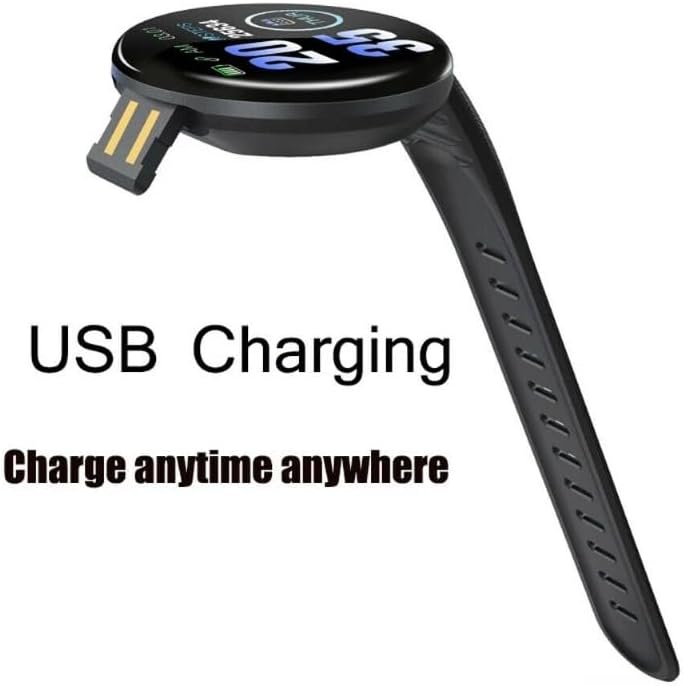
Image: The D18 Smartwatch with its strap detached to reveal a USB connector for direct charging.
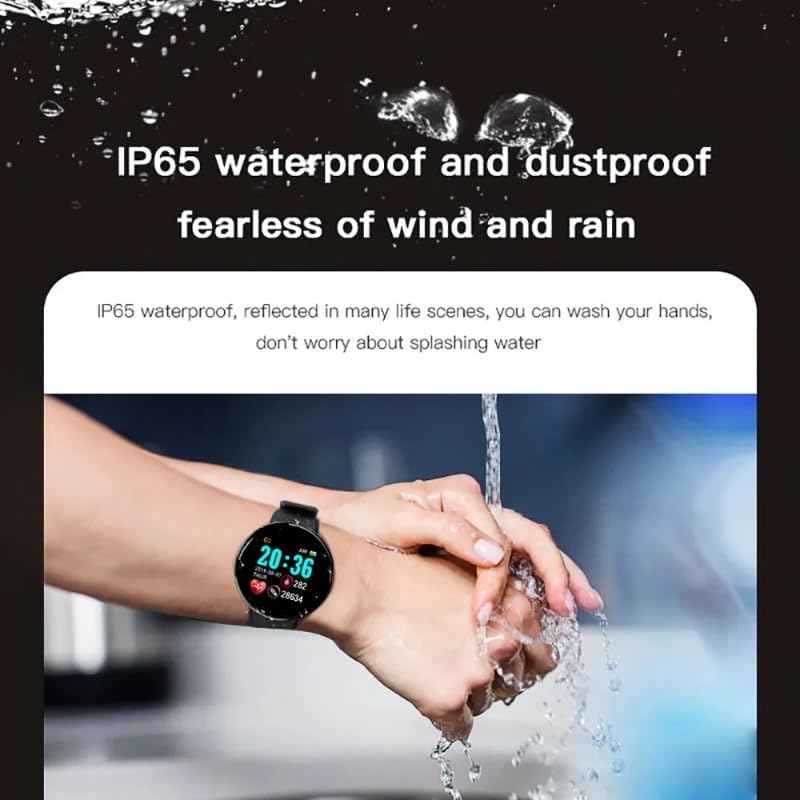
Image: The D18 Smartwatch plugged into a USB wall adapter, showing the charging indicator on its screen.
- Charging time: Approximately 2-3 hours for a full charge.
- Operating time: Approximately 2-3 days on a full charge.
- Standby time: Approximately 5-7 days.
2. App Installation and Pairing
To unlock the full functionality of your smartwatch, you need to install the companion application on your smartphone.
- Download the App: Search for the application named "FitPro" in your smartphone's app store (Google Play Store for Android, Apple App Store for iOS).
- Install and Open: Install the app and open it. Grant any necessary permissions requested by the app.
- Enable Bluetooth: Ensure Bluetooth is enabled on your smartphone.
- Pair the Device: In the FitPro app, navigate to the device binding section (usually labeled "Device" or "Mine"). The app will scan for available devices. Select "D18" or a similar identifier to connect.
- Confirm Pairing: Follow any on-screen prompts on both your phone and smartwatch to confirm the pairing.
The smartwatch is compatible with iOS 9.0 and above, and Android 5.0 and above.
Operating Instructions
Basic Navigation
- Power On/Off: Press and hold the touch button (usually at the bottom of the screen) to power on or off.
- Screen Activation: Raise your wrist or tap the touch button to wake the screen.
- Menu Navigation: Tap the touch button to cycle through different functions and menus.
- Selection/Confirmation: Press and hold the touch button to select an option or confirm an action.
Key Features
- Heart Rate Monitoring: The smartwatch continuously monitors your heart rate. Access this feature from the main menu to view real-time data. For accurate readings, ensure the watch is snug on your wrist.
- Activity Tracking (Pedometer): Tracks your steps, distance, and calories burned throughout the day. This data is synchronized with the FitPro app for detailed analysis.
- Sleep Monitoring: Automatically monitors your sleep patterns, including deep sleep, light sleep, and wake-up times. View your sleep quality reports in the FitPro app.
- Notifications: Receive alerts for incoming calls, SMS messages, and notifications from social media applications (e.g., WhatsApp, Facebook, Skype). Enable these notifications in the FitPro app settings.
- Alarm Clock: Set alarms through the FitPro app, and your smartwatch will vibrate to alert you.
- Sedentary Reminder: The watch can remind you to move after periods of inactivity. Configure this feature in the FitPro app.
- Remote Camera Control: Use your smartwatch as a remote shutter for your smartphone camera. Activate this feature in the FitPro app and shake your wrist or tap the watch to take a photo.
- Find Your Phone: If your phone is misplaced within Bluetooth range, use this feature on your smartwatch to make your phone ring.
Maintenance
Water Resistance
The D18 Smartwatch has an IP67 water resistance rating. This means it is protected against dust and can withstand immersion in water up to 1 meter for 30 minutes. It is suitable for daily use like washing hands or light rain exposure.

Image: A D18 Smartwatch on a wrist under running water, illustrating its water resistance. Note: The product description states IP67, while the image text states IP65. Please refer to the product specifications for the most accurate rating.
Important:
- Do not wear the smartwatch while swimming or bathing, as prolonged exposure to water pressure or hot water can damage the device.
- Avoid contact with hot water, steam, or corrosive liquids.
Cleaning
Regularly clean your smartwatch and strap to prevent skin irritation and maintain optimal performance.
- Wipe the screen and body with a soft, damp cloth.
- For the strap, use mild soap and water, then rinse thoroughly and dry completely before wearing.
- Avoid using harsh chemicals or abrasive materials.
Troubleshooting
- Smartwatch not turning on: Ensure the device is fully charged. Connect it to a USB power source for at least 30 minutes.
- Unable to pair with phone:
- Ensure Bluetooth is enabled on your phone.
- Make sure the smartwatch is within Bluetooth range (typically 10 meters).
- Restart both your phone and the smartwatch.
- Check if the FitPro app has all necessary permissions.
- If previously paired, try unpairing from your phone's Bluetooth settings and then re-pairing through the FitPro app.
- Inaccurate heart rate/step count: Ensure the smartwatch is worn snugly on your wrist, not too tight or too loose. Avoid excessive movement during measurements.
- Notifications not received:
- Verify that notifications are enabled in the FitPro app for the desired applications.
- Check your phone's notification settings to ensure the FitPro app is allowed to send notifications.
- Ensure the smartwatch is connected to your phone via Bluetooth.
Specifications
| Model Number | D18 |
| Display Type | Digital, 1.44 inches |
| Case Material | Plastic |
| Bluetooth Version | 4.0 |
| Battery Capacity | 90mAh |
| Operating Time | Approx. 2-3 days |
| Standby Time | Approx. 5-7 days |
| Water Resistance | IP67 (Do not wear while swimming or bathing) |
| App Name | FitPro |
| Compatibility | iOS 9.0 and above, Android 5.0 and above |
| Removable Strap | Yes |
| Touchscreen | Yes |
Support
For further assistance or inquiries, please refer to the contact information provided with your purchase or visit the official JINSHANGZI support channels.