
1. Introduction and Compatibility
This manual provides essential information for the Generic brand replacement remote control. This remote is designed to function with specific Vissani and Samsung Window Portable Air Conditioner models. It is an infrared (IR) replacement remote.
Important Compatibility Note: Please ensure your current remote control is identical in appearance to the remote shown in this manual. This replacement remote may not offer all functions present on your original remote. If your specific air conditioner model number is not listed in the product title, compatibility cannot be guaranteed, and it is advised not to purchase this replacement.
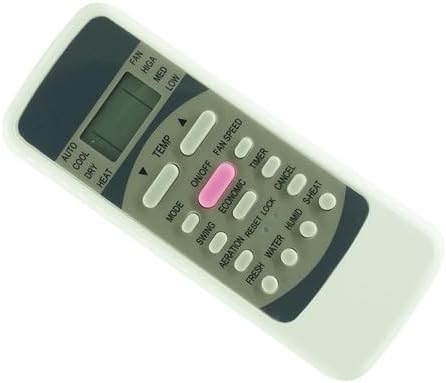
Image 1: Front view of the Generic replacement remote control. This image displays the layout of all buttons and the LCD screen, which shows current settings like mode, fan speed, and temperature.
2. Setup: Battery Installation
The remote control requires two (2) AA batteries for operation. Batteries are not included with the remote.
- Locate the battery compartment on the back of the remote control.
- Slide the battery compartment cover downwards or press the latch and lift to open.
- Insert two AA batteries, ensuring the positive (+) and negative (-) terminals align correctly with the markings inside the compartment. Incorrect insertion can prevent the remote from functioning.
- Replace the battery compartment cover by sliding it back into place until it clicks securely.

Image 2: Back view of the remote control with the battery cover removed. This image clearly shows the two slots for AA batteries and the spring contacts for proper battery placement.
3. Operating Instructions
Point the remote control directly at the infrared receiver on your air conditioner unit. Ensure there are no obstructions between the remote and the unit.
- ON/OFF Button: Press this button (often pink or centrally located) to power the air conditioner on or off.
- MODE Button: Cycles through various operating modes such as AUTO, COOL, DRY, HEAT, and FAN. The current mode is typically displayed on the remote's LCD screen.
- TEMP Buttons (▲/▼): Use these arrow buttons to increase or decrease the desired temperature setting.
- FAN SPEED Button: Adjusts the fan speed (e.g., LOW, MED, HIGH, AUTO).
- TIMER Button: Used to set a timer for the air conditioner to turn on or off automatically. Refer to your air conditioner's manual for specific timer programming details.
- SWING Button: Controls the oscillation of the air conditioner's louvers.
- ECONOMIC Button: Activates an energy-saving mode, if supported by your air conditioner.
- AERATION / FRESH / WATER / HUMID / S-HEAT Buttons: These buttons control specific functions related to air quality, humidity, or specialized heating, depending on your air conditioner model. Their functionality may vary or be unsupported by all compatible units.
- RESET / LOCK / CANCEL Buttons: These buttons are typically used for resetting settings, locking the remote to prevent accidental changes, or canceling active functions.
4. Maintenance
- Battery Replacement: Replace batteries when the remote's range decreases or it stops responding. Always replace both batteries at the same time with new ones of the same type.
- Cleaning: Wipe the remote control with a soft, dry cloth. Do not use liquid cleaners or abrasive materials, as they may damage the remote's surface or internal components.
- Storage: If the remote will not be used for an extended period, remove the batteries to prevent leakage and potential damage.
5. Troubleshooting
- Remote Not Responding:
- Check if the batteries are inserted correctly with the correct polarity.
- Replace old batteries with new ones.
- Ensure there is a clear line of sight between the remote's infrared emitter and the air conditioner's receiver.
- Verify that the remote is compatible with your specific air conditioner model.
- Some Functions Do Not Work: This replacement remote may not have all the exact functions or button mappings as your original remote. Refer to your air conditioner's original manual for its full capabilities.
- Intermittent Operation: This could indicate low battery power or interference. Try replacing batteries or moving closer to the air conditioner unit.
6. Specifications
| Brand | Generic |
| Manufacturer | Easytry |
| Compatible Devices | Air Conditioner (Vissani VAP09R1AWT, Samsung AR09TGHQABUNME, AR12TGHQABUNME, AR09TGHQABU, AR12TGHQABU) |
| Power Source | 2 x AA Batteries (not included) |
| Special Feature | Infrared Replacement Remote, Ergonomic Design |
| Color | Black |
7. Warranty and Support
This product is a replacement remote control. Specific warranty information should be obtained from the seller at the time of purchase. For any doubts or issues not covered in this manual, please contact the seller directly for assistance.