
Introduction
This manual provides comprehensive instructions for the Generic GB289WJSA replacement remote control. Designed to function as a direct replacement for your original Aquos TV remote, it offers full access to all standard television functions. Please read this manual carefully before use to ensure proper operation and longevity of your device.

Image: The GB289WJSA remote control being held, with a television screen visible in the background, illustrating its intended use.
Product Features
- Full Functionality: This replacement remote covers all functions of the original remote control, providing complete access to all buttons and features.
- Direct Replacement: Ideal for replacing lost or damaged original TV remote controls.
- Premium Material: Constructed from high-quality ABS material, ensuring durability, abrasion resistance, and a comfortable grip.
- Logical Button Layout: All buttons are arranged in an intuitive and user-friendly layout for easy navigation and operation.
Setup
1. Installing Batteries
The remote control requires two AAA batteries (not included). Follow these steps to install them:
- Locate the battery compartment cover on the back of the remote control.
- Press down on the tab and slide the cover downwards to open the compartment.
- Insert two AAA batteries, ensuring the positive (+) and negative (-) terminals align correctly with the markings inside the compartment.
- Slide the battery compartment cover back into place until it clicks securely.

Image: A close-up view of the remote control's open battery compartment, showing the correct orientation for inserting two AAA batteries.
Note: Batteries are not included with the remote control. Always use new batteries for optimal performance.
Operating Instructions
Once batteries are installed, the remote control is ready for immediate use with compatible Aquos TV models. No programming is required.
Basic Functions:
- Power Button (POWER): Press to turn the TV on or off.
- Volume Control (VOL +/-): Press '+' to increase volume, '-' to decrease volume.
- Channel Control (CH ^/v): Press '^' to go to the next channel, 'v' to go to the previous channel.
- Mute Button (Mute icon): Press to mute or unmute the TV sound.
- Navigation Buttons (Arrows, ENTER): Use the arrow keys to navigate menus and the 'ENTER' button to confirm selections.
- Number Buttons (0-9): Use to directly input channel numbers or other numerical selections.
- AV MODE: Switches between different input sources (e.g., HDMI, AV).
- SUPER ECO: Activates or deactivates the TV's super eco mode for power saving.

Image: A detailed view of the top portion of the remote control, highlighting the power button, numerical keypad, and input/eco mode buttons.
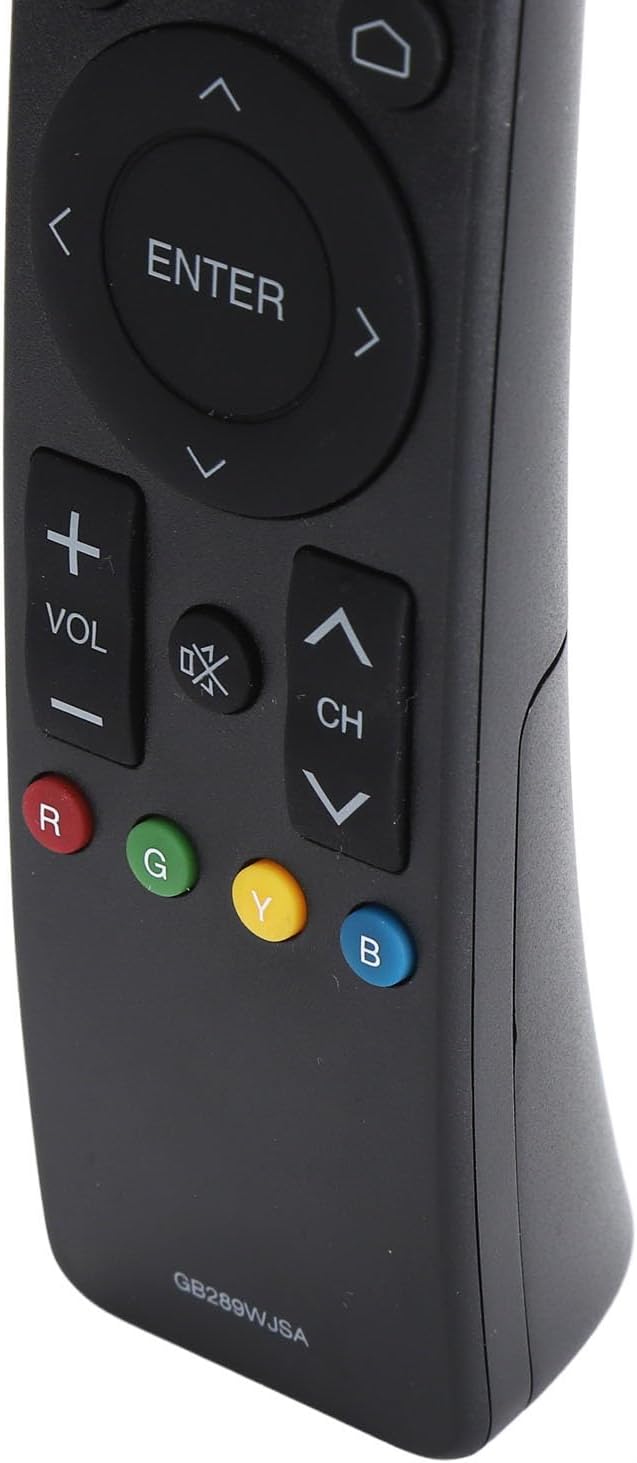
Image: A detailed view of the bottom portion of the remote control, showing the volume and channel controls, along with the colored function buttons (Red, Green, Yellow, Blue).
Compatible TV Models
This remote control is compatible with the following Aquos TV models:
- 2T C40AE1X
- 2T C45AE1X
- 2T C50AE1X
- LC60UA6500X
- LC40SA5500X
- LC50UA6500X
- LC40LE380X
- LC32SA4500X
- LC50UA440X
- 4T C42AH1X
- 4T C50AH1X
- 4T C50AH8X
- 4T C50AH
If your TV model is not listed, please verify compatibility with the product description or contact customer support.
Maintenance
Cleaning:
To clean the remote control, use a soft, dry cloth. For stubborn dirt, lightly dampen the cloth with water or a mild, non-abrasive cleaner. Avoid using harsh chemicals or abrasive materials, as these can damage the remote's surface or internal components.
Battery Replacement:
Replace batteries when the remote's response becomes sluggish or stops working. Always replace both batteries at the same time with new AAA batteries. Do not mix old and new batteries, or different types of batteries.
Storage:
When not in use for extended periods, remove the batteries to prevent leakage, which can damage the remote control. Store the remote in a cool, dry place away from direct sunlight and extreme temperatures.
Troubleshooting
- Remote not responding:
- Check if the batteries are inserted correctly with the correct polarity (+/-).
- Replace the batteries with new ones.
- Ensure there are no obstructions between the remote control and the TV's infrared receiver.
- Make sure you are within the effective operating range of the TV.
- Specific buttons not working:
- This could indicate a faulty button or internal issue. Try cleaning around the button in case of debris.
- If the issue persists after replacing batteries, the remote may need to be replaced.
- TV not responding to any remote:
- Ensure the TV is powered on and not in standby mode.
- Check the TV's own power button.
- If the TV is unresponsive to both the original and replacement remote, there might be an issue with the TV's IR receiver.
Specifications
| Feature | Detail |
|---|---|
| Product Type | TV Remote Control |
| Model | GB289WJSA |
| Material | ABS |
| Power Source | 2 x AAA Batteries (not included) |
| Compatibility | Aquos TV models (e.g., 2T C40AE1X, LC60UA6500X, 4T C50AH) |
| Package Includes | 1 x TV Remote Control |