
RG51i38/BGCEFU-01, KSTHW08A, KSTHW12A, KPN1-12CRN1-BH9, 2033550B0936, 17317000A04236, 17317000000100, 203355091490, RG51
Generic Remote Control User Manual
Model: RG51i38/BGCEFU-01, KSTHW08A, KSTHW12A, KPN1-12CRN1-BH9, 2033550B0936, 17317000A04236, 17317000000100, 203355091490, RG51B1/EU, KSTAP14B
Introduction
This user manual provides detailed instructions for the operation and maintenance of your new Generic Remote Control for Keystone Air Conditioners. Please read this manual thoroughly before use to ensure proper functionality and to prevent damage.
This remote control is designed as a direct replacement for specific Keystone Air Conditioner models, including RG51i38/BGCEFU-01, KSTHW08A, KSTHW12A, KPN1-12CRN1-BH9, 2033550B0936, 17317000A04236, 17317000000100, 203355091490, RG51B1/EU, and KSTAP14B. Ensure your original remote matches the appearance of this replacement for full compatibility.
Setup
1. Battery Installation
The remote control requires two (2) AA batteries (not included).
- Locate the battery compartment on the back of the remote control.
- Slide the battery compartment cover downwards to open it.
- Insert two AA batteries, ensuring the positive (+) and negative (-) terminals align correctly with the markings inside the compartment.
- Slide the battery compartment cover back into place until it clicks securely.

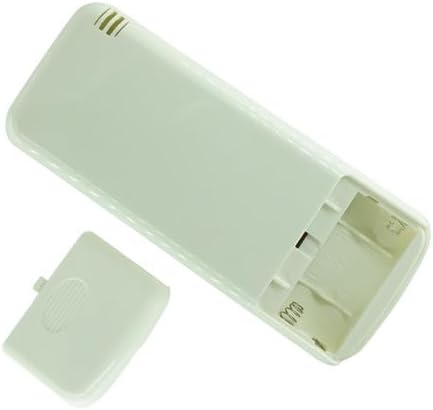
2. Initial Pairing (Not Required for IR Remotes)
This remote control operates using Infrared (IR) technology and does not require pairing with your air conditioner. It functions by emitting specific IR signals that your air conditioner recognizes. Simply point the remote at the air conditioner's IR receiver and press the desired function button.
Operating Instructions
Familiarize yourself with the buttons and their functions on the remote control. The layout is designed for intuitive use with compatible Keystone air conditioners.


Button Functions
| Button | Function |
|---|---|
| ON/OFF (Pink Button) | Powers the air conditioner on or off. |
| MODE | Cycles through operating modes: AUTO, COOL, DRY, HEAT (if applicable). |
| TEMP ▲ / ▼ | Adjusts the target temperature up or down. |
| FAN SPEED | Adjusts fan speed: HIGH, MED (Medium), LOW. |
| SWING | Activates or deactivates the automatic louver swing function. |
| ECONOMIC | Activates or deactivates energy-saving mode. |
| TIMER | Sets the timer for automatic on/off operations. Refer to your air conditioner's manual for specific timer programming. |
| AERATION | Controls the aeration or fresh air intake function (if supported by AC unit). |
| RESET LOCK | Resets settings or locks the remote to prevent accidental changes. |
| CANCEL | Cancels current timer settings or other active functions. |
| FRESH | Activates or deactivates the fresh air function. |
| WATER | Function related to water management (e.g., dehumidifier mode, if applicable). |
| HUMID | Activates or deactivates humidification/dehumidification function. |
| S-HEAT | Activates or deactivates supplementary heating function. |
Note: Not all functions may be available on every air conditioner model. The remote control transmits signals for these functions, but the air conditioner must support them to respond.
Maintenance
Cleaning the Remote Control
- Wipe the surface of the remote control with a soft, dry cloth.
- For stubborn dirt, slightly dampen the cloth with water and a mild detergent, then wipe dry immediately.
- Do not use abrasive cleaners, alcohol, or benzene, as these can damage the surface.
Battery Replacement
Replace batteries when the remote control's range decreases or the display becomes dim. Always replace both batteries at the same time with new AA batteries. Do not mix old and new batteries, or different types of batteries.
Dispose of used batteries according to local regulations.
Troubleshooting
| Problem | Possible Cause | Solution |
|---|---|---|
| Remote control not responding. |
|
|
| Some functions do not work. |
|
|
| Display is dim or blank. | Low battery power. | Replace batteries. |
If problems persist after following these steps, please refer to the support section or contact the manufacturer of your air conditioner.
Specifications
- Product Type: Replacement Infrared (IR) Remote Control
- Compatible Devices: Keystone Air Conditioners (Specific models listed in Introduction)
- Power Source: 2 x AA Batteries (not included)
- Color: Black
- Manufacturer: Easytry
- ASIN: B0D4DHS954
Warranty Information
This product is typically covered by a standard return policy. For specific warranty details, please refer to the seller's return policy at the time of purchase. Generally, products are eligible for return or replacement within 30 days of receipt if defective or not as described.
Note: This is a replacement remote control. Any warranty for the air conditioner itself is separate and provided by the air conditioner's manufacturer.
Support
For questions regarding the compatibility or functionality of this replacement remote control, please contact the seller directly through the platform where the purchase was made. The seller for this product is Easytry123.
For issues related to your air conditioner unit, please consult the air conditioner's original user manual or contact the air conditioner's manufacturer (Keystone).