
1. Product Overview
The EXTSUD HLW-QB5 is a versatile and precise wall scanner designed to detect various hidden objects within walls, floors, and ceilings. It is an indispensable tool for safely locating wood studs, metal pipes (ferrous and non-ferrous), and live AC wires before drilling, cutting, or performing any structural modifications. Its intuitive design and multiple detection modes ensure accurate results for both DIY enthusiasts and professional tradespeople.

Image 1.1: The EXTSUD HLW-QB5 Wall Scanner shown alongside a 9V battery, which powers the device. The scanner features a clear digital display and easy-to-use buttons.

Image 1.2: The multifunctional EXTSUD wall scanner in use, demonstrating its capability to quickly and accurately locate wood, metal, and live AC wires hidden within walls, floors, and ceilings. This ensures a wide range of detection functions for various applications.
2. Important Safety Instructions
Always observe the following safety precautions when using the EXTSUD HLW-QB5 wall scanner to prevent personal injury or damage to property:
- Read this instruction manual thoroughly before first use.
- Do not rely solely on the detector to locate live AC wires. Always turn off power to the area you are working on at the circuit breaker before drilling or cutting.
- Wear appropriate personal protective equipment (PPE) such as safety glasses and gloves.
- Ensure the device is clean and dry before use. Do not use in wet or excessively humid conditions.
- Do not attempt to open or modify the device. Refer all servicing to qualified personnel.
- Keep the device away from strong magnetic fields, extreme temperatures, and direct sunlight.
- Dispose of batteries responsibly according to local regulations.
3. Components and Display
Familiarize yourself with the different parts and indicators of your EXTSUD HLW-QB5 wall scanner for optimal use.

Image 3.1: Labeled diagram of the EXTSUD HLW-QB5 Wall Scanner, detailing its various components and display indicators.
- Marking Indicator
- Center Indicator
- Low Battery Symbol
- Signal Strength Indicator
- 1/2-inch Scan Mode (Wood)
- 1-inch Scan Mode (Wood)
- 1 1/2-inch Scan Mode (Wood)
- Arrow Direction
- Signal Percentage
- AC Mode
- Stud Mode
- AC Warning Symbol
- Metal Depth Display
- Magnetic and Non-Magnetic Symbol
- Metal Mode Display
- Metal Mode Button
- Wood Mode Button
- Scan Button
- On/Off/Stud Mode Button
- Battery Compartment (Rear of device)
- AC Mode Button
4. Setup
4.1 Battery Installation
The EXTSUD HLW-QB5 requires a 9V battery for operation.
- Locate the battery compartment on the back of the device (refer to Image 3.1, item 21).
- Open the battery compartment cover.
- Insert a new 9V battery, ensuring the polarity (+/-) matches the diagram inside the compartment.
- Close the battery compartment cover securely.
4.2 Initial Calibration
Proper calibration is crucial for accurate detection. Calibrate the tool before each scan.

Image 4.1: Steps for calibrating and using the Stud (Wood) Mode.
- Place the device flat against the wall where you intend to scan, ensuring there are no known studs, metal, or wires in that specific spot.
- Press and hold the desired mode button (e.g., Stud, Metal, or AC) to turn on the device and initiate calibration.
- Keep the device still until the calibration process is complete (usually indicated by a stable display or a beep).
- Once calibrated, you can begin scanning.
5. Operating Instructions
The EXTSUD HLW-QB5 offers multiple detection modes for various materials and depths.
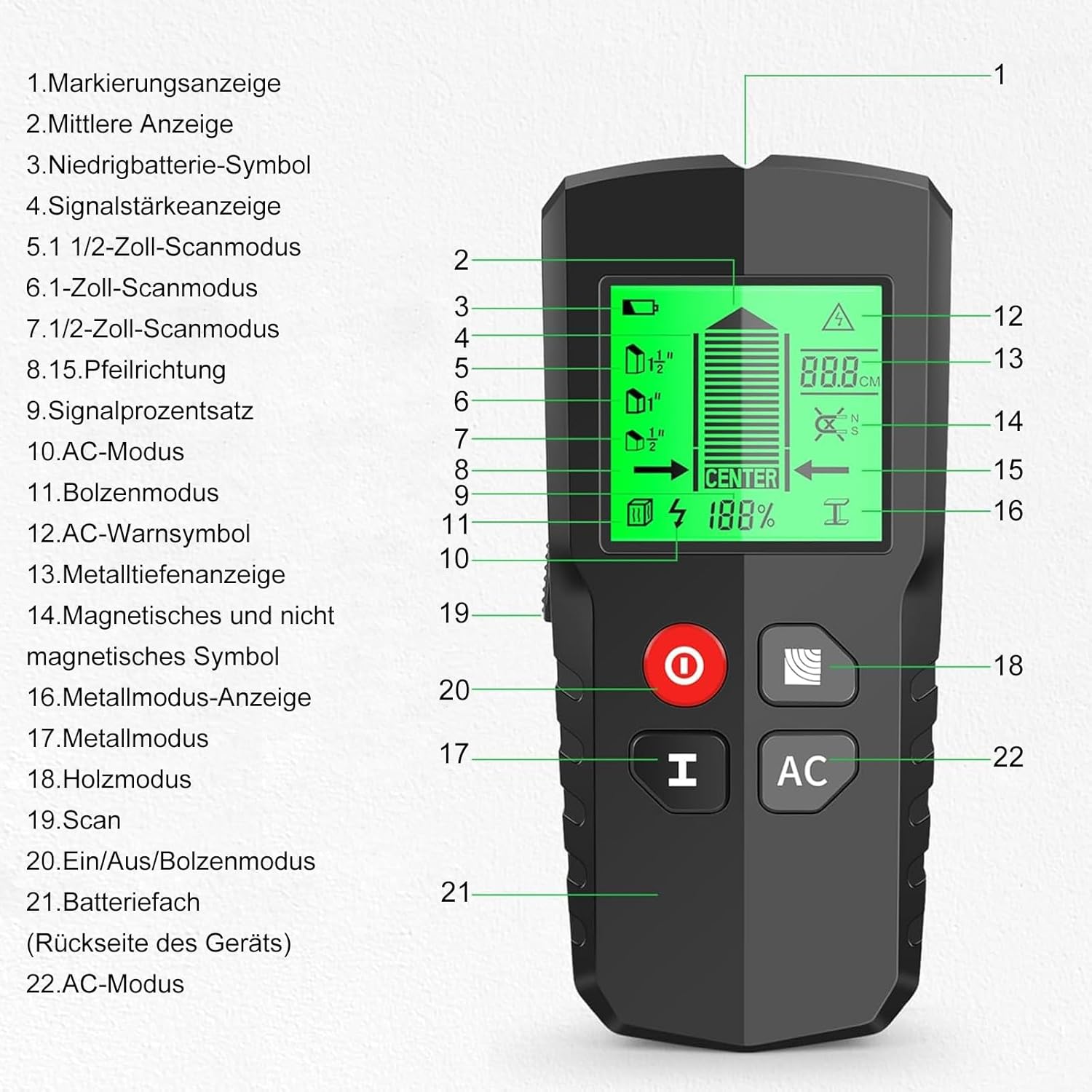
Image 5.1: Detection depths for various operating modes.
5.1 Wood Scan Mode (Stud Scan)
This mode is used to locate wood studs behind drywall or other common wall materials. It has three depth settings:
- Wood Mode 1/2: Detects wood up to 13mm (0.5 inches) deep.
- Wood Mode 1: Detects wood up to 25mm (1 inch) deep.
- Wood Mode 1 1/2: Detects wood up to 38mm (1.5 inches) deep.
To use:
- Press the 'H' (Stud) button to select the desired wood scan mode.
- Calibrate the device on a clear section of the wall (refer to Section 4.2).
- Slowly slide the device horizontally across the wall. The display will indicate signal strength and direction as you approach a stud.
- Mark the edges of the stud as indicated by the device. The 'CENTER' indicator will light up when the center of the stud is found.
5.2 Metal Scan Mode
This mode detects ferrous and non-ferrous metals, such as rebar, copper pipes, and metal studs, up to 80mm (3.15 inches) deep.
To use:
- Press the 'H' (Stud) button repeatedly until the metal mode is selected on the display.
- Calibrate the device on a clear section of the wall.
- Slowly slide the device horizontally across the wall. The display will show signal strength and indicate the presence of metal.
- Mark the location of the metal object.
5.3 AC Wire Scan Mode
This mode detects live unshielded AC wires up to 51mm (2 inches) deep.

Image 5.2: Steps for calibrating and using the AC Mode.
To use:
- Press the 'AC' button to select the AC scan mode.
- Calibrate the device on a clear section of the wall.
- Slowly slide the device horizontally across the wall. The display will show the AC warning symbol and signal strength when a live wire is detected. An audible alarm may also sound.
- Mark the location of the AC wire. Always verify by turning off power before any work.

Image 5.3: Visual and audible indicators for Stud, Metal, and AC Scan modes.
6. Maintenance
To ensure the longevity and accuracy of your EXTSUD HLW-QB5 wall scanner, follow these maintenance guidelines:
- Cleaning: Wipe the device with a soft, dry cloth after each use. Do not use abrasive cleaners or solvents.
- Storage: Store the device in a cool, dry place, away from direct sunlight and extreme temperatures.
- Battery Care: Remove the battery if the device will not be used for an extended period to prevent leakage and damage.
- Avoid Drops: Handle the device with care to prevent damage from drops or impacts.
7. Troubleshooting Guide
If you encounter issues with your EXTSUD HLW-QB5, refer to the table below for common problems and solutions.
| Problem | Possible Cause | Solution |
|---|---|---|
| Device does not turn on. | Low or dead battery; Incorrect battery installation. | Replace the 9V battery; Ensure battery is installed with correct polarity. |
| Inaccurate readings or false positives. | Improper calibration; High humidity; Nearby electronic interference. | Recalibrate the device on a clear section of the wall; Ensure the wall is dry; Move away from other electronic devices. |
| No detection in AC mode. | Wires are shielded; Wires are too deep; Wires are not live. | AC mode detects unshielded live wires. Ensure power is on for detection; Note depth limitations. |
| Display is dim or flickering. | Low battery. | Replace the 9V battery. |
8. Technical Specifications
| Feature | Specification |
|---|---|
| Model Number | HLW-QB5 |
| Dimensions (L x W x H) | 16.5 x 7.4 x 4 cm (6.5 x 2.9 x 1.6 inches) |
| Weight | 195 grams (0.43 lbs) |
| Material | Plastic |
| Power Source | 9V Battery (not included) |
| Wood Detection Depth | Up to 38mm (1.5 inches) |
| Metal Detection Depth | Up to 80mm (3.15 inches) |
| AC Wire Detection Depth | Up to 51mm (2 inches) |
| Recommended Uses | Metal detection, wood detection, cable detection |
| UPC | 762763038408 |
9. Warranty Information
EXTSUD products are manufactured to high-quality standards. This product comes with a standard manufacturer's warranty against defects in materials and workmanship. Please retain your proof of purchase for warranty claims. For specific warranty terms and conditions, refer to the product packaging or contact customer support.
10. Customer Support
If you have any questions, require technical assistance, or need to report an issue with your EXTSUD HLW-QB5 wall scanner, please contact our customer support team. Contact information can typically be found on the product packaging or on the official EXTSUD website.