
1. Introduction
This manual provides detailed instructions for the installation, operation, maintenance, and troubleshooting of the BENY BYM800 Micro Inverter. This device is designed for converting DC power from solar panels into AC power for home use, offering high efficiency and smart monitoring capabilities.
The BENY BYM800 Micro Inverter is engineered for optimal performance and durability, featuring a robust design suitable for various environmental conditions. Its advanced technology allows for unit-level power generation monitoring and remote management via the BYM Cloud application.

Figure 1: BENY BYM800 Micro Inverter with its components and monitoring app.
2. Safety Information
Before installing or operating the BENY BYM800 Micro Inverter, please read and understand all safety instructions. Failure to follow these instructions may result in electric shock, fire, or serious injury.
- Installation must be performed by qualified personnel only.
- Ensure the power supply is disconnected before any installation or maintenance.
- Do not attempt to repair the inverter yourself. Contact qualified service personnel.
- The inverter must be properly grounded.
- Avoid direct contact with live electrical parts.
- Ensure the installation environment meets the specified temperature and humidity requirements.
- The inverter is rated IP67 for water and dust resistance, but avoid submerging it in water.
3. Installation and Setup
3.1 Package Contents
Verify that all components are present:
- BENY BYM800 Micro Inverter
- 5-meter connection cable
- Mounting bracket and hardware
- User Manual (this document)
3.2 Mounting the Inverter
The inverter should be mounted in a location that allows for adequate ventilation and is protected from direct sunlight if possible, although its IP67 rating ensures durability in harsh weather.
- Attach the mounting bracket to a secure surface (e.g., wall, solar panel frame) using appropriate fasteners.
- Secure the BENY BYM800 Micro Inverter to the mounting bracket.
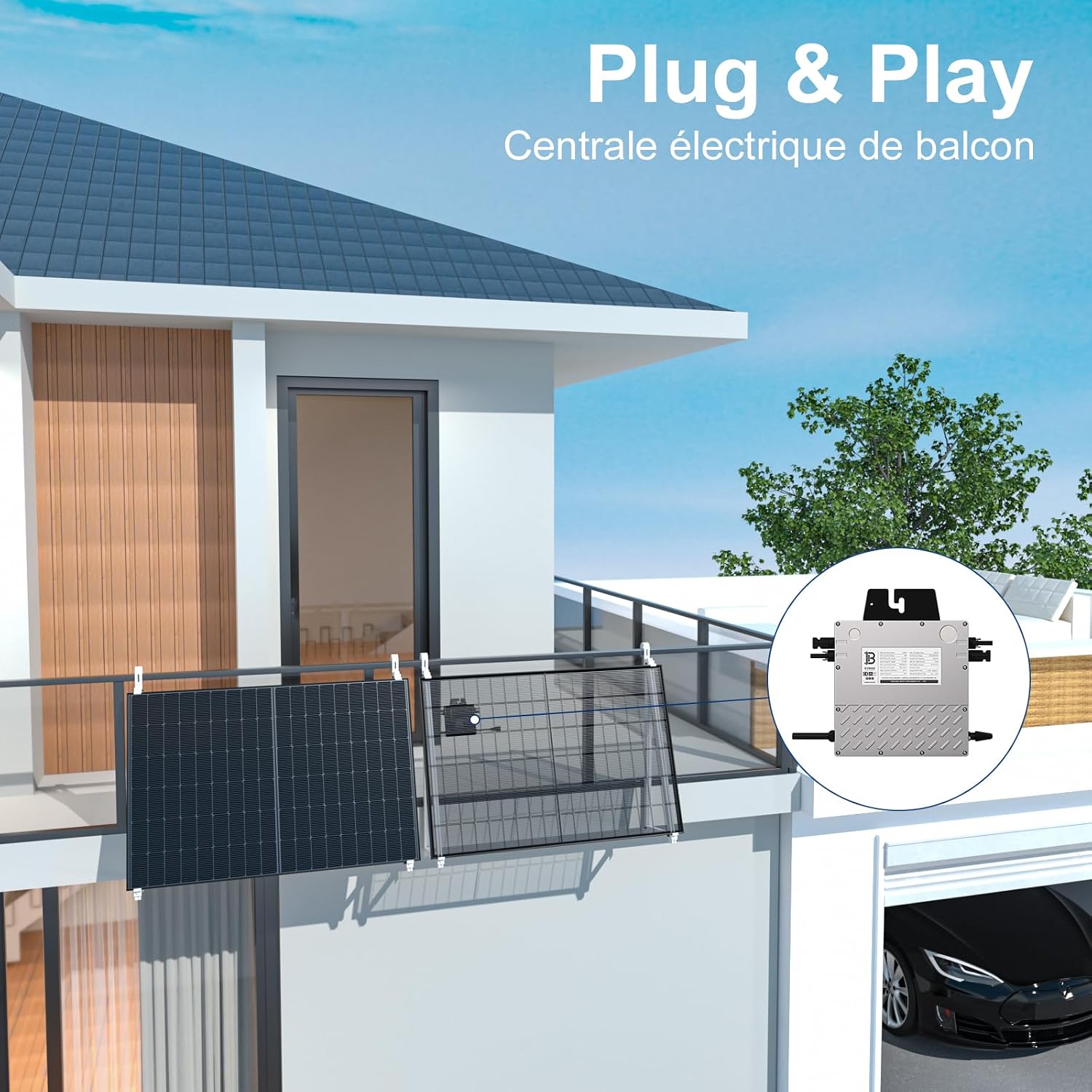
Figure 2: Example of a Plug & Play balcony power station setup.
3.3 Electrical Connections
Connect the solar panels to the DC input terminals of the inverter and the AC output cable to your home's electrical grid.
- Connect the DC cables from your solar panels to the designated DC input ports on the inverter. Ensure correct polarity (+ to + and - to -). The inverter supports one or two solar panels.
- Connect the 5-meter AC output cable from the inverter to a standard electrical outlet (EU Play type shown in diagram).
- Ensure all connections are secure and properly insulated.

Figure 3: Wiring diagram for a complete photovoltaic installation.
4. Operation
4.1 Initial Power-Up
Once all electrical connections are made, the inverter will automatically begin operation when sufficient sunlight is available to the solar panels. The inverter will convert DC power from the panels into AC power for your home.
4.2 Remote Monitoring and Control (BYM Cloud App)
The BENY BYM800 Micro Inverter features integrated Wi-Fi for remote monitoring and intelligent management via the BYM Cloud application.
- Download the BYM Cloud app from your device's app store.
- Follow the in-app instructions to connect your inverter to your Wi-Fi network.
- Once connected, you can view real-time transmission data, monitor power generation at the unit level, and manage your solar system from anywhere.

Figure 4: Remote surveillance and monitoring via the BYM Cloud application.
This remote management capability allows users to optimize system efficiency, identify and resolve issues promptly, and maximize energy production.
5. Maintenance
The BENY BYM800 Micro Inverter is designed for minimal maintenance. However, regular checks can ensure optimal performance and longevity.
- Cleaning: Periodically clean the exterior of the inverter to remove dust and debris. Use a soft, damp cloth. Do not use abrasive cleaners or solvents.
- Connections: Annually inspect all electrical connections for tightness and signs of corrosion. Ensure DC and AC cables are securely connected.
- Ventilation: Ensure that the area around the inverter remains clear to allow for proper airflow and heat dissipation.
- Monitoring: Regularly check the BYM Cloud app for any alerts or abnormal performance readings.
Note: Do not open the inverter casing. There are no user-serviceable parts inside. Refer all internal servicing to qualified technicians.
6. Troubleshooting
This section provides solutions to common issues you might encounter with your BENY BYM800 Micro Inverter.
| Problem | Possible Cause | Solution |
|---|---|---|
| No power output | Insufficient sunlight; DC input not connected; AC output not connected; Grid fault. | Check solar panel exposure; Verify DC and AC connections; Check grid status. |
| Low power output | Partial shading on panels; Dirty panels; Inverter overheating. | Clear shading; Clean panels; Ensure proper ventilation around inverter. |
| Wi-Fi connection issues | Weak Wi-Fi signal; Incorrect password; Router issues. | Move inverter closer to router or use Wi-Fi extender; Re-enter password; Restart router. |
| Inverter not responding | Internal fault. | Disconnect all power (DC and AC) for 5 minutes, then reconnect. If issue persists, contact support. |
If the problem persists after attempting the above solutions, please contact BENY customer support for further assistance.
7. Specifications
Detailed technical specifications for the BENY BYM800 Micro Inverter.

Figure 5: Detailed technical specifications of the BENY BYM800 Micro Inverter.
| Feature | Value |
|---|---|
| Model Name | BENY Micro Inverter (BYM1000) |
| Product Dimensions | 38 x 32 x 11 cm |
| Weight | 4.5 kg |
| Color | Silver |
| Power Source | Solar power |
| Electric Power / Output Power | 800 Watts |
| Voltage | 230 Volts |
| Included Components | 5m connection cable |
| Max Efficiency | 96.5% |
| MPPT Efficiency | >99.8% |
| Protection Rating | IP67 (Water and Dust Resistant) |
| Operating Temperature | -40°C to 70°C |
| Storage Temperature | -40°C to 85°C |
| Certifications | IEC/EN 61000-6, CISPR11+A1+A2, IEC/EN 62109-1/2, EN 50549-1:2019 VDE-AR-N 4105:2018/DIN VDE0124:2020, AS 4777.2. 2020 Inmetro, UTE C15-712-1/DIN VDE 0126/VFR 2019, G98, CEI 0-21:2020, NC RFG, NTS DAKKS |

Figure 6: IP67 waterproof design and product certifications.
8. Warranty and Support
8.1 Warranty Information
The BENY BYM800 Micro Inverter comes with a 25-year warranty period from the date of purchase. This warranty covers defects in materials and workmanship under normal use and service conditions.
The warranty does not cover damage resulting from improper installation, misuse, abuse, unauthorized modifications, natural disasters, or external causes. Please retain your proof of purchase for warranty claims.
8.2 Customer Support
For technical assistance, warranty claims, or any questions regarding your BENY BYM800 Micro Inverter, please contact BENY customer support.
Please visit the official BENY website for contact information and the most up-to-date support resources.


