
1. Introduction
This manual provides detailed instructions for the installation, operation, and maintenance of the X X-HOUSE PYM-K1108 Automatic Chain Drive Sliding Gate Opener. This system is designed for heavy-duty sliding gates, capable of handling gates weighing up to 1800 lbs (800 kg) and up to 40 feet in length. It features a powerful pure copper motor, advanced safety mechanisms, and convenient remote control access. Please read this manual thoroughly before installation and operation to ensure safe and efficient use of the product.
2. Safety Information
WARNING: Improper installation or use can lead to serious injury or property damage. Always follow safety guidelines.
- Ensure all electrical connections are made by a qualified electrician and comply with local electrical codes.
- Keep children and pets away from the gate area during operation.
- Do not attempt to repair the gate opener yourself. Refer to qualified service personnel.
- Regularly inspect the gate and opener for signs of wear, damage, or misalignment.
- Ensure the gate path is clear of obstructions before operating.
- In case of power failure, use the manual release keys to operate the gate.
3. Package Contents
Verify that all components listed below are present in your package. If any items are missing or damaged, please contact customer support.
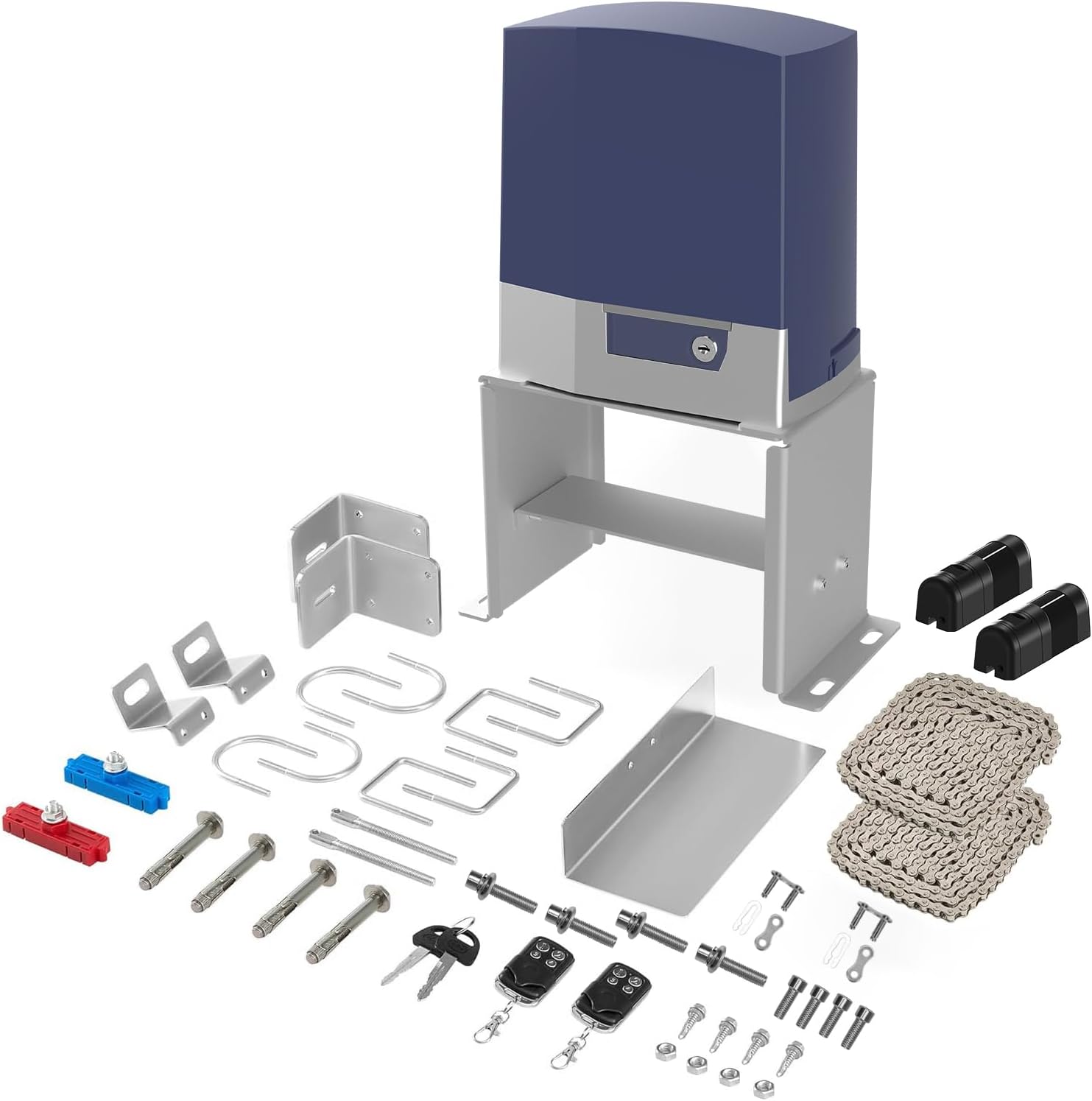
Image: Complete kit including the gate opener motor, remote controls, photocell sensors, chain, and various mounting hardware.
- Sliding Gate Opener Motor Unit (PYM-K1108)
- 2 x Remote Controls (SM01G compatible)
- Photocell Sensor Pair
- Drive Chain (sufficient length for 40ft gate)
- Mounting Base and Brackets
- Manual Release Keys
- Installation Hardware (bolts, nuts, washers, etc.)
- User Manual (this document)
4. Specifications
| Feature | Specification |
|---|---|
| Model Number | PYM-K1108 |
| Max Gate Weight | 1800 lbs (800 kg) |
| Max Gate Length | 40 ft |
| Motor Type | Pure Copper AC Motor |
| Power Supply | AC 110V |
| Operating Speed | 39 ft/min |
| Remote Control Range | Up to 100 ft (open distance) |
| Max Remote Controls Supported | 100 |
| Operating Temperature | -4°F to 158°F (-20°C to 70°C) |
| Noise Level | < 55 dB |
| Protection Rating | IP44 (Dust & Water Resistant) |
| Product Dimensions | 19.49 x 14.37 x 13.38 inches |
| Item Weight | 40.3 pounds |

Image: Detailed view of the gate opener unit, highlighting its dimensions and the powerful AC electric motor inside.
5. Setup and Installation
Installation of the gate opener requires careful planning and adherence to safety standards. It is highly recommended to consult with or hire a qualified professional for electrical wiring and complex mechanical adjustments.
5.1 Pre-Installation Checklist
- Ensure your sliding gate is properly installed, moves freely, and is structurally sound.
- Verify that the gate track is clean and clear of debris.
- Confirm availability of a stable 110V AC power source near the installation site.
- Gather all necessary tools (e.g., drills, wrenches, measuring tape, level).
5.2 Mounting the Gate Opener
- Prepare the Base: Choose a stable, level concrete pad or foundation next to the gate for mounting the opener. The base should be strong enough to support the unit's weight and operational forces.
- Position the Unit: Place the gate opener unit on the prepared base, ensuring proper alignment with the gate's chain path.
- Secure the Unit: Use the provided mounting hardware to securely bolt the gate opener to the foundation.
5.3 Installing the Drive Chain
- Attach the drive chain securely to both ends of the sliding gate.
- Route the chain through the sprocket on the gate opener unit, ensuring it is taut but not overly tight.
- Adjust chain tension as needed to allow smooth movement without excessive slack.
5.4 Electrical Connections
IMPORTANT: All electrical work must be performed by a certified electrician.
- Connect the gate opener to a dedicated 110V AC power supply.
- Wire the photocell sensors according to the provided wiring diagram. Ensure they are aligned to create an uninterrupted beam across the gate path.
- Connect any optional accessories (e.g., keypads, additional safety devices) as per their respective instructions.

Image: Examples of the gate opener installed with different gate designs, demonstrating its versatility.
6. Operating Instructions
The X X-HOUSE gate opener offers multiple modes of operation for convenience and security.
6.1 Remote Control Operation

Image: A user operating the gate with one of the included remote controls, demonstrating the 100-foot control range.
- Opening/Closing: Press the designated button on the remote control (typically button 1) to open or close the gate. A single press will initiate the movement.
- Stopping: Press the same button again during operation to stop the gate at any point.
- Programming Remotes: Refer to the detailed programming instructions in the separate remote control manual for adding or removing remotes. The system supports up to 100 remotes.
6.2 Automatic Closing Function
The gate opener can be configured to automatically close after a set period. This feature enhances security and convenience.
- Activation: This function is typically enabled via settings on the control board. Consult the control board's specific instructions for setting auto-close times (e.g., 10, 30, or 60 seconds).
- Safety Precaution: Ensure photocell sensors are correctly installed and functioning when using the auto-closing feature to prevent the gate from closing on obstructions.
6.3 Manual Release in Power Failure

Image: A hand inserting one of the manual clutch keys into the gate opener unit, allowing for manual operation during a power outage.
In the event of a power outage, the gate can be operated manually:
- Locate the manual release key slot on the side of the gate opener unit.
- Insert one of the provided manual release keys and turn it to disengage the motor.
- The gate can now be pushed open or closed by hand.
- To re-engage the motor, turn the key back to its original position and remove it.
6.4 Safety Features: Obstacle Detection & Photocell Sensors

Image: Photocell sensors mounted on gate posts, illustrating the infrared beam that detects obstacles in the gate's path.
- Obstacle Detection: The motor is equipped with an internal system that detects resistance during gate movement. If an obstacle is encountered, the gate will stop and reverse direction to prevent damage or injury.
- Photocell Sensors: These external sensors create an invisible infrared beam across the gate opening. If the beam is broken while the gate is closing, the gate will stop and reverse, providing an additional layer of safety.
7. Maintenance
Regular maintenance ensures the longevity and reliable operation of your gate opener.
- Monthly: Inspect the gate and its track for any obstructions, debris, or signs of wear. Clean the photocell sensor lenses to ensure proper function.
- Quarterly: Check the drive chain tension and lubricate it if necessary. Inspect all mounting bolts and hardware for tightness.
- Annually: Have a qualified technician inspect the electrical connections and motor for optimal performance and safety.
- Keep the gate opener unit clean and free from excessive dust or moisture. The unit has an IP44 rating for dust and water resistance, but extreme conditions should be avoided.

Image: An illustration highlighting the robust internal components, including the pure copper motor and durable stainless steel sprocket and chains, emphasizing the unit's premium design and durability.
8. Troubleshooting
Refer to the table below for common issues and their potential solutions. If the problem persists, contact customer support.
| Problem | Possible Cause | Solution |
|---|---|---|
| Gate does not respond to remote. | Dead remote battery, remote out of range, remote not programmed, power outage. | Replace remote battery. Move closer to the gate. Reprogram remote. Check power supply. |
| Gate stops or reverses unexpectedly. | Obstruction in gate path, misaligned photocell sensors, excessive friction. | Clear obstructions. Clean and realign photocell sensors. Check gate for smooth movement. |
| Motor runs but gate does not move. | Manual release engaged, broken or dislodged drive chain. | Disengage manual release. Inspect and reattach/repair drive chain. |
| Gate moves slowly or with difficulty. | Low voltage, worn gate wheels/track, insufficient lubrication, gate weight exceeds capacity. | Check power supply. Inspect gate hardware. Lubricate moving parts. Ensure gate weight is within limits. |
| Unusual noises during operation. | Lack of lubrication, loose components, worn gears/chain. | Lubricate chain and moving parts. Tighten loose hardware. Inspect gears and chain for wear. |
9. Warranty and Support
The X X-HOUSE Automatic Chain Drive Sliding Gate Opener is backed by a manufacturer's warranty. Please refer to the warranty card included in your package for specific terms and conditions, including coverage period and limitations.
For technical support, troubleshooting assistance, or to inquire about replacement parts, please contact X X-HOUSE customer service. Contact information can typically be found on the product packaging, the manufacturer's official website, or through your point of purchase.
When contacting support, please have your model number (PYM-K1108) and purchase date readily available to expedite assistance.