
Introduction
This manual provides detailed instructions for the installation, operation, and maintenance of your FineVu GX7000-2CH Premium Dash Cam. Please read this manual thoroughly before using the product to ensure proper functionality and safety.
Product Overview
The FineVu GX7000-2CH is a premium 2K QHD dash camera system featuring a front camera with a 5.1MP lens and a rear camera with a 2.1MP GalaxyCore CMOS sensor. It includes an IPS LCD touchscreen for intuitive control and advanced recording capabilities.

Image: FineVu GX7000-2CH Dash Cam showing the front unit, the rear unit, and the main unit with its LCD screen displaying a road view.
Components and Features
The GX7000-2CH system includes the main front dash cam unit, a rear camera, an external GPS antenna, a cigarette lighter power cable, a hardwire cable for parking mode, and a 32GB Micro SD card.
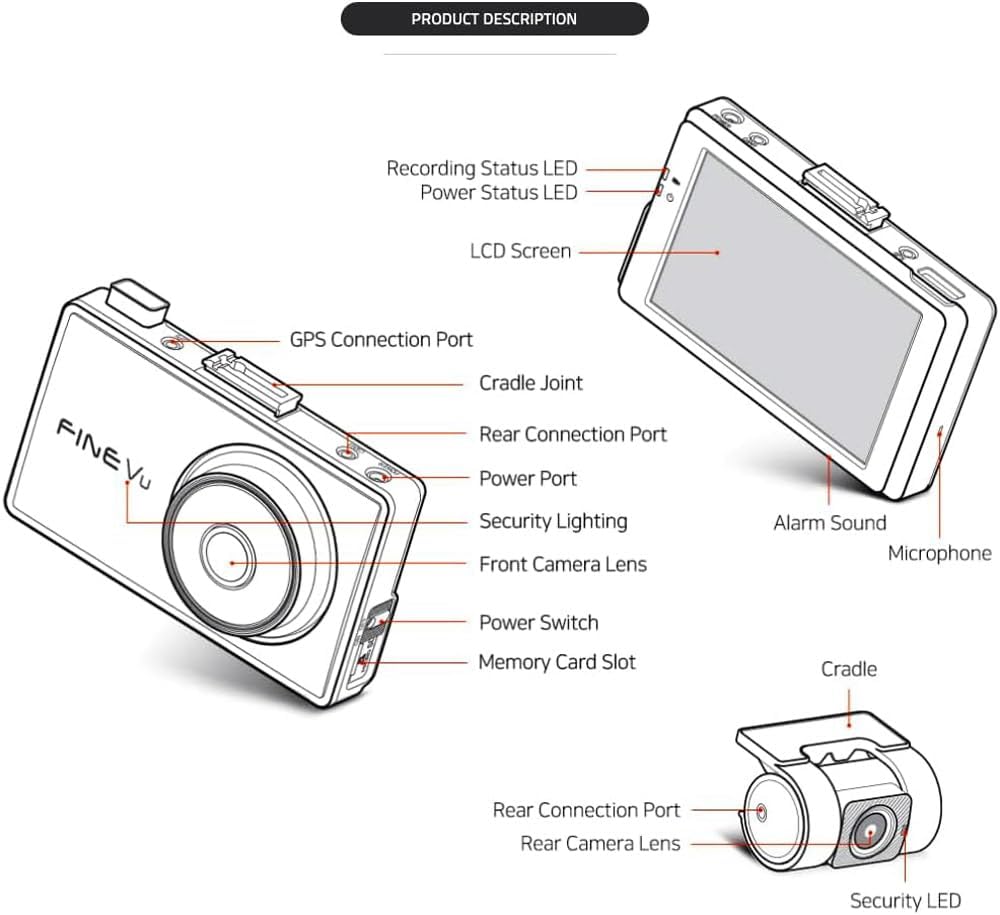
Image: Diagram illustrating the various components of the FineVu GX7000-2CH dash cam, including the front camera lens, LCD screen, power port, GPS connection port, memory card slot, rear connection port, and the rear camera unit.
Key Features:
- Front Camera: 5.1 Megapixel Lens, 1440P 2K QHD Resolution.
- Rear Camera: 2.1MP GalaxyCore CMOS Sensor.
- Display: Intuitive IPS LCD Touchscreen (800x480 resolution).
- Parking Mode: Pre-buffered Motion & Impact Detection.
- Connectivity: Optional Wi-Fi Connectivity to FineVu App, External GPS Antenna included.
- Night Vision: Auto Night Vision with Sony STARVIS Sensor.
Setup and Installation
1. Micro SD Card Insertion
- Ensure the dash cam is powered off.
- Locate the Memory Card Slot on the side of the main unit.
- Gently insert the included 32GB Micro SD card into the slot until it clicks into place.
- To remove, press the card gently to release it.
2. Mounting the Dash Cam
- Clean the chosen area on your windshield thoroughly.
- Attach the main unit to the cradle.
- Securely mount the dash cam on the windshield, ensuring a clear view of the road.
- Mount the rear camera on the rear window, ensuring a clear view.
3. Power Connection
- Standard Power: Connect the cigarette lighter power cable to the Power Port on the main unit and plug it into your vehicle's 12V power outlet.
- Parking Mode Power (Hardwire): For parking mode functionality, install the included FineVu hardwire cable into your vehicle's fuse box. Professional installation by a qualified auto electrician is recommended for this step.
4. GPS Antenna Connection
- Connect the external GPS antenna to the GPS Connection Port on the main unit.
- Position the GPS antenna in an area with a clear view of the sky, typically on the dashboard or near the windshield.
Operating Instructions
Powering On/Off
To power on the dash cam, ensure it is connected to a power source and press the Power Switch. The device will automatically power on when the vehicle ignition is turned on (if connected via cigarette lighter or hardwire). To power off, press and hold the Power Switch.
Using the IPS LCD Touchscreen
The IPS LCD touchscreen allows for intuitive control. Tap icons to navigate menus, adjust settings, and view recorded footage.

Image: The FineVu GX7000-2CH dash cam's IPS LCD touchscreen displaying a live view of the road with various on-screen indicators.
Recording Modes
- Continuous Recording: The dash cam automatically begins continuous recording when powered on.
- Event Recording: In the event of an impact or sudden braking, the dash cam will automatically save the current footage as an event file.
- Parking Mode Recording: When the vehicle is parked and the dash cam is hardwired, it enters parking mode. It records 20-second files (10 seconds before and 10 seconds after) when triggered by motion or impact.
Wi-Fi Connectivity (Optional)
The GX7000-2CH supports optional Wi-Fi connectivity to the FineVu App.
- Download the FineVu App from your smartphone's app store.
- Enable Wi-Fi on the dash cam via the touchscreen settings.
- Connect your smartphone to the dash cam's Wi-Fi network.
- Use the app to view live footage, download recordings, and adjust settings.
Advanced Features
Sony STARVIS Sensor & Night Vision
The integrated Sony STARVIS IMX335 sensor provides clear recording quality even in low-light conditions. The Auto Night Vision feature automatically adjusts exposure to enhance visibility during nighttime driving.
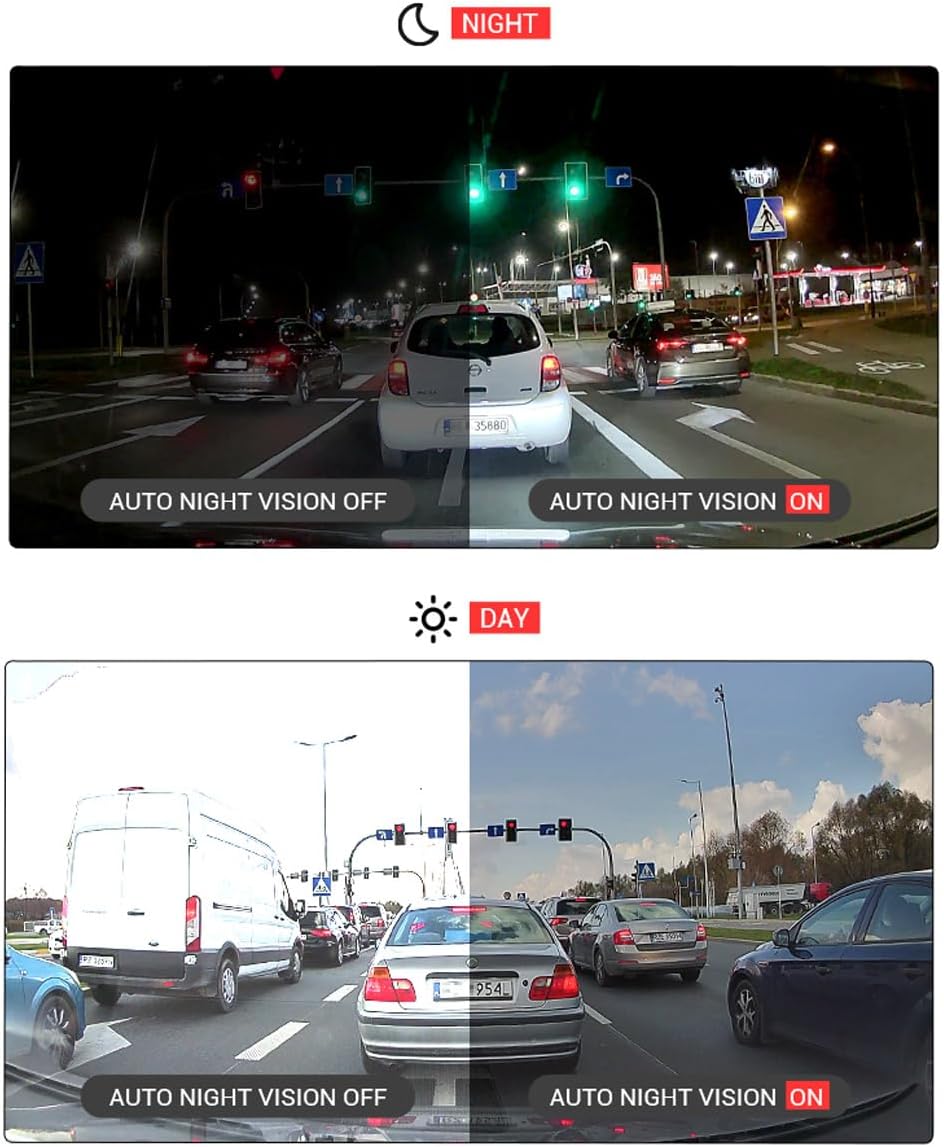
Image: Comparison showing the difference between normal sensor recording and Sony STARVIS sensor recording at night, highlighting improved clarity with STARVIS.

Image: Comparison demonstrating the effect of Auto Night Vision being off versus on, showing enhanced visibility in both night and day scenes when the feature is active.
ADAS (Advanced Driver-Assistance Systems)
The dash cam may offer ADAS features. Refer to the on-screen settings to enable and configure these features, which can provide visual and audio warnings for driving assistance.
Maintenance
- Micro SD Card: Regularly format the Micro SD card (at least once a month) through the dash cam's settings to ensure optimal performance and prevent data corruption. Replace the card if recording errors occur.
- Cleaning: Use a soft, dry cloth to clean the dash cam's lenses and touchscreen. Avoid abrasive cleaners or solvents.
- Firmware Updates: Check the FineVu website periodically for firmware updates to ensure your dash cam has the latest features and improvements.
Troubleshooting
| Problem | Possible Cause / Solution |
|---|---|
| Dash cam does not power on. | Check power cable connection. Ensure vehicle's 12V outlet is functional. If hardwired, verify fuse box connection. |
| Recording errors or corrupted files. | Format the Micro SD card. Ensure a high endurance Micro SD card is used. Replace the Micro SD card if issues persist. |
| GPS signal not acquired. | Ensure the external GPS antenna is connected and positioned with a clear view of the sky. Allow a few minutes for signal acquisition. |
| Wi-Fi connection issues. | Ensure Wi-Fi is enabled on the dash cam. Restart both the dash cam and your smartphone. Verify correct Wi-Fi password if applicable. |
Specifications
- Model Name: GX7000
- Front Camera Resolution: 2K QHD (2560p)
- Front Camera Sensor: 5.1 Megapixel
- Rear Camera Sensor: 2.1MP GalaxyCore CMOS
- Display: IPS LCD Touchscreen
- Connectivity: Wi-Fi, External GPS
- Special Features: Built-In WiFi, Motion & Impact Detection Parking Mode, Sony STARVIS Sensor, Auto Night Vision
- Control Method: Touch
- Included Components: User Manual, External GPS Antenna, Cigarette Lighter Power Cable, Hardwire Cable, 32GB Micro SD Card
Warranty and Support
For warranty information and technical support, please refer to the official FineVu website or contact FineVu customer service. Keep your purchase receipt as proof of purchase.
Manufacturer: FineVU
Date First Available: April 3, 2025