
1. Important Safety Instructions
When using electrical appliances, basic safety precautions should always be followed to reduce the risk of fire, electric shock, and personal injury. Read all instructions carefully before using the Milex Digital Steam Iron.
- Always ensure the voltage on the rating label corresponds to your mains voltage.
- Do not immerse the iron, power cord, or plug in water or other liquids.
- Unplug the iron from the electrical outlet when filling with water, emptying, or when not in use.
- Do not operate any appliance with a damaged cord or plug, or after the appliance malfunctions or has been dropped or damaged in any manner.
- Keep the iron and its cord out of reach of children and pets when it is switched on or cooling down.
- Never leave the iron unattended while it is connected to the power supply or on an ironing board.
- Use the iron only for its intended household use.
- The soleplate of the iron can become extremely hot. Avoid direct contact with the hot soleplate.
- Always place the iron on a stable, heat-resistant surface when resting.
2. Product Overview
The Milex Digital Steam Iron MSI004 is designed for efficient garment care. Familiarize yourself with its components before use.
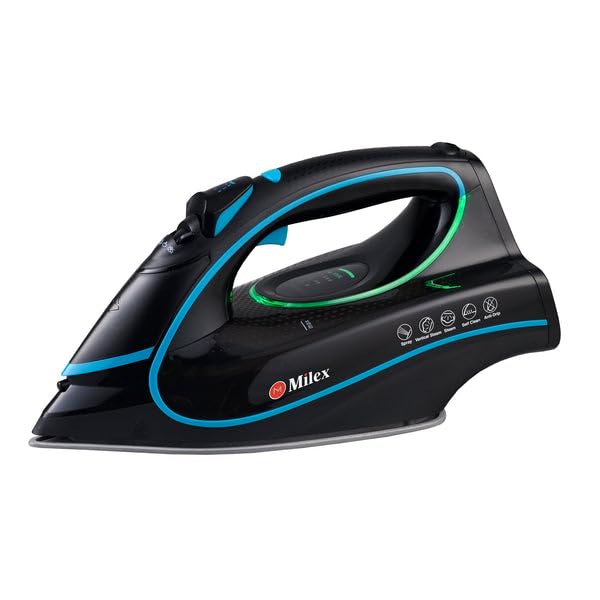
Figure 1: Milex Digital Steam Iron (3/4 view)
This image displays the Milex Digital Steam Iron from a three-quarter angle, highlighting its sleek black design with blue and green accents. Key features visible include the handle, water tank, and the general shape of the soleplate.
Components:
- Water Spray Nozzle: For moistening fabrics.
- Water Filling Inlet: Where water is added to the tank.
- Steam Control Dial/Buttons: To adjust steam output.
- Temperature Control Dial/Buttons: To select desired heat setting.
- LED Display: Shows current settings.
- Handle: For gripping the iron.
- Water Tank: Reservoir for water.
- Soleplate: The heated surface that glides over fabric.
- Power Cord: Connects the iron to the electrical outlet.

Figure 2: Ceramic Soleplate
This image provides a close-up view of the ceramic soleplate, showing its textured surface and steam vents designed for even heat distribution and smooth gliding.
3. Setup and First Use
3.1 Unpacking
- Remove the iron from its packaging.
- Remove any protective film or stickers from the soleplate.
- Inspect the iron for any signs of damage. If damaged, do not use and contact customer support.
3.2 Filling the Water Tank
- Ensure the iron is unplugged from the power outlet.
- Set the steam control to the "Dry Ironing" position (if applicable).
- Open the water filling inlet cover.
- Using a measuring cup, carefully pour clean tap water into the water tank up to the "MAX" fill line. Do not overfill.
- Close the water filling inlet cover securely.
Note: For areas with hard water, it is recommended to use a mixture of 50% tap water and 50% distilled water to prevent mineral buildup. Never use perfumed water, vinegar, starch, or descaling agents in the water tank.
4. Operating Instructions
4.1 Preparing for Ironing
- Sort garments according to fabric type (e.g., linen, cotton, wool, silk, synthetics).
- Check garment care labels for recommended ironing temperatures.
- Plug the iron into a suitable electrical outlet. The LED display will illuminate.
4.2 Setting Temperature and Steam
- Use the temperature control buttons to select the appropriate heat setting for your fabric. The LED display will show the selected temperature.
- Allow the iron to heat up until the indicator light (if present) or LED display confirms it has reached the desired temperature.
- For steam ironing, ensure the water tank is filled. Adjust the steam control to the desired steam level. Steam is typically available at higher temperature settings.
- For dry ironing, ensure the water tank is empty or the steam control is set to "Dry Ironing".
4.3 Using Steam Functions
- Continuous Steam: Select a steam setting on the control. Steam will be continuously emitted from the soleplate.
- Steam Burst: Press the "Burst" button for an extra shot of steam to remove stubborn wrinkles. Wait a few seconds between bursts.
- Water Spray: Press the "Spray" button to lightly moisten fabric before ironing.
4.4 Auto-Shutoff Feature
The iron is equipped with an auto-shutoff safety feature. If left unattended horizontally for a certain period (e.g., 30 seconds) or vertically (e.g., 8 minutes), the heating element will automatically turn off. To reactivate, simply move the iron.
4.5 Anti-Drip System
The anti-drip system prevents water from dripping from the soleplate when the iron is not hot enough to produce steam. This helps prevent water stains on delicate fabrics.
5. Maintenance and Cleaning
Regular maintenance ensures optimal performance and extends the life of your Milex Digital Steam Iron.
5.1 After Each Use
- Unplug the iron and allow it to cool completely.
- Empty any remaining water from the water tank.
5.2 Cleaning the Soleplate
- When the soleplate is cool, wipe it with a damp cloth and a non-abrasive cleaner if necessary.
- Do not use abrasive scouring pads or harsh chemicals, as these can damage the ceramic coating.
5.3 Self-Cleaning Function
The iron features a self-cleaning function to remove mineral deposits from the steam vents.
- Fill the water tank to the MAX line.
- Plug in the iron and set the temperature to maximum.
- Once the iron reaches maximum temperature, unplug it.
- Hold the iron horizontally over a sink.
- Press and hold the self-clean button (refer to product diagram for location). Hot water and steam will be expelled from the soleplate, flushing out mineral deposits.
- Gently shake the iron back and forth until the water tank is empty.
- Plug the iron back in and allow it to heat up again to dry the soleplate.
- Unplug and store once cool.
5.4 Storage
Always store the iron upright on its heel rest, with the cord neatly wrapped, once it has completely cooled down and the water tank is empty.
6. Troubleshooting
| Problem | Possible Cause | Solution |
|---|---|---|
| Iron does not heat up. | Not plugged in; power outage; auto-shutoff activated; faulty outlet. | Check power connection; check circuit breaker; move iron to reactivate; try a different outlet. |
| No steam or insufficient steam. | Water tank empty; temperature too low for steam; steam vents clogged; steam control set to "Dry". | Fill water tank; increase temperature setting; perform self-clean; adjust steam control. |
| Water drips from soleplate. | Temperature too low for steam (anti-drip system working); water tank overfilled. | Increase temperature; do not overfill water tank. |
| White flakes or residue on garments. | Mineral buildup in water tank/steam vents. | Perform self-clean function; use distilled water or a mix with tap water. |
7. Specifications
| Model Number | MSI004 |
| Brand | Milex |
| Power | 2400W |
| Voltage | 220-240V, 50Hz |
| Functions | Dry, Spray, Steam, Burst |
| Soleplate Material | Ceramic |
| Display Type | LED |
| Water Tank Capacity | 450ml |
| Special Features | Anti-drip, Auto-shutoff, Lightweight |
| Product Dimensions (L x W) | 32L x 16W centimetres |
8. Warranty and Customer Support
For information regarding warranty coverage, please refer to the warranty card included with your product or contact the retailer where the product was purchased.
If you experience any issues or have questions about your Milex Digital Steam Iron, please contact Milex customer support. You can find more information and contact details on the official Milex website or through the Milex Store on Amazon.