
Introduction
This manual provides detailed instructions for the SENGBIRCH Keyboard Case designed for the iPad Pro 11-inch (M4) 2024. It covers product features, setup, operation, maintenance, and troubleshooting to ensure optimal use of your device.

Figure 1: SENGBIRCH Keyboard Case with iPad Pro 11-inch (M4) 2024.
Product Overview
The SENGBIRCH Keyboard Case combines a protective folio case with a detachable Bluetooth keyboard, enhancing the functionality of your iPad Pro 11-inch (M4) 2024. Key features include:
- Magnetic Detachable Keyboard: Allows for flexible use, converting your iPad into a laptop or a tablet.
- Adjustable Viewing Angles: Built-in anti-slip grooves support multiple viewing positions.
- Integrated Pencil Holder: Securely stores and charges your stylus.
- Auto Wake/Sleep Function: Automatically wakes or puts your iPad to sleep when opening or closing the case.
- Long Battery Life: Rechargeable keyboard with extended standby time.
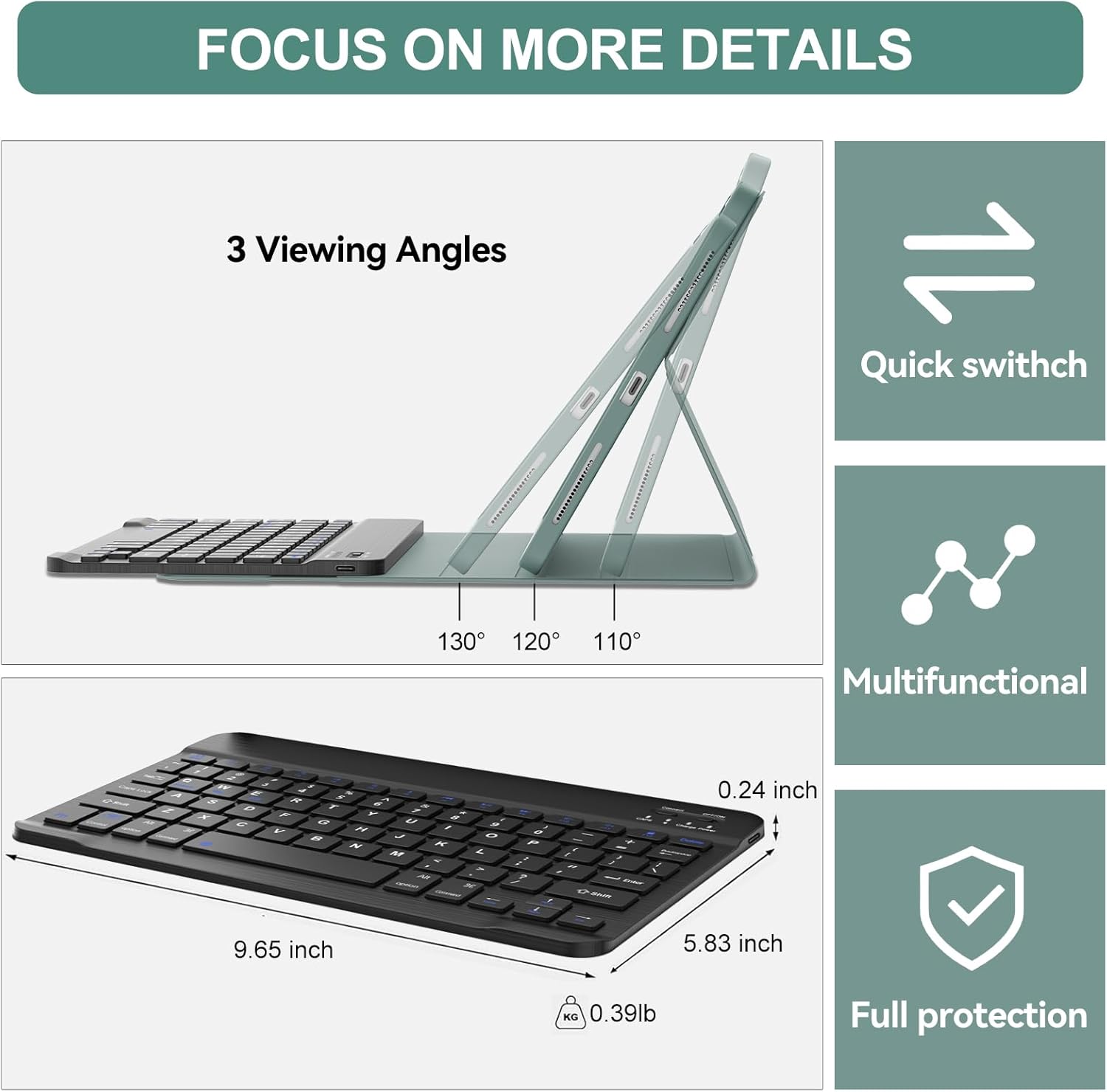
Figure 2: Key features including adjustable viewing angles and keyboard dimensions.
Compatibility
This keyboard case is specifically designed for the following iPad models:
- iPad Pro 11-inch (M4) 2024 (5th Generation)
- Compatible Model Numbers: A2836, A2837, A3006
Please verify your iPad model number before use. This case is not compatible with other iPad models, including previous generations of iPad Pro 11-inch, iPad Air, or standard iPad models.

Figure 3: Visual guide for product compatibility.
Setup Instructions
1. Charging the Keyboard
- Locate the USB-C charging port on the keyboard.
- Connect the provided USB-C charging cable to the keyboard and a power source (e.g., USB wall adapter, computer USB port).
- Allow the keyboard to charge fully. A full charge typically takes 2-3 hours. The charging indicator light will change or turn off when charging is complete.
Note: It is recommended to fully charge the keyboard before its first use.
2. Connecting via Bluetooth
- Ensure the keyboard is fully charged and powered on. The power switch is usually located on the side or top edge of the keyboard.
- Press the "Connect" button on the keyboard. The Bluetooth indicator light will start blinking, indicating it is in pairing mode.
- On your iPad Pro, go to Settings > Bluetooth.
- Turn on Bluetooth. Your iPad will search for nearby devices.
- From the list of available devices, select "Bluetooth 3.0 Keyboard".
- Once connected, the Bluetooth indicator light on the keyboard will stop blinking and remain solid or turn off, depending on the model.
The keyboard has a connection range of up to 10 meters.

Figure 4: Keyboard layout and key features.
Operating Instructions
1. Attaching and Detaching the Keyboard
The keyboard is magnetically attached to the case. To attach, simply align the keyboard with the magnetic strip inside the case. To detach, gently pull the keyboard away from the magnetic strip. This allows for flexible use, whether you need a full typing experience or prefer to use your iPad as a standalone tablet.

Figure 5: Detachable keyboard functionality.
2. Adjusting Viewing Angles
The case features built-in anti-slip grooves that allow you to adjust your iPad to three different viewing angles for typing, viewing, reading, or sketching. Simply position the bottom edge of your iPad into one of the grooves to secure your desired angle.
3. Using the Pen Holder
The case includes an upgraded pen slot designed for easy access and secure storage of your stylus. This slot also supports wireless charging for compatible styluses, ensuring your pen is always ready for use. The pen slot is located at the top edge of the case when the iPad is in landscape orientation.

Figure 6: Upper pen slot design for stylus storage and charging.
4. Auto Wake/Sleep Function
The case supports the iPad's auto wake/sleep feature. Opening the case will automatically wake your iPad, and closing it will put your iPad to sleep, conserving battery life.

Figure 7: User interacting with the iPad and keyboard case.
Maintenance
Cleaning
- To clean the case, gently wipe it with a soft, damp cloth. Avoid using harsh chemicals or abrasive cleaners.
- For the keyboard, use a soft, dry cloth. A can of compressed air can be used to remove debris from between the keys.
- Ensure the keyboard is powered off before cleaning.
Battery Care
- Recharge the keyboard when the battery indicator light shows low power.
- Avoid fully discharging the battery frequently to prolong its lifespan.
- If storing the keyboard for an extended period, charge it to about 50% and store it in a cool, dry place.
Troubleshooting
Keyboard Not Connecting to iPad
- Check Power: Ensure the keyboard is powered on and has sufficient battery charge.
- Re-pair Bluetooth:
- On your iPad, go to Settings > Bluetooth.
- Tap the "i" icon next to "Bluetooth 3.0 Keyboard" and select "Forget This Device".
- Turn off Bluetooth on your iPad, then turn it back on.
- On the keyboard, press the "Connect" button to enter pairing mode.
- Select "Bluetooth 3.0 Keyboard" from the iPad's Bluetooth device list to re-pair.
- Restart Devices: Try restarting both your iPad and the keyboard.
Keys Not Responding
- Check Battery: The keyboard battery might be low. Charge the keyboard fully.
- Bluetooth Connection: Ensure the keyboard is properly connected via Bluetooth as described above.
- Clean Keys: Check for any debris under the keys that might be preventing them from functioning correctly.
Specifications
| Brand | SENGBIRCH |
| Model Compatibility | iPad Pro 11-inch (M4) 2024 (A2836/A2837/A3006) |
| Connectivity Technology | Bluetooth, USB-C (for charging) |
| Keyboard Description | Multi-functional, Detachable, Bluetooth, Magnetic, Mechanical scissors keys |
| Special Features | Auto Wake/Sleep, Hotkeys and Media Keys, Lightweight, Portable, Rechargeable |
| Material | Acrylonitrile Butadiene Styrene, Polyurethane (PU), Thermoplastic Polyurethane (TPU) |
| Product Dimensions (Case) | 9.84"L x 7.48"W x 0.59"H (25 x 19 x 1.5 cm) |
| Keyboard Dimensions | 9.65"L x 5.83"W x 0.24"H (24.5 x 14.8 x 0.6 cm) |
| Item Weight | 1.74 pounds (0.79 kg) |
| Battery Type | 1 Lithium Ion battery (included) |
| Charging Time | 2-3 hours |
| Standby Time | Up to 220 hours |
Package Contents
The SENGBIRCH Keyboard Case package includes:
- 1 x Keyboard for iPad Pro 11 (M4) 2024
- 1 x Case for iPad Pro 11 (M4) 2024
- 1 x USB-C Charging Cable
- 1 x User Manual
Note: Tablet and stylus are not included.
Warranty and Support
For any product inquiries, technical support, or warranty information, please contact SENGBIRCH customer service. Refer to the contact information provided on the product packaging or the official SENGBIRCH website.
We are committed to providing high-quality products and support.