
Ufesa A7
Ufesa A7 Portable Air Conditioner 3-in-1 User Manual
Model: A7 | Brand: Ufesa
1. Introduction
Thank you for choosing the Ufesa A7 Portable Air Conditioner. This appliance is designed to provide efficient cooling, ventilation, and dehumidification for your indoor spaces. To ensure safe operation and optimal performance, please read this manual thoroughly before use and retain it for future reference.

Figure 1.1: The Ufesa A7 Portable Air Conditioner seamlessly integrated into a modern living room environment, demonstrating its compact design.

Figure 1.2: The Ufesa A7 Portable Air Conditioner providing comfort in a home setting, suitable for family spaces.
Safety Instructions
- Always connect the unit to a grounded power outlet.
- Do not operate the unit with a damaged cord or plug.
- Ensure proper ventilation around the unit. Maintain a minimum distance of 20 cm from walls and other objects.
- Do not block the air inlets or outlets.
- Keep children and pets away from the unit during operation.
- Do not insert objects into the air vents.
- Unplug the unit before cleaning or maintenance.
- This appliance uses R290 refrigerant, which is flammable. Handle with care and ensure the unit is placed in a well-ventilated area.
2. Product Overview
Familiarize yourself with the components of your Ufesa A7 Portable Air Conditioner.

Figure 2.1: Front view of the Ufesa A7 Portable Air Conditioner, showing the air outlet and a remote control. The unit is designed for efficient air circulation.

Figure 2.2: Overview of the Ufesa A7 Portable Air Conditioner highlighting its key features: suitable for 10-15m² spaces, 19.2 L/day dehumidification, 270 m³/h max airflow, 2 fan speeds, 54 dBA noise level, 4 wheels for portability, 15-31°C temperature range, 24h timer, remote control, LED display, R290 ecological gas, and 750W power.
Control Panel and Remote Control

Figure 2.3: Detailed view of the LED control panel on top of the unit, showing various function indicators and buttons for operation.

Figure 2.4: The remote control for the Ufesa A7 Portable Air Conditioner, featuring buttons for power, temperature adjustment, mode selection, fan speed, and timer.
3. Setup and Installation
Proper installation is crucial for the efficient operation of your portable air conditioner.
Placement
Place the unit on a flat, stable surface. Ensure there is at least 20 cm of clear space around the unit for proper airflow. The unit is equipped with 4 wheels for easy movement.

Figure 3.1: The portable air conditioner positioned in a living room, demonstrating suitable placement near a window for exhaust hose connection. The unit is ideal for spaces up to 12m².
Window Kit Installation
The included window kit is essential for exhausting hot air outside, ensuring effective cooling.

Figure 3.2: The complete window kit, including the exhaust hose, window sealing plate, and adapters, required for proper installation and heat expulsion.
- Attach the exhaust hose to the air outlet on the back of the unit.
- Connect the other end of the exhaust hose to the window kit adapter.
- Adjust the window sealing plate to fit your window opening.
- Insert the window kit adapter into the opening of the window sealing plate.
- Close the window to secure the sealing plate and prevent outside air from entering.
4. Operating Instructions
The Ufesa A7 offers three primary functions: Cooling, Fan, and Dehumidification.
Power On/Off
Press the Power button on the control panel or remote control to turn the unit on or off.
Mode Selection
Press the Mode button to cycle through the available modes:
- Cooling Mode: Reduces room temperature. Set your desired temperature between 15°C and 31°C using the temperature adjustment buttons.
- Fan Mode: Circulates air without cooling. You can select between two fan speeds.
- Dehumidification Mode: Removes excess moisture from the air (up to 19.2 L/day). The fan speed is fixed in this mode.
Fan Speed Adjustment
In Cooling or Fan mode, press the Fan Speed button to select between low and high fan speeds.
Timer Function
The 24-hour timer allows you to set the unit to turn on or off automatically after a specified period.
- Press the Timer button.
- Use the temperature adjustment buttons to set the desired delay in hours (1-24 hours).
- The timer will activate after a few seconds.
5. Maintenance
Regular maintenance ensures the longevity and efficiency of your air conditioner.
Cleaning the Air Filter
The air filter should be cleaned every two weeks or more frequently depending on usage and air quality.
- Unplug the unit from the power outlet.
- Locate and remove the air filter from the back of the unit.
- Rinse the filter under running water or use a vacuum cleaner to remove dust.
- Allow the filter to air dry completely before reinserting it.
Draining Water
In dehumidification mode, or in very humid conditions, the internal water tank may fill up. The unit will stop operating and display an error code when the tank is full.
- Place a shallow pan or bucket under the drain outlet at the back of the unit.
- Remove the drain plug to allow water to flow out.
- Once drained, replace the drain plug securely.
Storage
When storing the unit for an extended period:
- Ensure all water is drained from the unit.
- Clean the air filter.
- Store the unit in a dry, cool place, away from direct sunlight.
6. Troubleshooting
Refer to this section for common issues and their solutions.
| Problem | Possible Cause | Solution |
|---|---|---|
| Unit does not turn on. | No power supply. Power cord not securely plugged in. | Check power outlet. Ensure power cord is fully inserted. |
| Unit does not cool effectively. | Window kit not properly installed. Air filter is dirty. Room size exceeds capacity. Doors/windows are open. | Ensure exhaust hose is properly vented. Clean the air filter. Use in rooms up to 12m². Close all doors and windows. |
| Unit is noisy. | Unit is not on a flat surface. Air filter is dirty. | Place unit on a level surface. Clean the air filter. |
| Water leakage. | Drain plug is loose or missing. Unit is tilted. | Securely fasten the drain plug. Ensure unit is on a level surface. |
7. Specifications
| Feature | Detail |
|---|---|
| Model Name | Ufesa A7 Portable Air Conditioner |
| Model Number | 84105860 |
| Functions | Cooling, Fan, Dehumidification |
| Cooling Capacity | 7000 BTU/day |
| Dehumidification Capacity | 19.2 L/day |
| Max Airflow | 270 m³/h |
| Fan Speeds | 2 |
| Temperature Range | 15 - 31°C |
| Timer | 24-hour |
| Noise Level | Less than 54 dBA |
| Power | 750 Watts |
| Voltage | 1 Kilovolts |
| Refrigerant | R290 (Ecological Gas) |
| Recommended Room Size | Up to 12m² |
| Dimensions (L x W x H) | 88 x 37.3 x 31.8 cm |
| Weight | 23.7 Kilograms |
| Energy Class | A (as per energy label) |
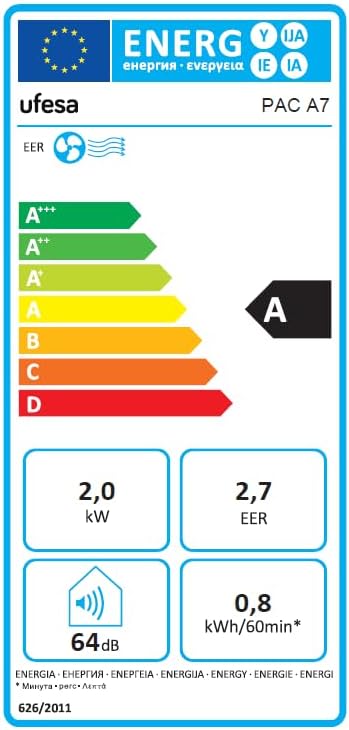
Figure 7.1: Energy efficiency label for the Ufesa PAC A7, indicating an A-class rating, 2.0 kW power, 2.7 EER, 64 dB noise level, and 0.8 kWh/60min energy consumption.
8. Warranty and Support
Ufesa products are manufactured to high-quality standards. For warranty information, technical support, or service inquiries, please refer to the warranty card included with your product or visit the official Ufesa website.
Please have your model number (A7) and serial number ready when contacting support.