
1. Introduction
This manual provides detailed instructions for the safe and effective operation of your WLLKIY ET31C/ET32C Automotive Signal Generator Multimeter. This device combines the functions of a signal generator and a multimeter, designed for automotive diagnostics and testing. It can simulate various automotive sensor signals, test ignition coils, and perform standard multimeter measurements.

Figure 1: WLLKIY ET31C/ET32C Automotive Signal Generator Multimeter and included accessories.
2. Safety Information
Please read and understand all safety warnings and operating instructions before using this instrument. Failure to follow these instructions may result in electric shock, fire, or serious injury.
- Always wear appropriate personal protective equipment, such as safety glasses, when working on vehicles.
- Do not use the device if it appears damaged or if the test leads are compromised.
- Ensure the device is powered off before connecting or disconnecting test leads.
- Avoid contact with live circuits.
- Do not exceed the maximum input ratings specified in the specifications section.
- Keep the device away from moisture and extreme temperatures.
3. Package Contents
Verify that all items listed below are present in your package:
- 1 x Signal Generator Multimeter (ET31C or ET32C model)
- 1 x Pair of Test Leads
- 1 x Pair of Alligator Clip Wires
- 1 x USB Type-C Cable (for ET32C charging, or data for both)
- 1 x English User Manual
Note: For ET31C, 3x 1.5V AAA batteries are required and are not included. The ET32C model includes a built-in 4.2V lithium battery.
4. Setup
4.1 Powering On the Device
- For ET31C: Open the battery compartment on the back of the device. Insert 3x 1.5V AAA batteries, ensuring correct polarity. Close the compartment.
- For ET32C: The device has a built-in rechargeable battery. If the battery is low, connect the included USB Type-C cable to the device and a suitable USB power source (e.g., computer USB port, USB wall adapter).
- Press and hold the power button (usually marked with a power symbol) to turn on the device.
4.2 Connecting Test Leads
Connect the test leads or alligator clip wires to the appropriate input jacks on the bottom of the device.
- COM Jack: Common (negative) input for all measurements and signal output.
- VΩHz Jack: Positive input for voltage, resistance, frequency, capacitance, diode, and continuity measurements.
- Output Jack: Positive output for signal generation.
5. Operating Instructions
5.1 Switching Between Modes
The device operates in two primary modes: Signal Generator and Multimeter. Use the MODE button to switch between these functions. The current mode will be displayed on the 2.8-inch screen.
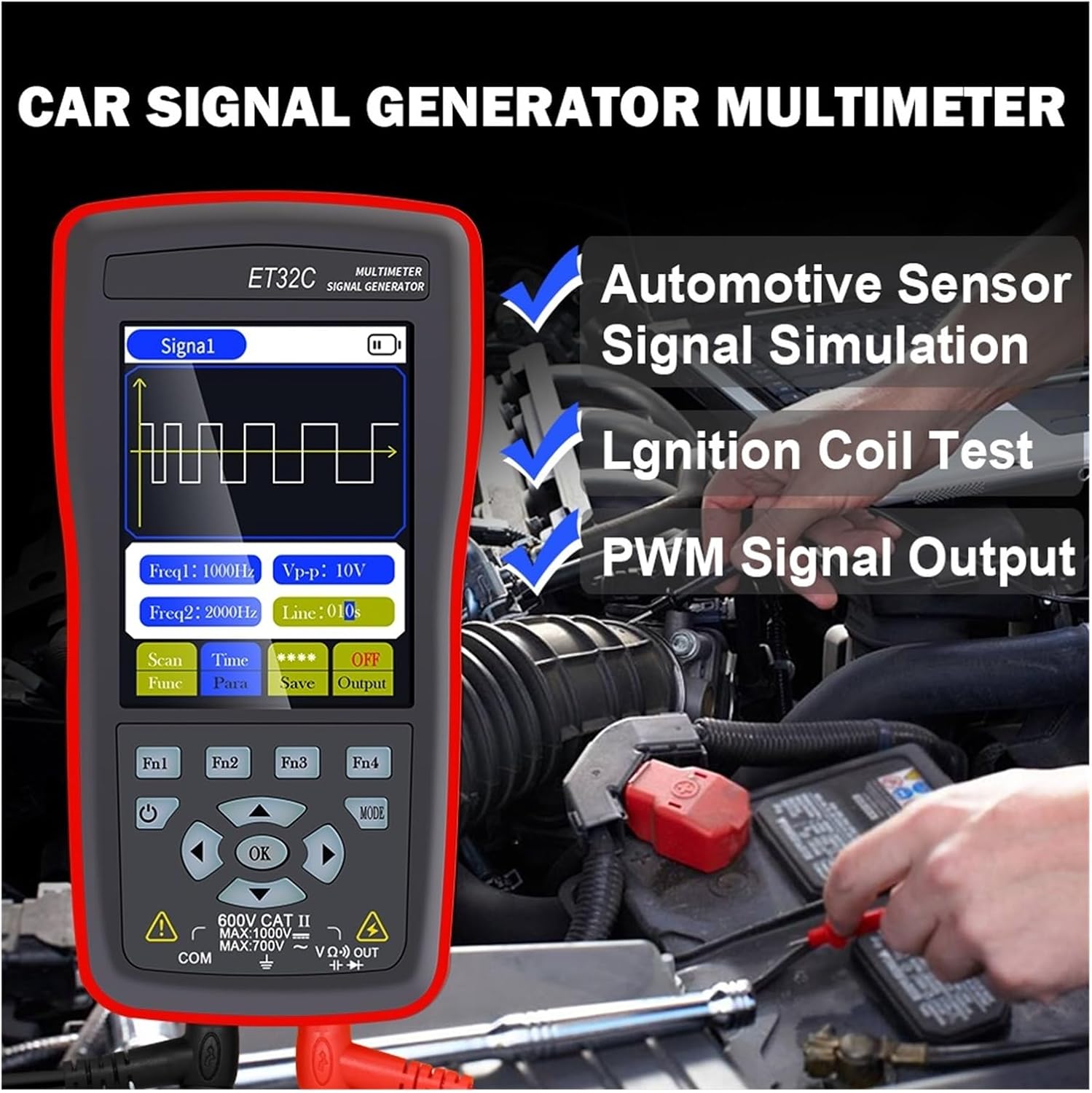
Figure 2: The device in use for automotive sensor signal simulation and ignition coil testing.
5.2 Signal Generator Functions
This mode allows you to generate various electrical signals for testing automotive components.
- Signal Types: Sine wave, Square wave, Combined wave (e.g., 58+2, 10+1 missing teeth), Scan wave, and DC wave.
- Frequency Range: 1Hz to 9999Hz (adjustable in 1Hz steps).
- Output Voltage (Peak-to-Peak): -12V to +12V (adjustable in 1V steps).
- Duty Cycle (for Square Wave): 1% to 99%.
- Scan Wave: Simulates crankshaft/camshaft signal changes from low to high speed (scan time 1s to 999s).
- Combined Wave: Allows setting of missing teeth signals (e.g., 58+2, 10+1). Maximum combined wave combinations: 99+99.
- Waveform Storage: The instrument supports storing up to 50 sets of waveform parameters.

Figure 3: Display illustrating combined wave signal generation with missing teeth settings.

Figure 4: The device's waveform storage feature, allowing up to 50 sets of parameters to be saved.
5.2.1 Automotive Signal Simulation
The signal generator can simulate Hall-type and magneto-electric crankshaft and camshaft signals. This is useful for diagnosing engine management systems without needing to run the engine.
- Supports simulation for both gasoline and diesel vehicles.
- Simulate various sensor outputs to test ECU responses.

Figure 5: The device functioning as a vehicle maintenance signal source, simulating sensor outputs.
5.2.2 Ignition Coil Control
The device can control ignition coils, solenoid valves, and relays to test their functionality.
- Coil control power: Less than 30V/1A.
- Connect the output to the component to be tested and observe its operation.

Figure 6: Screen showing the ignition coil test function, used to verify normal operation of coils, solenoid valves, and relays.
5.3 Multimeter Functions
In multimeter mode, the device performs standard electrical measurements.
- DC Voltage: Max 1000V.
- AC Voltage: Max 750V.
- Resistance: Max 40MΩ.
- Capacitance: Max 100uF.
- Frequency: Max 50KHz.
- Duty Cycle: 0.1% to 99.9%.
- Diode Test: 0V to 1.5V.
- Continuity Test: Resistance value for continuity detection: Max 30Ω.
- Display: 4000 counts, updates 3 times per second.

Figure 7: The device's multimeter display showing a measurement, alongside details of the 2.8-inch screen with 320x480 resolution.
6. Specifications
6.1 General Specifications
- Display: 2.8-inch, 320 * 480 resolution
- Touchscreen: Not supported
- USB Interface: Type-C USB
- Battery (ET31C): 3 * 1.5V AAA batteries (not included)
- Battery (ET32C): Built-in 4.2V lithium battery
- Storage Temperature: -20°C to 60°C (-4°F to 140°F)
- Operating Temperature: 0°C to 50°C (32°F to 122°F)
- Humidity: <85% RH (non-condensing)
- Product Dimensions (LxWxH): 134 mm * 69 mm * 25 mm
- Product Weight: 125 g (excluding accessories)
6.2 Signal Generator Parameters
- Sine Wave/Square Wave Frequency Range: 1Hz ~ 9999Hz
- Sine Wave/Square Wave Frequency Step: 1 Hz
- Sine Wave/Square Wave Peak Range: -12V ~ +12V
- Sine Wave/Square Wave Peak Step: 1V
- Scan Wave Scan Time Range: 1s ~ 999s
- Maximum Combined Wave Combinations: 99+99
- Output Voltage Range: -12V ~ +12V
- Output Voltage Step: 1V
- Coil Control Power: Less than 30V/1A
- Waveform Storage: 50 sets
- Duty Setting (for Square Wave only): 1% ~ 99%
6.3 Multimeter Parameters
- Maximum DC Input Voltage: 1000V
- Maximum AC Input Voltage: 750V
- Maximum Measured Resistance: 40MΩ
- Maximum Measured Capacitance: 100uF
- Maximum Frequency Measurement: 50 KHz
- Duty Cycle Measurement Range: 0.1% ~ 99.9%
- Diode Measurement Range: 0V ~ 1.5V
- Maximum Resistance for Continuity Detection: 30Ω
- Display Counts: 4000 counts
- Update Rate: 3 times per second
7. Maintenance
- Cleaning: Wipe the device with a soft, damp cloth. Do not use abrasive cleaners or solvents.
- Storage: Store the device in a cool, dry place away from direct sunlight and extreme temperatures. If storing for extended periods, remove AAA batteries from the ET31C model.
- Battery Care (ET32C): For optimal battery life, avoid fully discharging the battery frequently. Charge the device regularly if not in use for long periods.
- Test Leads: Inspect test leads for any damage (cuts, cracks) before each use. Replace damaged leads immediately.
8. Troubleshooting
| Problem | Possible Cause | Solution |
|---|---|---|
| Device does not power on. |
|
|
| Incorrect readings in Multimeter mode. |
|
|
| No signal output from Signal Generator. |
|
|
9. Warranty and Support
For warranty information and technical support, please refer to the documentation provided with your purchase or contact WLLKIY customer service directly. Contact details can typically be found on the manufacturer's official website or on the product packaging.