1. Important Safety Instructions
Please read this manual carefully before operating your Ufesa Portable Air Conditioner A9. Keep it for future reference. Failure to follow these instructions may result in electric shock, fire, or injury.
- This appliance uses R290 refrigerant. R290 is a flammable refrigerant.
- Do not use means to accelerate the defrosting process or to clean, other than those recommended by the manufacturer.
- The appliance shall be stored in a room without continuously operating ignition sources (e.g., open flames, an operating gas appliance, or an operating electric heater).
- Do not pierce or burn.
- Be aware that refrigerants may not contain an odor.
- The appliance should be installed, operated, and stored in a room with a floor area larger than 15m².
- Ensure the power supply matches the voltage specified on the rating label.
- Do not operate the unit with a damaged cord or plug.
- Keep the air inlet and outlet clear of obstructions.
2. Product Overview
The Ufesa Portable Air Conditioner A9 is a versatile 3-in-1 unit designed for cooling, ventilation, and dehumidification. It features a 9000 BTU/day cooling capacity, quiet operation, an LED display, a 24-hour timer, and comes with a remote control for convenient operation. It is suitable for rooms up to 15m².

Figure 2.1: Ufesa Portable Air Conditioner A9 unit with remote control, illustrating air circulation.

Figure 2.2: Overview of the Ufesa A9's main features and specifications, including coverage area, dehumidification capacity, airflow, fan speeds, noise level, wheels, temperature range, timer, remote control, LED display, R290 gas, and power consumption.
3. Setup
3.1 Unpacking
Carefully remove the air conditioner from its packaging. Retain the packaging for future storage or transport. Check for any damage during transit. Ensure all accessories, including the exhaust hose and window kit, are present.
3.2 Placement
Place the unit on a flat, stable surface in a room up to 15m². Ensure there is at least 30cm of space around the unit for proper airflow. Avoid placing it near heat sources or in direct sunlight. The unit is equipped with wheels for easy movement.

Figure 3.1: Proper placement of the Ufesa A9 in a room, demonstrating its suitability for spaces up to 15-20m².
3.3 Window Kit Installation
The included window kit is essential for exhausting hot air outside during cooling and dehumidification modes.
- Attach the exhaust hose to the air outlet on the back of the unit.
- Connect the other end of the exhaust hose to the window adapter.
- Adjust the window sealing plate to fit your window opening.
- Secure the window adapter into the sealing plate, ensuring a tight seal to prevent hot air from re-entering the room.

Figure 3.2: The complete vent kit, including the exhaust hose, window adapter, and window sealing plate, for expelling hot air.

Figure 3.3: The Ufesa A9 unit positioned in a room with the exhaust hose properly installed in a window.
3.4 Power Connection
Plug the power cord into a grounded electrical outlet. Ensure the outlet meets the power requirements of the unit.
4. Operating Instructions
The Ufesa A9 can be operated using the control panel on the unit or the included remote control.
4.1 Control Panel and LED Display
The top panel features an LED display and touch controls for various functions.

Figure 4.1: Close-up view of the Ufesa A9's LED display and touch control panel, indicating its 3-in-1 functionality for air conditioning, dehumidification, and fan modes.
4.2 Remote Control Functions
The remote control allows for convenient adjustment of settings from a distance.
- Power Button: Turns the unit ON/OFF.
- Mode Button: Cycles through Cooling, Fan, and Dehumidification modes.
- Temperature Up/Down Buttons: Adjusts the desired temperature in Cooling mode.
- Fan Speed Button: Selects fan speed (e.g., Low, Medium, High).
- Timer Button: Sets the 24-hour ON/OFF timer.
4.3 Operating Modes
- Cooling Mode: Provides powerful cooling. Ensure the exhaust hose is properly installed.
- Fan Mode: Circulates air without cooling. The exhaust hose is not required in this mode.
- Dehumidification Mode: Removes excess moisture from the air. The exhaust hose should be installed, and continuous drainage may be necessary.
4.4 Setting the Timer
Press the Timer button to set the desired operating duration (up to 24 hours) for automatic ON or OFF.
5. Maintenance
Regular maintenance ensures optimal performance and extends the lifespan of your air conditioner.
5.1 Cleaning the Air Filter
The air filter should be cleaned every two weeks or more frequently depending on usage. A dirty filter reduces efficiency and airflow.
- Turn off and unplug the unit.
- Locate and remove the air filter from the back or side of the unit.
- Wash the filter with lukewarm water and a mild detergent. Rinse thoroughly.
- Allow the filter to air dry completely before reinserting it into the unit.
5.2 Draining Water
During dehumidification mode, water will accumulate in the internal tank. The unit will stop operating when the tank is full. For continuous operation in dehumidification mode, connect a drainage hose to the continuous drainage port.
- Turn off and unplug the unit.
- Place a shallow pan or container under the drainage port.
- Remove the drain plug to allow water to flow out.
- Once drained, replace the drain plug securely.
5.3 Storage
When storing the unit for an extended period:
- Drain all accumulated water.
- Clean the air filter.
- Unplug the power cord and coil it neatly.
- Store the unit in a dry, upright position, preferably in its original packaging.
6. Troubleshooting
Refer to this section for common issues and their solutions.
| Problem | Possible Cause | Solution |
|---|---|---|
| Unit does not turn on | No power supply; Power cord not plugged in; Full water tank | Check power outlet; Plug in power cord; Drain water tank |
| Unit not cooling effectively | Dirty air filter; Exhaust hose not installed or blocked; Room too large; Doors/windows open | Clean air filter; Install/clear exhaust hose; Ensure room size is within limits; Close doors/windows |
| Water leakage | Drain plug loose; Unit not level; Continuous drainage hose blocked | Secure drain plug; Place unit on a level surface; Clear drainage hose |
| Unusual noise | Unit not on a level surface; Internal components loose | Ensure unit is level; Contact customer support if noise persists |
7. Specifications
Technical details for the Ufesa Portable Air Conditioner A9.
- Model: A9
- Dimensions (L x W x H): 88 x 37.3 x 31.8 cm
- Weight: 24.26 kg
- Cooling Capacity: 9000 BTU/day
- Noise Level: 54 dB
- Energy Efficiency Rating: A
- Refrigerant: R290
- Coverage Area: Up to 15 m²
- Power: 950 W (implied from 2.6 kW cooling capacity and A rating, typical for 9000 BTU)
- Voltage: 1 Kilovolts (This seems to be an error in the source data, typically it would be 220-240V for household appliances. Please refer to the product label for accurate voltage.)
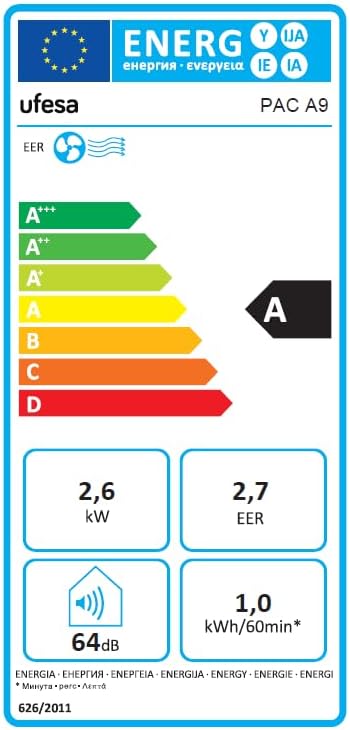
Figure 7.1: Energy efficiency label for the Ufesa PAC A9, showing an 'A' rating, 2.6 kW cooling, 2.7 EER, 64 dB noise, and 1.0 kWh/60min energy consumption.
8. Warranty and Support
For warranty information and customer support, please refer to the warranty card included with your product or visit the official Ufesa website. Keep your purchase receipt as proof of purchase for any warranty claims.