
Introduction
The BENRO Rhino FRHN24C is a lightweight and compact carbon fiber tripod designed for photographers seeking portability and stability. Its innovative folding design makes it easy to transport for various shooting environments, from studio work to outdoor travel. This manual provides comprehensive instructions for the safe and effective use of your BENRO Rhino FRHN24C tripod.
Product Features
- Lightweight & Compact Design: The BENRO Rhino series features a compact folding design, making it highly portable for travel and outdoor photography.
- Advanced Carbon Fiber Construction: Manufactured from high-quality carbon fiber, ensuring optimal stability, lightweight performance, and durability for demanding use.
- Low-Angle Shooting Capability: The center column can be inverted or rotated, allowing for easy low-angle photography.
- Button-Type Leg Angle Adjustment: Features a button-type mechanism for quick and easy adjustment of leg angles.
- Nut-Type Leg Locks: Equipped with nut-type leg locks for secure and precise extension and retraction of the tripod legs.
- Arca-Swiss Compatible Ball Head: Includes an Arca-Swiss standard compatible ball head for versatile camera positioning.
- Dedicated Carrying Case: Comes with a cushioned carrying case for safe and convenient transportation.
Package Contents
Please verify that all items are present in the package:
- BENRO Rhino FRHN24C Tripod
- Ball Head (Arca-Swiss compatible)
- Dedicated Carrying Case
- Spike Feet (set of 3)
- Allen Wrench

Image: The BENRO Rhino FRHN24C tripod in its folded state, accompanied by its cushioned carrying bag, the detachable ball head, a set of spike feet, and an Allen wrench for adjustments.
Setup
1. Attaching the Ball Head
- Unscrew the protective cap from the tripod's mounting plate.
- Align the ball head's base with the tripod's mounting screw (typically 3/8 inch).
- Rotate the ball head clockwise until it is securely tightened onto the tripod. Ensure it is firm but do not overtighten.

Image: A detailed view of the tripod's top plate, showing the standard 3/8-inch mounting screw for attaching a ball head or other accessories.
2. Extending the Tripod Legs
- Release the leg angle adjustment levers on each leg by pressing the 'PUSH' button and pulling the lever outwards.
- Extend the legs to your desired angle. There are multiple preset angles available. Push the lever back in to lock the angle.
- To extend each leg section, twist the nut-type leg locks counter-clockwise to loosen. Pull out the leg section to the desired length.
- Twist the nut-type leg locks clockwise to tighten and secure each leg section. Ensure all sections are firmly locked before use.

Image: A close-up view of the tripod's leg hinge, highlighting the 'PUSH' button used to release and adjust the leg angle.

Image: A detailed shot of the nut-type twist locks on the carbon fiber tripod legs, used for extending and securing each leg section.
3. Adjusting the Center Column
- Loosen the center column locking knob located at the base of the center column.
- Raise or lower the center column to your desired height.
- Tighten the center column locking knob firmly to secure the column in place.

Image: A close-up of the center column's locking mechanism, which secures the column at the desired height.
Operating Instructions
1. Normal Height Shooting
Extend the tripod legs and center column to achieve the desired shooting height. Ensure all leg locks and the center column lock are securely tightened for maximum stability.

Image: The BENRO Rhino FRHN24C tripod fully extended, illustrating its maximum height of 1590mm (including ball head), minimum height of 390mm (including ball head), and folded length of 490mm.
2. Low-Angle Shooting
For low-angle shots, you can either spread the legs to their widest angle or invert the center column. To invert the center column:
- Loosen the center column locking knob and remove the center column from the tripod chassis.
- Invert the center column and reinsert it into the tripod chassis from below.
- Tighten the center column locking knob to secure it. This allows the camera to be positioned very close to the ground.

Image: The BENRO Rhino FRHN24C tripod configured for low-angle photography, demonstrating the inverted center column with a camera mounted underneath the tripod chassis.
3. Monopod Conversion
One of the tripod legs can be detached and combined with the center column to form a monopod. This feature is useful for situations where a full tripod is not practical or allowed.
4. Using the Weight Hook
A retractable hook is located at the bottom of the center column. You can hang a weight (e.g., a camera bag) from this hook to increase the tripod's stability, especially in windy conditions or when using heavy camera equipment.

Image: A close-up view of the retractable weight hook located at the base of the tripod's center column, designed for attaching additional weight to enhance stability.
5. Changing Feet
The tripod comes with interchangeable rubber feet and spike feet. To change them, simply unscrew the current feet and screw in the desired type. Rubber feet are suitable for indoor and smooth surfaces, while spike feet provide better grip on soft ground or ice.

Image: A detailed view of a tripod leg equipped with a metal spike foot, suitable for outdoor use on uneven or soft terrain.
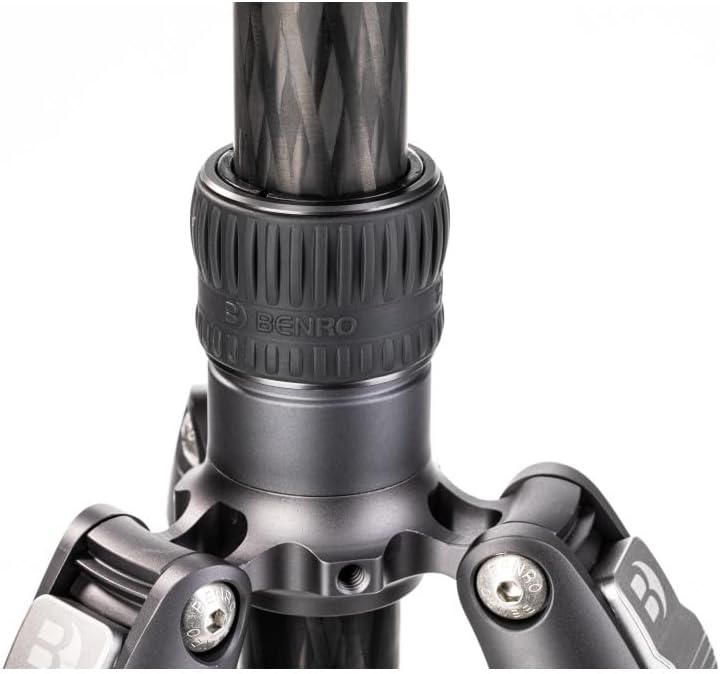
Image: A detailed view of a tripod leg fitted with a rubber foot, ideal for indoor use or on delicate surfaces to prevent scratches and provide grip.
Maintenance
- Cleaning: After use, especially in dusty or sandy environments, wipe down the tripod legs and joints with a soft, dry cloth. For stubborn dirt, use a slightly damp cloth and then dry thoroughly.
- Lubrication: Avoid applying lubricants to the leg locks or moving parts unless specifically recommended by BENRO. Excessive lubrication can attract dirt and hinder performance.
- Storage: Store the tripod in its dedicated carrying case in a cool, dry place, away from direct sunlight and extreme temperatures.
- Inspection: Regularly inspect all screws, knobs, and leg locks for tightness. Use the provided Allen wrench to tighten any loose screws.
Troubleshooting
- Tripod is unstable: Ensure all leg sections are fully extended and all twist locks are securely tightened. Check that the leg angle adjustment levers are fully engaged. Make sure the camera is properly mounted on the ball head and the ball head is tightened. Consider using the weight hook for added stability.
- Leg sections are difficult to extend/retract: Check for any dirt or debris in the leg lock mechanisms. Clean the leg sections and locks. Do not force the locks; ensure they are fully loosened before attempting to adjust.
- Ball head movement is stiff or loose: Adjust the tension knob on the ball head. If it remains stiff, ensure no foreign objects are obstructing movement. If it's too loose, ensure the camera is not exceeding the ball head's weight capacity.
- Camera not securely mounted: Ensure the quick release plate is correctly attached to your camera and then properly seated and locked into the ball head clamp.
Specifications
| Feature | Specification |
|---|---|
| Brand | BENRO |
| Model Series | BENRO Rhino |
| Model Number | FRHN24C |
| Material | Aluminum, Carbon Fiber, Magnesium Alloy |
| Color | Black |
| Maximum Height (with EV) | 150 cm |
| Tripod Head Type | Ball Head |
| Compatible Devices | Camera |
| Special Features | Low-angle shooting compatible, Arca-Swiss standard ball head |
| Number of Items | 1 |
| Included Components | Tripod, Ball Head, Case |
| Country of Origin | China |
Warranty and Support
This BENRO Rhino FRHN24C Carbon Fiber Tripod comes with a manufacturer's warranty of 12 months from the date of purchase. This warranty covers defects in materials and workmanship under normal use.
For warranty claims, technical support, or any inquiries regarding your product, please contact BENRO customer service through their official website or the retailer from whom you purchased the product. Please retain your proof of purchase for warranty validation.


