
1. Product Overview
This manual provides instructions for the UFDIPLMY LED Backlight Strip, designed as a replacement component for various television models. These strips feature 6 LEDs and are 575mm in length, providing efficient and long-lasting illumination for your display.

Image 1.1: Two UFDIPLMY LED backlight strips. Each strip measures 575mm and contains 6 LEDs. Various model numbers are visible on the strips.
The LED backlight strips are engineered for durability and energy efficiency, offering a typical lifespan exceeding 100,000 hours. They are an environmentally friendly solution for TV repair and maintenance.
2. Specifications
| Length | 575 mm |
| LED Quantity per Strip | 6 LEDs |
| Voltage per LED | 6V |
| Package Dimensions | 1.18 x 0.79 x 0.39 inches |
| Item Weight | 1.76 ounces |
| Manufacturer | UFDIPLMY |
3. Compatibility
These LED backlight strips are compatible with various TV models and part numbers. Please verify the part numbers on your existing strips against the following list to ensure compatibility before installation:
- Rtv32z2sm
- S32Z118
- JL.D32061330-006AS-M
- 006GS
- LE-32Z10
- CX315DLEM
- 03CX320037
- CX32D06-ZC22AG-05
- 04
- HL-00320A30-0601S-03
- HL-00320A30-0601S-07
- SJ.CX.D3200601-3030HS-M

Image 3.1: Detail of a backlight strip showing the identification number JLD32061330-006GS-M_V01.

Image 3.2: Detail of a backlight strip showing the identification number HL-00320A30-0601S-03.

Image 3.3: Detail of a backlight strip showing the identification number SJ.CX.D3200601-3030HS-M.
Important: Always confirm the exact part number and physical dimensions of your original backlight strips before purchasing and installing replacements.
4. Setup and Installation
Replacing LED backlight strips requires technical knowledge and careful handling of electronic components. If you are not comfortable with this procedure, it is recommended to seek professional assistance.
Safety Precautions:
- Disconnect Power: Always unplug the television from the power outlet before beginning any repair work.
- Static Discharge: Wear an anti-static wrist strap or frequently touch a grounded metal object to prevent electrostatic discharge (ESD) damage to sensitive electronic components.
- Handle with Care: LCD/LED panels are fragile. Handle them carefully to avoid cracks or damage.
- Tools: Use appropriate tools for disassembling the TV, such as plastic prying tools to avoid scratching the casing.
Installation Steps (General Guide):
- Disassemble the TV: Carefully remove the back cover, stand, and any other components necessary to access the display panel. Document each step, perhaps by taking photos, to aid reassembly.
- Remove the LCD/LED Panel: Gently lift and remove the LCD/LED panel, placing it on a clean, soft, and flat surface to prevent damage.
- Access Backlight Assembly: Remove the diffuser sheets and any frames covering the old backlight strips.
- Remove Old Strips: Disconnect the power connectors from the old LED strips and carefully peel them off the chassis. Note their exact placement.
- Install New Strips: Align the new UFDIPLMY LED backlight strips in the exact positions of the old ones. Ensure the adhesive backing (if present) is properly applied for secure mounting.
- Connect Power: Connect the power cables to the new LED strips. Ensure all connections are firm and correctly oriented (positive to positive, negative to negative).
- Test Backlights: Before reassembling the entire TV, temporarily connect the power supply and turn on the TV to verify that all new LED strips illuminate correctly. Immediately disconnect power after testing.
- Reassemble TV: Carefully reassemble the diffuser sheets, LCD/LED panel, and all other components in reverse order of disassembly. Ensure no cables are pinched and all screws are tightened appropriately.
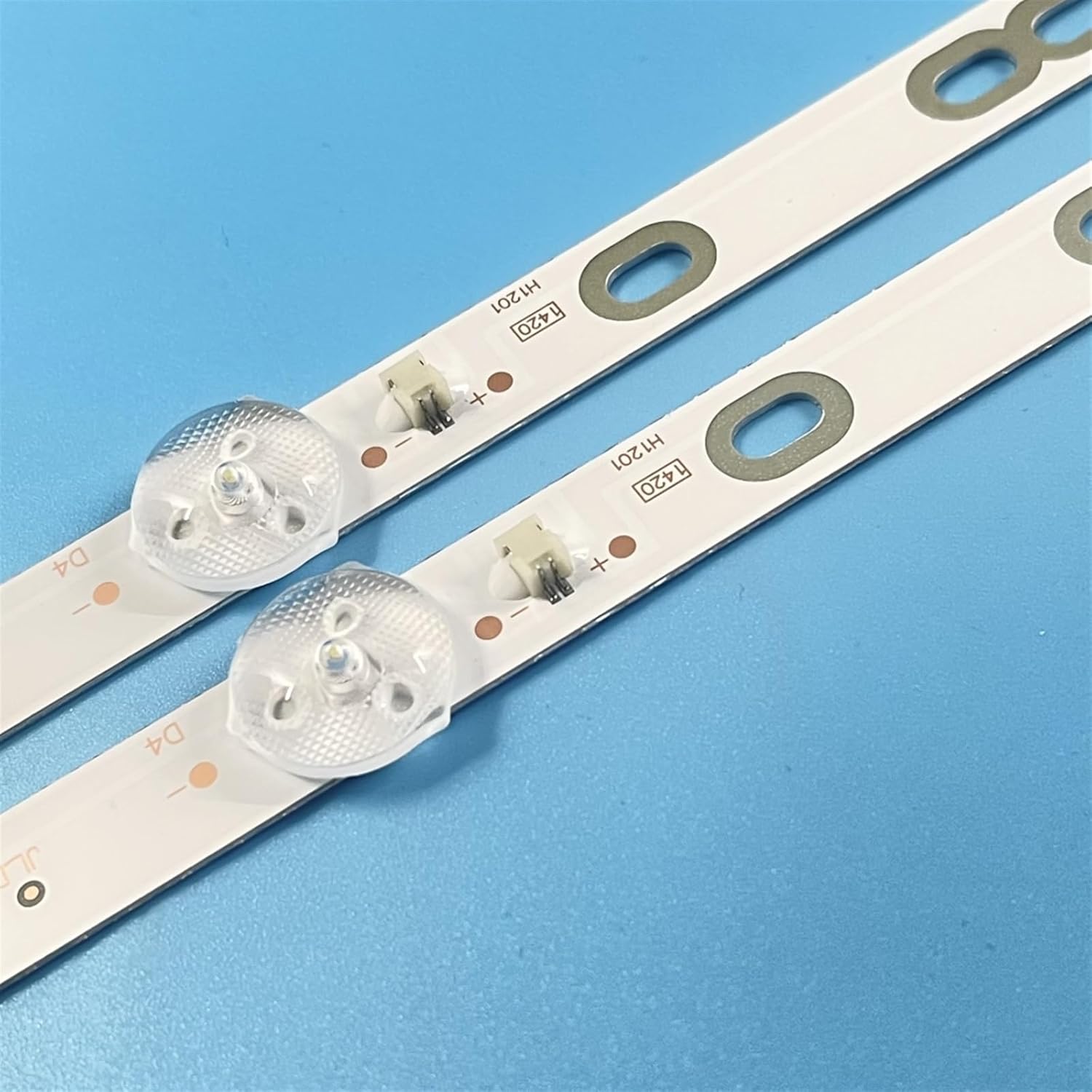
Image 4.1: Detail of the LED backlight strip showing the individual LED modules and the electrical connector points. Ensure correct polarity during connection.
5. Operating Instructions
Once properly installed, the UFDIPLMY LED Backlight Strips operate automatically as part of your television's display system. There are no user-adjustable settings directly on the backlight strips themselves.
The brightness and functionality of the backlights are controlled by the television's internal circuitry and user settings (e.g., brightness, contrast, backlight level) accessible through the TV's remote control or on-screen menu.
6. Maintenance
The LED backlight strips are designed to be maintenance-free under normal operating conditions. However, proper care during installation and handling can extend their lifespan and prevent issues.
- Dust Prevention: Ensure the interior of the TV is free from dust during reassembly to prevent accumulation on the diffuser sheets, which can affect light distribution.
- Avoid Physical Stress: Do not bend or apply excessive force to the LED strips, as this can damage the circuit board or the LEDs.
- Temperature Control: Ensure the TV operates within its recommended temperature range. Excessive heat can degrade LED performance over time.
7. Troubleshooting
If you encounter issues after installing the new backlight strips, consider the following troubleshooting steps:
- No Backlight / Dark Screen:
- Verify all power connectors to the LED strips are securely attached and correctly oriented.
- Check for any visible damage to the LED strips or their wiring.
- Ensure the TV's power supply board is functioning correctly and providing power to the backlight circuit.
- Confirm that the TV's main board is sending the correct signals to the backlight driver.
- Flickering Backlight:
- This could indicate a loose connection or a faulty LED on one of the strips. Recheck connections.
- A failing power supply or backlight driver board in the TV can also cause flickering.
- Uneven Brightness / Dark Spots:
- Ensure all diffuser sheets and optical films are correctly seated and free from dust or debris.
- Check if any LED on a strip is not illuminating.
For complex issues, consulting a qualified electronics repair technician is recommended.
8. Warranty and Support
For information regarding warranty coverage or technical support for your UFDIPLMY LED Backlight Strips, please refer to the seller's return policy or contact the manufacturer directly through their official channels. Keep your purchase receipt as proof of purchase.
The product is designed for a long service life, typically exceeding 100,000 hours, under proper installation and operating conditions.