
LA070WV4-SD01
User Manual for 7 inch LA070WV4-SD01 LCD Display Screen
Model: LA070WV4-SD01
Introduction
This manual provides comprehensive instructions for the proper setup, operation, and maintenance of your Generic 7 inch LA070WV4-SD01 LCD Display Screen. Please read this manual thoroughly before using the product to ensure optimal performance and longevity. Keep this manual for future reference.
Product Overview
The LA070WV4-SD01 is a 7-inch LCD display screen designed for various applications requiring a compact and clear visual interface. It features an 800x480 resolution and a 1.27:1 aspect ratio, providing a crisp display for its size.

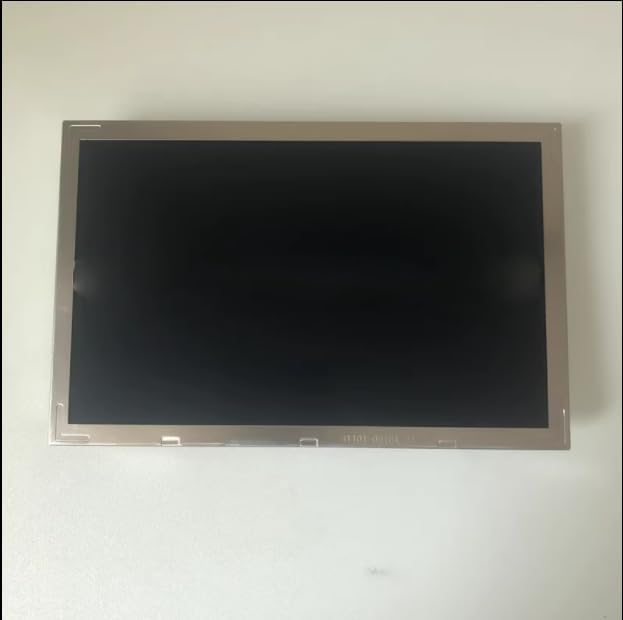
Setup Instructions
- Unpacking: Carefully remove the LCD display from its packaging. Inspect for any signs of damage during transit.
- Preparation: Ensure your workspace is clean and static-free. Have all necessary tools and connecting cables ready.
- Connection:
- Identify the appropriate connector on the back of the LCD panel (refer to Figure 2). This is typically a Flexible Flat Cable (FFC) interface.
- Connect the corresponding FFC cable from your host device (e.g., single-board computer, display controller) to the LCD panel's connector. Ensure the connection is secure and correctly oriented to prevent damage.
- If applicable, connect any power supply cables to your display controller or host device. The LCD panel itself is typically powered via the FFC connection from the controller.
- Mounting (Optional): The display features mounting points (refer to Figure 2) for integration into an enclosure or frame. Use appropriate screws and standoffs to secure the display without overtightening.
- Initial Power-On: Once all connections are secure, power on your host device. The display should initialize and show output.
Note: Incorrect connection of the FFC cable can cause damage to the display or host device. Always ensure proper alignment before applying force.
Operating the Display
The LA070WV4-SD01 LCD display functions as an output device for your connected system. Its operation is primarily controlled by the signals received from the host device.
- Display Output: Once powered and connected, the display will mirror the video output from your host device. Ensure your host device's display settings (resolution, refresh rate) are compatible with the LA070WV4-SD01's specifications (800x480 resolution).
- Brightness Control: Brightness control is typically managed by the display controller or host device software. Refer to your host device's documentation for instructions on adjusting display brightness.
- Power Management: The display's power state is linked to the host device. When the host device powers down or enters a low-power state, the display will follow suit.
Maintenance
Proper maintenance ensures the longevity and optimal performance of your LCD display.
- Cleaning the Screen:
- Turn off the display and disconnect power before cleaning.
- Use a soft, lint-free cloth (e.g., microfiber cloth) to gently wipe the screen surface.
- For stubborn smudges, lightly dampen the cloth with distilled water or a specialized LCD screen cleaner. Never spray liquid directly onto the screen.
- Avoid using harsh chemicals, abrasive cleaners, or alcohol-based solutions, as these can damage the screen coating.
- General Care:
- Keep the display in a clean, dust-free environment.
- Avoid exposing the display to extreme temperatures, direct sunlight, or high humidity.
- Do not apply pressure to the screen surface.
Troubleshooting
If you encounter issues with your LA070WV4-SD01 LCD display, refer to the following common problems and solutions:
| Problem | Possible Cause | Solution |
|---|---|---|
| No display/Black screen |
|
|
| Flickering or distorted image |
|
|
| Partial display or lines on screen |
|
|
If the issue is not resolved by the above steps, please refer to the support section.
Specifications
| Feature | Detail |
|---|---|
| Model Number | LA070WV4-SD01 |
| Screen Size | 7 inches |
| Resolution | 800x480 pixels |
| Aspect Ratio | 1.27:1 |
| Product Dimensions | 11.81 x 3.94 x 7.87 inches |
| Brand | Generic |
| ASIN | B0D47FH6GD |
| Date First Available | May 27, 2024 |
Warranty and Support
For information regarding warranty coverage and technical support for your LA070WV4-SD01 LCD display, please refer to the documentation provided by your point of purchase or the manufacturer's official website. As this is a component, warranty terms may vary depending on the system it is integrated into.
For technical assistance, troubleshooting beyond this manual, or replacement parts, please contact the vendor or system integrator from whom you acquired this product.
Related Documents - LA070WV4-SD01
 |
Dart Valley Systems Automatic Soap Dispenser Instructions Manual Comprehensive instruction manual for the Dart Valley Systems Automatic Soap Dispenser (Model SD01-001/005), detailing specifications, installation procedures, and essential care and maintenance guidelines. |
 |
Anabas ALTC-SD01 低温調理器 取扱説明書 | 家庭用調理ガイド Anabas ALTC-SD01 低温調理器の取扱説明書。安全上の注意、使い方、お手入れ方法、仕様、トラブルシューティング、レシピなど、家庭での低温調理をサポートする情報を提供します。 |
 |
Martin Jerry SD01/STD01 Smart Dimmer WiFi Connection User Manual User manual for the Martin Jerry SD01 and STD01 smart dimmer switches, detailing how to connect them via WiFi using the Smart Life app, including troubleshooting and AP mode setup. |
 |
SD01 Sliding Shower Door Installation Guide - WELLFOR Comprehensive installation instructions for the WELLFOR SD01 Sliding Shower Door, including parts list, recommended tools, and step-by-step assembly guidance. |
 |
Verefa V60 Pro Robot Vacuum Cleaner User Manual User manual for the Verefa V60 Pro robot vacuum cleaner, detailing setup, operation, maintenance, and troubleshooting for efficient home cleaning. |
 |
COMHOMA Standing Desk Converter Assembly Instructions Detailed assembly instructions for the COMHOMA SD01 standing desk converter, including parts list, step-by-step guidance, safety warnings, and customer support information. |