
KDSZJDV T510
KDSZJDV T510 Citronella Training Collar User Manual
1. Introduction
This user manual provides comprehensive instructions for the KDSZJDV T510 Citronella Training Collar. This remote-controlled training system is designed to assist in modifying dog behavior through humane methods, utilizing tone, vibration, and citronella spray. Please read this manual thoroughly before use to ensure proper operation and the safety of your pet.
2. Product Overview
2.1 Package Contents
The KDSZJDV T510 Citronella Training Collar package includes the following items:
- 1 x Remote Control
- 2 x Citronella Bark Collars (Receiver Units)
- 1 x Charging Cable
- 1 x User Instructions Manual

Image: Contents of the KDSZJDV T510 Citronella Training Collar package.
3. Important Safety Information
Adherence to these guidelines is crucial for the safety and well-being of your dog and the effective operation of the device:
- The collar is recommended for dogs over 6 months old and weighing more than 8-12 pounds.
- This collar is not suitable for aggressive dogs, dogs with impaired sense of smell, or dogs with excessively long necks.
- Ensure the collar is not too tight or too loose. A finger space should exist between the collar and the dog's neck. Improper fit can affect device operation.
- For dogs with long fur, trim the fur along the spray path to ensure effective spray delivery.
- Position the receiver collar on the middle of the dog's neck, ensuring the spray nozzle faces the dog's nose.
- The remote control is not waterproof and must be kept away from water.
- This collar operates via remote control and does not feature an automatic bark detection function. It will not activate automatically when the dog barks.
4. Getting Started: Setup
4.1 Collar Adjustment and Placement
Proper fit of the collar is essential for comfort and effectiveness. The collar strap is adjustable from 3 to 21 inches, suitable for dogs weighing 8-120 lbs.
- Adjust the strap to fit snugly but comfortably around your dog's neck, allowing one finger to fit between the collar and the neck.
- If the strap is too long, excess material can be cut with scissors. After cutting, the edges should be sealed with heat (e.g., a lighter flame) to prevent fraying.
- Ensure the spray nozzle on the receiver unit is positioned towards the dog's nose for optimal effect.

Image: Collar adjustment and suitability for various dog sizes (8-120 lbs).
4.2 Powering On/Off the Receiver
To power the collar receiver unit:
- Power On: Press and hold the power button on the receiver for 2 seconds. The green light will illuminate, and two beeps will be heard, indicating the device is powered on.
- Power Off: Press and hold the power button on the receiver for 2 seconds. The red light will illuminate for 2 seconds, and the device will vibrate for 1 second before powering off.
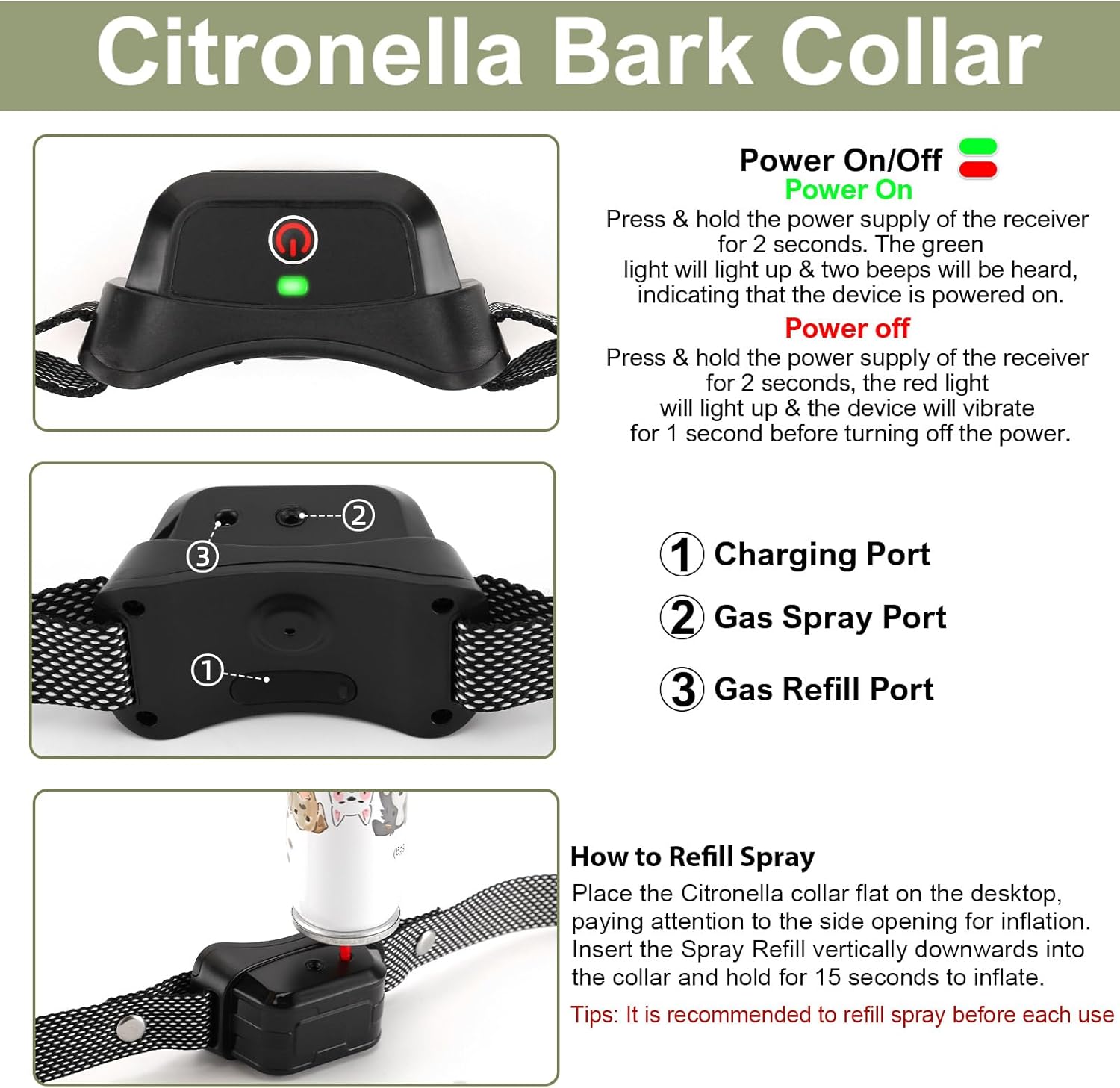
Image: Power On/Off instructions for the collar receiver.
5. Operating Instructions
5.1 Remote Control Functions
The remote control allows you to activate the training modes and adjust intensity levels. Familiarize yourself with the buttons:
- Spray Once Button: Activates a single spray.
- Spray Twice Button: Activates two consecutive sprays.
- Tone Button: Activates an audible beep.
- Vibration Button: Activates a vibration.
- Level Up/Down Buttons: Adjusts the intensity level (1-6) for vibration and spray modes.
- Channel Switching: Allows selection between Collar 1 and Collar 2 if using multiple units.
- Indicator Light: Shows status (e.g., battery, operation).

Image: Layout and functions of the remote control.
5.2 Training Modes and Intensity Levels
The collar offers three training functions: Tone, Vibration, and Spray, each with six adjustable intensity levels (1-6) for Vibration and Spray. The Tone function has a single intensity.
- Tone Mode: Emits an audible beep. Useful for attracting attention or as a warning.
- Vibration Mode: Delivers a tactile vibration. Intensity can be adjusted from level 1 (mild) to 6 (strong).
- Spray Mode: Releases a burst of citronella spray. Intensity can be adjusted from level 1 (short burst) to 6 (longer burst).
Select the appropriate mode and intensity based on your dog's temperament and the training situation. Start with the lowest effective level and increase only if necessary.

Image: Overview of the three training modes and adjustable levels.
5.3 Locking and Unlocking the Remote
To prevent accidental activation, the remote control features a lock function:
- Lock Screen: Simultaneously long-press the "+" and "-" buttons for 1 second. The screen will display a lock screen icon, and the remote will be locked, disabling further operations.
- Unlock Screen: Simultaneously long-press the "+" and "-" buttons for 1 second. The lock screen icon will disappear, and you can resume using the function buttons.
6. Refilling the Citronella Spray
It is recommended to refill the citronella spray before each use to ensure consistent performance.
- Place the collar flat on a stable surface.
- Hold the citronella refill spray can upright.
- Vigorously and firmly press the nozzle of the refill can down into the refill port on the collar receiver.
- Hold for approximately 15 seconds to inflate the collar's reservoir.
Image: Instructions for refilling the citronella spray.
7. Charging the Devices
Both the remote control and the collar receiver have built-in rechargeable batteries.
- Charging Time: A full charge takes approximately 1.5 to 2 hours.
- Battery Life: Once fully charged, the devices can be used for 10-15 days, depending on usage frequency.
- Charging Compatibility: The included Type-C charging cable is compatible with various charging ports, including standard charging plugs, power banks, laptop computers, and car chargers.

Image: Charging the remote control and collar receiver.
8. Waterproofing
The collar receiver unit is IPX7 waterproof, meaning it can withstand immersion in water up to 1 meter for 30 minutes. This allows for use in various weather conditions and environments, including rain, swimming, and bathing.
Important Note: The remote control is not waterproof and must be protected from water exposure.

Image: Collar receiver's IPX7 waterproof capability.
9. Product Specifications
| Feature | Specification |
|---|---|
| Model Name | T510 |
| Brand | KDSZJDV |
| Training Modes | Beep, Vibration, Spray |
| Intensity Levels | 6 adjustable levels for Vibration & Spray |
| Waterproof Rating | IPX7 (Collar Receiver) |
| Charging Time | 1.5 - 2 hours |
| Battery Life | 10 - 15 days (approx.) |
| Collar Material | Nylon |
| Adjustable Collar Size | 3 - 21 inches |
| Recommended Dog Weight | 8 - 120 lbs |
| Item Weight | 0.1 Grams (Collar Receiver) |
10. Troubleshooting
If you encounter issues with your KDSZJDV T510 Citronella Training Collar, consider the following common solutions:
- Device Not Responding: Ensure both the remote control and the collar receiver are fully charged and powered on. Check that the remote is not in lock mode.
- Spray Not Activating: Verify that the citronella spray reservoir is refilled. Ensure the collar is properly fitted and the nozzle is clear.
- Inconsistent Operation: Check the collar's fit on your dog's neck. Ensure there is no interference between the remote and the collar.
- Remote Not Controlling Correct Collar: Use the channel switching function on the remote to select the correct collar (1 or 2).
For persistent issues not resolved by these steps, please refer to the Warranty and Support section for contact information.
11. Warranty and Support
The KDSZJDV T510 Citronella Training Collar comes with a 2-year free warranty.
If you have any questions, require assistance, or need to claim warranty service, please contact KDSZJDV customer support. Refer to the product packaging or the official KDSZJDV website for the most current contact information.
Related Documents - T510
 |
T510 Spray Dog Training Collar User Manual User manual for the T510 Spray Dog Training Collar, detailing its features, operation, safety instructions, and troubleshooting. |
 |
Samsung Galaxy Tab A T510 User Manual Comprehensive user manual for the Samsung Galaxy Tab A (T510) tablet, covering features, getting started, apps, settings, and troubleshooting. |
 |
Samsung Galaxy Tab A (2019) Quick Start Guide Get started with your Samsung Galaxy Tab A (2019) tablet. This guide covers device customization, setup, features, and support resources. |
 |
DIXSG Touch Screen Digitizer Sensor Outer Glass Panel User Manual User manual for the DIXSG Touch Screen Digitizer Sensor Outer Glass Panel, covering safety information, product details, installation instructions, precautions, features, troubleshooting, and after-sales service. Includes model numbers T510, T290, T295, T550, T555, T580, T585, T590, T595, T560, T561, TAB 7. |
 |
Samsung Galaxy Tab A (2019) User Manual - SM-T510, SM-T515, SM-T517 Comprehensive user manual for the Samsung Galaxy Tab A (2019) tablets (models SM-T510, SM-T515, SM-T517), covering setup, features, settings, and troubleshooting. |
Ask a question about this manual
Ask about setup, troubleshooting, compatibility, parts, safety, or missing instructions. Manuals+ will review the question and use this page’s manual context to help answer it.