
Introduction
Welcome to the Green Soul Zodiac Lite Office Chair instruction manual. This guide provides essential information for the safe assembly, operation, maintenance, and troubleshooting of your new ergonomic office chair. Please read this manual thoroughly before beginning assembly or using the chair to ensure proper function and longevity.
Safety Information
- Ensure all parts are present and undamaged before assembly. Do not use if any parts are missing or broken.
- Follow assembly instructions carefully. Improper assembly can lead to instability and injury.
- Do not stand on the chair. Use it only for seating one person at a time.
- Do not use the chair on uneven surfaces.
- Keep children and pets away during assembly. Small parts can be a choking hazard.
- Do not use abrasive cleaners or harsh chemicals on the chair. Refer to the maintenance section for cleaning instructions.
- Regularly check all bolts and screws to ensure they are tightened.
What's in the Box
Upon opening the package, verify that all the following components are included:
- Chair Parts
- Assembly Manual
- Hardware (screws, bolts, tools)
Setup and Assembly
The Green Soul Zodiac Lite Office Chair is designed for quick and easy self-installation. Key areas are thoughtfully pre-assembled, requiring only 4 simple steps to complete. All necessary tools and hardware are included in the package, along with a detailed, easy-to-follow instruction manual.
For detailed visual guidance on assembly, please refer to the included physical assembly manual.

A full view of the Green Soul Zodiac Lite Office Chair, showcasing its ergonomic design and teal color.
Operating Instructions
The Zodiac Lite chair offers several adjustable features to customize your seating experience for optimal comfort and support.
1. Adjustable Headrest
The headrest can be adjusted in 2 ways (height and tilt) to provide precise support for your neck and head. Gently push or pull the headrest up or down to adjust its height. Tilt the headrest forward or backward to find your preferred angle.
2. Adjustable Lumbar Support
The height-adjustable lumbar support ensures proper spinal alignment, reducing strain and promoting healthy posture. Locate the lumbar support mechanism on the backrest and adjust its height to fit the natural curve of your lower back.
3. Adjustable Armrests
The 1D PP padded armrests can be adjusted to support your arms, neck, and shoulders. Use the button or lever located on the side of the armrest to raise or lower them to your desired height.

Close-up view of the chair's backrest, highlighting the 2-way adjustable headrest and height-adjustable lumbar support for personalized comfort.
4. Synchro-Tilt Mechanism
Experience enhanced flexibility and relaxation with the chair's Smart Synchro-tilt single lock Mechanism. This allows the chair to tilt between 90-135 degrees, with a back-to-seat tilt ratio of 2:1. Use the lever located under the seat to engage or disengage the tilt lock and adjust the recline angle.

Illustration demonstrating the chair's synchro-tilt mechanism, allowing the backrest and seat to recline in a coordinated motion for flexible seating positions.
5. Height Adjustment (Gas Lift)
The BIFMA Certified Class 4 Gaslift provides smooth and reliable height adjustments. To raise the seat, lift the lever while taking your weight off the seat. To lower the seat, lift the lever while seated.
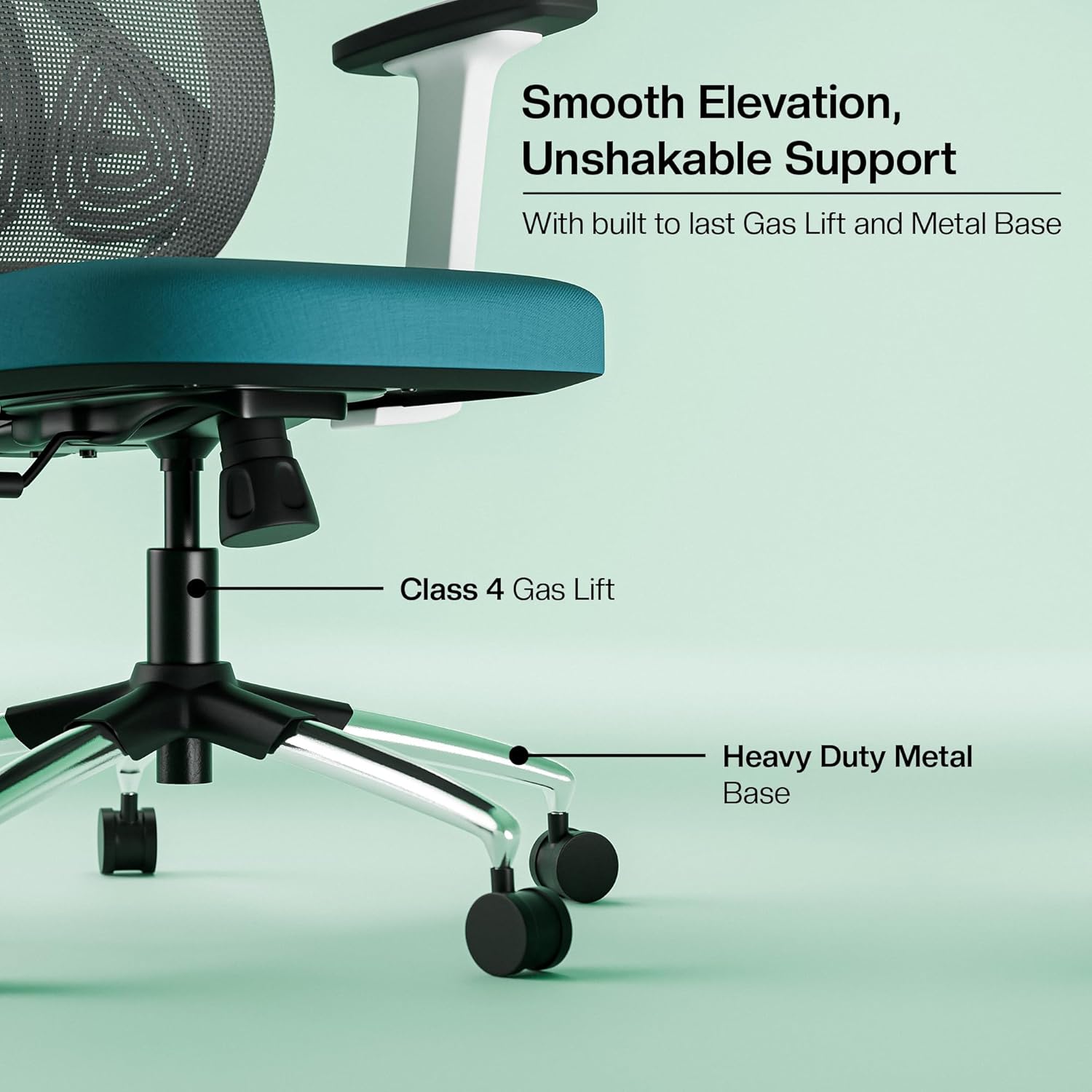
Detail of the chair's base, showing the Class 4 Gas Lift for smooth height adjustments and the heavy-duty metal base with dual castor wheels for stability and mobility.
Product Overview Video
An overview video showcasing the key features and ergonomic adjustments of the Green Soul Zodiac Lite Office Chair.
Maintenance
To maintain the appearance and functionality of your Green Soul Zodiac Lite Office Chair, follow these simple care instructions:
- Cleaning: Wipe clean with a soft, damp cloth. Avoid using harsh chemicals, abrasive cleaners, or solvents, as these can damage the mesh fabric, foam, or frame finish.
- Inspection: Periodically check all screws, bolts, and moving parts to ensure they are secure. Tighten any loose fasteners to prevent wobbling or instability.
- Environment: Avoid prolonged exposure to direct sunlight or extreme temperatures, which can cause material degradation.
Troubleshooting
If you encounter any issues with your Green Soul Zodiac Lite Office Chair, please refer to the following common solutions:
- Chair feels wobbly: Check all assembly screws and bolts. Ensure they are fully tightened.
- Gas lift not adjusting height: Ensure the height adjustment lever is fully engaged or disengaged. If the issue persists, the gas lift may need replacement. Contact customer support.
- Casters not rolling smoothly: Check for debris (hair, lint) wrapped around the caster wheels. Clean them thoroughly.
- Recline mechanism stuck: Ensure the tilt lock lever is disengaged. If it remains stuck, inspect for any obstructions or contact customer support.
Specifications
| Feature | Detail |
|---|---|
| Brand | Green Soul |
| Model Name | Zodiac Lite |
| Colour | Teal |
| Material | Mesh (Back), Foam (Seat) |
| Product Dimensions | 58D x 66W x 128H Centimeters |
| Item Weight | 15.6 Kilograms |
| Back Style | High Back |
| Frame Material | PP with Reinforced Glass Fibre Frame |
| Special Features | 1D PP Padded Arm Rest, Adjustable Height, Adjustable Lumbar, Ergonomic, Head Support |
| Recommended Uses | Office |
| Maximum Weight Capacity | 110 Kgs |
| Height Suitability | 5ft.2’ to 6ft. 1" |
| Swivel | 360° |
| Reclining Position Count | 3 |
| Included Components | Assembly Manual, Chair Parts, Hardware |
| Country of Origin | India |

Diagram illustrating the key dimensions of the Zodiac Lite Office Chair, including backrest width, seat depth, and overall height.
Warranty
The Green Soul Zodiac Lite Office Chair comes with a 3-year on-site warranty. This warranty covers manufacturing defects and issues arising from normal use. For specific terms and conditions, please refer to the warranty information provided with your purchase or contact Green Soul customer support.
Additionally, a 1 Year Extended warranty by OneAssist is available for purchase, offering additional coverage for 12 months.
Support
For any queries, assistance, or to report issues with your Green Soul Zodiac Lite Office Chair, please contact Green Soul customer care:
- Phone: +91 8444-956-789
- Email: info@greensoul.online
Please have your purchase details and model number (Zodiac Lite) ready when contacting support.