
EDISHINE B530612
EDISHINE 52" Farmhouse Ceiling Fan User Manual
Model: B530612 | Brand: EDISHINE
Product Overview
The EDISHINE 52-inch Farmhouse Ceiling Fan is designed to provide optimal air circulation and lighting for your living spaces. Equipped with a remote control, it allows for convenient adjustment of fan speeds, light brightness, and direction. Its reversible DC motor ensures comfort throughout the year, while the dimmable lighting and timer functions enhance usability. The fan features five wooden blades with two color options to complement various interior designs.

Image: The EDISHINE 52-inch Farmhouse Ceiling Fan, showcasing its light oak wooden blades, black motor housing, and net cage light kit. Also shown are the remote control, downrods, and alternative dark wooden blades.
Safety Instructions
Please read all instructions carefully before installation and use to ensure safe operation and prevent injury or damage.
General Safety
- Always disconnect power at the main circuit breaker before installation, cleaning, or maintenance.
- Ensure all electrical connections comply with local codes and ordinances, as well as the National Electrical Code (NEC).
- Do not operate the fan with damaged blades or any visible defects.
- Keep hands, hair, and clothing away from moving fan blades.
Electrical Safety
- Installation must be performed by a qualified electrician or a person with electrical experience.
- The fan must be grounded to prevent potential electrical shock.
- Ensure the supply voltage is compatible with the fan's requirements (120V AC).
What's in the Box
Verify that all components are present before beginning installation:
- Fan Motor Housing
- 5 Wooden Blades (reversible, two-color finish)
- Light Kit with Net Cage
- Remote Control
- Remote Wall Mount Holder
- Downrods (4-inch and 10-inch options)
- Mounting Bracket
- Hardware Pack (screws, wire nuts, etc.)
- Instruction Manual
Setup & Installation
Follow these steps for proper installation. It is recommended to have two people for certain steps due to the fan's weight (approximately 14 pounds).
- Prepare for Installation: Turn off power at the circuit breaker. Ensure the mounting location can support the fan's weight and that the ceiling box is UL listed for fan support.
- Install Mounting Bracket: Secure the mounting bracket to the ceiling junction box. Ensure it is firmly attached to a structural support (joist).
- Assemble Downrod and Motor: Choose the desired downrod length (4-inch or 10-inch). Feed the fan wires through the downrod and attach the downrod to the fan motor housing.
- Hang the Fan: Carefully lift the fan assembly and hang it from the mounting bracket. Make sure the ball joint of the downrod is properly seated in the bracket.
- Make Electrical Connections: Connect the fan's electrical wires to the household wiring according to the wiring diagram provided in the detailed manual. Ensure all connections are secure.
- Attach Blades: Select your preferred blade color (light oak or dark black). Attach the five wooden blades to the fan motor housing using the provided screws.
- Install Light Kit: Connect the light kit wiring to the fan motor housing. Secure the net cage light kit to the fan. Install appropriate light bulbs (not included, E26 base recommended).
- Final Checks: Ensure all screws are tightened and connections are secure. Restore power at the circuit breaker.

Image: Diagram illustrating the fan's dimensions (52" diameter, 14" to 21" height with different downrods) and recommended blade span for various room sizes.

Image: Visual guide for flat ceiling mount (minimum 90 inches from floor) and sloped ceiling mount (up to 20 degrees slope) with safety clearances.
Operating Instructions
The EDISHINE ceiling fan is operated via the included remote control. Ensure batteries are installed correctly in the remote.
Remote Control Functions
- Fan ON/OFF: Turns the fan on or off.
- Fan Speed (1-6): Adjusts fan speed from 1 (lowest) to 6 (highest).
- Light ON/OFF: Turns the light on or off.
- Light Brightness (+/-): Dims or brightens the light (10% to 100%). Features a memory function to recall previous settings.
- Forward/Reverse: Changes the direction of the fan blades. Press once, wait for the fan to stop and reverse direction.
- Natural Wind Mode: Simulates a natural breeze by varying fan speed.
- Timer (30min/2hours): Sets the fan to turn off automatically after 30 minutes or 2 hours.
- ALL OFF: Turns off both the fan and light simultaneously.
- Beep Control: The remote emits a beep when a button is pressed. This feature can be turned off (refer to the full manual for specific steps).

Image: The remote control for the EDISHINE fan, highlighting features such as super quiet operation, customizable lighting, 6 speeds, timer, and reversible DC motor.
Reversible DC Motor
The fan features a reversible DC motor, allowing you to change the direction of airflow for year-round comfort:
- Summer Mode (Downward Airflow): Blades rotate counter-clockwise, creating a downward breeze that provides a cooling effect.
- Winter Mode (Upward Airflow): Blades rotate clockwise, drawing warm air up towards the ceiling and circulating it downwards, helping to balance room temperature.
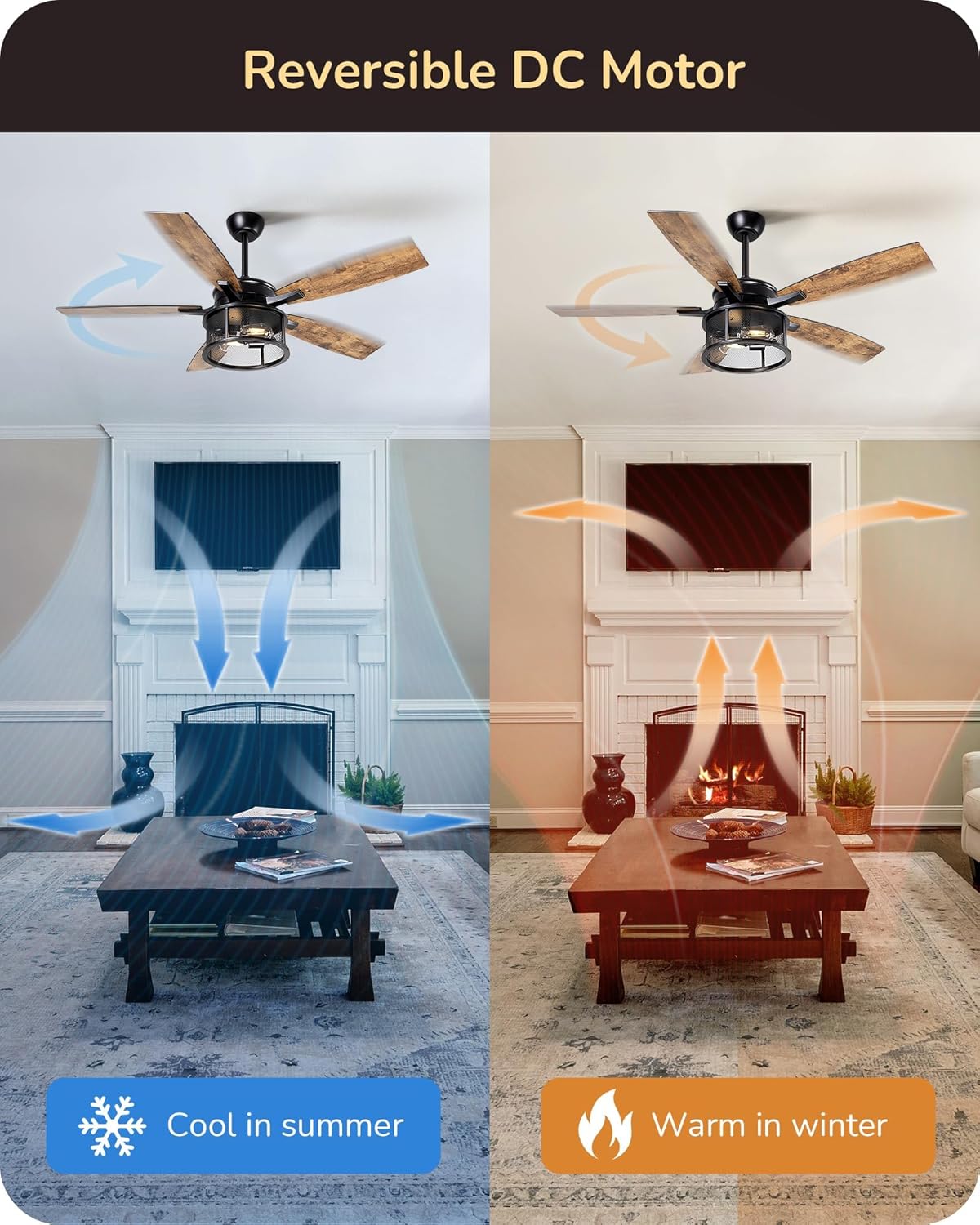
Image: Illustration of the reversible DC motor function, showing downward airflow for cooling in summer and upward airflow for circulating warm air in winter.
Maintenance
Regular maintenance helps ensure the longevity and optimal performance of your ceiling fan.
- Cleaning: Dust the fan blades and motor housing regularly with a soft, lint-free cloth. For deeper cleaning, wipe with a slightly damp cloth, then dry immediately. Do not use abrasive cleaners or solvents.
- Blade Care: Periodically check that all blade screws are tight. Loose blades can cause wobbling and noise.
- Light Bulb Replacement: Ensure power is off before replacing light bulbs. Use E26 base bulbs as specified.
- Annual Check: Annually inspect the fan's hanging system, downrod, and electrical connections for any signs of wear or looseness.
Troubleshooting
If you encounter issues with your EDISHINE ceiling fan, refer to the following common problems and solutions:
| Problem | Possible Cause | Solution |
|---|---|---|
| Fan does not start | No power to the fan; Loose wire connections; Remote control battery low/dead. | Check circuit breaker; Verify all wiring connections are secure; Replace remote control batteries. |
| Light does not work | Loose wire connection in light kit; Faulty light bulb; Remote control issue. | Check light kit wiring; Replace light bulb; Ensure remote is functioning. |
| Fan wobbles | Loose blade screws; Unbalanced blades; Loose mounting bracket. | Tighten all blade screws; Use blade balancing kit (if necessary); Ensure mounting bracket is securely installed. |
| Excessive noise | Loose screws; Motor issues; Blades hitting an obstruction. | Check and tighten all screws; Ensure no obstructions are near blades; If motor noise persists, contact support. |
| Remote not responding | Low/dead batteries; Remote out of range; Interference. | Replace batteries; Move closer to the fan; Check for other devices causing interference. |
Specifications
| Feature | Detail |
|---|---|
| Brand | EDISHINE |
| Model Name | HCFR01B |
| Item Model Number | B530612 |
| Style | Farmhouse-Net Cage |
| Product Dimensions | 52"D x 52"W x 12.4"H |
| Item Weight | 21.3 pounds |
| Number of Blades | 5 |
| Blade Material | Wooden Blades |
| Motor Type | Reversible DC Motor |
| Fan Speeds | 6 |
| Noise Level | 46 dB |
| Wattage | 30 watts |
| Voltage | 120 Volts (AC) |
| Control Method | Remote |
| Light Direction | Downlight |
| Number of Lights | 2 |
| Dimmable | Yes (10%-100% brightness adjustment) |
| Timer Function | Yes (30min/2hours) |
| Indoor/Outdoor Usage | Indoor |
| Certification | UL Listed |
Warranty and Support
EDISHINE products are manufactured to high-quality standards. For any questions, technical assistance, or warranty claims, please contact EDISHINE customer support. Keep your purchase receipt as proof of purchase for warranty purposes.
For further assistance, please visit the official EDISHINE store or contact their customer service department.
Ask a question about this manual
Ask about setup, troubleshooting, compatibility, parts, safety, or missing instructions. Manuals+ will review the question and use this page’s manual context to help answer it.